
The Screen Is Too Low. Your Neck Pays the Price.
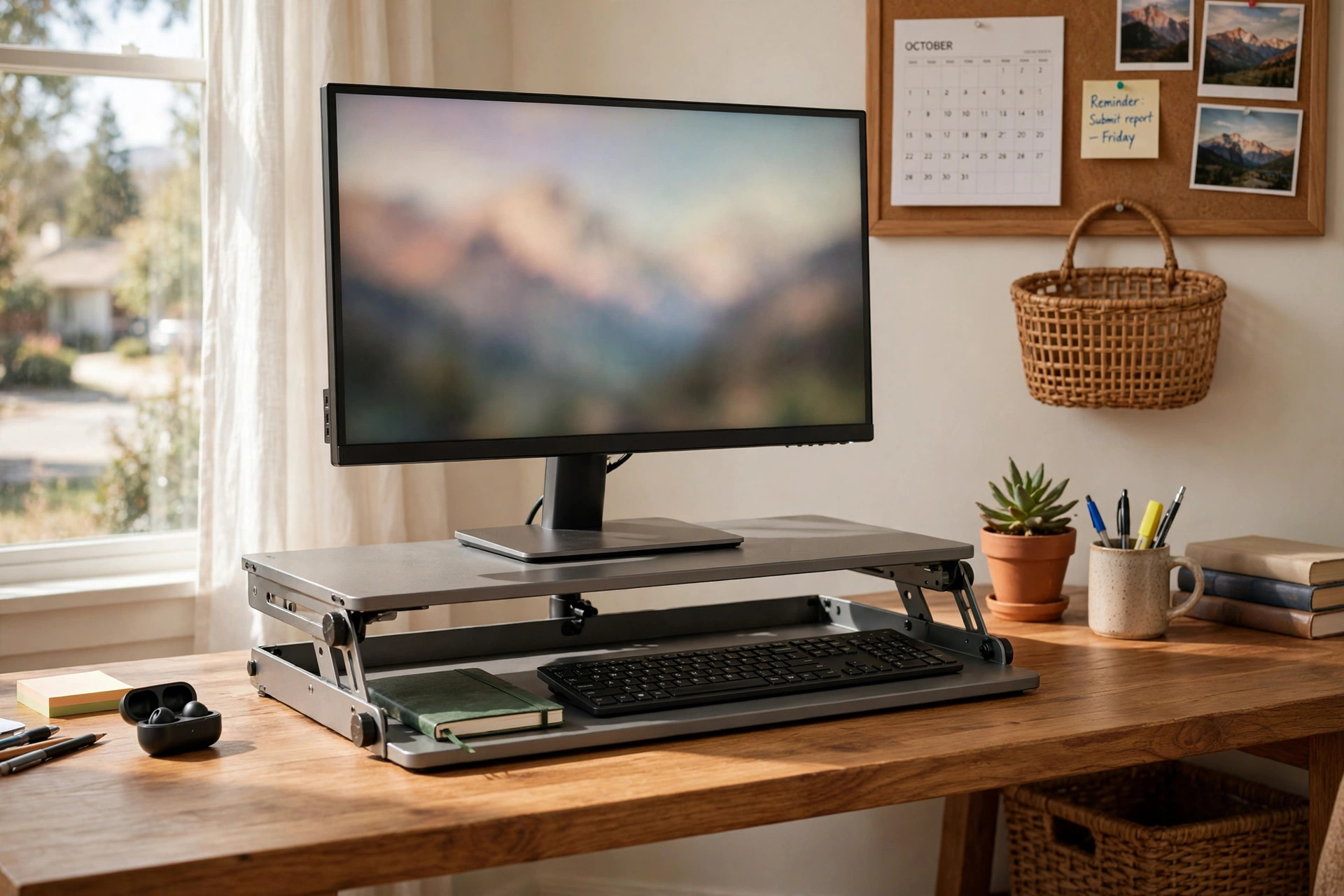
An adjustable monitor stand riser for neck pain is one of the simplest fixes for a sore neck at the desk. Most people set their screen far below eye level. The chin drops. The head tilts forward. The neck bends for hours. After a long day, the neck aches, the shoulders tighten, and a dull headache sets in. A riser solves the core problem. It lifts the monitor so the top of the screen sits at or just below eye level. The head stays upright. The spine keeps its natural curve. This small change can ease the strain that causes so much daily neck pain.
Neck pain from desk work has become common. Many people now work at home for eight hours a day or more. They use laptops that force the eyes down and the neck forward. An adjustable model matters because every person is different. A fixed stack of books cannot adjust. An adjustable riser can. It lets you find the exact height that keeps your neck straight.
Why Screen Height Matters So Much: Adjustable Monitor Stand Riser for Neck Pain
The Weight of a Tipped Head
The human head weighs about ten to twelve pounds. When it sits upright over the spine, the neck carries that weight with ease. When the head tips forward, the strain grows fast. A head bent only fifteen degrees forward can feel like twenty-seven pounds to the neck. At thirty degrees, it can feel like forty pounds. Research on office ergonomics has long shown that small changes to screen position can cut muscle fatigue in a clear way.
The Twenty-Degree Rule
Eye-care and ergonomics guides share a simple rule. Sit straight, close your eyes, and look ahead. When you open them, the top of the screen should meet your gaze or sit a little lower. The eyes should angle down no more than about twenty degrees to see the middle of the screen. When the screen is too low, the whole head follows the eyes down. When the screen is at the right height, the head stays level and only the eyes move. An adjustable riser makes this rule easy to follow. You raise or lower the platform until the screen lands in that sweet spot. No guesswork is needed.
Who Benefits Most
People with desk jobs benefit the most. Students who study on laptops for long hours also gain. Anyone who ends the day with a stiff neck, tight shoulders, or tension headaches between the eyes should check screen height first. It is the cheapest fix to try. An ergonomic standing desk for a small home office pairs well with a riser too, since standing desks also need correct screen height at every desk level.
What to Look for When You Choose One
Height Range and Adjustment Steps
The heart of the product is its adjustment. Look for a riser that lifts the screen at least four to six inches above the desk. Check how it adjusts. Some use a dial or crank that moves in small steps. Some use spring arms that glide up and down. Some are posts with notches you set by hand. Fine adjustment is better than coarse adjustment. You want to land exactly at eye level, not an inch above or below it. Models with a gas spring arm give the smoothest feel and the widest range.
Load Rating and Screen Size
Every riser has a weight limit. Check it before you buy. A basic platform riser may hold up to forty or fifty pounds. That is plenty for one screen. A riser made for two monitors needs to hold far more, often sixty to eighty pounds. Also check the screen sizes it accepts. A platform made for a nineteen-inch screen will look lost under a thirty-four-inch ultrawide. A gas spring arm will list a range, such as thirteen to thirty-two inches. Stay inside that range. An arm pushed past its limit can sag.
Footprint and Desk Space
A good riser should free space, not steal it. Simple platforms sit under the screen and give you a shelf below for a keyboard, a notebook, or a laptop that serves as a second screen. Arms clamp to the back of the desk and lift the screen off the surface entirely. That leaves the whole desk open. Measure your desk depth before you order.
Build Quality and Stability
The riser must feel solid. Press on it in your mind as you read the product details. Metal frames last longer than thin plastic. Thick glass tops look clean but show dust. Wood tops feel warm but can warp near heat. If you pick an arm, check the clamp. It should grip the desk edge firmly without needing tools you do not own. Furniture makers that study posture have shown that a shaky screen makes the eyes work harder, which adds to fatigue.
Tilt, Swivel, and Extra Features
The best risers do more than change height. Look for tilt that lets you angle the screen back a few degrees. Look for swivel so you can turn the screen toward a guest or a second chair. Some platforms add small storage drawers. Some arms add cable clips that run wires down the back of the post. USB hubs built into some risers add ports at arm’s reach.
The Main Types of Adjustable Monitor Stand Risers
Fixed Platform Risers With Steps
These are the simplest kind. A flat platform sits on legs or stacked boxes. You raise it by adding or removing sections. They are cheap and sturdy. The downside is the step size. Each section may add an inch or more. You may land between the ideal height and the next step down. Still, for many buyers, this type solves the problem at the lowest price.
Crank and Dial Risers
These platforms use a crank or a dial to move the surface up and down in small steps. They give finer control than stacked boxes. They suit shared desks, where two people of different heights use the same screen at different times. One turn of the dial raises the screen half an inch. The mechanism adds some cost and some parts that can wear, but it is a good middle ground.
Gas Spring Arms
A gas spring arm is the premium choice. The screen floats on an arm that you push up, down, forward, and back with one hand. It holds its place once you let go. These arms mount to the desk edge with a clamp or through a grommet hole. They offer the widest height range and the smoothest motion. They also clear the desk surface entirely. If you want an adjustable monitor arm for a dual screen setup, this is the type to buy. The cost is higher, and setup takes some care, but the daily comfort is hard to beat.
Laptop Risers
Laptop users need their own version. A laptop riser lifts the built-in screen to eye level and angles the keyboard for typing. Many pair the riser with an external keyboard and mouse, which is the correct way to use it. A laptop stand that supports good posture can end the habit of hunching over a low keyboard.
Sit-Stand Converters With Screen Lift
Some desktop converters raise both the keyboard tray and the screen platform at once. These suit people who switch between sitting and standing during the day. The screen stays at eye level in both positions. Check that the screen platform itself adjusts on its own, since your sitting eye level and your standing eye level are far apart. Pairing such a converter with an adjustable height desk converter for existing table setups gives a full sit-stand station without buying a whole new desk.
What They Cost in the United States
Prices spread wide. Simple fixed platform risers sell for fifteen to forty dollars at large home-goods marketplaces and major electronics stores. Crank and dial risers cost forty to one hundred dollars. Gas spring arms run from sixty to over two hundred dollars, with dual-arm models at the top of the range. Laptop risers cost twenty to eighty dollars. Sit-stand converters with screen lift cost two hundred to five hundred dollars or more.
Where to shop is a matter of taste. Office supply stores and work essentials suppliers carry many models you can try in person. Affordable furniture makers sell simple platforms at low prices. Independent product reviewers and technology publications test these products head to head, which can help you compare value before you buy. Wherever you buy, check the return policy. You may need a week of daily use to know if the height range truly fits your body.
Care and Upkeep
A monitor riser needs little care. Dust the platform once a week. Wipe glass tops with a damp cloth and dry them at once. Wipe wood tops with a dry cloth and keep drinks in sealed cups nearby. Check the screws and bolts every few months. Desk arms can loosen with daily motion. A quick turn of the included wrench keeps the arm steady. If the riser has a crank or dial, keep the threads clean and free of grit. A drop of household oil on moving metal parts once a year keeps them smooth.
Cable care matters too. A riser only helps if the screen stays put. Cables that pull tight can tilt the screen or drag it sideways. Route cables through the clips on the arm or along the back of the platform. Leave a little slack so the screen can move through its full range.
Safety Notes
A riser holds expensive gear above your desk, so safety is worth a minute of thought. Always respect the weight limit printed in the manual. Do not stack books or speakers on top of the screen platform. If children or pets share the room, place the desk where the screen cannot be pulled down. Some arms let you lock the height with a set screw. Use it if your model has one.
Check the clamp on desk-edge arms once a month. Desks made of thin or hollow material can crush under a tight clamp. A small metal plate under the desk spreads the load and guards the surface.
Questions People Ask
How high should my monitor be? The top edge of the screen should sit at or just below eye level when you sit straight. The middle of the screen should be about fifteen to twenty degrees below your straight-ahead gaze. Your neck should feel upright, not bent. If you must tilt your head back to see the top of the screen, the riser is set too high.
Will a riser really help neck pain? It helps when low screen height is the cause. Many desk workers find that raising the screen ends the forward head tilt that drives their pain. But for the common ache that builds during the workday, correct screen height is one of the most effective fixes. An ergonomic footrest for under desk at home setups can add comfort too, since the feet also shape posture.
Is an arm better than a platform? An arm gives more range and frees desk space. A platform is cheaper, simpler, and easier to set up. For one screen on a deep desk, a platform often does the job. For two screens, a small desk, or a shared workstation, an arm is usually worth the extra cost.
Can I use a riser with a laptop as my only computer? Yes, but use it the right way. Lift the laptop so its screen reaches eye level, then add an external keyboard and mouse at desk height. If you type on the laptop’s own keyboard while it sits on the riser, your shoulders will hunch up to reach it. That trades neck pain for shoulder pain. A separate keyboard costs little and completes the setup.
What if I share my desk with someone taller or shorter? Choose a riser that adjusts fast. A gas spring arm or a crank riser lets each person set their height in seconds. Mark each person’s setting with a small piece of tape on the post.
A Short Final Word
Neck pain at the desk often has a simple cause and a simple fix. The screen sits too low, the head tips forward, and the neck carries a load it was never built to hold. An adjustable monitor stand riser for neck pain lifts the screen to where your eyes already look. It costs little, sets up in minutes, and works with the desk you already own. Choose one with the right height range, a solid build, and a weight limit that fits your screen. Set it with care, give your body a week to adjust, and enjoy the feeling of a neck that no longer complains at five o’clock. If desk space is tight, a wall mounted stand that saves desk space may be worth a look as well.
References
Best Buy. (n.d.). Consumer electronics retailer. https://www.bestbuy.com Herman Miller. (n.d.). Office furniture and ergonomic seating. https://www.hermanmiller.com IKEA. (n.d.). Home furnishings. https://www.ikea.com Office Depot. (n.d.). Office supplies and furniture. https://www.officedepot.com PCMag. (n.d.). Technology product reviews. https://www.pcmag.com Staples. (n.d.). Office supplies and furniture. https://www.staples.com Steelcase. (n.d.). Office furniture and workplace research. https://www.steelcase.com The Spruce. (n.d.). Home and garden advice. https://www.thespruce.com UPLIFT Desk. (n.d.). Standing desks and ergonomic office furniture. https://www.uplift-desk.com Wayfair. (n.d.). Furniture and home goods. https://www.wayfair.com Wirecutter. (n.d.). Product reviews from The New York Times. https://www.nytimes.com/wirecutter
Was this guide helpful?

About Jennifer Lee
The My Garden US editorial team writes practical, in-depth home and garden guides for American homeowners — tested advice, no fluff.
You May Also Like

Home Office Printer Paper Storage Organizer: A Complete Guide
August 18, 2026 0 views
Home Office Trash Can With Lid for Documents
September 28, 2026 0 views
Home Office Desk Grommet for Cable Pass Through: A Simple Guide
January 25, 2026 0 views