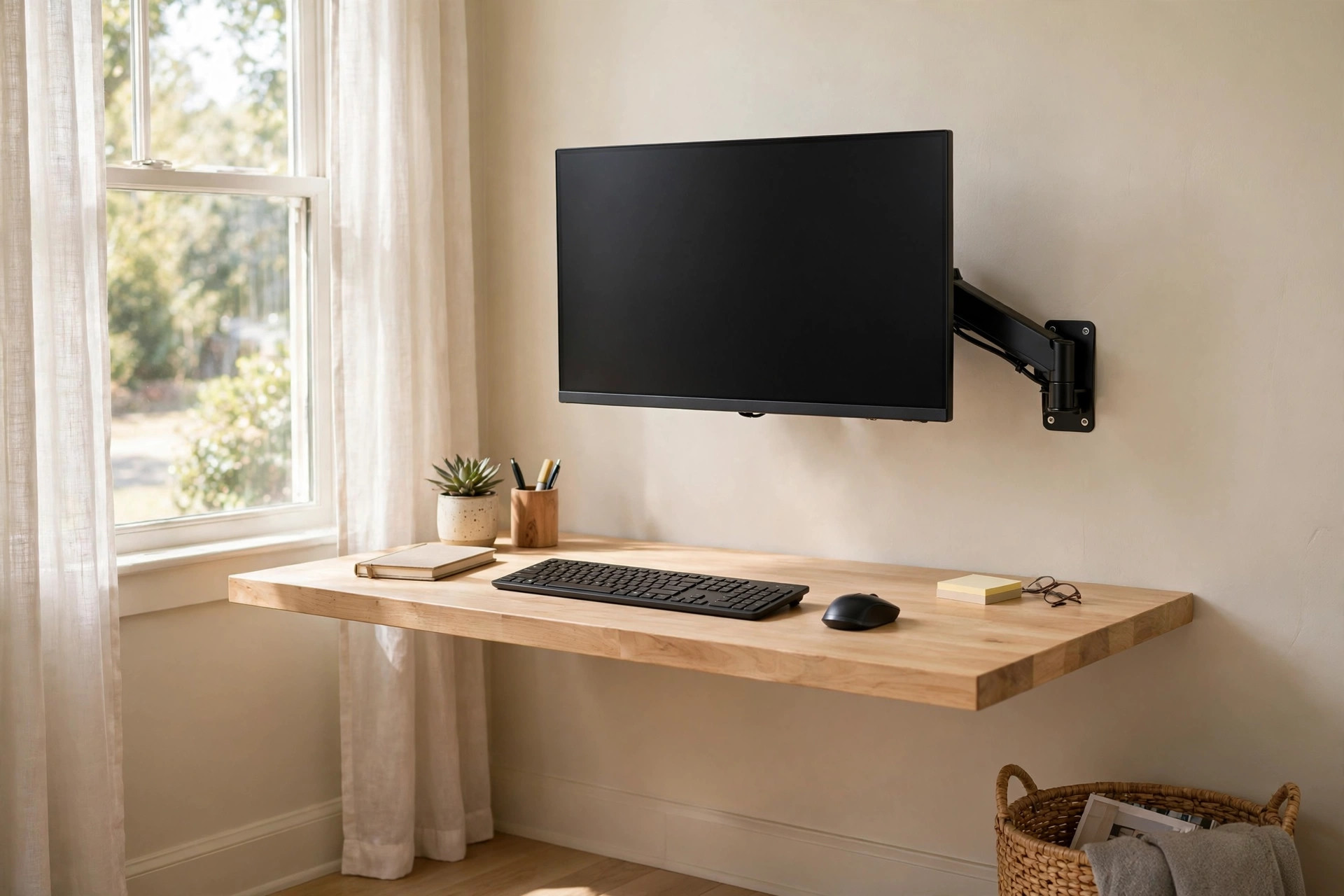

A desk can fill up fast. A monitor sits in the middle. The keyboard waits in front of it. Papers, pens, a phone, and a coffee cup fight for what little room is left. Many home workers face this problem in a spare bedroom, a hallway corner, or a small city apartment. A wall mounted monitor stand to save desk space offers a plain answer. It takes the screen off the desk and puts it on the wall. The whole desk stays free for real work.
The idea is not new. Offices have used wall brackets for years to hold heavy screens. What has changed is the size of the home office. People now work from rooms that were never built for work. A desk of 40 inches across is common. A standard monitor base can eat up a third of it. A wall mount gives that third back. The screen floats at eye level. The space under it holds books, a lamp, or nothing at all.
Why It Matters
Desk space is work space. When the desk is full of gear, work slows down. Papers pile up. The keyboard slides back and forth. The mouse runs out of room. A cramped desk can also hurt the body. Many people lean forward to see a screen that sits too low. Neck and back pain follow.
A wall mounted monitor stand to save desk space fixes both problems at once. It frees the desk surface. It also puts the screen at the right height.
What to Look For in a Wall Mounted Monitor Stand: Wall Mounted Monitor Stand to Save Desk Space
Not all wall mounts are the same. A few checks keep a buyer from picking the wrong one. The list below covers the points that matter most.
Mount Strength and VESA Size
Every flat screen has four screw holes on its back. They sit in a square pattern. This pattern is called VESA. Common sizes are 75 by 75 millimeters and 100 by 100 millimeters. Larger screens may use 200 by 100 or 200 by 200. The buyer should check the back of the monitor first. The manual gives the VESA size. So does the maker site.
The mount must match that pattern. It must also carry the weight of the screen. Most mounts list a weight range, such as 4 to 20 pounds. The screen should sit near the middle of that range, not at the top. A mount pushed to its limit will sag or droop over time.
Wall Type
The wall itself matters as much as the mount. A wood stud wall holds screws best. A drywall wall needs special anchors. A brick or concrete wall needs masonry screws and a drill with a hammer setting. Glass and thin panel walls should be avoided.
A stud finder is a cheap tool that pays for itself here. It finds the wood behind the drywall. Mounting into at least one stud is the safe rule. Mounts with two rails can span two studs. That spreads the load and holds firm.
Viewing Distance and Angle
The screen should sit about an arm’s length away. That is 20 to 28 inches for most people. The mount should place the center of the screen near that distance from the seated eye. If the desk is shallow, a mount with an extension arm helps. The arm reaches out from the wall and brings the screen closer.
Tilt and swivel add comfort. A tilt of 15 degrees down lets the screen face the eyes. A swivel of 90 degrees lets two people share the view. Not every job needs these moves. A fixed mount suits a single user in a fixed chair. An adjustable monitor arm for dual screen setup work suits people who shift seats or share the desk.
Types and Options
Wall mounts fall into a few clear types. Each type fits a different need.
Fixed mounts. The screen sits flat against the wall. It does not move. This type is the cheapest and the thinnest.
Tilting mounts. The screen tilts up and down but stays close to the wall. This type fits rooms with light from above. A slight downward tilt cuts glare. It costs a little more than a fixed mount. It suits bedrooms and dens where the chair stays put.
Full-motion mounts. An arm reaches out from the wall. The screen tilts, swivels, and pulls close. This is the most flexible type. It also gives the most desk space back, since the screen can push back flat against the wall when not in use. A wall mounted monitor stand to save desk space of this type is the best pick for small desks.
Dual and triple mounts. One wall plate holds two or three arms. Each arm holds one screen. This type suits traders, coders, and editors who work with many windows. It needs a strong wall and a wide stud span. An affordable dual monitor setup for remote workers usa often pairs well with this kind of mount.
Desk-adjacent mounts. Some stands bolt to the wall at the back edge of the desk and rise like a pole. They are not true wall mounts, but they save the same space. They suit renters who cannot drill into the wall. A wall mounted fold down desk for small spaces can pair with such a pole stand when wall drilling is off limits.
Shoppers can browse mount styles at large retailers such as Amazon and Best Buy, and compare monitor pairings at Dell. Furniture makers like IKEA also show how wall-mounted gear fits into small home office layouts.
Cost and Price
A wall mounted monitor stand to save desk space costs less than most people expect. The price bands below reflect typical United States retail prices.
Basic fixed mounts run from 15 to 30 dollars. They hold one screen up to 32 inches. They include the wall plate, screws, and a simple wrench. This is the right band for a first try.
Tilting mounts run from 25 to 60 dollars. The extra money buys the tilt joint and a stronger arm. This band suits most home users.
Full-motion mounts run from 40 to 150 dollars. The price climbs with reach, weight rating, and build quality. A gas-spring arm, which holds the screen with air pressure, sits at the top of this band. It moves with a light touch and stays where it is left.
Dual mounts run from 60 to 200 dollars. Triple mounts run higher still. These prices buy one wall plate and two or three arms. They pay off fast for people who would otherwise buy two or three desk stands.
Installation adds cost if a handyman is hired. A simple job runs 75 to 150 dollars in most cities. Most buyers with a drill and a level can do it themselves in under an hour.
Price review sites help compare brands. Readers can check current picks at Wirecutter and PCMag, which test monitor arms for build quality and ease of setup. General home office guidance also appears at The Spruce.
Care and Upkeep
A wall mount is a simple machine. It needs little care, but a little care goes far. The steps below keep it safe for years.
Dust the arm once a month. Dust works into joints and makes them stiff. A soft cloth is enough. Do not use oil on a gas-spring arm. Oil can leak into the seals and spoil the lift.
Check the screws twice a year. Walls shift with heat and cold. Screws can loosen a hair. A quarter turn with a wrench is often all that is needed. Do not over-tighten. Over-tightening can crack the wall or strip the anchor.
Wipe the VESA plate when the screen is removed. Grime builds up behind the screen where no one looks. A quick wipe keeps the plate clean and the screws easy to turn.
Watch for sag. If the screen starts to tilt on its own, the tilt joint needs a tighten. Most mounts have a hex bolt for this. A few turns restore the hold. If the arm will not hold the screen level after a tighten, the weight may be past the rated limit. A stronger mount is the safe answer.
Cable care matters too. Cables should hang with a loose curve, not pull tight. Tight cables tug on the ports. A loose curve lets the arm move free. Velcro ties hold cables to the arm without pinching them.
Ergonomic workplace research from makers like Herman Miller and Steelcase stresses that gear should be checked and adjusted on a schedule, not just at setup time. The same habit fits a monitor mount. Standing desk makers such as Uplift Desk echo this point in their setup guides: small, regular tweaks beat one big fix.
Safety
A monitor is heavy. A 27-inch screen can weigh 12 pounds or more. That weight hangs on a few screws. Safety is not a side note. It is the main point.
Mount only into solid structure. Wood studs are best. Masonry with the right anchors is good. Drywall alone is not enough. A toggle bolt in drywall can hold a small screen, but a stud is still the safer pick.
Keep the load under the rated limit. The rating covers the mount and the wall together. A mount rated for 20 pounds on a wood stud may fail on weak plaster. When in doubt, pick a mount rated well above the screen weight.
Let a second person help. One person holds the screen. The other drives the screws. A dropped screen breaks. A dropped screen can also hurt a foot or a hand. Two people make the job quick and safe.
Mind the cables. Power and video cables must not pull tight when the arm moves. A pulled cable can yank the screen. It can also spark at a loose plug. Leave slack and tie cables to the arm.
Keep small children in mind. A low-mounted screen in a play area is a risk. Mount the screen high enough that a child cannot grab it. Lock the swivel if the mount has a lock screw.
Frequently Asked Questions
Will a wall mounted monitor stand to save desk space fit my monitor? It will fit if the VESA pattern matches and the weight sits within the rated range. Check the back of the monitor for the four-hole pattern. Check the manual or the maker site for the weight. Match both to the mount box.
Can I mount on drywall with no studs? It is possible with heavy toggle anchors, but it is not the best choice. A stud gives a far stronger hold. A stud finder costs little and finds the wood fast. If no stud sits where the screen must go, a plywood backer board screwed into two studs makes a safe base.
How much desk space will I really gain? A standard monitor base takes about 8 by 10 inches of desk. The keyboard can then move back that full depth. On a 40-inch desk, that is about a quarter of the width given back. The gain feels bigger than the numbers, since the space sits right in the work zone.
Is a wall mount better than a desk clamp arm? Both save space. A wall mount frees the desk edge too, since no clamp eats the back rim. A clamp arm suits renters who cannot drill. A wall mount suits owners who want the cleanest look and the firmest hold. An adjustable monitor arm for dual screen setup in clamp form is a fine middle path.
Can the mount hold an ultrawide or curved screen? Yes, if the rating covers it. Ultrawide screens are wide and heavy. They need a mount rated for their full weight plus margin. A full-motion arm with a wide VESA plate suits curved screens best. Fixed mounts can work too, since ultrawide users rarely move the screen.
Do I need tools beyond a drill? A level, a stud finder, a pencil, and the right drill bits cover most jobs. The mount box includes screws and a wrench. A tape measure helps center the screen. That is the whole kit.
A Final Word
A small desk does not have to mean a cramped workday. A wall mounted monitor stand to save desk space moves the biggest item off the desk and onto the wall. The cost is low. The install takes an hour. The payoff lasts for years: a clear desk, a screen at eye level, and a work area that feels calm.
Pick a mount that fits the VESA pattern and the weight. Mount it into a stud. Keep the screws snug and the cables loose. Do that, and the screen will sit firm and true. The desk below stays free for the work that matters.
References
Amazon. (n.d.). Online shopping. https://www.amazon.com Best Buy. (n.d.). Consumer electronics retailer. https://www.bestbuy.com Dell. (n.d.). Computers and monitors. https://www.dell.com Herman Miller. (n.d.). Office furniture and ergonomic seating. https://www.hermanmiller.com IKEA. (n.d.). Home furnishings. https://www.ikea.com PCMag. (n.d.). Technology product reviews. https://www.pcmag.com Steelcase. (n.d.). Office furniture and workplace research. https://www.steelcase.com The Spruce. (n.d.). Home and garden advice. https://www.thespruce.com UPLIFT Desk. (n.d.). Standing desks and ergonomic office furniture. https://www.uplift-desk.com Wirecutter. (n.d.). Product reviews from The New York Times. https://www.nytimes.com/wirecutter
Was this guide helpful?

About Emily Rodriguez
The My Garden US editorial team writes practical, in-depth home and garden guides for American homeowners — tested advice, no fluff.
You May Also Like
Ergonomic Laptop Riser for Standing Desk Height: What to Know Before You Buy
July 23, 2026 0 views
Best Home Office Desk for Two Monitors: A Practical Buying Guide
January 21, 2026 0 views
Best Task Lighting for Home Office Desk Setup
June 14, 2026 0 views