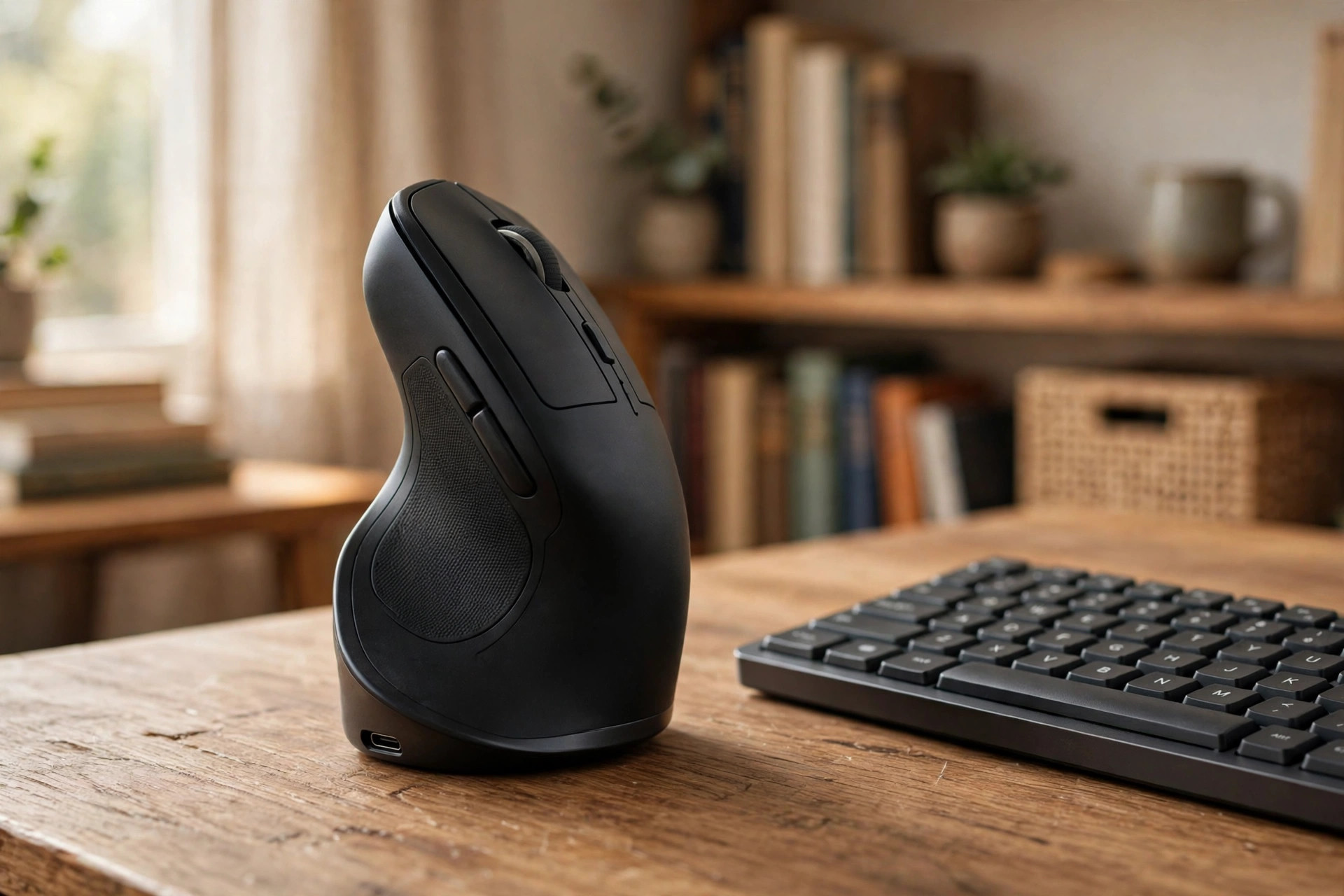

A Small Device That Can Save Your Wrist
An ergonomic vertical mouse for wrist pain relief looks strange the first time you see it. It stands tall on the desk like a small sail. Yet more home workers are buying one every year. The reason is simple. Many hours at a computer can leave the wrist sore, stiff, or numb. The shape of a regular mouse forces the forearm to twist flat against the desk. A vertical mouse lets the hand rest on its side, in the same relaxed position as a handshake. For people who type and click for eight hours a day, that change in posture can make a real difference.
This guide explains how these mice work, what to look for when you shop, how much to pay, and how to use one with care. It also answers common questions and gives tips for a healthier home desk.
Why the Wrist Hurts at a Desk: Ergonomic Vertical Mouse for Wrist Pain Relief
The Twist Problem
A standard mouse asks the forearm to rotate. The palm faces down. Two bones in the forearm cross over each other. This is called pronation. Held for minutes at a time, it is harmless. Held for hours at a time, day after day, it can cause strain. The muscles stay tense. The tendons rub. The wrist joint sits in a bent position while the fingers click again and again.
Many desk workers feel the result in the evening. The wrist aches. The fingers tingle. The thumb feels weak. Some people get carpal tunnel symptoms, though a mouse alone rarely causes that condition. More often the pain comes from tired muscles and irritated tendons. Ergonomic designers study these problems closely. Companies like Herman Miller and Steelcase publish guidance on neutral postures at work, and the hand position is always part of it.
Why Posture Matters More Than Speed
A fast mouse does not help a sore wrist. A better grip does. The body works best in neutral positions. The wrist should be straight, not bent up or down. The forearm should rest at a natural angle. The shoulder should stay low and relaxed. When one part of this chain breaks, the rest of the body pays for it. Pain in the wrist often leads to tension in the neck and shoulder. Fixing the mouse is one step. Fixing the chair, the desk height, and the breaks between work is another.
How an Ergonomic Vertical Mouse Works
The Handshake Grip
The idea is plain. The hand grips the mouse the way it grips a handshake. The thumb rests on one side. The little finger rests on the other. The wrist stays upright. The two forearm bones no longer cross. The tendons run straight. Studies of workplace comfort suggest this neutral grip lowers muscle strain during long click sessions.
For a person shopping for an ergonomic vertical mouse for wrist pain relief, this is the core promise. The device changes the shape of the hand, not the speed of the work. You still point and click as usual. The cursor moves the same way. Only the posture changes.
Getting Used to It
Most users need a few days to adjust. The cursor may feel slow or jumpy at first. This is normal. Give it a week of regular use before you judge. Many people report that the new grip feels odd on day one and natural by day ten. Keep your old mouse nearby during the change. Swap back for short periods if your hand feels tired. The goal is comfort, not a contest.
What to Look for When You Choose
Size and Grip Shape
Hands come in different sizes. A mouse that fits a large hand will cramp a small one. Check the height and width of the body before you buy. Some models come in more than one size. A few are shaped for the left hand, though most are right-handed only. Read the product notes for hand-size ranges. Review sites such as Wirecutter and PCMag often test models with different hand sizes and note which ones fit best.
A good test is the finger rest. Your fingers should reach the buttons without stretching. Your thumb should sit flat on its rest, not hang in the air. If you can try the mouse in a store, hold it for a full minute. Notice any pressure points. Comfort at minute one is a fair hint of comfort at hour six.
Wired or Wireless
A wired mouse costs less and never needs a charge. It draws power from the computer. A wireless mouse frees the desk from cables. Most wireless models use a small USB receiver or Bluetooth. Battery life varies from a few weeks to many months. If you dislike charging, look for a model with long battery life or a simple on-off switch. For a shared desk, a wireless model also keeps cables out of the way.
Buttons and Scroll Wheel
Most vertical mice have at least two buttons and a scroll wheel. Many add side buttons for back and forward in a web browser. Some let you change the cursor speed with a button on the body. A few support extra software for custom button maps. You do not need every feature. Choose what you will use. Extra buttons you never touch only add weight.
Sensor Quality
The sensor reads the desk surface and moves the cursor. A modern optical sensor works on most desks and pads. If your desk has a glass top, check that the sensor works on glass. Some do, and some do not. Adjustable speed settings, often called DPI, let you set how far the cursor moves for each inch of mouse travel. This is useful for large monitors.
Types of Vertical Mice
Basic Wired Models
These are the simplest choice. They plug into a USB port and work at once. They cost the least. They suit a fixed home desk where the computer never moves. The cable is thin on most models. If you hate clutter, a cable holder or a desk grommet can keep it neat.
Wireless Models
Wireless models are popular for home offices. They connect by Bluetooth or a USB dongle. Battery life is the key spec. Some run for months on one charge. A rechargeable model with a USB-C port is easy to top up. Pairing is simple on most computers. Makers of computer gear such as Logitech offer several wireless vertical designs with long battery claims.
Large and Small Designs
Some vertical mice are tall and narrow. Some are short and wide. The tall ones put the wrist in a full upright pose. The wide ones use a slanted angle, often called a semi-vertical shape. The slanted shape is a middle step between a flat mouse and a full vertical one. New users sometimes find the slant easier to learn.
Gaming and Heavy Use
A small group of vertical mice aims at gamers and power users. They add high-speed sensors and extra buttons. They cost more. For office work they are not needed, but some people like the extra precision.
Travel Models
Compact vertical mice fold or shrink for a laptop bag. They suit people who work from cafes or client sites. The smaller body can cramp a large hand on long days. For travel they are fine. For a main desk, choose a full-size model.
What It Costs
Prices run from low to high. A basic wired model often costs between twenty and forty dollars. A good wireless model often costs between forty and one hundred dollars. Premium models with extra features can pass one hundred dollars. These are broad ranges from United States stores, and prices move with sales.
A higher price does not always mean more comfort. Some mid-priced models win comfort tests against costly ones. Spend more for wireless freedom, better battery life, and a brand with a strong warranty. Spend less if you want a simple wired tool for a fixed desk. Read recent reviews before you buy, since new models arrive each year.
Care and Upkeep
Keep It Clean
A mouse gathers skin oil and dust. Wipe the body once a week with a soft, dry cloth. For sticky spots, use a cloth barely damp with water. Do not drip liquid into the buttons or the sensor window. Clean the desk pad too. A dirty pad makes the sensor work harder and the cursor less smooth.
Charge and Store
If your mouse is rechargeable, charge it before the battery dies fully. A short top-up every few weeks is enough for most models. When you travel, switch the mouse off or unplug the receiver. Store it where it will not roll off the desk. A simple stand or a small tray keeps it safe.
When to Replace
Most mice last two to four years of daily use. The buttons wear first. If clicks feel mushy or double-click on their own, the switches are tired. A worn scroll wheel also signals age. There is no rule that says you must replace on a schedule. Replace when comfort drops.
Safety and Smart Habits
A Mouse Is Not a Cure
An ergonomic vertical mouse for wrist pain relief can ease strain. It is not medical treatment. If pain is sharp, constant, or spreads up the arm, see a doctor or a hand therapist. Numbness that does not fade after rest deserves care. Do not try to push through serious pain with a new gadget alone.
Build a Better Desk
The mouse is one piece of the desk. The chair, the screen height, and the keyboard matter just as much. Your elbows should rest near a right angle. The top of the screen should sit near eye level. Your feet should rest flat on the floor. An ergonomic wrist rest for keyboard and mouse can support the forearms during typing. A quiet keyboard for shared home office space keeps noise down while you work. And an ergonomic lumbar support pillow for office chair helps the lower back during long days. Retailers such as IKEA and Wayfair sell desk setups where these parts fit together.
Take Breaks
No mouse removes the need for rest. Stand up every thirty to sixty minutes. Roll the shoulders. Open and close the fists. Stretch the fingers wide, then make a soft fist. These small moves take less than a minute. They do more for comfort than any device. A standing desk from UPLIFT Desk can make it easier to change posture through the day, since you can raise the desk and work on your feet for a while.
Set Up Your Space
Place the mouse close to the body. The upper arm should hang relaxed at your side. Do not reach far for the mouse. Keep the wrist straight and floating just above the desk, not pressed hard on the edge. A rounded desk edge is kinder than a sharp one. Home office guides at The Spruce offer simple room layouts that put these ideas into practice.
Frequently Asked Questions
Will a vertical mouse fix my wrist pain?
It can reduce strain for many people, but it is not a cure. The upright grip puts less twist on the forearm, which often eases ache from long computer days. If pain lasts more than a week or two, or if you feel numbness, talk to a doctor. A hand therapist can also check your grip and desk setup.
How long does it take to get used to one?
Most people need three to ten days. The first day feels strange. The cursor may move too fast or too slow. Adjust the speed settings and keep practicing. Short sessions at first help. By the second week, most users work at full speed.
Are vertical mice good for small hands?
Some are, and some are not. Vertical mice vary in size more than flat ones do. Look for models sold in small or medium sizes. Check the listed hand-length range. Reviews often note fit for smaller hands. If nothing fits, a semi-vertical slanted model may suit you better.
Can I use a vertical mouse for gaming?
Yes, for casual games. Most vertical mice handle everyday games well. Fast competitive games may feel less precise than with a gaming mouse. A few brands make vertical models with high-speed sensors for players who want both comfort and speed. They cost more than basic office models.
Wired or wireless: which is better for wrist comfort?
Comfort is the same either way. The choice comes down to the desk. Wireless gives a cleaner look and suits laptops. Wired costs less and never needs charging. Pick the one that fits your setup and habits.
Do I still need a wrist rest with a vertical mouse?
Many users find they do not need one. The upright grip keeps the wrist floating in a neutral pose. But a rest can still help during long typing sessions on the keyboard. If your desk edge presses into your forearm, a soft rest or a rounded edge pad helps.
A Final Word
An ergonomic vertical mouse for wrist pain relief is a small change with a plain logic. It lets the hand rest the way the hand wants to rest. For home workers who click for hours, that can mean less ache at the end of the day. Choose a size that fits your hand. Decide between wired and wireless. Keep the desk, chair, and breaks in good shape. Then give the new grip a week to feel natural. Your wrist may thank you.
References
Herman Miller. (n.d.). Office furniture and ergonomic seating. https://www.hermanmiller.com IKEA. (n.d.). Home furnishings. https://www.ikea.com Logitech. (n.d.). Computer accessories and headsets. https://www.logitech.com PCMag. (n.d.). Technology product reviews. https://www.pcmag.com Steelcase. (n.d.). Office furniture and workplace research. https://www.steelcase.com The Spruce. (n.d.). Home and garden advice. https://www.thespruce.com UPLIFT Desk. (n.d.). Standing desks and ergonomic office furniture. https://www.uplift-desk.com Wayfair. (n.d.). Furniture and home goods. https://www.wayfair.com Wirecutter. (n.d.). Product reviews from The New York Times. https://www.nytimes.com/wirecutter
Was this guide helpful?

About Sarah Mitchell
The My Garden US editorial team writes practical, in-depth home and garden guides for American homeowners — tested advice, no fluff.
You May Also Like

Compact Bookshelf for Home Office Closet Setup: A Small-Space Guide
July 28, 2026 0 views
Quiet Keyboard for Shared Home Office Space: A Complete Guide
June 15, 2026 0 views
Home Office Desk Mat in Leather for Writing: A Complete Guide
March 22, 2026 0 views