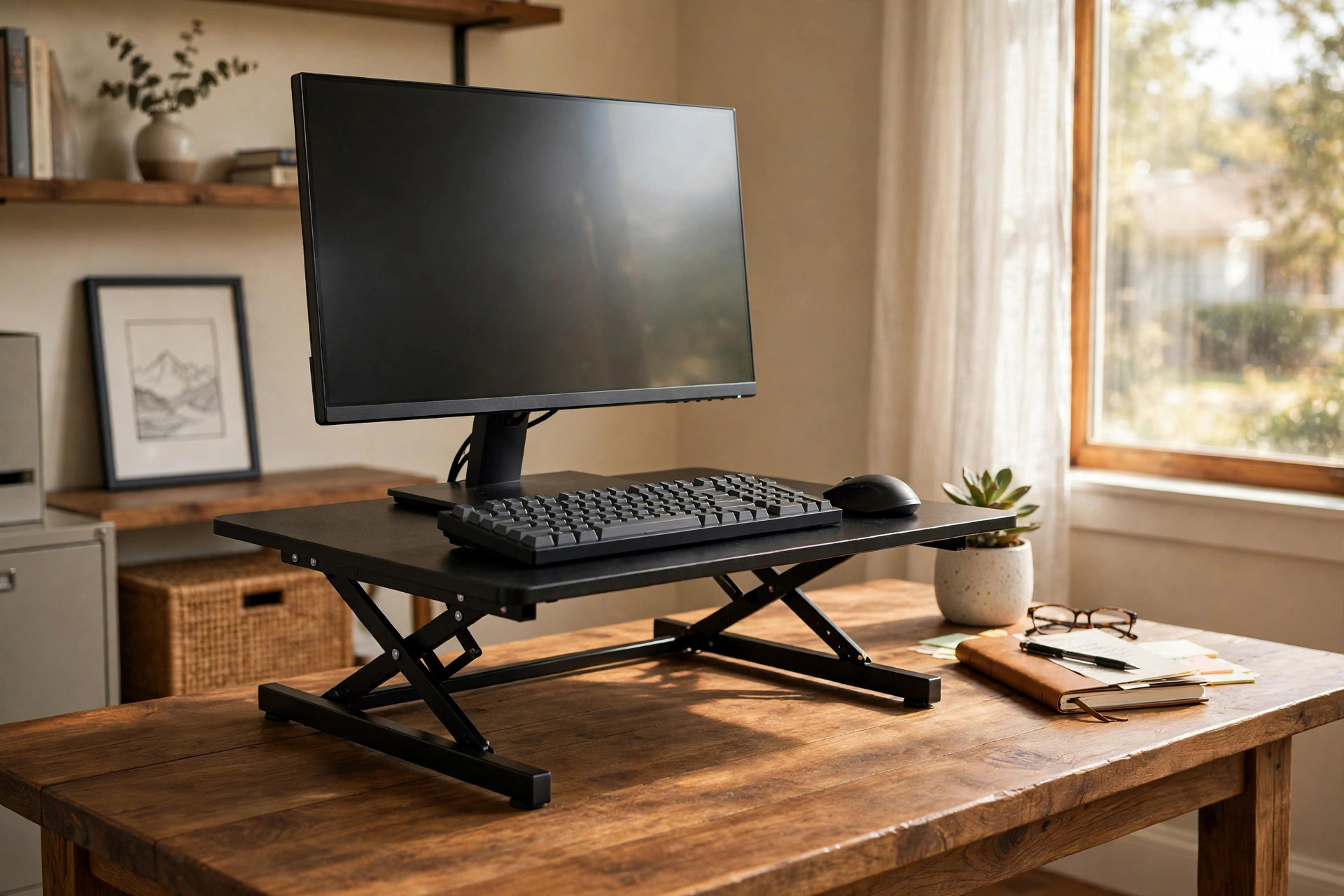

Many people work at the same table they have owned for years. The table is fine. The chair is fine. But after long hours of sitting, the back and neck start to complain. An adjustable height desk converter for existing table furniture offers a simple answer. It sits on top of the table you already own and raises the keyboard, mouse, and monitor to standing height. When you want to sit again, it lowers back down. There is no need to throw out a good table or buy a full electric standing desk.
These converters have become common in home offices, small apartments, and shared workrooms. They cost less than a whole new desk. They also move with you if you change rooms. This guide explains why they matter, what types exist, what to look for, what they cost, how to keep them safe, and the questions buyers ask most.
Why It Matters
Long hours of sitting have a cost. Backs stiffen. Necks ache. Energy drops in the afternoon. Doctors have said for years that movement during the day helps the body and the mind. An adjustable height desk converter lets a worker stand for part of the day and sit for the rest. The change can be made in seconds with one hand.
For renters and students, a converter is often the best choice. A full sit-stand desk is large and hard to move. A converter is a single unit that lifts off the old table and fits in a car. For couples who share a table, the unit adjusts to each person in turn. For people with a nice wooden table they love, the converter keeps the table and adds the health benefit.
Studies covered by consumer health writers, such as the team at Consumer Reports, have noted that sit-stand options can ease low back pain when used in a sensible way. The key is balance. Standing all day brings its own problems. A converter makes that balance easy because the change from sitting to standing takes no effort at all.
Types and Options: Adjustable Height Desk Converter for Existing Table
Not every converter works the same way. There are three main types. Each has strengths and trade-offs.
Scissor-lift converters. This is the most common type. Two arms cross like an X under the work surface. A gas spring or a lever controls the lift. The user pulls a handle and the top rises smoothly. These are simple, sturdy, and usually the cheapest option. They work well for single monitors and laptops.
Z-lift converters. This design uses a Z-shaped frame. It rises almost straight up, so it takes less depth on the table. That matters on narrow tables. The Z shape also tends to stay stable at full height. It is a good pick for a table that is less than 24 inches deep.
Electric converters. A small motor lifts the unit at the touch of a button. Some models save height presets. These cost more, but they are easy to use and very smooth. They are a good choice for people who switch between sitting and standing many times a day, or for anyone with a bad shoulder who should not pull a heavy lever.
Widths range from about 28 inches for compact units to 48 inches for large ones that hold two monitors. Some models include a keyboard tray below the main surface. Others are a single flat top. A desk converter with keyboard tray lets the arms rest at a neutral angle while the screen sits at eye level, which many ergonomists favor.
A few newer units fold flat for storage. That can help in a small room where the converter must be put away each night. Before choosing, measure the table depth and check the weight limit. Most units hold 25 to 45 pounds, which is enough for a monitor, a keyboard, and a laptop dock.
How to Choose: What to Look For
Buying the right unit takes some thought. The following points cover the basics.
Weight capacity. Add up the monitor, arms, keyboard, dock, and anything else that will sit on the unit. Leave a margin. A unit rated for 35 pounds that carries 30 will lift smoothly and last longer. The product pages at big retailers like Home Depot and Lowe’s list these ratings clearly.
Height range. A converter should lift the monitor to eye level for the tallest user and lower enough for comfortable seated typing. Most units rise 15 to 20 inches above the table. Shorter users may need a unit with a low minimum height. Measure while seated at the table to be sure.
Stability at full height. Some cheap units wobble when raised. Read reviews that test the unit at standing height with a monitor on it. Review sites such as Wirecutter and PCMag often test this exact point, since wobble makes typing unpleasant.
Footprint. The base must fit the table with room to spare for a notebook or a coffee mug. Check the depth of the base, not just the top. A base that hangs over the table edge is a tipping risk.
Lift mechanism quality. Gas springs feel smooth and hold their height. Cheap spring arms can droop over time. If the unit uses a lever, test how much force it takes. The best units rise with one light hand.
Keyboard tray width. If you type for hours, the tray should be wide enough for both hands and a mouse without crowding. Some trays are too narrow for comfort. A tray that is at least 25 inches wide suits most typists.
Noise. Electric units hum. Manual units may click. In a shared room, a quiet manual unit may be the better neighbor.
Materials. Steel frames last longer than plastic ones. Bamboo or wood tops look better in a home office than plain black laminate. Many design stores, including IKEA and Wayfair, offer home-office pieces in styles that blend with home decor.
Pairing a converter with the right accessories improves the result. An adjustable monitor light bar for eye care cuts screen glare during evening work. An ergonomic keyboard tray for corner desk setup can add comfort if the converter itself lacks a tray. And a compact bookshelf for home office closet setup keeps supplies close without crowding the table.
Cost and Price
Prices vary widely. A basic manual scissor-lift converter for a laptop costs about 90 to 150 dollars. Mid-range units with a keyboard tray and a solid gas spring run 180 to 300 dollars. Large electric units that hold dual monitors can cost 350 to 600 dollars.
What drives the price? Size, weight capacity, lift type, and brand name. Electric lift adds the most cost. A well-known office brand charges more than a no-name import, but it often includes a longer warranty. Five years of coverage is common on good units.
Used units appear on resale markets for half price. That can be a good deal, but test the lift before buying. A worn gas spring is expensive to replace. For most buyers, a new mid-range manual unit is the best value. It does the job, lasts for years, and costs far less than a full electric desk, which often starts above 500 dollars for a quality frame.
Delivery matters too. These units weigh 25 to 55 pounds. Check the shipping cost and whether the box fits through a standard door. Most units arrive assembled or need only a few screws.
Care and Upkeep
A converter needs little care, but a small amount keeps it working for years.
Dust the unit weekly with a soft cloth. Crumbs and dust collect under the keyboard tray and can scratch the table. A felt pad or a desk mat under the base protects the table finish.
Check the lift mechanism every few months. Tighten any loose bolts with the included wrench. If the unit uses a gas spring and starts to droop, stop using it and contact the maker. A failing spring can drop the surface suddenly.
Keep liquids away. Coffee spills can seep into the hinge and make the lift stiff. If a spill happens, dry the unit right away and work the lift up and down to clear the joints.
For electric units, keep the cord clear of the moving arms. A pinched cord is a fire risk. Unplug the unit during long trips away from home.
Wipe the top with a damp cloth. Avoid harsh cleaners on wood tops. The care advice in guides from The Spruce notes that simple mild soap and water is enough for most office surfaces.
Safety
Converters are simple machines, but a few safety rules matter.
Pinch points. Scissor and Z arms close like scissors. Keep fingers, hair, and shirt sleeves away from the arms when raising or lowering the unit. Teach children not to play with it.
Tipping. Place the base fully on the table. Do not let it hang over the edge. Heavy monitors should sit toward the center of the unit, not near the front lip.
Weight limits. Never exceed the rated weight. Overloading can bend the arms or burn out a motor. It also voids the warranty.
Cord safety. Monitors and docks need cords long enough to reach the full raised height. Short cords pull tight and can drag the monitor off the unit. Buy extension cords if needed and route them with slack.
Footing. The table itself must be sturdy. A wobbly card table is a poor base for a 40-pound converter with a monitor on it. Use a solid table that does not rock.
The U.S. Consumer Product Safety Commission style guidance on furniture tip-over applies here as well: heavy items belong low and centered, and tall setups should not be placed where small children climb.
FAQ
Will a converter work on any table? Almost any solid table works. The table should be at least as deep as the converter base and strong enough to hold the unit plus equipment. Glass tops can work if they are thick tempered glass, but check the maker first. Folding tables are usually too weak.
Is a converter as good as a full standing desk? It gives the same sit-stand benefit for less money and with the table you own. A full desk offers more surface space and cleaner cable paths. For most home offices, a converter is enough.
How long does it take to set up? Most units arrive nearly assembled. Setup takes 10 to 30 minutes. Electric units need a power outlet near the table.
Can I use two monitors on a converter? Yes, with a wide unit rated for the weight. A 36-inch or wider converter usually fits two 24-inch monitors. Use a single monitor arm mounted on the unit if the stands take too much space.
Will it damage my table? The base sits flat and spreads the weight. Rubber feet or a desk mat prevent scratches. Very heavy units on soft wood may leave dents over time, so use a mat for protection.
How often should I switch between sitting and standing? A common pattern is 30 to 60 minutes of standing followed by sitting, repeated through the day. Listen to the body. Sore feet mean it is time to sit. A stiff back means it is time to stand.
Final Word
An adjustable height desk converter for existing table furniture is one of the simplest upgrades a home office can get. It turns the table you already own into a flexible sit-stand station. It costs a fraction of a new desk. It sets up in minutes. It moves with you when life changes.
Choose a unit that fits your table, holds your gear, and lifts smoothly. Keep it clean and use it safely. Then enjoy the small pleasure of standing up to work, without giving up the table you love.
References
Consumer Reports. (n.d.). Product reviews and ratings. https://www.consumerreports.org Herman Miller. (n.d.). Office furniture and ergonomic seating. https://www.hermanmiller.com IKEA. (n.d.). Home furnishings. https://www.ikea.com Lowe’s. (n.d.). Home improvement products. https://www.lowes.com PCMag. (n.d.). Technology product reviews. https://www.pcmag.com The Home Depot. (n.d.). Home improvement products. https://www.homedepot.com The Spruce. (n.d.). Home and garden advice. https://www.thespruce.com U.S. Consumer Product Safety Commission. (n.d.). Product safety information. https://www.cpsc.gov UPLIFT Desk. (n.d.). Standing desks and ergonomic office furniture. https://www.uplift-desk.com Wayfair. (n.d.). Furniture and home goods. https://www.wayfair.com Wirecutter. (n.d.). Product reviews from The New York Times. https://www.nytimes.com/wirecutter
Was this guide helpful?

About Emily Rodriguez
The My Garden US editorial team writes practical, in-depth home and garden guides for American homeowners — tested advice, no fluff.
You May Also Like

Home Office Bookshelf with Closed Storage Bins: A Complete Buying Guide
June 27, 2026 0 views
Best Budget Office Chair Under 150 Dollars: What Really Matters
March 19, 2026 0 views
Quiet Keyboard for Shared Home Office Space: A Complete Guide
June 15, 2026 0 views