
Introduction
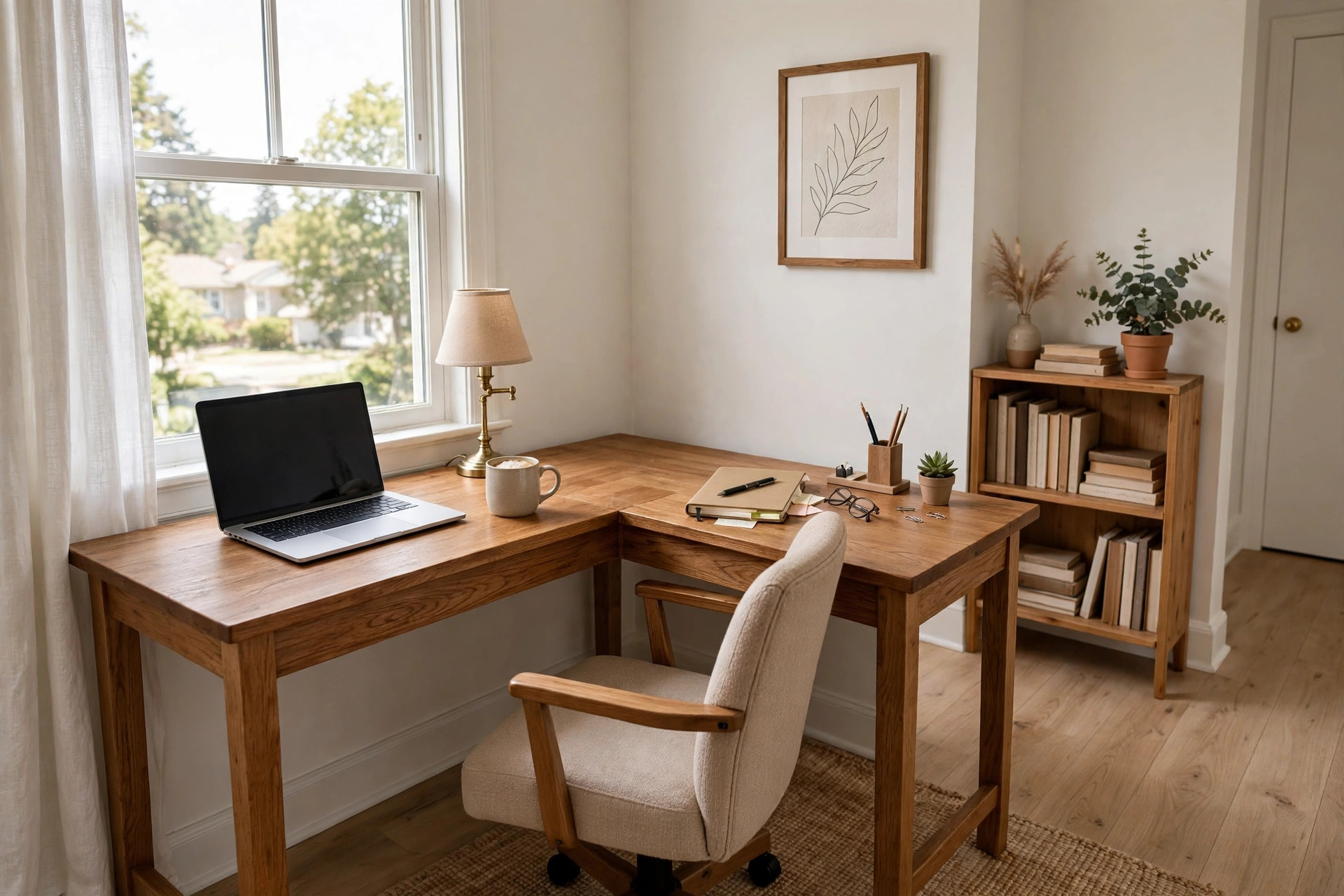
A small l shaped desk for corner home office use is one of the simplest ways to set up a real work area in a small home. Many houses and apartments have a free corner that serves no purpose. A desk shaped like the letter L fits that corner well. It gives you two work surfaces. One side can hold your computer. The other side can hold papers, books, or a printer.
People work from home more now than in years past. Remote workers, students, and small business owners all need a steady place to sit and work. The kitchen table is not a good answer for long days. It is too high for some chairs. It is shared with family meals. A small corner desk solves this. It marks one spot as your work zone.
This guide explains why a small L shaped desk suits a corner home office. It covers sizes, materials, and types. It gives price ranges. It explains care and safety. It ends with answers to common questions.
Why a Corner Desk Matters: Small L Shaped Desk for Corner Home Office
A corner is often wasted space. It is hard to place a normal desk there. A rectangular desk leaves a gap behind it or sticks out into the room. An L shaped desk uses both walls. You gain surface area without taking much floor space.
Two surfaces matter for real work. A laptop or monitor sits on one arm of the L. The other arm holds a notebook, a phone, or a cup. You do not need to pile things on top of each other. Your work stays spread out and easy to reach.
A corner setup also cuts down on clutter. The walls behind the desk can hold a shelf or a pegboard. Papers and small tools stay off the desk top. Many home workers report that a set work spot helps them focus. When you sit at your desk, your mind knows it is work time. When you leave it, the day is done.
For small rooms, a compact L shaped desk beats a large one. A large desk eats the room. A small one fits and still gives enough room for a computer and a few items. Measure your corner before you shop. A desk that is too big will make the room feel tight.
What to Look for When You Choose
Size and Fit
Start with a tape measure. Measure both walls from the corner out. Note the space you need to pull out a chair. Most people need about 24 to 30 inches of clear space in front of the desk.
Small L shaped desks usually run 40 to 55 inches on the long side. The short side runs 30 to 48 inches. Depth is often 20 to 24 inches per arm. These sizes fit a laptop or a single monitor with room to spare.
Check the height too. Most desks stand 28 to 30 inches tall. That height works with a standard office chair. If you are tall or short, look for legs you can adjust. Some desks let you raise or lower the top by an inch or two.
Material and Build
Common materials are wood, engineered wood, and metal. Solid wood costs more and lasts longer. Engineered wood, such as particle board with a laminate top, costs less. It works well if you keep it dry. A metal frame with a wood top is strong and light.
Look at how the desk is joined. Screws and cam locks hold most flat-pack desks together. A desk with a crossbar or a back panel will wobble less. Check the weight limit. Many small desks hold 50 to 100 pounds. That is enough for a monitor, a laptop, and books.
Read reviews about the finish. A good laminate resists scratches and coffee rings. A poor one peels at the edges after a year. A glass top looks clean but shows dust and needs care with heavy items.
Layout of the L
Some desks let you flip the L. This is called a reversible design. You can put the long arm on the left or the right. Reversible desks fit more corners. Check whether the desk you like offers this.
Think about which side your door or window is on. Put the long arm on the wall with fewer obstacles. If you use a desktop computer, the tower can sit on the floor under the short arm. If you use a printer, keep it on the short arm near an outlet.
Storage
Some small L shaped desks come with drawers. Others are open under the top. Drawers help if you keep pens, chargers, and papers. Open designs give more leg room. Pick based on what you store.
If the desk has no drawers, you can add a small rolling file cart. It slides under the short arm. Mobile carts are sold at stores like IKEA and Wayfair. They add storage without taking permanent floor space.
Types and Options
Compact Corner Desk
The basic type is a simple two-piece corner unit. It is light and low in cost. It suits a laptop user or a student. It often lacks drawers. It is easy to move if you change rooms.
L Desk with Hutch
A hutch is a set of shelves that sits on the desk top. It adds storage above the work surface. This type suits people with many books or binders. It can make a small desk feel tall, so measure your ceiling clearance.
L Desk with Drawers
This type builds drawers into one or both arms. It keeps small items out of sight. It costs more than the open type. It is a good pick if you dislike clutter. Many ergonomic standing desk for small home office buyers later switch to a seated L desk with drawers when they want more storage.
Sit-Stand L Desk
Some L shaped desks rise and lower with a motor or a crank. You can sit or stand while you work. These cost more. They suit people who work long hours and want to change posture. Brands such as UPLIFT Desk make models in this class. Guides on standing work can be found at Wirecutter.
Corner Desk with Monitor Shelf
A raised shelf holds the monitor at eye level. This helps your neck. You can also slide a keyboard under the shelf. If you use two screens, look for a shelf wide enough for both. A small corner desk with drawers for apartment office use often pairs well with a clip-on monitor arm instead of a shelf.
Cost and Price
Prices for a small L shaped desk for corner home office use fall into clear bands. Simple open designs in engineered wood run from 60 to 140 dollars. Desks with drawers or a hutch run from 140 to 300 dollars. Solid wood or premium metal-frame desks run from 300 to 600 dollars. Motorized sit-stand L desks run from 500 to over 1,000 dollars.
Sales drop these prices often. Back-to-school season and holiday weekends bring deals. Large stores such as Amazon, Target, and Staples stock many models in the low and mid bands. Higher-end office brands like Herman Miller and Steelcase sell desks built for daily office use over many years.
Watch the shipping cost. A desk is a heavy box. Some sellers ship free. Others add a large fee. Assembly is usually do it yourself. Most desks take one to two hours to build with basic tools. If you pay for assembly, add 50 to 100 dollars to your budget.
Set a budget before you shop. A 120-dollar desk serves a student well. A person who works eight hours a day at home may want to spend 250 to 400 dollars for a sturdier build and better ergonomics. Pair the desk with a good chair. Advice on seating appears in guides like the best office chair for long hours home office roundup.
Care and Upkeep
A desk lasts longer with simple care. Wipe the top with a damp cloth once a week. Dry it right away. Do not let water sit on engineered wood. The edges swell when they soak up moisture.
Use a desk mat under your keyboard and mouse. It guards against scratches. Use coasters under cups. Heat from a hot mug can mark a laminate top.
Tighten screws every six months. Desks loosen with daily use. A wobbly desk is often fixed with ten minutes and a screwdriver. Check the feet too. Adjustable feet keep the desk level on uneven floors.
Keep cords tidy. A cable tray under the desk stops wires from hanging. Tied cords also make cleaning easier. Dust builds up behind desks fast. Pull the desk out once a season and vacuum behind it.
Sunlight fades some finishes. If your corner sits by a window, a blind or curtain helps. Wood tops can be oiled once a year with a product made for furniture. Laminate tops need no oil.
Safety
A desk seems safe, but a few risks exist. A tall hutch or shelf can tip if a child climbs it. Anchor tall units to the wall with the straps that come in the box. This takes five minutes and stops a tip-over.
Sharp corners are a hazard in tight rooms. You will brush past the desk often. Corner guards or a desk with rounded edges help. Keep the area in front of the desk clear so you do not trip on cords or bags.
Check the weight on shelves. A hutch shelf rated for 20 pounds should not hold 40 pounds of books. Overloading can crack a shelf or pull screws loose.
Ventilation matters for computers. Do not push a desktop tower flat against the wall. Leave a few inches for air flow. A hot computer in a tight corner can shut down or wear out faster.
If you buy a sit-stand desk, teach children not to play with the controls. The moving top can pinch fingers. Keep the area under the desk clear of toys and pets when it moves.
Frequently Asked Questions
How much room do I need for a small L shaped desk?
Measure both walls from the corner. Most small L desks need 40 to 55 inches on the long wall and 30 to 48 inches on the short wall. Add 24 to 30 inches of open space in front for your chair. If your room is tight, look for models marketed as compact.
Which side should the long arm face?
Face the long arm toward the wall with the fewest obstacles. Put it near an outlet for your computer. Many desks are reversible, so you can switch sides. If you write with your right hand, the right arm often works as the writing side.
Can a small L shaped desk hold two monitors?
Some can. You need a long arm of at least 48 inches for two standard monitors. Use a dual monitor arm that clamps to the desk back. This saves surface space. Check the desk weight limit before you add two screens.
Is engineered wood strong enough for daily use?
Yes, for most people. A well-made engineered wood desk holds a computer, books, and daily items for years. Keep it dry. Avoid standing on it. If you want a desk that lasts a decade or more, solid wood or a steel frame is a safer bet.
Do I need a desk with drawers?
Not always. Drawers help if you keep many small items. Open designs give more leg room and cost less. A rolling cart under the short arm gives storage without built-in drawers. Think about what you reach for each day before you decide.
How do I stop the desk from wobbling?
Tighten all screws. Place the desk on a level floor. Adjust the feet. Push it into the corner so both walls brace it. If it still wobbles, a crossbar or wall anchor adds strength. Heavy use of a sit-stand desk can add shake, so read PCMag reviews for stability notes before you buy.
A Final Word
A small L shaped desk for corner home office use turns dead space into a real work zone. It costs less than a full office setup. It fits rooms that cannot hold a big desk. Measure your corner. Pick a sturdy build. Keep cords and clutter under control. With the right desk and a good chair, a quiet corner can serve you well for years. Home office ideas from The Spruce can help you plan the rest of the room around your new desk.
References
Amazon. (n.d.). Online shopping. https://www.amazon.com Herman Miller. (n.d.). Office furniture and ergonomic seating. https://www.hermanmiller.com IKEA. (n.d.). Home furnishings. https://www.ikea.com PCMag. (n.d.). Technology product reviews. https://www.pcmag.com Staples. (n.d.). Office supplies and furniture. https://www.staples.com Steelcase. (n.d.). Office furniture and workplace research. https://www.steelcase.com Target. (n.d.). Retail store. https://www.target.com The Spruce. (n.d.). Home and garden advice. https://www.thespruce.com UPLIFT Desk. (n.d.). Standing desks and ergonomic office furniture. https://www.uplift-desk.com Wayfair. (n.d.). Furniture and home goods. https://www.wayfair.com Wirecutter. (n.d.). Product reviews from The New York Times. https://www.nytimes.com/wirecutter
Was this guide helpful?

About Emily Rodriguez
The My Garden US editorial team writes practical, in-depth home and garden guides for American homeowners — tested advice, no fluff.
You May Also Like

Wall Mounted Folding Desk with Chalkboard: A Smart Space Saver
April 27, 2026 0 views
Compact Desk With Keyboard Tray for Small Room
April 9, 2026 0 views
An Ergonomic Chair for Pregnancy Home Office Use: A Practical Guide
January 19, 2026 0 views