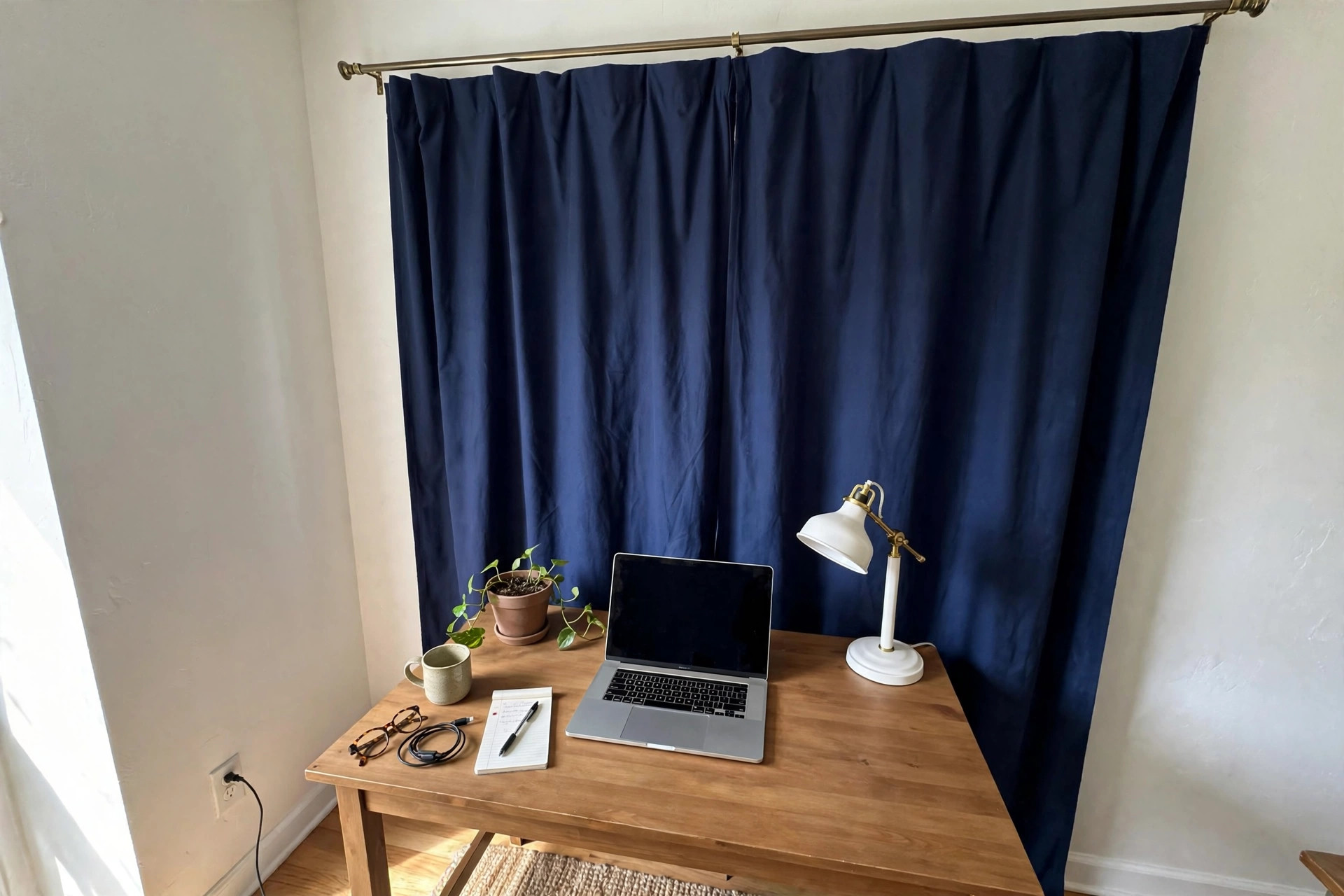

A home office curtain backdrop for video calls is one of the simplest ways to improve how you look on camera. A curtain hung behind your desk can hide a messy room, block glare from a window, and give your calls a calm, professional feel. You do not need a green screen or a studio. You only need the right fabric, the right color, and a simple way to hang it.
Millions of Americans now work from home. Hiring managers, clients, and team members judge your professionalism in seconds when you join a video call. A curtain backdrop is a small change with a large effect. This guide explains why it matters, what to look for, the main types, what it costs, how to keep it clean, how to stay safe while hanging it, and answers to common questions.
Why a Curtain Backdrop Matters
Video calls are now part of daily work life. Your background tells a story before you say a word. A blank wall can look fine, but it can also look cold. A cluttered room can distract the people you speak with. A curtain backdrop solves both problems at once.
First, it controls what the camera sees. The camera frames only a small area behind you. A curtain fills that frame with one clean surface. Books, wires, laundry, and kitchen counters all disappear behind it. You keep your privacy and your home looks tidy without extra cleaning.
Second, it improves light. Hard window light behind you can turn your face into a dark shadow. A curtain softens that light. It filters bright sun and spreads it out. Your face looks brighter and clearer on camera, which helps people read your expressions.
Third, it helps sound a little. Thick curtains absorb some echo in a bare room. They do not replace real sound treatment, but they make a small room sound warmer. If you want more serious sound control, you may look at home office acoustic panels to reduce echo for your walls as well.
Fourth, it sets a tone. A plain curtain in navy, gray, or warm beige looks professional in almost any field. It shows that you take your work space seriously. Retailers with broad home office ranges such as IKEA and Wayfair carry curtains in many plain colors that work well on camera.
How to Choose the Right Curtain: Home Office Curtain Backdrop for Video Calls
Color
Color is the most important choice. Solid colors work best. Patterns can shimmer or blur on some webcams, especially thin stripes or small checks. On most cameras, medium tones look best.
– Navy blue: calm and professional. Works for almost every skin tone. – Charcoal gray: modern and neutral. Does not fight with your clothes. – Warm beige or taupe: soft and welcoming. Good for client-facing work. – Deep green: rich and quiet. Popular in home offices.
Very dark colors like black can look harsh. Very bright colors like red or orange can tint your face with reflected color. White curtains can blow out in bright light and wash out your face. Test your choice with a short recording before an important call.
Fabric
Fabric weight matters more than fabric price. A heavy curtain hangs straight and blocks light. A thin curtain lets light pass through and can billow in a draft. Look for these types:
– Blackout curtains: thick and lined. They block window light completely and give the cleanest look. – Velvet or heavy cotton: rich texture and good light control. Velvet absorbs light well. – Linen or cotton blend: lighter and airy. Better for rooms where you still want some soft light.
Avoid shiny fabrics like satin. Shine creates hot spots that the camera cannot handle. Matte fabric always looks better on video. The design team at Steelcase has long studied how surfaces and light affect work spaces, and matte, non-reflective finishes are a consistent finding.
Size
Measure before you buy. The curtain should cover the full area the camera sees. Most webcams show about 6 to 8 feet wide behind you. Buy a curtain panel at least twice the width of the area you want to cover so it has soft folds. Folds look better than a flat sheet. A curtain 8 to 10 feet wide usually covers one person on camera.
Height matters too. The curtain should reach from near the ceiling to the floor, or at least from the rod to below the frame. A curtain that is too short looks unfinished. Most people buy panels 84 to 96 inches long. Measure your wall and add 2 to 3 inches above the top of your camera frame.
Types and Options
Tension Rod Curtains
A tension rod fits inside a window frame or between two walls without screws. This is the best choice for renters. You twist the rod until it presses tight. It holds a light or medium curtain with ease. Tension rods cost little and leave no holes in the wall. The downside is weight: a heavy blackout curtain may pull a tension rod down. Test it first with the curtain you plan to use.
Wall Mounted Rod
A wall mounted rod uses brackets screwed into the wall or ceiling. It holds heavy curtains safely. This is the best choice for a permanent home office. Ceiling mounts look clean and keep the curtain close to the wall. Installation takes about 30 minutes with basic tools. Advice on mounting basics is easy to find on home improvement sites like The Spruce, which covers rod placement for clean drape.
Freestanding Backdrop Stand
A backdrop stand is a portable frame with two legs and a crossbar. Photographers use these stands for studio backdrops. You can drape a curtain over one in seconds and fold it away after the call. This is the best choice if your desk sits in a shared room or if you move your setup often. Stands are light and cheap, but they can tip if the curtain is very heavy.
Dual Purpose Curtains
Some workers hang the curtain over a real window behind their desk. During calls, the curtain is closed and becomes the backdrop. After work, the curtain opens to let light in. This works well in small apartments where one wall must serve two jobs. A room darkening curtain in a solid color is the usual pick for this setup.
Which Type Is Right for You
| Situation | Best Option | |—|—| | Renter, no holes allowed | Tension rod | | Permanent home office | Wall mounted rod | | Shared room or mobile setup | Freestanding stand | | Curtain over a window | Dual purpose blackout panel |
Cost and Price
A home office curtain backdrop for video calls is one of the cheapest upgrades you can make. Prices vary by size and fabric.
– Budget setup: $15 to $40. One basic curtain panel plus a tension rod. Fine for light fabric. – Mid range setup: $40 to $90. A blackout panel pair plus a wall mounted rod. This is what most home workers buy. – Premium setup: $90 to $200. Heavy velvet panels plus a ceiling mount or a sturdy backdrop stand.
Curtain panels come in pairs in many stores, so one package may cover your whole frame. Compare prices at large retailers such as IKEA for budget panels and office specialists such as Herman Miller and Uplift Desk if you are building a full home office setup around the backdrop.
Do not forget small costs: hooks or rings, a steamer to remove wrinkles, and wall anchors if you mount into drywall. These add $10 to $25. Even at the top end, a curtain backdrop costs less than most webcams and far less than a new desk.
Care and Upkeep
Curtains collect dust. Dust shows on camera as a dull, gray cast on the fabric. Plan to care for your backdrop so it always looks fresh.
Wash or dry clean the curtain as the label says. Most cotton and polyester panels can go in a home washer on gentle. Velvet and linen may need dry cleaning. Wash dark curtains before you hang them so loose dye does not stain the wall.
Steam out wrinkles before important calls. A hand steamer takes two minutes and makes a big difference on camera. Hang the curtain a day before you need it so gravity can pull out fold lines from the package.
Vacuum the curtain every month with a brush attachment. This keeps dust off and helps the color stay rich. If the room has pets, check for hair with a lint roller before calls.
Check your rod or stand every few months. Tighten screws on wall brackets. Check tension rods for slip. A curtain that sags on one side will distract viewers more than no curtain at all.
Lighting matters as much as the curtain. A good best task lighting for home office desk setup keeps your face bright against the backdrop. Put a soft light in front of you, slightly above eye level, and keep it out of the camera frame.
Safety
Hanging a curtain is simple work, but a few safety steps keep it safe.
Mount into solid material. Drywall alone will not hold a heavy curtain and rod. Use wall anchors rated for the weight, or mount into a wood stud. A rod that pulls out of the wall can fall on you or your equipment.
Use a stable ladder. Many falls happen from chairs or desks used as steps. Use a real step ladder with a handhold. Keep one hand on the ladder while you work.
Keep cords clear. Tie back long pull cords out of reach of children and pets. Cord loops can be a hazard for small children. Safety guidance from Wirecutter and other review sites regularly covers cordless and safe window covering options for homes with children.
Do not block vents. Do not hang a heavy curtain over a heating vent or a radiator. Heat can build up behind the fabric. Keep the curtain at least 12 inches from heat sources.
Secure freestanding stands. Put the legs of a backdrop stand flat on the floor. If you have pets or small children, add sandbags to the legs so the stand cannot tip during a call.
FAQ
Will a curtain backdrop really make me look more professional? Yes, for most people. It removes visual noise from the frame and gives the camera one clean surface. Clients and managers see a calm, controlled space. It will not fix bad lighting or a poor camera, so pair it with good light and a clear microphone.
What color curtain is best for video calls? Solid navy, charcoal gray, warm beige, or deep green. These colors look professional on most webcams and suit most skin tones. Avoid bright red, bright orange, pure white, and thin stripes, which can cause color or shimmer problems on camera.
Can I use a shower curtain or a bedsheet as a backdrop? A bedsheet can work in a pinch, but sheets wrinkle fast and look thin on camera. A real curtain panel hangs better and blocks more light. If you must use a sheet, iron it first and hang it tight. Upgrade to a real curtain when you can.
Do I need a blackout curtain? Only if you hang the curtain over a window. Blackout fabric blocks daylight so the sun does not wash out your camera image. If the curtain hangs on a bare wall with no window behind it, a regular heavy curtain is fine.
How far should I sit from the curtain? Sit 3 to 5 feet in front of the curtain. This keeps the fabric slightly soft in focus, which looks natural. Sitting too close can make the fabric fill the frame harshly. Sitting too far shows the edges of the curtain.
Will curtains help with echo on calls? A little. Thick curtains absorb some sound and reduce echo in a hard room. For a big improvement, pair the curtain with a noise cancelling headset for home office meetings or add wall panels. Technology reviews on sites like PCMag cover headsets in detail.
A Short Final Word
A home office curtain backdrop for video calls is a small project with a clear payoff. Pick a solid, matte color. Choose fabric heavy enough to hang straight. Mount it safely so it fills the camera frame. Keep it clean and wrinkle free. In one afternoon and for less than the cost of a tank of gas, you can give every video call a calm, professional frame. Your room stays yours, and your work looks its best.
References
Herman Miller. (n.d.). Office furniture and ergonomic seating. https://www.hermanmiller.com IKEA. (n.d.). Home furnishings. https://www.ikea.com PCMag. (n.d.). Technology product reviews. https://www.pcmag.com Steelcase. (n.d.). Office furniture and workplace research. https://www.steelcase.com The Spruce. (n.d.). Home and garden advice. https://www.thespruce.com UPLIFT Desk. (n.d.). Standing desks and ergonomic office furniture. https://www.uplift-desk.com Wayfair. (n.d.). Furniture and home goods. https://www.wayfair.com Wirecutter. (n.d.). Product reviews from The New York Times. https://www.nytimes.com/wirecutter
Was this guide helpful?

About James Carter
The My Garden US editorial team writes practical, in-depth home and garden guides for American homeowners — tested advice, no fluff.
You May Also Like
Rolling Cart for Home Office Printer Stand: A Complete Guide
July 31, 2026 0 views
Home Office Chair Replacement Wheels for Carpet: A Complete Buying Guide
September 7, 2026 0 views
Small Bookshelf With Doors for Office Documents
June 2, 2026 0 views