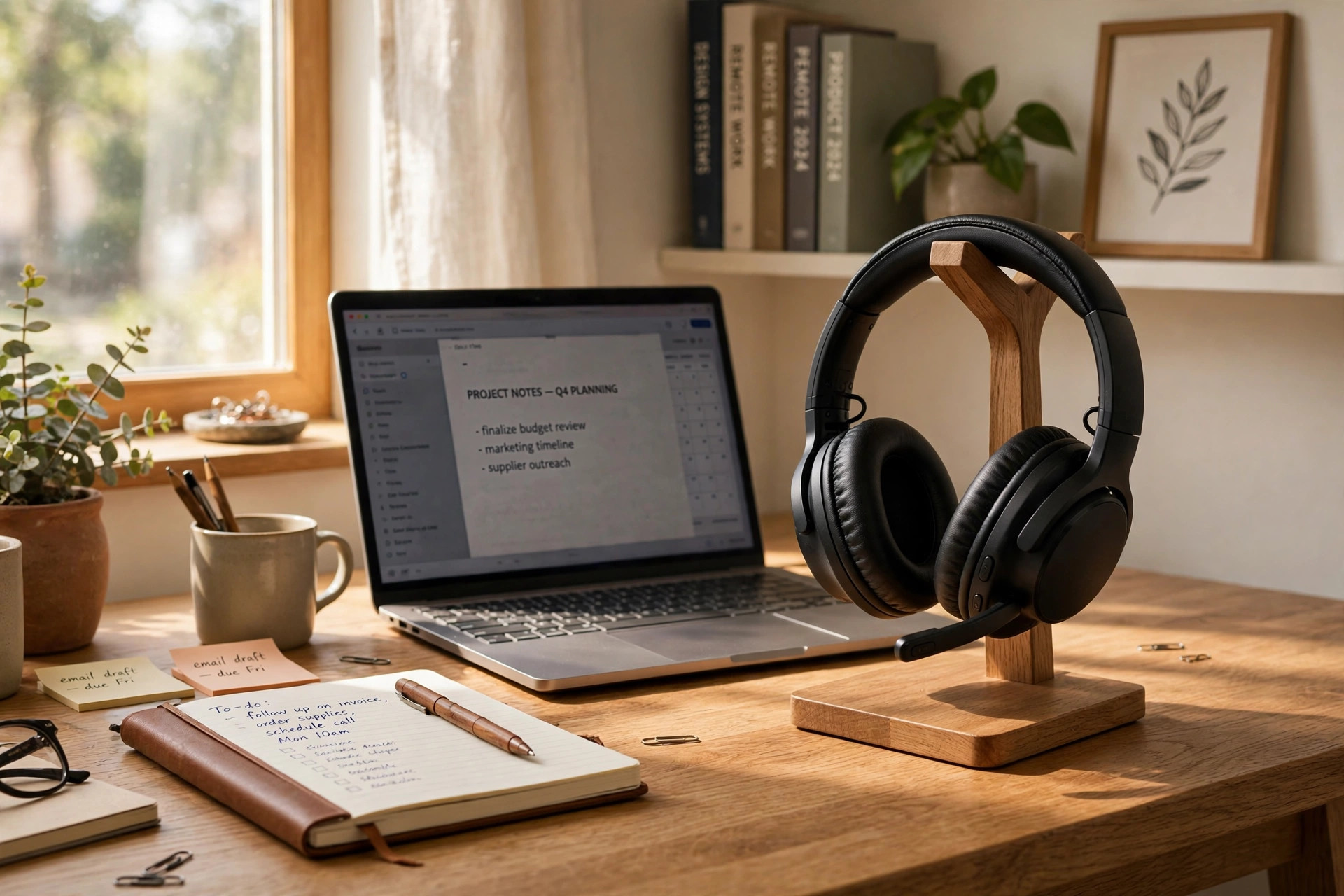

A noise cancelling headset for home office meetings can change the way you work. It removes the hum of the house. It keeps your voice clear. It makes long video calls far easier. This guide explains what these headsets do, how to pick one, and how to keep it working well for years.
Why a Noise Cancelling Headset Matters in a Home Office
Home offices are rarely quiet. A dog barks at the door. A child asks a question from the next room. The washing machine runs through its cycle. The lawn mower starts outside. Each of these sounds can break your focus. Worse, each one can reach your coworkers through your microphone.
A noise cancelling headset for home office meetings works in two directions. First, it quiets the world around you. Speakers play a sound wave that cancels the noise before it reaches your ears. This is called active noise cancellation. Second, many models also filter noise from your microphone. Your voice goes out clean, while the dog and the dishwasher stay out of the call.
Studies of remote work keep reaching the same result. Poor sound is the top complaint about home video calls. People forgive a blurry camera. They rarely forgive bad audio. A good headset fixes the problem at the source. It costs less than most other office upgrades, yet it improves every single meeting.
Comfort is the other reason. Cheap earbuds hurt after an hour. A well built headset spreads its weight across a soft headband and large ear cushions. You can wear it through a full morning of calls and forget it is there.
What to Look for When You Shop: Noise Cancelling Headset for Home Office Meetings
Start with the fit. Over-ear cups sit around the ears and block sound by shape alone. On-ear pads press on the ears and grow sore after an hour or two. In-ear buds are light, but they rarely cancel noise as well. For home office meetings, over-ear models win in most cases. Try the headset for at least thirty minutes before you decide. What feels fine in the store can ache by noon.
Noise Cancellation Strength
Not all cancellation is equal. Basic models cut steady low sounds, such as fan noise and engine hum. Better models also soften voices and keyboard clicks. The best can hush a barking dog. Read reviews that test the headset in real rooms, not only in a lab. Buying guides from Wirecutter and the testers at PCMag both rate noise cancellation in real rooms.
Microphone Quality
Your coworkers hear only your microphone. A headset can have fine speakers and a weak mic, and the call will still suffer. Look for models with a boom microphone that sits close to your mouth. Some newer designs hide the mic in the ear cup. Those can work well too, but a boom usually wins. Check reviews that record sample calls. Your voice should sound full and near, not thin and far.
Battery Life and Charging
Most wireless models run 20 to 40 hours on one charge. That is enough for a full work week of calls. Wired models never run out of power, but the cord can snag and limit your movement. A quick charge feature is worth having. Fifteen minutes of charging should give you hours of talk time. If you travel with the headset, a folding design and a hard case protect it in your bag.
Connection Type
Bluetooth is the standard for wireless headsets. Look for Bluetooth 5.0 or newer for a steady link. Many workers pair one headset with two devices at once, such as a laptop and a phone. This feature is called multipoint, and it is very handy. You can take a call on the phone without dropping the laptop link. USB models connect through a small dongle. The dongle gives a stronger signal than plain Bluetooth, which helps in busy offices.
Comfort and Weight
A headset for meetings should weigh under 300 grams if possible. Lighter is better for long days. Check the clamp force, which is how hard the headband squeezes. Too loose and the headset slides. Too tight and it gives you a headache. Memory foam cushions mold to your head and feel better than plain foam. If you wear glasses, test the headset with them on. Thick arms can break the seal around your ears and let noise leak in.
Types of Noise Cancelling Headsets
Over-Ear Wireless
These are the most popular choice for home workers. Large cups cover the ears. A boom mic picks up the voice. Battery life is long. Brands such as Bose, Sony, and Logitech lead this field. Prices range wide, so you can find one that fits your budget. The downside is size. They are not pocketable, and they look formal on a quick walk to the kitchen.
On-Ear Wireless
On-ear models rest on the ears instead of around them. They are smaller and lighter, which some people prefer. The trade is comfort and isolation. Sound leaks in and out more easily. For quiet homes, they can be enough. For homes with children or pets, over-ear is usually the better pick.
In-Ear True Wireless
Small buds fit in the ear and cancel noise with clever software. They are great for travel and for quick calls. For a full day of meetings, many people find them tiring. The mic also sits farther from the mouth, so the voice can sound weaker. They work as a second headset, but rarely as the main one.
Wired USB Headsets
A wired headset plugs into your computer and works every time. There is no battery to charge and no signal to drop. Call centers still use wired models for this reason. The cord limits you to the desk, which suits people who sit still during calls. Prices are low, so this is the cheapest way into clear audio.
Cost and Price: What Should You Spend?
A noise cancelling headset for home office meetings costs anywhere from 30 to 400 dollars in the United States. The price tells you a fair amount about what you get.
Under 75 dollars, you will find basic wired models and simple wireless ones. Noise cancellation at this price is weak. The mic may be average. For occasional calls in a quiet home, these can do the job. Do not expect miracles in a noisy house.
From 75 to 175 dollars, quality jumps. This is the sweet spot for most home workers. You get solid noise cancellation, a clear microphone, and all-day comfort. Best Buy and Amazon both stock many strong models in this range, and sales often drop prices lower.
From 175 to 400 dollars, you reach premium models. Cancellation is stronger. Materials feel better. Features like multipoint and adaptive noise control appear. These headsets can last five years or more with care. If you lead meetings all day, the cost per hour of use is tiny.
One more thought on price. Your employer may pay for part of it. Many companies give remote workers a stipend for office gear. Ask your manager before you buy. The headset may count as a business expense for tax purposes too. Keep your receipt and talk to your tax preparer. Rules change year to year.
A well planned office pairs good audio with good furniture. A quiet keyboard for a shared home office space keeps your typing out of the mic. A sturdy laptop stand for standing desk posture lifts the screen to eye level. A clear web camera for home office zoom meetings rounds out the setup. Gear works best as a team.
Care and Upkeep
A headset lasts longer with simple care. Wipe the ear cushions once a week with a soft dry cloth. Sweat and skin oil break down the pads over time. Most brands sell replacement cushions, which cost far less than a new headset. Swap them when they crack or flake.
Store the headset on a stand or in its case. Tossing it in a drawer bends the headband and strains the hinges. If it folds flat, fold it before you pack it. Keep it away from heat. A car dashboard in summer can melt glue and warp plastic.
Charge the battery with care. Do not leave it plugged in for days at a time. Lithium batteries age faster when they sit at full charge in heat. Most makers suggest storing at about half charge if you will not use it for weeks. Update the firmware when the app prompts you. Updates often fix mic bugs and improve noise cancellation.
Clean the microphone gently. A soft brush removes dust from the mic holes. Do not poke them with pins or wet them with cleaners. If callers say your voice sounds muffled, the mic holes may be blocked. A quick clean usually fixes it.
Safety and Healthy Use
Headsets are safe when used with sense. The main risk is volume. Long hours at high volume can harm your hearing. Keep calls at a level where you can still hear the room a little. Take the headset off between meetings when you can. Your ears need rest like your eyes do.
Noise cancellation changes how you hear your own voice. Some people speak louder without knowing it. Others feel a light pressure in the ears from the cancellation. If it bothers you, lower the cancellation strength or turn it off during short calls. Most models let you adjust it in the app.
Check local rules if you drive or cycle with the headset on. Many states limit ear covering while driving. For home use this is no issue, but it is worth knowing. Also, keep the headset away from small children. The cord on wired models and the small parts on some buds can be hazards.
If you use a headset with a charging case, recycle old batteries properly. Many stores take them back for free. Do not throw lithium batteries in the trash. They can catch fire in waste trucks. Your city website lists drop off points.
How to Set Up Your Headset for the Best Sound
Good gear needs good settings. Start in a quiet moment. Put the headset on and open your meeting app. Find the audio settings and choose your headset as both the speaker and the microphone. Many calls sound bad only because the app picked the laptop mic by mistake.
Test with the app’s built in tool. Most meeting apps have a test call feature. Speak a sentence and listen to the playback. If you sound far away, move the mic closer. If you hear echo, lower the speaker volume a notch. Echo usually means your mic hears your own speakers.
Mind your room too. Hard bare walls bounce sound around. A rug, curtains, and a bookshelf soften the echo. Face away from noisy windows if you can. Small changes add up.
Match your headset to your chair and desk for long call days. A supportive chair from a maker like Steelcase or Herman Miller keeps your back happy. An adjustable desk from Uplift Desk lets you stand between calls. A tidy desk from Wayfair keeps cables under control. Comfort is a full picture, not one product.
Frequently Asked Questions
Do I really need noise cancellation for home office meetings?
It depends on your home. If your house is quiet during work hours, a simple headset may do. If you share the space with family, pets, or street noise, cancellation is worth every penny. It helps you focus and it keeps your voice clear for others. Most remote workers who try it never go back.
Is a boom microphone better than a built in mic?
In most tests, yes. A boom sits near your mouth, so it picks up more voice and less room. Built in mics in the ear cup have improved a lot in recent years, and top models now sound very good. But for the clearest call, a boom still wins. If you record meetings or host webinars, choose a boom.
Can I use one headset for both my phone and my laptop?
Yes, if the model supports multipoint Bluetooth. This feature keeps both devices connected at once. You can join a video call on the laptop and still take a phone call without re-pairing. Check the product page for the word multipoint before you buy. Not every model has it.
How long should a headset battery last?
For home office use, look for at least 20 hours of talk time. Heavy users who take calls all day should aim for 30 hours or more. Remember that noise cancellation drains the battery faster. Turn it off when you listen to music in a quiet room to save power. A quick charge feature helps on busy days.
Are expensive headsets worth it over cheap ones?
Often yes, up to a point. A 150 dollar headset is usually much better than a 40 dollar one. The jump from 150 to 350 dollars is smaller but still real. Premium models cancel more noise, feel better after hours, and last longer. Buy the best you can afford in your range, and read real reviews first.
Will a noise cancelling headset block my doorbell or phone?
It may. Strong cancellation can hide sounds you want to hear. Many models have a transparency mode that lets outside sound in with one tap. Use it between calls. Some headsets also flash a light when a second device rings. Know your model before an important delivery day.
A Short Final Word
A noise cancelling headset for home office meetings is one of the smartest upgrades a remote worker can make. It costs less than a good chair. It improves every call you join. Choose for fit and mic quality first, cancellation strength second, and battery third. Care for it well, and it will serve you for years. Clear sound is not a small thing. It is how your work is heard.
References
Amazon. (n.d.). Online shopping. https://www.amazon.com Best Buy. (n.d.). Consumer electronics retailer. https://www.bestbuy.com Bose. (n.d.). Headphones, earbuds, and speakers. https://www.bose.com Herman Miller. (n.d.). Office furniture and ergonomic seating. https://www.hermanmiller.com Logitech. (n.d.). Computer accessories and headsets. https://www.logitech.com PCMag. (n.d.). Technology product reviews. https://www.pcmag.com Sony. (n.d.). Electronics and entertainment products. https://www.sony.com Steelcase. (n.d.). Office furniture and workplace research. https://www.steelcase.com UPLIFT Desk. (n.d.). Standing desks and ergonomic office furniture. https://www.uplift-desk.com Wayfair. (n.d.). Furniture and home goods. https://www.wayfair.com Wirecutter. (n.d.). Product reviews from The New York Times. https://www.nytimes.com/wirecutter
Was this guide helpful?

About Sarah Mitchell
The My Garden US editorial team writes practical, in-depth home and garden guides for American homeowners — tested advice, no fluff.
You May Also Like

Best Desk Accessories Set for New Home Office: A Complete Guide
August 13, 2026 0 views
Wall Mounted Desk Shelf Above Computer Monitor: A Simple Buying Guide
September 26, 2026 0 views
Ergonomic Gaming Chair for Home Office Work
September 22, 2026 0 views