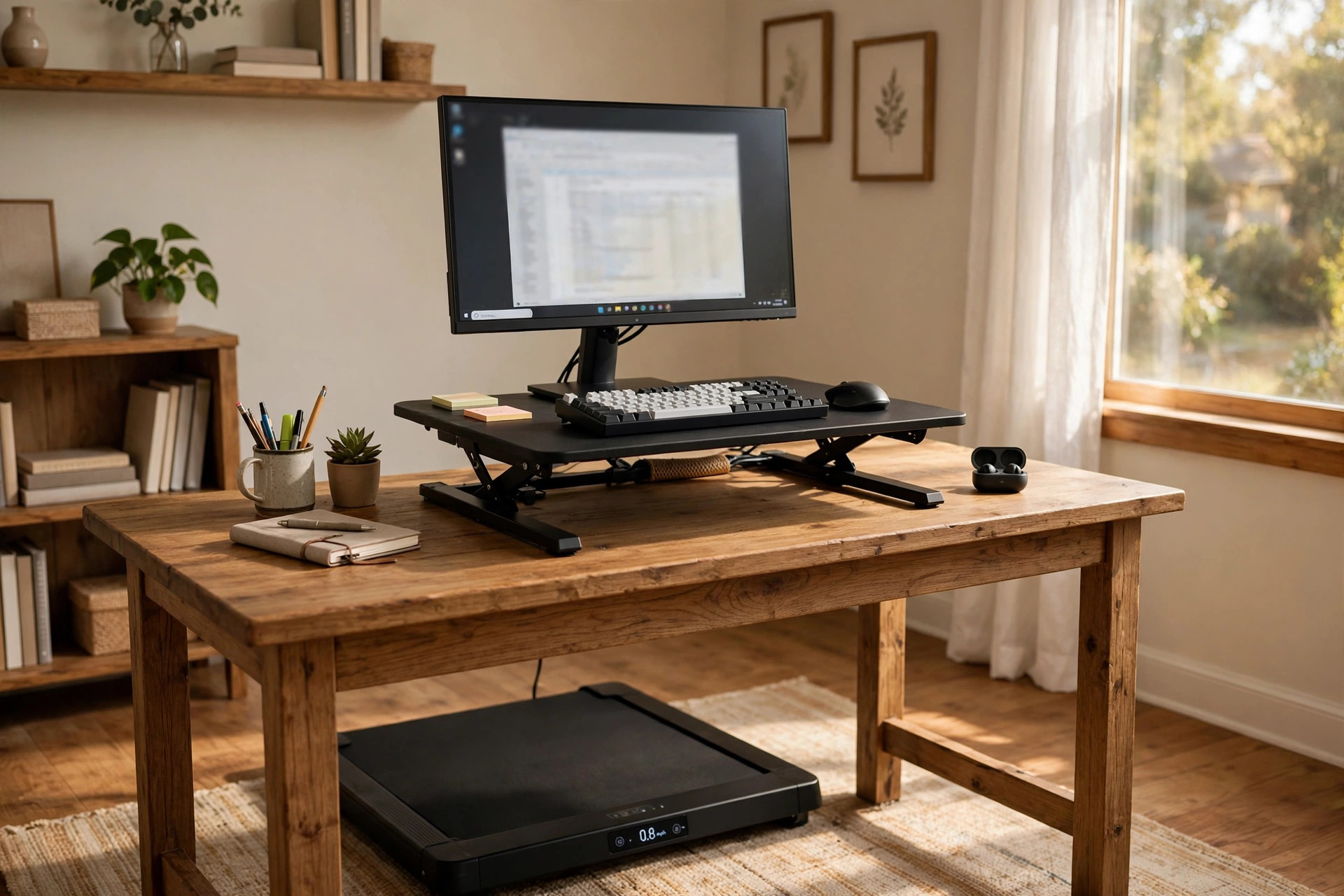

A home office desk riser for treadmill walking solves a common problem. Many people walk on a small treadmill at home but cannot reach their work. A riser lifts the desk surface to the right height. It sits on a desk or works as a stand-alone unit. It lets a person walk at one or two miles per hour while typing, reading, or taking calls. The idea is simple. The details matter. This guide covers what the riser is, why it helps, what to check before buying, how much it costs, and how to use it without injury.
Why a Desk Riser Works With a Walking Treadmill
A desk built for sitting is too low for walking. When a person walks, the body stands taller. The arms rise higher. A desk at sitting height forces the shoulders to hunch. The neck bends down. After an hour, the back aches. A home office desk riser for treadmill walking lifts the work surface by six to twenty inches. The screen reaches eye level. The keyboard sits at elbow height. The posture stays tall while the legs move.
Walking at a desk also fights long sitting hours. Many home workers sit for eight hours or more. Studies on activity breaks show that short periods of movement help blood flow and focus. A walking treadmill under the desk makes movement part of the work day. There is no need to find time for a walk. The walk happens during email, reports, and phone calls. A riser is what makes this possible on a regular desk.
Another reason is cost. A full treadmill desk can cost a thousand dollars or more. A desk riser costs far less. A person who already owns a desk and a walking pad can add a riser and have a walking workstation for a fraction of the price. This matters for people building a home office on a budget.
What to Look for When You Choose One: Home Office Desk Riser for Treadmill Walking
Not every riser works over a treadmill. Walking adds motion. The riser must stay steady while the user steps. It must be tall enough for a standing stride. These points deserve care.
Height Range and Adjustment
The most important spec is height range. When walking, the elbows should rest at about ninety degrees. For a person of average height, the keyboard tray should sit at forty to forty-eight inches from the floor. The riser must reach this range. Check the stated maximum height. Also check the minimum height. Some risers adjust with a gas spring or a handle. Others use fixed legs with set heights. Smooth adjustment helps. A riser that jumps or slips is hard to trust.
Weight Capacity
The riser holds monitors, a keyboard, a mouse, and often a laptop. A walking user may lean slightly on the desk. The stated weight limit should be at least fifty pounds. Higher is better for two monitors. Read the manual for how the limit is measured. Some brands rate the limit only when the riser is at its lowest setting.
Footprint and Desk Fit
Measure the desk before buying. The riser base must sit fully on the desk top. Some risers are wide and deep. They need a desk at least twenty-four inches deep. Others are narrow and fit small desks. Also check the space under the riser. A keyboard tray that pulls out needs room in front. A compact treadmill desk for walking while working may already include a walking belt, so check that the riser does not clash with the treadmill arms.
Stability
Walking shakes the desk. A wobbly riser makes typing hard and can tip a monitor. Look for wide feet, a heavy base, and cross bracing. Read user reviews about shake at full height. A small test helps. Place the riser on the desk, load it with books equal to the planned weight, and walk in place. Watch for sway.
Monitor Mounting
Some risers have a flat top for a monitor stand. Others include a monitor arm or a VESA mount. A mounted monitor keeps the screen at eye level while walking. If the riser has no mount, a separate best laptop stand for standing desk posture can raise a laptop screen to the same height.
Noise and Motion Parts
Gas springs and levers can squeak. Cheap hinges can rattle with each step. In a shared home, quiet parts matter. Look for sealed bearings and rubber pads. Rubber feet also protect the desk surface from scratches.
Types and Options
Desk risers for treadmill walking fall into a few groups. Each group suits a different setup.
Sit-stand converters. These are the most common. They sit on an existing desk and raise with a scissor lift or gas spring. They turn a normal desk into a height-adjustable station. An adjustable height desk converter for existing table is the same class of product. When paired with a walking pad under the desk, it forms a simple walking workstation.
Over-treadmill standing desks. These are tall desks with long legs that straddle the treadmill. The treadmill belt slides between the legs. The desk does not sit on another desk. It stands on the floor. This type is very stable. It needs floor space. It works well in a dedicated office corner.
Laptop risers and platforms. These are small, light platforms that lift a laptop to standing height. They cost little and fit anywhere. They suit people who work mostly on a laptop. They are less steady for heavy typing. They are a good trial option before buying a larger unit.
Full treadmill desk combos. These are sold as one piece. The desk and the treadmill come together. They cost the most. They fit together by design. A person who wants no guesswork can start here. This guide focuses on risers, but a combo is worth knowing as a comparison point.
Cost and Price
Prices vary with size, build, and features. A small laptop riser costs twenty to sixty dollars. A standard sit-stand converter costs one hundred to four hundred dollars. Wide models with dual monitor arms cost four hundred to seven hundred dollars. Over-treadmill standing desks cost two hundred to six hundred dollars. Full treadmill desk combos cost eight hundred to two thousand dollars.
Extra cost may come from the treadmill itself. A walking pad for under-desk use costs two hundred to five hundred dollars. Add the riser price to the pad price for the true total. A mid-range setup often totals four hundred to eight hundred dollars. This is far below a gym membership over several years, and it is used daily.
Watch for hidden costs. A monitor arm may be sold apart. A floor mat for the treadmill may be extra. Shipping for heavy risers can be high. Some stores, such as those listed on Wayfair, bundle shipping in the price. Others add it at checkout.
Care and Upkeep
A desk riser has moving parts. It needs light care to last.
Dust the lift arms and hinges once a month. Use a dry cloth. Do not use oil unless the manual allows it. Some gas springs fail if oiled. Wipe the work surface with a damp cloth. Avoid harsh cleaners on wood tops.
Check screws and bolts every three months. Walking vibrates the frame. Bolts loosen over time. Tighten them with the tool that came in the box. If a lever starts to stick, check for dust in the slot before forcing it.
Keep the treadmill belt clean as well. Dust on the belt can drift up to the desk. Vacuum under the treadmill each month. A clean belt runs quieter. This helps the whole workstation feel calm during calls.
If the riser has a keyboard tray, check its rails. Trays that stick can be eased with a dry silicone spray made for drawer slides. Test the tray empty first.
Safety
Walking while working is safe when done with care. A few rules prevent most problems.
Start slow. Walk at one mile per hour for the first week. Increase speed only when typing stays easy. Most people work best at one and a half to two miles per hour. Faster speeds suit reading or calls, not fine typing.
Wear proper shoes or walk barefoot on a clean belt. Loose slippers can catch. Tie long cords away from the belt. Keep pets and children away from the treadmill while it runs.
Set the screen at eye level. Looking down at a laptop for hours strains the neck. Raise the screen with the riser or a stand. Keep the keyboard close so the shoulders stay relaxed.
Take breaks. Walk for thirty to sixty minutes, then sit or stand still for a while. Feet and knees need rest. A timer on the desk helps. Drink water. A small shelf on the riser can hold a bottle.
Stop and step off if dizziness or pain starts. The treadmill has a safety key. Clip it to clothing. It stops the belt if the user steps too far back.
Check the load limit of the treadmill. Walking pads have weight limits, often two hundred to three hundred pounds. Stay within the limit. Place the treadmill on a flat, hard floor. A mat under the belt cuts noise and keeps the floor safe.
Frequently Asked Questions
Can any desk riser work with a treadmill?
Not every riser suits walking. The riser must reach standing elbow height, about forty to forty-eight inches from the floor. It must stay stable while the user steps. Many basic risers meet this need. Check height range and weight capacity before buying.
Do I need a special treadmill?
A walking pad made for under-desk use works best. These pads have no tall arms, so they slide under a desk. They run at low speeds, usually up to four miles per hour. A full gym treadmill can work but takes more space. Its arms may block the desk.
Is typing hard while walking?
Typing is easy at one to two miles per hour for most people. Speed drops slightly at first. Accuracy returns within a week or two. Tasks with heavy mouse work, such as design, may feel harder. Many users save fine detail work for sitting breaks.
How much space does the setup need?
A walking pad is about fifty inches long and twenty inches wide. The desk above it needs matching width. Add room to step on and off safely. A corner of six by four feet holds most setups. Measure the room before ordering.
Will it bother people on calls?
At low speed, a walking pad hums softly. A desk riser with rubber feet keeps vibration low. Most callers cannot hear it. A headset with noise removal helps. Walking also adds slight breath noise. Pause the belt during important calls if needed.
Can it help with back pain?
Many users report less stiffness from breaking up sitting time. Walking keeps the spine moving. It is not a cure. People with back problems should ask a doctor first. Good posture at the riser matters as much as the walking itself.
A Short Final Word
A home office desk riser for treadmill walking is a small change with a large effect. It lifts the work to the body instead of forcing the body down to the work. It turns dead sitting hours into moving hours. The buyer who measures the desk, checks the height range, and starts at a slow pace will get the most from it. Trusted makers of office furniture, such as Herman Miller and Steelcase, publish useful guides on standing and walking work postures. Retailers like IKEA carry low-cost riser options for first-time buyers. Review sites such as The Spruce, Wirecutter, and PCMag compare popular models in plain terms. Desk specialists like UPLIFT Desk focus on height-adjustable gear built for daily use. With the right riser and a steady walking pad, the home office becomes a place where work and movement share the same hour.
References
Herman Miller. (n.d.). Office furniture and ergonomic seating. https://www.hermanmiller.com IKEA. (n.d.). Home furnishings. https://www.ikea.com PCMag. (n.d.). Technology product reviews. https://www.pcmag.com Steelcase. (n.d.). Office furniture and workplace research. https://www.steelcase.com The Spruce. (n.d.). Home and garden advice. https://www.thespruce.com UPLIFT Desk. (n.d.). Standing desks and ergonomic office furniture. https://www.uplift-desk.com Wayfair. (n.d.). Furniture and home goods. https://www.wayfair.com Wirecutter. (n.d.). Product reviews from The New York Times. https://www.nytimes.com/wirecutter
Was this guide helpful?

About Lisa Anderson
The My Garden US editorial team writes practical, in-depth home and garden guides for American homeowners — tested advice, no fluff.
You May Also Like
Adjustable Foot Hammock for Under Desk Comfort: A Complete Guide
September 26, 2026 0 views
Home Office Curtain Backdrop for Video Calls
May 23, 2026 0 views
Ergonomic Mesh Office Chair Under 200 Dollars: What to Know Before You Buy
August 28, 2026 0 views