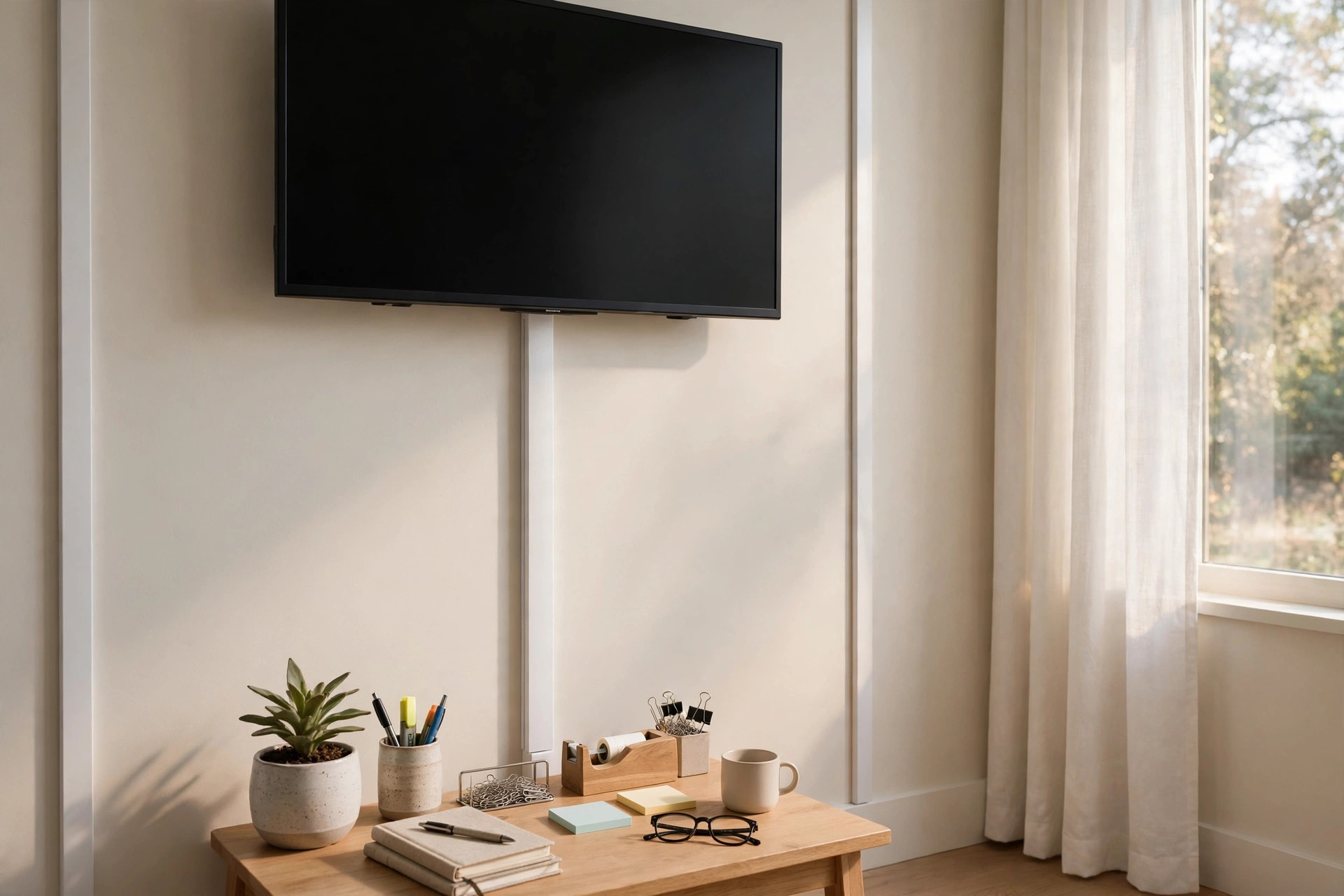
A wall mounted TV looks clean in a home office. Then the cables ruin the effect. Power cords, HDMI lines, and audio wires hang loose. They collect dust. They look messy. A home office cable raceway for wall mounted tv solves this. It is a slim cover that runs down the wall. It hides every cord inside. It takes about an hour to install. It costs little. The result looks like a professional did it.
Why a Cable Raceway Matters
A bare TV mount is only half the job. The cables matter just as much. Loose wires pull down the look of the whole room. They also create real hazards. A cord that hangs free can snag on a chair. It can pull on the TV port. It can overheat if tangled in a bundle.
A raceway keeps every line in one tidy channel. The TV appears to float on the wall. Nothing dangles. Cleaning under the screen takes seconds. There is nothing to dust around.
Safety is a bigger reason. Loose power cords are a known home hazard. The U.S. Consumer Product Safety Commission warns that damaged or pinched cords can cause fires. A raceway shields cords from pets, kids, and chair wheels. It also stops cords from rubbing against sharp mount brackets.
For people who work from home, the room doubles as an office. A tidy wall behind the TV helps focus. It also looks better on video calls. Clients and coworkers see a clean setup. Small details like this build a calm work space.
What a Cable Raceway Actually Is: Home Office Cable Raceway for Wall Mounted Tv
A cable raceway is a flat plastic channel. It sticks to the wall with adhesive or screws. One half mounts flat to the wall. The other half snaps on as a cover. The cables run inside the channel. The cover hides them.
Most raceways are about one inch wide. They come in two to six foot lengths. You can join pieces to reach the floor. You can cut them with a hacksaw. The front cover is usually paintable. Paint it the wall color and it almost disappears.
Some raceways have two channels inside. This matters for one reason. Power lines and signal lines should not touch. Keep the power cord in one channel. Keep HDMI and network lines in the other. This reduces picture noise. It also follows basic electrical practice.
How It Differs from In-Wall Kits
In-wall cable kits pass cords through a hole in the drywall. They look perfect. They are harder to install. They may break local rules. Many rental leases forbid cutting walls. Raceways sit on the wall surface. They need no holes. They peel off when you move. That makes them the right choice for renters and simple projects.
Types of Raceways for a Wall Mounted TV
Not every raceway fits every setup. Know the main types before you buy.
Straight Stick Raceways
These are the common choice. Flat white channels sold in straight lengths. They cost little. They install with sticky tape. They work for most office TVs. Brands at big stores sell them in kits with connectors. Home improvement guides often point readers to the raceway kits stocked at Home Depot for quick weekend installs.
Corner and Bend Fittings
A straight run rarely goes straight down. The cord may need to turn around a shelf. Bend fittings join pieces at ninety degrees. Corner pieces turn inside or outside corners. Buy these with the same brand of raceway. Sizes must match.
Floor Cord Covers
Some setups end at a desk instead of the floor. A floor cord cover ramps over cables that cross the floor. It stops chairs from rolling over cords. It also prevents trips. Use one if the TV sits above a dual monitor desk nearby that shares an outlet.
J-Channel and Open Cable Managers
J-channels hang under a desk. They are not wall raceways. But many offices use both. The wall raceway runs from TV to desk level. The J-channel takes the cords under the desk to the outlet. Together they hide every wire.
How to Choose the Right Size
Count your cables first. List every line that runs to the TV. A typical home office TV has a power cord, one HDMI cable, and sometimes a network cable or an optical audio line. That is three or four cables.
Pick a raceway wide enough for all of them with room to spare. A one-inch raceway holds two or three thin cables. A two-inch raceway holds four or five. Do not pack cables tight. Tight packs are hard to cover. They also trap heat.
Check the cable ends too. HDMI plugs are bulky. They need room to turn inside the channel. Measure the plug. Add a half inch. That sets your minimum width.
Length is easy. Measure from the bottom of the TV to the outlet. Buy one length longer than you need. Cutting is simple. Stretching is not.
Paintable or Pre-Finished
Most raceways come in white. White works on light walls. For dark walls, buy a paintable raceway. Paint it after install. Use the same wall paint. Two thin coats are enough. Reviewers at Wirecutter note that paintable models blend best in finished rooms.
Step-by-Step Install
Set aside an hour. You need a raceway kit, a hacksaw, a level, and a tape measure. No drill is required for adhesive mounts.
Step 1: Plan the route. Find the shortest straight path from the TV to the outlet. Avoid windows and door frames. Mark the line lightly with a pencil.
Step 2: Dry fit the cables. Hold each cable along the route. Make sure they reach with slack. Leave six inches of slack at each end.
Step 3: Cut the raceway. Cut the base channel to length. Cut slowly. A rough edge can be filed smooth. Step-by-step photo guides at Family Handyman show the cutting technique in detail.
Step 4: Mount the base. Peel the adhesive backing. Press the channel to the wall along your pencil line. Use a level. Hold it for thirty seconds per foot.
Step 5: Lay in the cables. Place power and signal lines in separate channels if your raceway has two. Keep gentle curves. Do not bend HDMI cables sharply.
Step 6: Snap on the cover. Start at one end and press along the length. The cover clicks into place. Step back and check the line is straight.
Step 7: Paint if needed. Mask the wall edges. Apply thin coats. Let each coat dry fully.
That is all. The TV wall now looks clean.
Cost and Price Ranges
Raceways are among the cheapest office upgrades. A basic stick raceway kit costs between ten and twenty dollars. This covers about four feet of wall. Bend fittings and connector packs add five to ten dollars.
Wide dual-channel raceways cost twenty to forty dollars per kit. Floor cord covers run fifteen to thirty dollars. A full office cable kit with wall and desk parts can reach fifty dollars.
Compared with an electrician visit, the savings are large. Running outlets behind a TV through the wall can cost two hundred dollars or more. A raceway gives a clean look for a tenth of that. Stores like Lowe’s carry starter kits that include every fitting in one box.
Hidden Costs to Watch
Paint is one hidden cost if you choose a paintable model. A sample pot of wall paint costs a few dollars. Stronger adhesive may be needed on textured walls. Budget five extra dollars for mounting tape rated for texture.
Care and Upkeep
Raceways need almost no care. Dust the cover with a dry cloth once a month. Check the adhesive bond once a year. Heat from a sunny window can loosen cheap tape. Press the channel back if it lifts.
When you add a new device, pop off the cover. Lay the new cable inside. Snap the cover back on. Do not force a thick cable into a full channel. Buy a wider raceway instead.
If you move the TV, peel off the raceway slowly. Warm the adhesive with a hair dryer. This softens the bond. Clean the wall with mild soap after removal.
Pairing the wall raceway with good task lighting for your home office desk makes the whole room feel finished. Light and tidy lines work together.
Safety Rules
Raceways are safe when used right. Follow these rules.
Keep power cords separate from signal cables. Heat builds in tight bundles. Give each cable air space.
Do not run cords under rugs to reach the outlet. This is a fire risk. Move the outlet run or use a proper floor cover instead.
Check cords for damage before hiding them. A cracked cord inside a raceway is still a hazard. Replace damaged cords first.
Do not exceed the outlet load. A raceway does not change electrical limits. Count the watts of every device on the circuit.
Keep raceways away from heat sources. Do not mount them next to a radiator or a space heater. Plastic channels can warp in heat.
Common Mistakes to Avoid
People make the same errors again and again. Learn from them.
Buying too narrow. This is the top mistake. Cables never fit. The cover pops off. Measure plugs before you buy.
Skipping the level. A crooked raceway looks worse than loose cables. Use a level. Mark the line first.
Painting before install. Paint the wall color on the raceway after it is mounted. Painted pieces are hard to cut cleanly.
Ignoring the desk end. The raceway stops at desk level. Cables still need a path from there to the outlet. Plan the desk side too. An ergonomic standing desk for a small home office with built-in cable trays makes this easy.
Using nails on the cover. Screws and nails crack the cover. Use the supplied adhesive or proper mounting clips.
Where to Place the TV for Best Results
Raceway install goes better when the TV sits in the right spot. Mount the TV at eye level when seated. The center of the screen should match your eye height. This is basic office ergonomics. Workplace design research from firms like Herman Miller and Steelcase backs this rule.
Place the TV near an existing outlet. The shorter the raceway run, the cleaner it looks. Long runs across empty walls draw the eye.
Think about glare. Do not face the screen toward a window. Glare forces you to raise brightness. That wastes energy and strains eyes.
Leave room behind the TV for air flow. Electronics need to breathe. A two-inch gap between TV and wall is enough.
Matching Raceways to Your Office Style
Raceways come in white, black, and wood tones. Match them to your room. White on white walls vanishes. Black suits dark media walls. Wood-tone covers fit warm offices with timber furniture.
If your office has a standing desk, choose raceways with flexible sections. Desks move up and down. A short flexible link absorbs the motion. Rigid raceways can pull loose on moving desks.
For small rooms, keep the raceway path as short as possible. Every extra foot draws attention. Tuck the outlet end behind the desk leg or a side table.
Office style guides from retailers like IKEA show cable management as part of room planning. Treat the raceway as part of the design, not an afterthought.
When to Call a Professional
Most raceway jobs are simple. Call an electrician in three cases.
First, if you want a new outlet behind the TV. Only a licensed electrician should add outlets. Second, if your walls are plaster or brick. Adhesive fails on rough masonry. A pro can anchor channels safely. Third, if you smell burning or see scorched cords. Stop and call at once.
Home project references at Bob Vila list these same cases as pro-level jobs.
Frequently Asked Questions
Will a cable raceway damage my wall?
Adhesive raceways rarely damage walls. They use foam tape that peels off with gentle heat. Some paint may lift on old or poorly primed walls. Test a small hidden spot first.
Can I hide the power cord and HDMI in one raceway?
Yes, if the raceway is wide enough. Use a dual-channel raceway for best results. Put the power cord in one side. Put HDMI and network cables in the other. This keeps signal lines clean.
How do I cut a raceway to fit?
Use a fine-tooth hacksaw. Mark the line with a pencil. Cut slowly with steady strokes. File the edge smooth. Cut the base and the cover to the same length.
Do raceways work on textured walls?
Light texture works with standard adhesive. Heavy texture needs stronger tape. Clean the wall with rubbing alcohol first. Press hard for a full minute per foot. Screw mounts work on any wall.
Can I paint a cable raceway?
Yes, if it is labeled paintable. Most PVC raceways take latex paint well. Clean the surface first. Apply thin coats. Let it dry fully between coats.
Is a raceway better than an in-wall kit?
It depends. In-wall kits look seamless but need wall cutting. Raceways need no tools beyond a saw. They suit renters and quick jobs. They also cost far less.
A Short Final Word
A home office cable raceway for wall mounted tv is a small job with a big payoff. It hides the mess. It protects the cords. It makes the room look planned. Pick the right width. Mount it level. Paint it to match. In one hour the wall looks like it belongs in a magazine. Start with the cables you have. Plan the route. Then enjoy a clean screen on a clean wall.
References
Bob Vila. (n.d.). Home improvement advice. https://www.bobvila.com Family Handyman. (n.d.). DIY home repair and maintenance. https://www.familyhandyman.com Herman Miller. (n.d.). Office furniture and ergonomic seating. https://www.hermanmiller.com IKEA. (n.d.). Home furnishings. https://www.ikea.com Lowe’s. (n.d.). Home improvement products. https://www.lowes.com Steelcase. (n.d.). Office furniture and workplace research. https://www.steelcase.com The Home Depot. (n.d.). Home improvement products. https://www.homedepot.com U.S. Consumer Product Safety Commission. (n.d.). Product safety information. https://www.cpsc.gov Wirecutter. (n.d.). Product reviews from The New York Times. https://www.nytimes.com/wirecutter
Was this guide helpful?

About Robert Taylor
The My Garden US editorial team writes practical, in-depth home and garden guides for American homeowners — tested advice, no fluff.