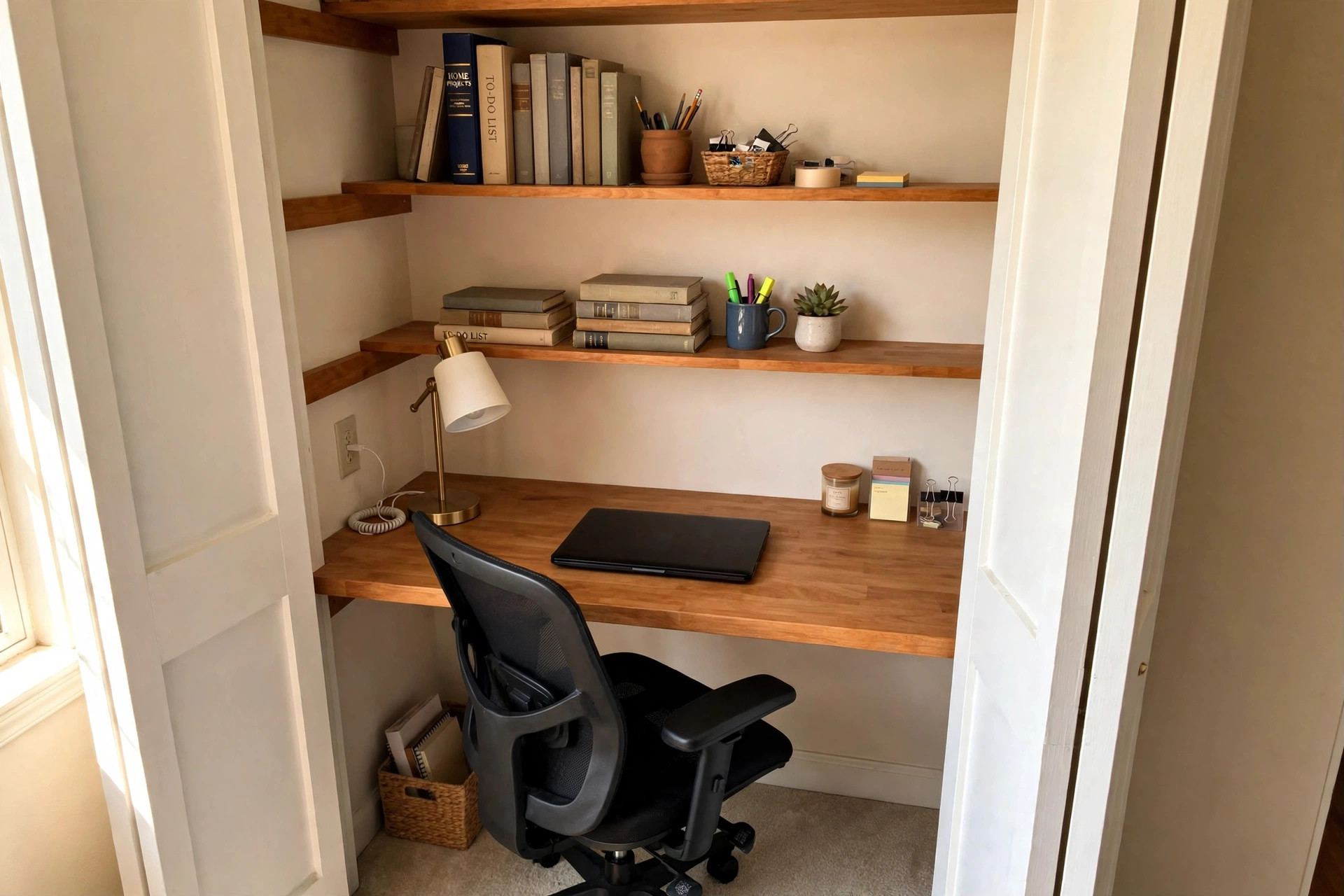

Many American homes have one closet that holds little more than old boxes and winter coats. At the same time, many workers need a real place to do their jobs from home. A home office closet to office conversion kit joins these two facts. It is a boxed set of parts that turns a spare closet into a small working office. The kit gives you a desk surface, shelves, and often a place to hide cords. With one weekend of work, a dead space becomes a place where you can sit down, open a laptop, and get things done.
The idea has a common name: the cloffice. It blends the words closet and office. People who live in apartments, small houses, and condos like it because it does not take a bedroom away. It also keeps work in one spot. When the day ends, the door can close, and the office is out of sight.
Why a Closet Office Makes Sense
Rent and home prices make space dear. Not every worker has a spare bedroom to turn into an office. The kitchen table works for a week or two. After that, the bad chair, the noise, and the lack of storage wear a person down. A closet is often the only unused space left.
A closet office also helps the mind. Work stays in one place. The brain learns that the closet means work and the couch means rest. Parents with small children find that a door they can shut makes calls much easier.
Cost is another reason. A full room remodel can run into thousands of dollars. A home office closet to office conversion kit costs far less. Most of the structure is already there: walls, a floor, a light fixture in many cases. The kit adds the work surface and storage that a closet lacks.
What a Conversion Kit Usually Includes: Home Office Closet to Office Conversion Kit
Kits differ by brand and price, but most share the same core parts. A desk panel is the heart of the kit. It is a board, often laminate or solid wood, that mounts to the closet walls at sitting height. Many panels fold up or down.
Above the desk, the kit adds shelves. These hold books, files, and office supplies. Some kits include a shelf with a lip that stops items from sliding off. Others include small cubbies for paper trays.
Cord control is part of many kits. A hole or slot in the desk panel lets cords drop through. Clips or a tray under the desk keep cables off the floor. A few kits include a small power strip bracket.
Hardware comes in the box: brackets, screws, wall anchors, and hinge parts for fold-down panels. A printed guide walks through the steps. Some makers add a small parts list so you can check that nothing is missing before you start.
What the kit does not include is just as worth noting. It rarely includes a chair, a lamp, or paint. You buy those on your own to fit your taste and budget.
Types of Conversion Kits
Three main types sit on the market. Each fits a different closet and a different way of working.
Fold-Down Desk Kits
The fold-down kit has a desk panel on hinges. It folds flat against the wall when not in use. This type suits closets that must still store clothes or supplies part of the time. It also suits people who share the home and want the office to vanish at night. The trade is strength. A fold-down panel holds less weight than a fixed one, so heavy printers and large monitors may not suit it. A related idea for tight rooms is a floating shelf desk for tiny bedroom office, which uses wall space in much the same way.
Wall-Mounted Workstation Kits
These kits fix every part to the wall. Nothing rests on the floor. The desk, the shelves, and the side rails all mount to studs. This type is strong and clean. Cords route behind the panels. It fits closets with solid walls and gives a built-in look. The work takes more skill, since every part must hit a stud or a sound anchor. Renters should check their lease before they drill.
Freestanding Insert Kits
A freestanding kit is a small desk unit that slides into the closet. It needs no wall work at all. Some units roll on casters. This type is best for renters and for people who want to move the office later. It gives up some width, since the unit has its own legs and frame inside the closet walls.
How to Choose the Right Kit
A good choice starts with facts about your closet and your work. Walk through the points below before you buy.
Measure First
Measure the width, depth, and height of the closet interior. Write the numbers down. Leave at least 24 inches of depth for the desk and your knees. Check the door swing. A door that swings in can hit a chair or a fixed desk. Many people remove the closet doors and hang a curtain instead. This adds light and air and removes the swing problem.
Match the Kit to Your Work
A writer with a laptop needs little: a 36-inch panel and one shelf. A designer with two monitors needs a wider panel, strong mounts, and room for a monitor arm. If you take video calls, think about the wall behind you. A plain, neat shelf reads better on camera than a pile of boxes.
Power and Cords
Count what you plug in: laptop, monitor, lamp, phone charger, printer. Most closets have no outlet. An extension cord from the nearest outlet is the common fix. Choose a heavy-duty cord rated for indoor use and run it along the wall, not across the floor. Kits with cord slots make this job cleaner.
Light
Closets are dark. A single ceiling bulb may not reach the desk. Add a small desk lamp or an LED strip under the top shelf. Warm white light near 3000K feels easy on the eyes for long days. If the closet has no ceiling light at all, a battery puck light can fill the gap until you add wiring.
Ventilation and Comfort
A small closed space warms up fast with a person and a computer in it. Leave the door open while you work when you can. A small fan on the shelf moves air. If the closet sits on an outside wall, check for damp in wet months. Paper and electronics dislike damp.
Chair Space
The chair is the part people forget. Measure the chair you own or plan to buy. You need room to pull it out and sit down. A closet 24 inches deep is tight for a full office chair. A slim task chair or a stool may fit better. For rooms where even a closet feels large, a corner desk with hutch for small home office can serve a similar role in a corner of a bedroom.
Cost and Price
A home office closet to office conversion kit spans a wide price range. Basic fold-down kits start near 60 to 100 dollars. Mid-range kits with shelves and cord control run 120 to 250 dollars. Full wall-mounted workstation kits with wood panels can reach 300 to 500 dollars or more.
The kit is only part of the spend. Plan for a lamp at 20 to 40 dollars, a power strip at 15 dollars, and paint or contact paper at 20 to 30 dollars if you want a fresh look. A decent task chair costs 80 to 200 dollars. All told, most closet offices land between 200 and 600 dollars.
Watch for hidden costs. If you hire a handyman to mount a wall kit, add 100 to 200 dollars for labor. If the closet needs an outlet added by an electrician, that job often runs 150 to 300 dollars. These costs are worth it for a daily workspace, but they should be in the plan from the start.
Setting Up the Closet
Start with an empty closet. Take everything out. Clean the walls and the floor. Patch small holes with spackle and let it dry. A coat of light paint makes the small space feel larger. White, pale gray, and soft blue are common picks.
Install the kit per the guide. Find the studs with a stud finder and mark them. Mount the desk panel first and check that it is level. Add the shelves next, then the cord parts. Do not load the shelves until every screw is tight.
Set your gear in place. Put the monitor or laptop where your eyes meet the top third of the screen. Keep the keyboard close so your elbows rest near your sides. Add the lamp to the side you do not write with, so your hand does not cast a shadow. If floor space is short, a wall mounted fold down desk for small spaces follows the same fold-away logic and can pair well with a closet setup in a shared room.
Finish with small comforts. A curtain on a tension rod can close the office at day’s end and hide the gear from the room.
Care and Upkeep
A closet office needs little care, but small habits keep it sound. Dust the shelves once a month. Cords gather dust fast in still air. Check the desk mounts twice a year. Tighten any screw that has worked loose. Wood panels can swell in damp air, so wipe spills at once and keep the space dry.
Keep paper use low. A closet has no room for tall file piles. Scan papers you must keep and shred the rest. One small tray for active work is enough. When the tray fills, it is time to file or toss.
Safety
A closet office is safe when a few rules are kept. Never overload an outlet or a power strip. Add up the watts of your gear and stay well under the strip’s rating. Keep the power strip where air can reach it, not buried under paper.
Mount heavy items to studs. A shelf of books that pulls out of drywall can hurt. Use the wall anchors that come with the kit, and use the right anchor for your wall type. If you are unsure, ask at a hardware store.
Mind the heat. Laptops and monitors give off warmth. In a small closed closet, that warmth builds. Keep vents clear and give the laptop room to breathe. Never place a lamp shade against a wall or a shelf where heat can build.
If you remove the closet doors, store them flat in a dry place. You may want them back when you sell the home or move out.
Frequently Asked Questions
How wide must a closet be for an office?
Most kits fit closets 36 to 72 inches wide. A 36-inch closet fits a laptop setup. A 48-inch closet fits a monitor and a small printer side by side. Measure your own closet and compare it to the kit’s listed fit range before you order.
Can I build a closet office in a rental?
Yes, with care. Freestanding insert kits need no wall holes. If you use a wall-mounted kit, you will leave screw holes to patch when you move. Read your lease first. Some leases bar any wall mounting. Keep the closet doors if you remove them so you can put them back.
Do I need an electrician?
Not always. Many people run a heavy-duty extension cord from a nearby outlet. If you want a real outlet inside the closet, hire a licensed electrician. That work must meet local code, and it is not a job for a first-timer.
Will a closet office hurt my home’s value?
A neat, well-built closet office rarely hurts value. It can even help, since buyers like to see a home office space. Keep the change easy to undo. Store the doors, avoid odd paint, and a buyer can turn it back into a closet in an hour.
How do I keep the closet office cool?
Leave the door open while you work. Use a small fan. Choose LED lamps, which run cooler than old bulbs. If the closet stays hot even with the door open, it may be a poor pick for long workdays, and a cooler corner of the home may serve better.
What is the first step if I have never done a project like this?
Clear the closet and measure it. Then shop with the numbers in hand. Start with a simple kit and add pieces later. Guides from home design publishers, such as the home office design guides at The Spruce, show real closet offices and help you picture the end result.
A Final Word
A home office closet to office conversion kit is a small buy that solves a large problem. It gives remote workers a true office inside the home they already have. Measure well, pick the kit type that fits your closet and your work, mind power and light, and keep the space tidy. Do that, and the smallest room in the house may become the most useful one. For more ideas on small workspaces, the small-space desk ideas at IKEA and the small-space living advice at Apartment Therapy are good next stops, while the closet organization systems at The Container Store can help with the storage side of the job. Shoppers comparing kits can browse the home office furniture ranges at Wayfair. Those who sit long hours should read the ergonomic chair guidance from Herman Miller and the workplace ergonomics research at Steelcase. Workers who want a sit-stand option can look at the standing desk makers at UPLIFT Desk. For gear picks, the independent product reviews at Wirecutter and the tech buying guides at PCMag round out the research.
References
Apartment Therapy. (n.d.). Home design ideas and inspiration. https://www.apartmenttherapy.com Herman Miller. (n.d.). Office furniture and ergonomic seating. https://www.hermanmiller.com IKEA. (n.d.). Home furnishings. https://www.ikea.com PCMag. (n.d.). Technology product reviews. https://www.pcmag.com Steelcase. (n.d.). Office furniture and workplace research. https://www.steelcase.com The Container Store. (n.d.). Storage and organization products. https://www.containerstore.com The Spruce. (n.d.). Home and garden advice. https://www.thespruce.com UPLIFT Desk. (n.d.). Standing desks and ergonomic office furniture. https://www.uplift-desk.com Wayfair. (n.d.). Furniture and home goods. https://www.wayfair.com Wirecutter. (n.d.). Product reviews from The New York Times. https://www.nytimes.com/wirecutter
Was this guide helpful?

About Sarah Mitchell
The My Garden US editorial team writes practical, in-depth home and garden guides for American homeowners — tested advice, no fluff.
You May Also Like
Ergonomic Desk Setup for Neck and Shoulder Pain: A Practical Guide
July 27, 2026 0 views
A Home Office Desk with Cable Management Holes: A Plain Guide
May 10, 2026 0 views
An Affordable Dual Monitor Setup for Remote Workers USA Can Count On
January 15, 2026 0 views