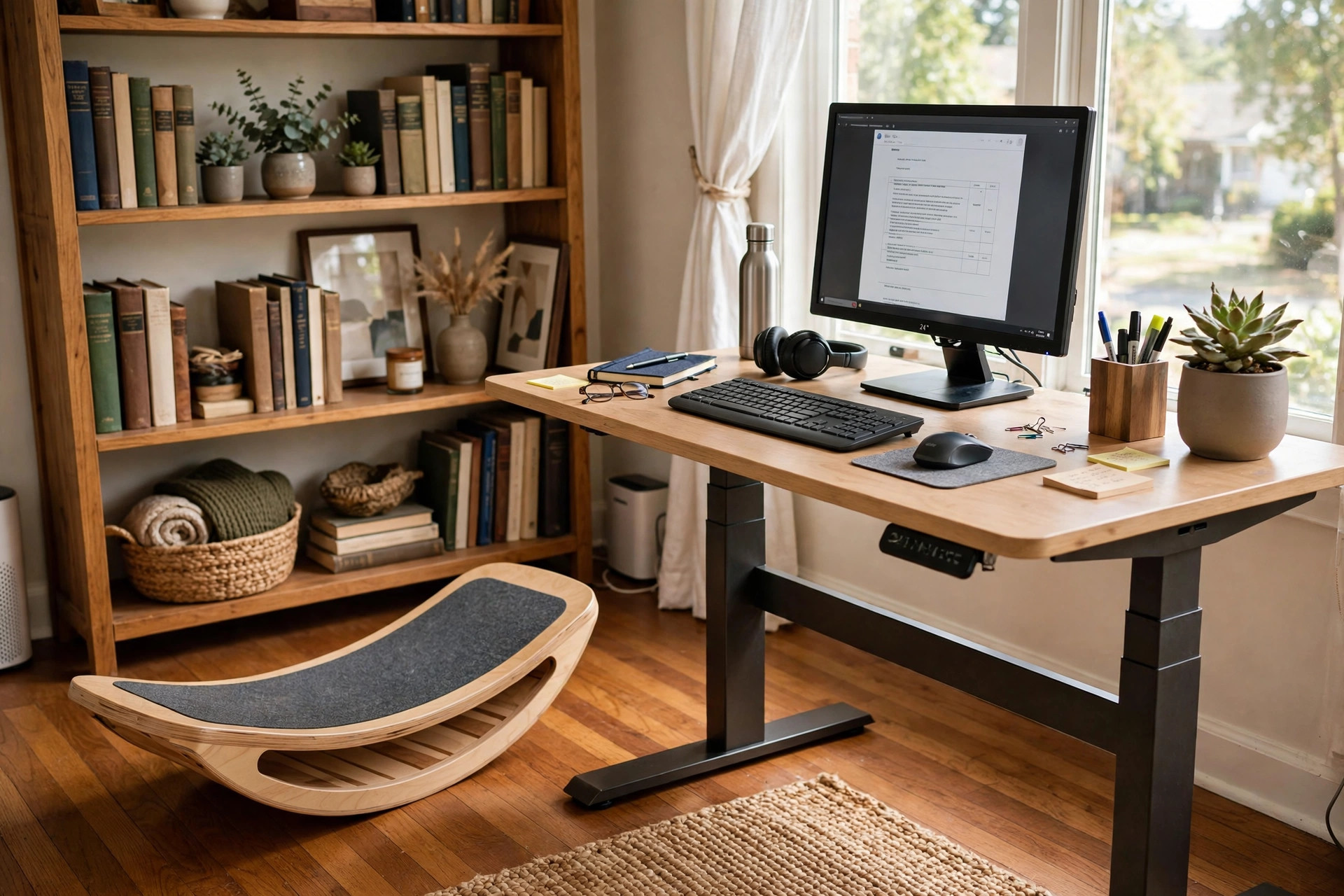

An ergonomic balance board for standing desk use is a low wooden or plastic board that rests on the floor under a standing desk. The user stands on it and shifts weight from side to side or front to back. The board tilts and rocks under the feet. This small motion keeps the body from standing still like a statue for hours. Many office workers now pair the board with an adjustable height desk or a fixed standing desk. The idea is simple. The body was made to move, not to hold one stiff pose all day.
Standing desks became common in American home offices over the last decade. Millions of people bought them to escape the back pain and stiff hips of all-day sitting. But a new problem followed. Standing in one spot for hours is hard on the feet, the knees, and the lower back. Legs grow tired. Feet ache. The lower back complains by late afternoon. An ergonomic balance board for standing desk use answers this problem. It turns still standing into active standing. The shift is small, but the body notices it.
Why It Matters
Most workers do not think about how much time they spend on their feet. An office worker at a standing desk may stand three, five, or even seven hours a day. Human legs are not built for long stillness. Blood moves more slowly through still legs. Muscles in the calves and feet stiffen. Joints in the ankles and knees get little variety. Over months, this can lead to tired legs at the end of every work day.
Gentle motion changes the picture. When the worker stands on a balance board, the ankles make small corrections all day. The calf muscles tighten and release. The core muscles work a little harder to keep balance. The body burns slightly more energy than it would standing still. Posture tends to improve because the worker cannot slump and lock the knees. The back stays straighter almost by itself.
There is also a question of comfort. Many workers report that a balance board makes standing time pass faster. The feet do less complaining. Short breaks to sit still help, but a board helps during the standing hours themselves. For people who work from a standing desk every day, this small change can make the whole setup feel better.
It is worth being honest about limits. A balance board is not exercise in the normal sense. It does not replace a walk at lunch or a trip to the gym. The movement is mild. Studies of standing-desk accessories show small gains in comfort and movement, not dramatic changes in health. The board is best seen as a comfort tool. It makes long standing more bearable. That is a fair and useful goal.
What to Look For When You Choose: Ergonomic Balance Board for Standing Desk Use
A balance board looks simple, but several details matter. The board must fit the worker, the floor, and the desk. A bad match leads to a board that sits in a closet. A good match leads to daily use.
Size and Footprint
Most boards are between 25 and 35 inches long. Taller workers need longer boards so both feet rest with room to spare. The board should leave the worker able to reach the desk and the keyboard in a normal way. Measure the space under the desk before buying. Leave room for the chair as well, since the board stays on the floor even during seated breaks.
Tilt and Rocker Style
Boards fall into a few basic designs. A rocker board tilts in one direction, usually side to side. It is the easiest to use and the safest choice for beginners. A wobble board tilts in every direction and asks more from the ankles. A roller board rests on a separate cylinder and allows wider motion. Rocker boards suit most office workers. The more demanding designs suit people with strong ankles and some balance training.
Material and Build
Many boards are made of pressed wood or plywood. Wood boards feel solid and warm underfoot. They also last for years. Plastic boards are lighter and often cheaper. Some boards have a grippy top surface, like a skateboard deck. Grip matters. A slick board under socks can be unsafe. Look for a textured top or plan to wear shoes.
Weight Capacity and Noise
Check the weight rating. Most boards hold at least 250 pounds, and many hold 300 or more. Noise is easy to forget. A board that creaks or thumps will annoy the worker and anyone on calls. Wood boards with felt or rubber pads on the bottom tend to run quiet on hard floors. Test reviews often mention noise, so read buyer feedback before ordering.
Floor Protection
The board moves against the floor all day. Hardwood and laminate floors can show wear. Many boards ship with a mat or pads. If not, buy a flat rubber mat to place under the board. The mat also quiets the motion and stops the board from sliding on smooth floors.
Types and Options
The market offers more variety than a first glance suggests. Each type serves a different worker.
Rocker boards. These are the common choice for office use. A curved bottom lets the board tip side to side. Motion is gentle and predictable. Most office workers should start here.
Wobble boards. A round board with a dome or ball under the center. The feet can move in every direction. This builds ankle strength but can distract from work. Better for short standing sessions or workers who want more challenge.
Roller balance boards. A flat board sits across a foam or hard roller. The board rolls as the worker shifts weight. The range of motion is large. These boards suit experienced users and often come with a rail for beginners. They take more floor space.
Standing-desk mats with motion. Some anti-fatigue mats have built-in bumps or a raised center that invites weight shifts. These are not true balance boards, but they give part of the benefit with almost no learning curve. Workers who fear balance boards may like these as a first step.
Inflatable balance discs. A thick rubber disc filled with air. The worker stands on the unstable surface. Discs are cheap and store easily. They offer less side-to-side motion than a board but still wake up the leg muscles.
For most home office workers, a simple wooden rocker board with a grippy top is the right pick. It costs less than the fancy designs, it runs quiet, and it is easy to learn.
Cost and Price
Balance boards for desk use range widely in price. Basic plastic rocker boards start around 25 dollars. Midrange wooden boards cost between 60 and 120 dollars. These are the most popular. They look good in a home office and last a long time. High-end boards with premium wood, custom shapes, or training extras can cost 150 to 250 dollars.
Price does not always track quality. A simple 70-dollar wooden rocker board often serves as well as a 200-dollar model. What matters is the grip surface, the weight rating, and the build quality. Read reviews that mention months of use, not just first impressions.
Budget for extras. A floor mat costs 20 to 40 dollars. Some workers also buy a footrest for under-desk relief for seated hours. If the current desk is not adjustable, an ergonomic footrest for under desk at home or a better chair may matter more than a board. Spend the money where the body complains most.
There is also the question of whether a board suits the whole setup. Workers with a best laptop stand for standing desk posture already care about neck height. A board adds motion below. The two go well together. Workers who want real movement may look at a compact treadmill desk for walking while working instead, though the cost is far higher.
How to Start Safely
New users should treat the first week as training. The ankles and feet need time to adapt.
Start with short sessions. Stand on the board for ten to fifteen minutes at a time during the first days. Sit down when the feet tire. Add five minutes per day as comfort grows. Most workers reach an hour or more within two weeks.
Keep the desk for support. In the first days, keep one hand near the desk edge when stepping on and off. Step on with one foot in the center, then bring the other foot aboard. Do the reverse to step off. Never jump onto the board.
Wear the right footwear. Flat shoes with grip work best. Thick running shoes add instability and can make the board feel twitchy. Some workers go barefoot or in socks on a grippy board. If the top is smooth, shoes are safer.
Watch the posture. The board should not cause hunching. Keep the monitor at eye level and the keyboard at elbow height. A proper desk setup guide can help get the heights right. If the neck or shoulders start to ache, the desk setup is likely the problem, not the board.
Take the board out of the way for tasks that need full focus or fine hand work. Some workers find the motion distracts them during detailed spreadsheets or design work. That is normal. Use the board for email, reading, and calls. Step off for precision work.
Care and Upkeep
A balance board needs little care. Wooden boards benefit from an occasional wipe with a damp cloth. Do not soak the wood. Check the screws and bolts every few months if the board has moving parts. Tighten anything that loosens.
Inspect the grip surface once in a while. Sandpaper-style grip wears down over a year or two of daily use. Replacement grip tape is cheap and easy to apply. A board that feels slick is a board that should be regripped or replaced.
Store the board flat when not in use. Leaning it against a wall for months can warp cheap wood. Keep it out of damp basements. If the board has a roller, store the roller with the board so the pair stays together.
Most good boards last three to five years of daily office use. The bottom curve wears slowly. When the rock feels uneven or the board cracks, replace it. A broken board underfoot is a fall risk.
Safety
Balance boards are safe for most healthy adults, but a few cautions apply.
People with ankle injuries, knee problems, or balance disorders should ask a doctor before use. The same goes for pregnant workers and older workers with fall risk. The motion is mild, but a fall from even a low board can hurt.
Keep the area clear. Cords, bags, and pet toys near the board are trip hazards. The board should sit on a flat, stable floor. Thick carpet can make some boards feel unpredictable. A mat on top of carpet can help.
Children should not use an adult balance board without supervision. The board can slide or tip under a small child.
Stop and sit down if anything hurts sharply. Mild muscle tiredness is normal in the first week. Sharp pain in the ankle, knee, or back is not. Rest and, if the pain returns, talk to a health professional.
Workplace safety rules may apply in a formal office. Home office workers answer to themselves, but the same care is wise. A guide to home office ergonomics covers the wider setup around the board.
Frequently Asked Questions
Can I use a balance board all day? Most workers should not. Two to four hours spread across the day is a common and comfortable range. Mix standing-board time with seated time and plain standing. The body likes variety more than any single position.
Will a balance board help my back pain? It may ease the ache that comes from still standing. The gentle motion keeps the spine from locking into one pose. It is not a treatment for back injury or chronic back disease. Workers with real back problems should see a doctor and consider a full ergonomic office review.
Is a balance board better than an anti-fatigue mat? They do different jobs. A mat cushions the feet and reduces pressure. A board adds motion. Many workers use both. The mat sits under the board or beside the desk for plain standing time.
Do balance boards make noise on calls? Good ones run quiet. Wooden rocker boards with rubber pads are nearly silent. Cheap plastic boards may creak. If calls are constant, choose a quiet model and keep the floor mat in place.
Can beginners use a wobble board at a desk? Beginners should start with a rocker board. Wobble boards demand more ankle work and can pull attention from the screen. Move up only after the rocker board feels easy.
How long does it take to get used to the board? Most people feel steady within a few days. Full comfort, where the motion fades into the background, often takes one to two weeks. Short daily sessions build skill faster than one long session.
A Short Final Word
An ergonomic balance board for standing desk use is a small buy with a clear job. It keeps the legs moving during long standing hours. It asks little and gives steady comfort in return. Choose a simple rocker board with good grip, start with short sessions, and keep the rest of the desk setup sound. The board will not change a career, but it can change how the work day feels. For the standing-desk worker with tired legs, that is enough. More ideas for a better workspace can be found in reviews of home office gear and office furniture guides.
References
Consumer Reports. (n.d.). Product reviews and ratings. https://www.consumerreports.org Herman Miller. (n.d.). Office furniture and ergonomic seating. https://www.hermanmiller.com IKEA. (n.d.). Home furnishings. https://www.ikea.com PCMag. (n.d.). Technology product reviews. https://www.pcmag.com Steelcase. (n.d.). Office furniture and workplace research. https://www.steelcase.com The Spruce. (n.d.). Home and garden advice. https://www.thespruce.com UPLIFT Desk. (n.d.). Standing desks and ergonomic office furniture. https://www.uplift-desk.com Wayfair. (n.d.). Furniture and home goods. https://www.wayfair.com Wirecutter. (n.d.). Product reviews from The New York Times. https://www.nytimes.com/wirecutter
Was this guide helpful?

About Jennifer Lee
The My Garden US editorial team writes practical, in-depth home and garden guides for American homeowners — tested advice, no fluff.
You May Also Like
Home Office Monitor Riser with Drawer Storage: A Complete Buyer Guide
April 2, 2026 0 views
Home Office Desk with Keyboard Tray Slide Out: A Full Buyer’s Guide
May 12, 2026 0 views
Home Office Chair Replacement Wheels for Carpet: A Complete Buying Guide
September 7, 2026 0 views