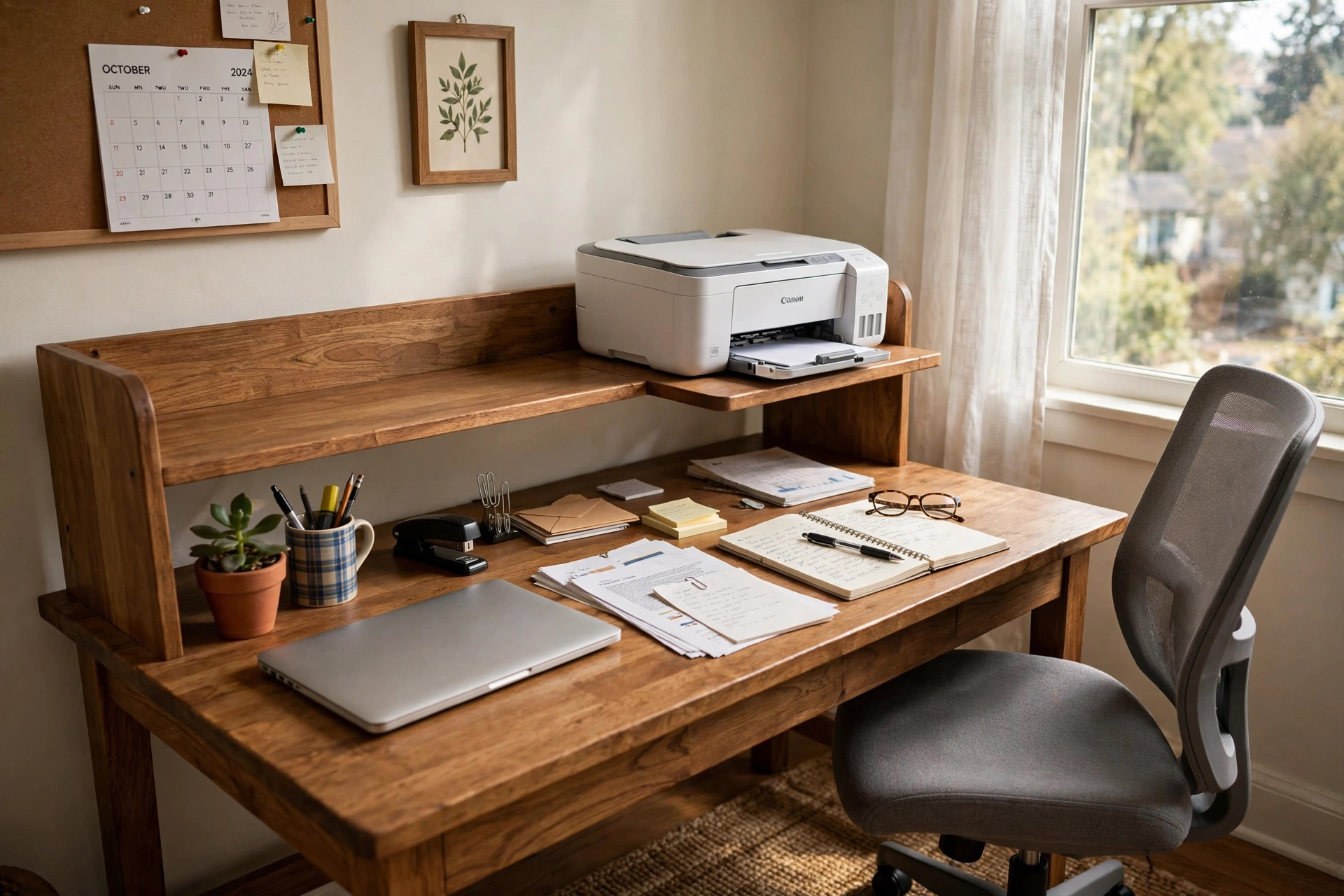

A home office desk with printer shelf attachment is a simple answer to a common problem. The printer takes up space on the desk. Papers pile up around it. The work surface shrinks day by day. A desk with a built in printer shelf lifts the printer above or beside the work zone. The desk top stays clear. The printer stays close at hand. The whole room looks and feels more orderly.
This style of desk became popular as home offices moved into small bedrooms and corners of living rooms. Space is the main reason. A separate printer stand needs floor space that many people do not have. A shelf attachment gives the printer a home without a second piece of furniture. For anyone who prints a few pages a day and works in a tight room, this one feature can change how the desk functions.
Why a Printer Shelf Matters
The work surface is the most valuable part of any desk. That is where the computer sits. That is where notes are written and papers are spread out. When a printer sits in the middle of it, the usable space can drop by a third or more. A printer shelf attachment moves the machine up, onto a raised platform, or off to a side wing. The main surface is free again.
There is also the matter of cables. A printer needs power and a data cable. When it sits on the desk, those cables cross the work area. When the printer sits on a shelf, the cables can drop behind the desk. Many shelves have holes or slots for cords. The result is a cleaner look and fewer tangled wires.
Easy reach is another benefit. A printer on the floor means bending down for every print job. A printer on a separate cart means rolling it out. A printer on a shelf at arm height is simple. The user reaches, takes the page, and returns to work. For older workers and anyone with back trouble, this small change is a daily relief.
What to Look for When You Shop: Home Office Desk with Printer Shelf Attachment
Size of the Shelf
Measure the printer first. Write down the width, the depth, and the height. Add two inches to the width and the depth. That is the minimum shelf size that will hold the machine safely. Laser printers are often wider than inkjet printers. All in one machines with scanners on top need extra height. A shelf that fits an inkjet printer may not fit an all in one unit.
The shelf must also support the weight. A small inkjet printer may weigh eight pounds. A laser printer can weigh forty pounds or more. Check the weight limit of the shelf or the attachment. A weak shelf will bow over time. In the worst case it can fail and drop the printer onto the desk.
Desk Size and Room Fit
The desk itself must fit the room. Measure the wall where it will stand. Leave room for the chair to pull out. Leave room for the user to walk past. A corner desk can save space. A straight desk along one wall is simpler to set up. Make sure the printer shelf does not make the desk too deep for the space.
Height of the Shelf
Some shelves sit low, just a few inches above the desk. These suit a desk where the monitor stands tall and the shelf must slide under a cabinet. Other shelves rise higher and leave open space beneath for the monitor or for paper trays. Think about what else will live under or beside the shelf. A tall shelf with open space beneath can hold the monitor. A low shelf is better for a printer that is used often and must be reached without standing.
Build Material
Most desks with printer shelves are made of engineered wood, solid wood, or metal with wood tops. Engineered wood is common and costs less. Solid wood costs more and lasts longer. Metal frames with wood tops give a modern look and strong support. Look for a finish that resists scratches and water rings from coffee cups.
Cable Management
Good desks have holes or channels for cords. The printer power cord and the data cable should pass behind the desk, not across it. If the desk has no cable holes, check that the back edge is open. A small gap between the desk and the wall can serve the same purpose.
Types and Options
Raised Rear Shelf
The most common design is a raised shelf along the back of the desk. The printer sits on top. The monitor or laptop sits on the main surface below. The keyboard fits in front. This layout keeps everything in one line. It works well for desks that stand against a wall.
Side Wing Shelf
Some desks have a side wing. The main desk is one piece. A smaller attached piece juts out to the side and holds the printer. This design suits L shaped layouts. It keeps the printer out of the main view but within arm reach. It is a good choice when the printer is loud, since it sits off to the side.
Overhead Shelf With Printer Space
A hutch or overhead shelf unit can hold books on top and the printer on a middle shelf. This design adds storage above the desk. It needs a sturdy frame. Check the weight rating of each shelf. Printers are heavier than books.
Detachable and Adjustable Attachments
Some printer shelves are sold as separate attachments. They clamp or bolt to a standard desk. These are useful when the buyer already owns a desk and does not want to replace it. Check that the clamp fits the thickness of the desk edge. Adjustable shelves let the user change the height. This helps when the printer is replaced by a taller or shorter model.
Desks With Built In Power
A related option is the home office desk with built in power outlets. Power strips are built into the desk surface or the side panel. This pairs well with a printer shelf, since the printer needs an outlet nearby. The two features together cut cable clutter to a minimum.
Cost and Price
Prices vary with size, material, and brand. A basic desk with a printer shelf in engineered wood often costs between eighty and one hundred eighty dollars. These models are sold by large furniture retailers and online stores. They suit light use and smaller printers.
A mid range desk, often in the one hundred eighty to three hundred fifty dollar band, brings better materials. The frame is thicker. The finish is tougher. The weight limits are higher. Many mid range desks add drawers, a keyboard tray, or cable channels.
A high end desk can cost three hundred fifty dollars or more. These use solid wood or heavy steel frames. They carry large laser printers with ease. They often come from office furniture makers with long warranties. For a printer that weighs forty pounds or more, the extra strength is worth the cost.
Watch for extra charges. Delivery can add a fee. Assembly may be required. Some desks ship flat and need an hour or two to put together. Read reviews to learn how hard the assembly is before buying.
Care and Upkeep
Dust the shelf and desk once a week. Paper dust from the printer settles fast. A soft cloth is enough. For wood surfaces, use a mild cleaner. Avoid strong chemicals that can dull the finish.
Check the screws and bolts twice a year. Desks loosen with use. A wobbly shelf is a risk under a heavy printer. Tighten any loose joints with the tools that came with the desk.
Keep liquids away from the printer shelf. A spilled cup can run into the printer vents. Use a coaster and keep drinks on the main desk, away from the machine.
Paper storage matters too. Do not stack reams of paper on the same shelf as the printer. The extra weight can strain the shelf. Keep paper in a drawer or on a lower shelf. Only the printer and a small stack of loaded paper should sit on the printer shelf.
If the desk has a keyboard tray, slide it in when not in use. This protects the tray slides. If the desk sits near a window, close the blinds during strong sun. Sunlight can fade the finish over time.
Safety
Place the desk where the printer shelf cannot tip. Against a wall is best. If the desk stands free in a room, keep heavy items low and the printer close to the wall side. A top heavy desk can tip if a child climbs it.
Anchor tall desks to the wall when children are in the home. Many desks include wall straps for this purpose. Use them. A printer falling from a shelf can cause serious injury.
Mind the power cord. Do not run it under rugs where it can overheat. Do not overload one outlet with the printer, the computer, the monitor, and a space heater. A surge protector is a wise buy. It guards the printer and the computer against power spikes.
Let the printer cool before moving it. Laser printers get hot inside. Turn the machine off and wait a few minutes before lifting it on or off the shelf.
Keep the area around the shelf clear of paper stacks and clutter. Printers need air flow around the vents. Blocked vents can cause overheating. A fire risk is small but real, and good air flow also helps the printer last longer.
FAQ
Will a printer shelf hold a heavy laser printer?
It depends on the shelf. Check the weight rating before you buy. Many shelves are rated for twenty to thirty pounds, which suits inkjet printers. Heavy laser printers need shelves rated for fifty pounds or more. When in doubt, choose a desk with a solid wood or steel shelf.
Can I add a printer shelf to a desk I already own?
Yes. Detachable printer shelf attachments clamp or bolt to most desks. Measure the desk edge thickness and the available space first. Make sure the clamp fits. Also check that the desk is stable enough to carry the extra weight at the back or side.
What size printer fits on a standard shelf?
Most shelves are about twenty to twenty four inches wide and twelve to sixteen inches deep. That fits most inkjet and small all in one printers. Large laser printers and wide format printers may need a bigger shelf. Always measure the printer and compare it to the shelf dimensions.
Is a desk with a printer shelf better than a separate printer stand?
For small rooms, yes. A separate stand needs floor space. A shelf uses space that is already taken by the desk. The shelf also keeps the printer at a better height for daily use. A separate stand is better only when the printer is very large or shared by more than one person.
How do standing desks handle printers?
A standing desk that moves up and down needs a printer shelf that moves with it, or the printer stays at a fixed height. Some owners place the printer on a separate fixed shelf beside the desk. If you are weighing the options, a home office standing desk with drawers attached can add storage while you plan where the printer will live.
What if I walk on a treadmill at my desk?
A home office desk riser for treadmill walking lifts the work surface for use while walking. A printer on that same surface will shake with each step. It is better to keep the printer on a separate fixed shelf or a side table when the desk moves during the day.
A Short Final Word
A home office desk with printer shelf attachment is a small upgrade with a large effect. It frees the work surface. It tidies the cables. It puts the printer at a kind reach. Measure the printer. Check the weight rating. Choose a material that will last. With those three steps done, the desk will serve well for years, and the home office will feel larger than it is.
For more background, see The Spruce, Wirecutter, and PCMag. For more background, see IKEA, Wayfair, and Herman Miller. Buying guides are also published by Steelcase and UPLIFT Desk.
References
Herman Miller. (n.d.). Office furniture and ergonomic seating. https://www.hermanmiller.com IKEA. (n.d.). Home furnishings. https://www.ikea.com PCMag. (n.d.). Technology product reviews. https://www.pcmag.com Steelcase. (n.d.). Office furniture and workplace research. https://www.steelcase.com The Spruce. (n.d.). Home and garden advice. https://www.thespruce.com UPLIFT Desk. (n.d.). Standing desks and ergonomic office furniture. https://www.uplift-desk.com Wayfair. (n.d.). Furniture and home goods. https://www.wayfair.com Wirecutter. (n.d.). Product reviews from The New York Times. https://www.nytimes.com/wirecutter
Was this guide helpful?

About Jennifer Lee
The My Garden US editorial team writes practical, in-depth home and garden guides for American homeowners — tested advice, no fluff.
You May Also Like
Best Standing Desk for Short People Under 5ft: A Practical Guide
February 21, 2026 0 views
Home Office Desk Pad With Mouse Pad Combo: What You Should Know
May 20, 2026 0 views
Small Standing Desk for Laptop Only Use: A Practical Guide
March 17, 2026 0 views