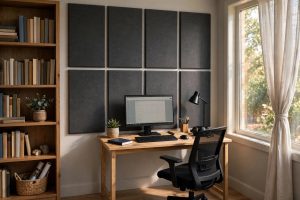

A home office desk with built in power outlets is one of the simplest upgrades a remote worker can make. The ports sit right in the desktop, so a laptop charger, a phone cord, and a desk lamp all plug in at arm’s length. No more crawling behind the desk to find a wall outlet. This guide explains how these desks work, what to look for before buying, and how to keep the electrical parts safe for years.
Why a Home Office Desk With Built in Power Outlets Matters
The modern desk carries more gear than desks did twenty years ago. A laptop, a monitor or two, a phone, a tablet, a desk lamp, and a speaker all need power. When the only outlet is on the wall two feet away, cords stretch across the floor or dangle off the back edge. It looks messy, and loose cords collect dust and trip feet.
A desk with outlets built into the top changes that. The power source lives where the work happens. Cords run short and straight. The space under the desk stays clear, which makes vacuuming easy and reduces strain on the plugs. For people who move a laptop between rooms, a desktop port means the charger never wanders far. Small rooms benefit most, because every extra power strip on the floor takes up space.
How the Built-In Power Systems Work: Home Office Desk with Built in Power Outlets
Most of these desks carry a recessed strip set into the desktop. A flip-up cover hides the ports when they are not in use. The strip connects to a single cord that plugs into a wall outlet. Some desks add USB-A or USB-C ports for phones and tablets. A few include a wireless charging pad on the surface.
Higher priced desks may offer surge protection in the strip. That guards against spikes when storms pass through. Simpler desks use a plain pass-through panel with no surge part inside. Either way, the strip is the same kind of circuit found in an ordinary power strip. It does not supply more power than the wall outlet can give.
Reset Buttons and Indicator Lights
Many desk strips carry a small reset button. It trips when the load exceeds the safe limit. Press it after unplugging one device, and the power returns. An indicator light shows that the strip has power. When the light is off and the wall outlet works, the strip or its fuse may need replacement. These small parts make trouble-shooting simple, and they add no real cost to the desk.
USB Ports and Wireless Charging Pads
USB ports built into the desktop run off the same circuit as the AC outlets. Two amps is the usual rating. That fills a phone in a couple of hours. Some premium desks add a flat charging pad on the left or right side of the top. Set a compatible phone face down on the circle, and it charges with no cable at all. Pads draw little power, so they share the strip safely with other gear.
Cord Management Around the Outlets
Even with outlets in the desktop, some cords still need to reach the wall. A cable tray under the desk holds the slack. Zip ties bundle cords together so they run in one neat line. Desk grommets let monitor cables drop through a hole and stay out of sight. Shoppers comparing options often pair these desks with a best desk organizer set for small office desk to keep the work surface clear.
What to Look for When You Choose
Number and Type of Ports
Count your devices before you shop. A laptop, two monitors, a lamp, and a phone need at least four AC outlets plus one or two USB ports. Three outlets is the common minimum on smaller desks. Larger desks sometimes offer six. USB-C ports charge newer phones and tablets faster than old USB-A ports, so check which type the desk includes.
Placement of the Outlet Panel
The panel usually sits at the back edge or in a back corner. That keeps plugs behind the monitor where they do not disturb your hands. A center-mounted panel suits people who share the desk across its full width. Make sure the cover closes flat so papers and mugs sit level on top.
Desk Size and Weight Capacity
A desk with built-in power still needs to fit the room and the work. A 48-inch top suits a laptop and one monitor. Two monitors want 55 to 63 inches. Check the listed weight limit and add up the monitors, the computer, and everything that will rest on top. Steel frames with cross bars hold more than plain wooden legs.
Material and Finish
Wood tops in walnut or oak tones suit classic rooms. White or light gray tops suit small rooms because they reflect light. Laminate surfaces wipe clean and resist scratches better than bare wood. Metal legs last longer than particle board legs, and they survive moves without wobbling.
Height Options
Many power-outlet desks come at fixed sitting height. Taller workers may want a standing-height model instead. Buyers weighing height options can look at an ergonomic standing desk converter with keyboard tray as an add-on that lifts the keyboard while the outlet panel stays put.
Types of Desks With Built-In Power
Writing Desks With Outlet Panels
The classic writing desk carries a modest outlet panel at the back. It suits homework, bill paying, and light laptop work. Prices sit at the low end of the range. The panel often holds two or three AC outlets and two USB ports.
Computer Desks With Power Strips
Larger computer desks build in wider strips with four to six outlets. They may include a monitor shelf and a CPU stand. The power cord usually exits at the back left or right leg. These desks fit a full desktop computer setup.
Standing Desks With Integrated Outlets
Some electric standing desks add outlet strips to the top. The strip moves with the desk as it rises. One main cord connects the desk to the wall, so it still needs slack at full height. Budget shoppers can compare with a best budget standing desk under 300 dollars to see how height adjustment and power features trade off.
Corner and L-Shaped Desks
Corner desks place the outlet panel near the bend so both wings of the L share one power source. These desks hold the most gear. They suit video editing and stock trading setups where many screens run at once.
Cost and Price Ranges
Prices for a home office desk with built in power outlets range from about $80 to $400. Small writing desks with simple panels start near $80 to $130. Mid-size computer desks with four to six outlets run $150 to $250. Standing desks with integrated outlets start near $300 and climb higher with brand and frame quality.
The premium over a plain desk is usually $30 to $80. That covers the strip, the wiring, and the recessed cut in the top. Cheap desks sometimes hide a thin power strip under a plastic cover instead of a true recessed panel. Reading the product photos helps tell the difference.
Installation and Setup
Assembly follows the usual flat-pack pattern. Lay out the parts, attach the legs, and set the top in place. The outlet panel arrives prewired in most models. The buyer only routes the main cord to the wall. Total build time runs thirty to sixty minutes with a basic screwdriver or hex key.
Place the desk within six feet of a wall outlet before assembly. The main cord is usually six feet long. Longer cords exist but add cost. Keep the cord path away from chair wheels so rolling feet never catch it.
Care and Upkeep
Dust the outlet cover when you dust the desk. Dust in the slots can break the spring covers over time. Wipe the top with a damp cloth and mild soap. Avoid soaking the panel. Never pour liquid near the outlets.
Test the ports every few months. Plug in a lamp or phone charger and check each outlet. A loose outlet may need the whole strip replaced. Many makers sell replacement strips for their desk models.
Keep the strip below its rated wattage. Most desk strips handle 1,875 watts at 125 volts. A laptop, two monitors, a lamp, and a phone charger draw far less than that. Space heaters draw far more. Never plug a heater into a desk strip. Plug it straight into a wall outlet.
Seasonal Checks
Give the desk a full check twice a year. In spring, dust the slots and confirm every port works. In fall, look at the main cord for fraying where it meets the leg or the wall. Cords that run along baseboards can wear where the chair rolls over them. A cord with cracked insulation should be replaced at once, not taped. Most makers sell the exact cord as a spare part.
Keeping the Desktop Panel Clean
Coffee spills are the main enemy of a desktop outlet panel. The flip-up cover blocks most splashes, but a knocked-over mug can reach inside. Close the cover whenever you leave the desk with an open drink nearby. Use a coaster on the opposite side of the desk from the panel. If a spill does reach the panel, unplug the desk and let it dry fully before plugging it back in.
Safety Tips for Desks With Power
The electrical strip in a desk is safe when used as the maker intends. A few rules protect the house and the user.
– Plug the desk cord directly into a wall outlet, not into a second power strip. – Never daisy-chain extension cords off the desktop panel. – Unplug the desk before moving it across the room. – Keep the cord clear of heat vents and radiators. – Replace the strip if it sparks, smells hot, or feels loose. – Do not let small children poke objects into the slots.
National safety agencies publish plain guidance on safe outlet use in the home. The guides from product testers at sites like the Wirecutter (https://www.nytimes.com/wirecutter) and PCMag (https://www.pcmag.com) also explain wattage limits in simple terms.
Frequently Asked Questions
Are desks with built-in outlets safe?
Yes. The strips use standard household circuits and meet the same standards as any power strip. Follow the maker’s wattage limit and plug the desk directly into a wall outlet. Replace the strip at the first sign of damage.
Can I add an outlet panel to a desk I already own?
Yes. Aftermarket grommet outlets drop into a drilled hole in the desktop. Clamp-on strips attach to the back edge with no drilling. Both cost $20 to $50. They give an old desk the same feature without a full replacement.
Do the USB ports charge a laptop?
Most USB-A ports on desk strips deliver 2.1 to 2.4 amps, which suits phones and tablets. They will not charge a full-size laptop. USB-C ports with power delivery can charge some slim laptops. Check the listed wattage before counting on it.
What happens if one outlet stops working?
First check whether the whole strip went dark, which may mean a tripped breaker. If one outlet is dead while the rest work, the strip likely needs replacement. Contact the desk maker for the matching part.
Can these desks go against any wall?
Any wall with a standard outlet works. The desk cord reaches about six feet. Measure from the desk spot to the nearest outlet before buying. Corner desks need the outlet on the wall behind the corner bend.
Do built-in outlets raise the electricity bill?
No. The strip itself uses no power. Only the devices plugged into it draw current. A phone charger left plugged in with no phone attached draws a tiny trickle, so unplug chargers when not in use if you want to save that small amount.
Can I use the desk outlets for a printer or a space heater?
A printer is fine. It draws modest power in short bursts. A space heater is not fine. Heaters pull 1,500 watts or more, which leaves almost no margin on a desk strip. Run heaters from a wall outlet with a direct line to the breaker.
Will the outlet panel collect dust in the slots?
A little dust will settle there over time. The flip-up cover keeps most of it out. A quick wipe during weekly dusting is enough. Never blow into the slots with your mouth, since moisture is the real hazard. A dry cloth or a soft brush does the job.
A Short Final Word
A home office desk with built in power outlets solves a small problem in a clean way. The right count of ports, placed at the back edge, ends the search for wall outlets behind furniture. Shop by size first, ports second, and price third. With basic care and respect for wattage limits, the built-in strip will outlast the desk itself.
For more background, see UPLIFT Desk, The Spruce, and IKEA. For more background, see Wayfair, Herman Miller, and Steelcase.
References
Herman Miller. (n.d.). Office furniture and ergonomic seating. https://www.hermanmiller.com IKEA. (n.d.). Home furnishings. https://www.ikea.com PCMag. (n.d.). Technology product reviews. https://www.pcmag.com Steelcase. (n.d.). Office furniture and workplace research. https://www.steelcase.com The Spruce. (n.d.). Home and garden advice. https://www.thespruce.com UPLIFT Desk. (n.d.). Standing desks and ergonomic office furniture. https://www.uplift-desk.com Wayfair. (n.d.). Furniture and home goods. https://www.wayfair.com Wirecutter. (n.d.). Product reviews from The New York Times. https://www.nytimes.com/wirecutter
Was this guide helpful?

About Robert Taylor
The My Garden US editorial team writes practical, in-depth home and garden guides for American homeowners — tested advice, no fluff.
You May Also Like

Small Standing Desk With Wheels for Mobility: What to Know Before You Buy
February 15, 2026 0 views
Adjustable Desk Divider for Shared Home Office: A Practical Guide
January 1, 2026 0 views
Best Ring Light for Home Office Video Calls
September 4, 2026 0 views