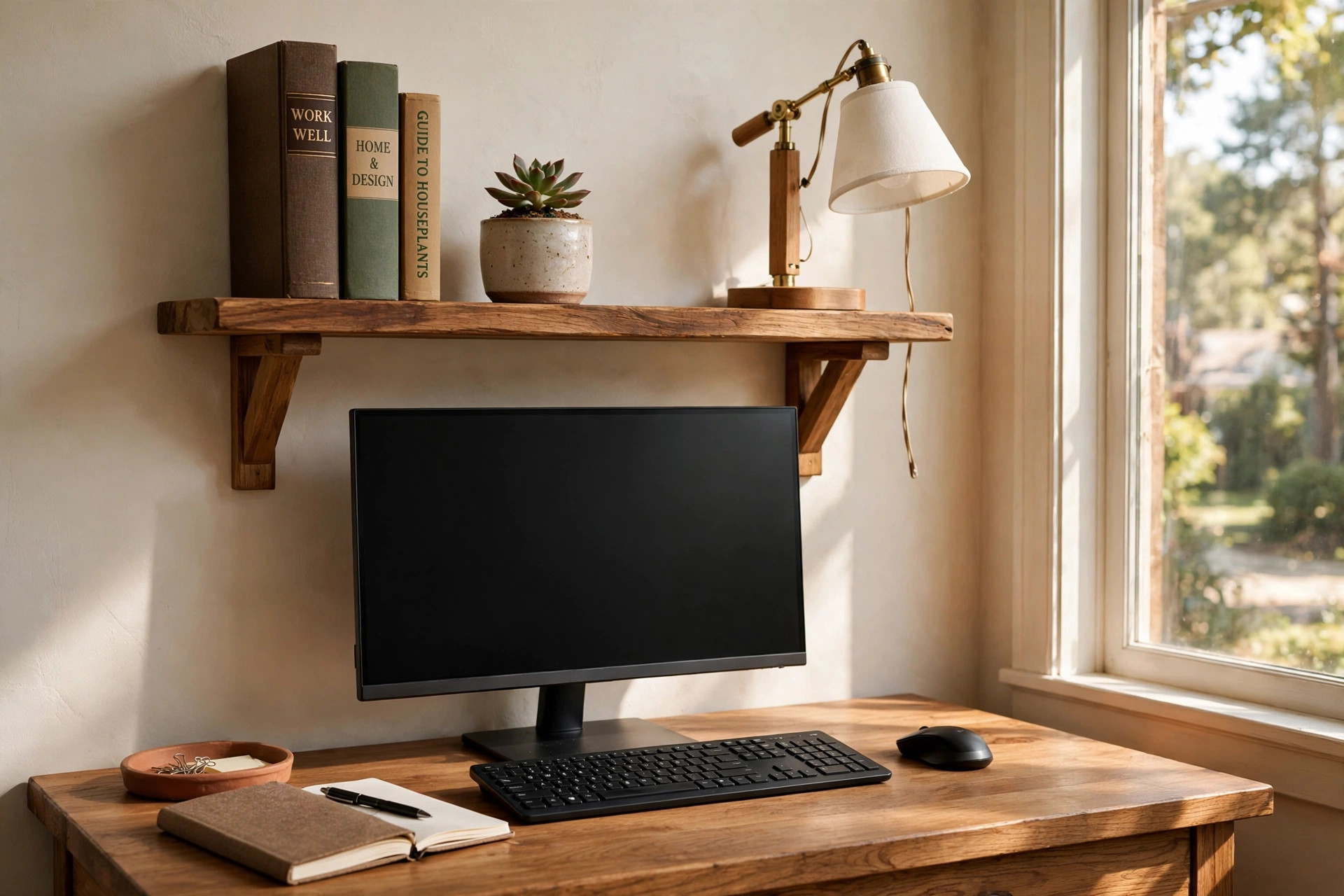

A wall mounted desk shelf above computer monitor is one of the simplest upgrades a home office can receive. Desks in American homes keep getting smaller. Apartments grow tighter. Floor space is precious. Wall space, by contrast, often sits empty above the screen. A shelf put to work on that wall gives back the desk surface that clutter stole.
The idea is plain. A narrow shelf is fixed to the wall a few inches above the monitor. It holds the small things that used to crowd the desk. A phone charger. A small plant. A pair of speakers. Notebooks and pens. The desk below stays clear for the keyboard, the mouse, and the real work.
This guide explains the types, the costs, the mounting, and the care, and it ends with answers to common questions.
Why It Matters
A desk shelf above the monitor solves three problems at once. The first is clutter. Small items spread across a desk like weeds in a garden. A shelf gathers them into one neat row. The second is reach. Items on the shelf sit near eye level, so you can see and grab them without digging through drawers. The third is posture. When speakers, chargers, and boxes move off the desk, the monitor can sit at the right height and distance. You stop craning your neck. You stop hunching. Many people pair the shelf with an adjustable monitor arm for a dual screen setup to free even more surface area.
There is also a quieter benefit. A tidy desk makes work feel lighter. A crowded visual field raises the feeling of stress. A clean one lowers it. A shelf simply gives every small thing a home. That is why kitchens have cabinets and workshops have pegboards. The wall above your monitor can work the same way.
Small rooms gain the most. A floating shelf desk for a tiny bedroom office already proves that walls can carry a workspace. A shelf above the monitor takes the same logic one step further. Nothing touches the floor. Nothing touches the desk. Storage floats in dead air space. Renters benefit too, since many shelves use just two screws, and a pair of small holes is easy to patch on moving day.
People who record video calls notice one more gain. A styled shelf reads as background scenery. A few books, a plant, and a small clock look far better on camera than a pile of cables.
What to Look For When You Choose One: Wall Mounted Desk Shelf Above Computer Monitor
Shopping for a shelf is easy if you know what matters. Five points decide nearly everything: size, weight capacity, mounting type, material, and finish.
Size and Depth
Measure the wall above your monitor before you shop. Most shelves for this job are 24 to 48 inches wide and 6 to 10 inches deep. Eight inches of depth is the sweet spot for most desks.
Check the height too. The bottom of the shelf should clear the top of the monitor by at least 3 to 4 inches. This gap lets heat escape and gives you room to adjust the screen.
Weight Capacity
Weight ratings matter more than most buyers expect. A shelf that holds ten books, a speaker, and a lamp carries real weight. Look for a rated capacity of at least 20 to 25 pounds for a single shelf. Cheaper shelves rated for 10 pounds can bow or pull out of the wall over time. Wood and thick engineered boards carry more than thin metal mesh.
Mounting Type
Three mounting styles dominate the market. Hidden floating brackets slide into the back of the shelf and leave a clean look. They need solid studs or strong anchors. Visible L-brackets are simple and strong. They cost less and hold more, but the brackets show. The third style is a shelf riser that sits on the desk behind the monitor instead of on the wall. It is not truly wall mounted, but it serves the same purpose and needs no drilling. Renters often prefer it, as they often prefer a wall mounted fold down desk for small spaces over furniture that needs heavy anchors.
Whatever style you choose, find the wall studs first. A stud finder costs little and saves a great deal of trouble. Screws driven into a stud hold far more than screws in drywall alone. If no stud sits where you want the shelf, use toggle bolts or other heavy-duty wall anchors rated for the shelf plus its load.
Material and Finish
Solid wood shelves look warm and last for decades. Pine and oak are common and easy to stain. Engineered wood, like MDF with a veneer, costs less and resists warping. Metal shelves suit modern rooms and hold heavy gear. Glass shelves look light and elegant but show dust and hold less.
Match the finish to your desk and room. A dark walnut shelf over a light desk can look sharp. A white shelf on a white wall nearly disappears, which suits minimal rooms. Ergonomic furniture guidance from Herman Miller (https://www.hermanmiller.com) notes that a comfortable workspace is also a pleasant one, and the shelf is part of that picture.
Types and Options
The market offers several shapes, and each suits a different desk.
Single floating shelf. One clean board, hidden brackets, no visible hardware. Best for simple storage and a tidy look. This is the most popular type by far.
Shelf with visible brackets. Industrial or farmhouse style. Strong and honest about how it holds weight. Good for heavy items like thick reference books or a large speaker.
Shelf with a cable slot or grommet. A narrow notch or hole at the back lets charging cables drop through to the desk. This keeps cords from draping across the wall. Anyone with a phone, a tablet, and earbuds charging at once will value this feature.
Double-tier shelf. Two narrow boards, one above the other, on shared brackets. It doubles storage in the same wall footprint. It also adds visual weight, so it suits larger rooms and wider desks.
Shelf with a built-in light. Some shelves carry an LED strip under the front edge. The light washes the desk below in a soft glow and replaces a desk lamp. Desk setup coverage at PCMag (https://www.pcmag.com) has discussed how under-shelf lighting helps during evening work.
Desk riser shelf. This type stands on the desk behind the monitor on short legs. It is not fixed to the wall, so renters and the drilling-shy can use it. UPLIFT Desk (https://www.uplift-desk.com) sells desk accessories of this kind, and home office ideas from The Spruce (https://www.thespruce.com) show many ways to style them.
Cost and Price
Prices are friendly. A basic engineered-wood floating shelf, 36 inches wide, sells for 20 to 40 dollars. Shelving options at IKEA (https://www.ikea.com) often sit in this range, and furniture listings on Wayfair (https://www.wayfair.com) cover the same ground with wider styling choices. A solid wood shelf of the same size costs 50 to 120 dollars, depending on the species and finish. Shelves with LED lighting, cable slots, or double tiers run 60 to 150 dollars. Heavy-duty brackets add 10 to 25 dollars to any project.
Do not forget the small costs. A stud finder is 15 to 30 dollars. A box of good wall anchors is under 10 dollars. Research from Steelcase (https://www.steelcase.com) reminds buyers that the cheapest piece of office furniture is often the one you buy once, and a well-chosen shelf is exactly that kind of purchase.
For most buyers, 40 to 80 dollars buys a shelf that will last for years. Spending more buys better wood, cleaner brackets, and a nicer finish.
How to Install It Well
Installation takes about thirty minutes. Gather a level, a drill, a pencil, a tape measure, a stud finder, screws, and anchors. Start by deciding the height. Sit at your desk in your normal chair. The shelf should sit 3 to 6 inches above the top of the monitor. Mark the height on the wall with light pencil.
Hold the shelf or its bracket against the wall at the mark. Set the level on top. Adjust until the bubble centers. Mark the screw holes. Now check for studs with the stud finder. If a mark lands on a stud, drive a wood screw straight in. If a mark misses the stud, drill a hole and set a toggle bolt or heavy anchor first.
Mount the shelf, set the level on it one more time, and tighten everything. Tug the shelf firmly. It should not move at all. Then load it from the center outward, placing the heaviest items near the brackets.
If the wall is plaster, brick, or concrete, use masonry anchors and a masonry drill bit. Tested picks at Wirecutter (https://www.nytimes.com/wirecutter) sometimes cover no-drill office gear, and that coverage is a good place to compare riser options before you buy.
Care and Upkeep
A shelf asks for little care. Dust it weekly with a dry cloth. Wood shelves benefit from a wipe with a damp cloth once a month, followed by a dry one. Never soak a wood shelf. Water seeps into joints and swells the fibers. For painted or veneered shelves, a soft cloth and mild soap handle most marks. Metal shelves need only dusting, though a check for rust near bathroom-adjacent walls is wise in humid climates.
Check the mounting twice a year. Grab the shelf and give it a firm shake. Screws loosen as houses settle and seasons change. Tighten anything that has worked loose. If an anchor spins freely in the wall, replace it with a larger toggle bolt. This five-minute check prevents the slow failure that ends with books on the keyboard.
Revisit what the shelf holds every few months. Shelves attract clutter the way desks do. That old phone charger, the dead batteries, the papers you meant to file, they all drift upward. A quick clear-out keeps the shelf doing its job.
Safety Notes
Safety is simple but not optional. First, respect the weight limit. The rating on the box is the maximum, not a suggestion to test. Heavy items belong near the brackets or studs, never at the unsupported center of a long shelf. Second, keep liquids away. A shelf above electronics is a bad place for an open mug or a vase without a saucer. One spill can kill a monitor. Use a sealed water bottle or keep drinks on the desk instead. Third, keep the shelf clear of heat. Monitors vent warm air from the top. Leave the 3 to 4 inch gap described earlier. Do not lay paper or cloth across the vents.
Fourth, think about earthquakes and bumps. In regions where the ground shakes, add a small lip or rail at the front edge of the shelf, or use museum putty under loose items. Even outside those regions, a shelf beside a door can catch a bump from a swinging door. Common sense covers most of this, and a few minutes of planning covers the rest.
Frequently Asked Questions
How high should a wall mounted desk shelf above computer monitor sit? Place the bottom of the shelf 3 to 6 inches above the top of the monitor. This gap lets heat escape and leaves room to tilt or raise the screen. If you use a monitor arm, lift the screen to its highest point before you measure, so the shelf never blocks movement.
Can I mount a shelf on drywall without hitting a stud? Yes, if you use proper anchors. Toggle bolts and heavy-duty wall anchors can each hold 50 pounds or more in drywall. Plain nails and simple screws cannot. They will pull out over time. When a stud is available, always use it. Screws in a stud are the strongest option of all.
What should I put on the shelf? Put light, often-used items on the shelf. Speakers, a phone charger, notebooks, a small plant, a clock, and a lamp are all good choices. Keep heavy reference books near the brackets. Keep liquids in sealed containers or off the shelf entirely.
Will a shelf above the monitor block my webcam or microphone? It can, if the shelf sits too low or too far forward. Most webcams clip to the top of the monitor, and a shelf 3 to 6 inches above clears them easily. Microphones on arms swing below the shelf without trouble.
Is a floating shelf strong enough for books? A well-mounted floating shelf holds books without complaint. The key is the mounting, not the shelf. Hidden brackets must go into studs or heavy anchors. A 36-inch shelf on two studs can carry 25 to 50 pounds. Buy good anchors and find the studs.
Can renters use a wall mounted desk shelf above computer monitor? Yes. Many renters mount one shelf with two screws and patch the holes on moving day. A small tube of spackle and a dab of paint make the holes vanish. Renters who cannot drill at all can use a desk riser shelf instead, which needs no holes.
A Final Word
A wall mounted desk shelf above computer monitor is a small project with an outsized payoff. It costs less than a dinner out. It takes less than an hour to install. It returns desk space, calms clutter, and lifts the look of the whole room. Measure twice, find the studs, and respect the weight limit.
References
Herman Miller. (n.d.). Office furniture and ergonomic seating. https://www.hermanmiller.com IKEA. (n.d.). Home furnishings. https://www.ikea.com PCMag. (n.d.). Technology product reviews. https://www.pcmag.com Steelcase. (n.d.). Office furniture and workplace research. https://www.steelcase.com The Spruce. (n.d.). Home and garden advice. https://www.thespruce.com UPLIFT Desk. (n.d.). Standing desks and ergonomic office furniture. https://www.uplift-desk.com Wayfair. (n.d.). Furniture and home goods. https://www.wayfair.com Wirecutter. (n.d.). Product reviews from The New York Times. https://www.nytimes.com/wirecutter
Was this guide helpful?

About Emily Rodriguez
The My Garden US editorial team writes practical, in-depth home and garden guides for American homeowners — tested advice, no fluff.
You May Also Like
Rolling Cart for Home Office Printer Stand: A Complete Guide
July 31, 2026 0 views
The Best Daylight Lamp for Home Office Winter Blues
May 7, 2026 0 views
Small L Shaped Desk for Corner Home Office: A Practical Guide
February 6, 2026 0 views