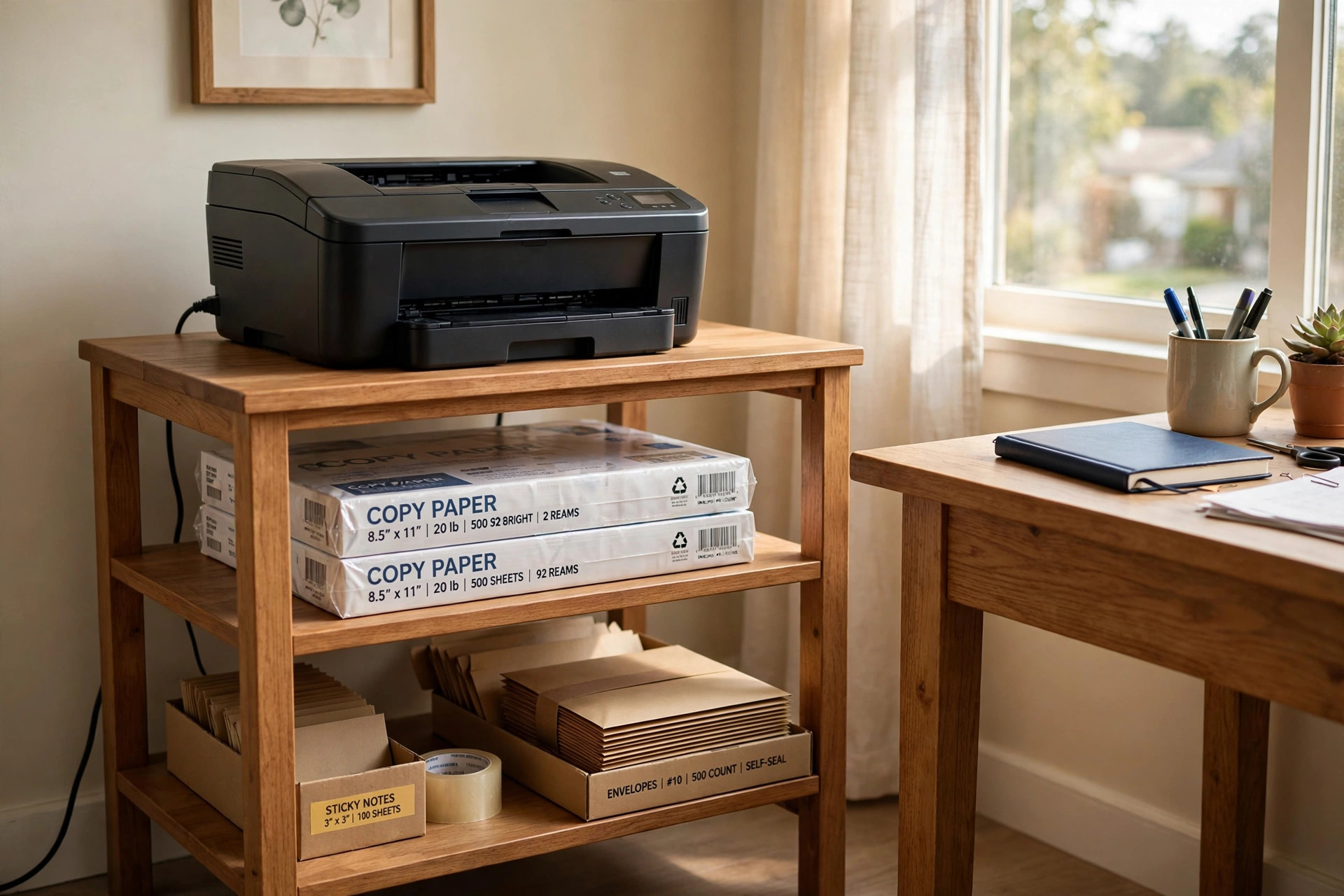

A home office side table for printer and supplies is one of the least talked about pieces of a work space. People spend weeks on a desk and a chair. The printer ends up on the floor. Paper reams sit in a corner. Cables run across the carpet. It works, but it is not a good setup.
A small side table solves the problem in one move. It lifts the printer to a working height. It holds paper, ink, and envelopes within reach. It keeps the main desk clear for actual work. This guide walks through what matters, what to look for, what types exist, what they cost, and how to keep the table in good shape.
Why It Matters
A printer on the floor is hard to use. You bend down to load paper. You kneel to clear a jam. You trip on the power cord. Over months, this small daily hassle adds up. A home office side table for printer and supplies puts the machine at knee or waist height. You can see the display. You can reach the paper tray. You can swap ink without moving the whole unit.
It also saves the desk. Printers take up space. A full size laser printer can be two feet wide. Add a stack of paper and a box of toner, and half a desk is gone. With a side table, the desk stays open for a keyboard, a notebook, and a cup of coffee. The work space feels larger even when the room is the same size.
There is also the matter of weight. Many printers are heavy. A mid size laser printer weighs forty to sixty pounds. Paper adds more. A ream of standard paper weighs about five pounds. A side table made for this job is built to carry that load day after day. A wobbly TV tray is not.
Finally, supplies stay in one place. Paper, spare ink, labels, envelopes, and a stapler all have a home. When you need to print a letter, everything is there. No hunting through closets. No lost toner boxes. It is a small thing, but it makes the work day run smoother.
What to Look For When You Choose One: Home Office Side Table for Printer and Supplies
Size and Weight Capacity
Start with the printer. Measure its width, depth, and height. Then add two inches on each side for air flow. Printers make heat. They need room to breathe. A top surface that is too small will leave the machine hanging over the edge. That is unsafe and it looks bad.
Check the weight limit. The maker should list how much the top shelf can hold. Add the printer weight, the paper weight, and a margin for safety. If the table is rated for fifty pounds and the printer weighs forty five, that is too close. Look for a rating at least twenty percent above the total load.
Also think about height. The printer display and paper tray should be easy to reach from a sitting position. For most people, a table top between twenty four and thirty inches high works well. A table that is too tall puts the printer out of reach. One that is too low sends you back to bending down.
Layout and Storage
A flat top with no shelves below is fine for the printer alone. But most buyers want storage too. Open shelves let you slide in paper reams and see what you have. Cabinet doors hide the clutter. Drawers hold small items like ink sticks, scissors, and tape. Some tables mix all three.
Think about how you work. If you print a lot, open shelves are best. You can grab a ream in seconds. If the table sits in a shared living room, closed storage keeps things neat. A small corner desk with drawers for an apartment office pairs well with a side table that hides its supplies behind doors.
Cable management matters too. The table should have a hole or a slot in the back panel for cords. Some have a small tray under the top to hold a power strip. These details keep wires off the floor and out of sight.
Build Quality
Look at the frame and the joints. Solid wood and steel frames last longest. Good particle board is fine for light printers. Thin board with plastic edge banding will sag under a heavy laser machine over time. If you can, read the fine print on the shelf material.
Wheels are a feature worth having. A table with locking casters can roll out for paper jams and then lock in place. This is a real help with heavy printers. Make sure the wheels lock. A table that rolls away while you load paper is worse than none.
The finish should stand up to heat and the odd coffee spill. A sealed top wipes clean. Unfinished or poorly coated board stains fast and swells with moisture.
Types and Options
Open Shelf Stands
The simplest type is a three or four shelf open stand. The printer sits on top. Paper and supplies sit on the shelves below. These are light, cheap, and easy to move. They suit small inkjet printers and light use. They are not great for very heavy machines.
Cabinet Units
Cabinet units look like a small filing chest. The printer sits on top. Doors below hide shelves full of supplies. Some have a pull out tray for the printer, so it can slide forward for use. These cost more. They look good in a home where the office shares space with living areas.
Rolling Carts
A rolling cart is a home office side table for printer and supplies on wheels. It is often smaller than a cabinet unit. It holds the printer on top and a few shelves of supplies below. It can tuck under a desk or into a closet when not in use. For tight rooms, this is a strong pick.
Tiered Printer Stands
Some stands have a raised rear shelf for a monitor or a scanner above the printer. This turns the side table into a small print station. It suits people who scan and copy as much as they print. It pairs well with an affordable dual monitor setup for remote workers on the main desk.
Wood and Metal Designs
Wood tables look warm and suit traditional rooms. Metal frame tables look modern and hold more weight. Many good tables mix the two: a steel frame with wood shelves. Pick the style that matches your desk and the room.
Cost and Price
Prices run from about twenty five dollars to over two hundred. A basic three shelf open stand costs twenty five to fifty dollars. It will hold a light inkjet printer and a few reams of paper. A rolling cart with locking wheels runs forty to ninety dollars. A solid cabinet unit with doors and drawers costs one hundred to two hundred dollars or more.
Big brand names cost more. Designer models from Ikea or Wayfair often cost more than store brand versions with the same weight rating. The brand name does not always mean a stronger table. Read the weight rating first and the name second.
Watch for shipping weight too. A heavy steel unit may cost extra to ship. Some sellers offer free shipping over a set amount. If you buy in a store, measure your car before you go. Many cabinet units come in flat boxes that are larger than they look.
A good rule is to spend more when the printer is heavy. A fifty pound printer on a thirty dollar table is a poor bet. The table will sag. The shelves will bow. In a year you will buy again. Spend seventy or eighty dollars once and the table lasts for years.
Care and Upkeep
Care is simple. Dust the top and shelves once a week. A dry cloth is enough. For sticky spots, use a damp cloth and dry at once. Do not soak the board. Water seeps into cut edges and causes swelling.
Keep the printer vents clear. Dust builds up in the back and sides of the machine. Once a month, pull the table away from the wall and wipe behind it. This takes five minutes and helps the printer run cool.
Check the wheels and screws twice a year. Casters pick up hair and thread. Clean them so they roll true. Tighten any loose screws. A table that rocks puts stress on the joints. Fixing it early keeps it strong.
Store paper flat and dry. Paper left on an open shelf near a window can curl in humid weather. If the room is damp, keep reams in their wrap until you need them. Toner and ink should stay in a drawer away from heat. Extreme heat can harm ink cartridges.
If the table has a finish that chips, touch it up with a small bottle of matching furniture paint. Chips left open let in moisture. A quick touch up takes ten minutes.
Safety
Weight is the main safety point. Never put more weight on the table than it is rated for. Overloaded shelves bow. Overloaded frames tip. If you upgrade to a bigger printer, check that the old table can still hold it.
Lock the wheels when the table is in place. An unlocked cart can roll when you press the printer buttons. It can also roll across the room and hit a wall or a foot. The lock takes one second to set.
Keep the power cord safe. Run it through the cable hole in the back. Do not let it drape across a walkway. Do not run it under a rug where it can overheat. A printer draws real power. Use a grounded outlet and a good power strip.
Keep the table away from heat sources. Do not place it next to a space heater or a radiator. Heat can warp the finish and harm the printer. Also keep liquids off the top. A spilled drink near a powered printer is a real hazard.
If children are in the home, use a cabinet with doors that latch. Paper reams are heavy and can fall on small hands. Loose ink boxes can spill. A latched door keeps curious hands out.
For rooms that double as work space, anchor tall units to the wall if the maker says to. A tip over restraint costs little and stops a fall. More on home safety basics can be found at the Consumer Product Safety Commission.
Frequently Asked Questions
How big should a home office side table for printer and supplies be?
Measure your printer first. Add two inches on each side and on the back for air flow. For most home printers, a top of about twenty four inches wide and eighteen inches deep works. Check the weight rating too. It should beat your printer weight by at least twenty percent.
Can the table hold a heavy laser printer?
Yes, if you buy the right one. Look for a steel frame or thick shelves rated for one hundred pounds or more. Cheap thin board tables are fine for small inkjet printers. They will sag under a heavy laser machine. When in doubt, go up one price level for a stronger build.
Is a rolling cart a good idea for a printer?
For many people, yes. A rolling cart lets you pull the printer out to clear jams and load paper. Locking casters keep it still during use. It is also easy to move when you clean. Just make sure the cart is rated for the printer weight and the wheels lock firmly.
What should I store on the lower shelves?
Paper is first. Keep two or three reams on hand. Next are spare ink or toner cartridges. Then envelopes, labels, and a stapler. Small tools like a letter opener and tape fit in a drawer. Keep the heaviest items, like paper reams, on the lowest shelf. This keeps the center of gravity low and the table stable.
Can I use the side table for a scanner too?
Many people do. If you scan often, look for a tiered stand with a raised shelf above the printer. The scanner sits up top. The printer stays below. This works well in a corner setup, much like a floating shelf desk for a tiny bedroom office works for small rooms. Just check that the upper shelf can hold the scanner weight.
How do I hide the cords?
Use the cable holes in the back panel. Run the power cord and any data cable through them. A small tray or a set of cable clips under the top shelf holds a power strip and extra cord length. Bundle long cords with a twist tie. This keeps everything neat and out of the way.
A Final Word
A home office side table for printer and supplies is a small buy with a large daily payoff. It gets the printer off the floor. It keeps paper and ink where you can reach them. It frees the desk for real work. It costs little and lasts for years.
Take ten minutes to measure the printer and the space. Pick a table with a weight rating to spare. Choose open shelves for speed or closed doors for a tidy look. Lock the wheels. Tidy the cords. Then get back to work in a room that finally feels in order.
For more background, see Wirecutter, PCMag, and Herman Miller. Buying guides are also published by Steelcase and UPLIFT Desk.
References
Herman Miller. (n.d.). Office furniture and ergonomic seating. https://www.hermanmiller.com IKEA. (n.d.). Home furnishings. https://www.ikea.com PCMag. (n.d.). Technology product reviews. https://www.pcmag.com Steelcase. (n.d.). Office furniture and workplace research. https://www.steelcase.com U.S. Consumer Product Safety Commission. (n.d.). Product safety information. https://www.cpsc.gov UPLIFT Desk. (n.d.). Standing desks and ergonomic office furniture. https://www.uplift-desk.com Wayfair. (n.d.). Furniture and home goods. https://www.wayfair.com Wirecutter. (n.d.). Product reviews from The New York Times. https://www.nytimes.com/wirecutter
Was this guide helpful?

About Robert Taylor
The My Garden US editorial team writes practical, in-depth home and garden guides for American homeowners — tested advice, no fluff.
You May Also Like
Ergonomic Wrist Rest for Keyboard and Mouse: A Practical Guide
August 24, 2026 0 views
Adjustable Monitor Light Bar for Eye Care: A Complete Buyer Guide
May 9, 2026 0 views
Small Desk Lamp With Magnifier for Detailed Work
June 12, 2026 0 views