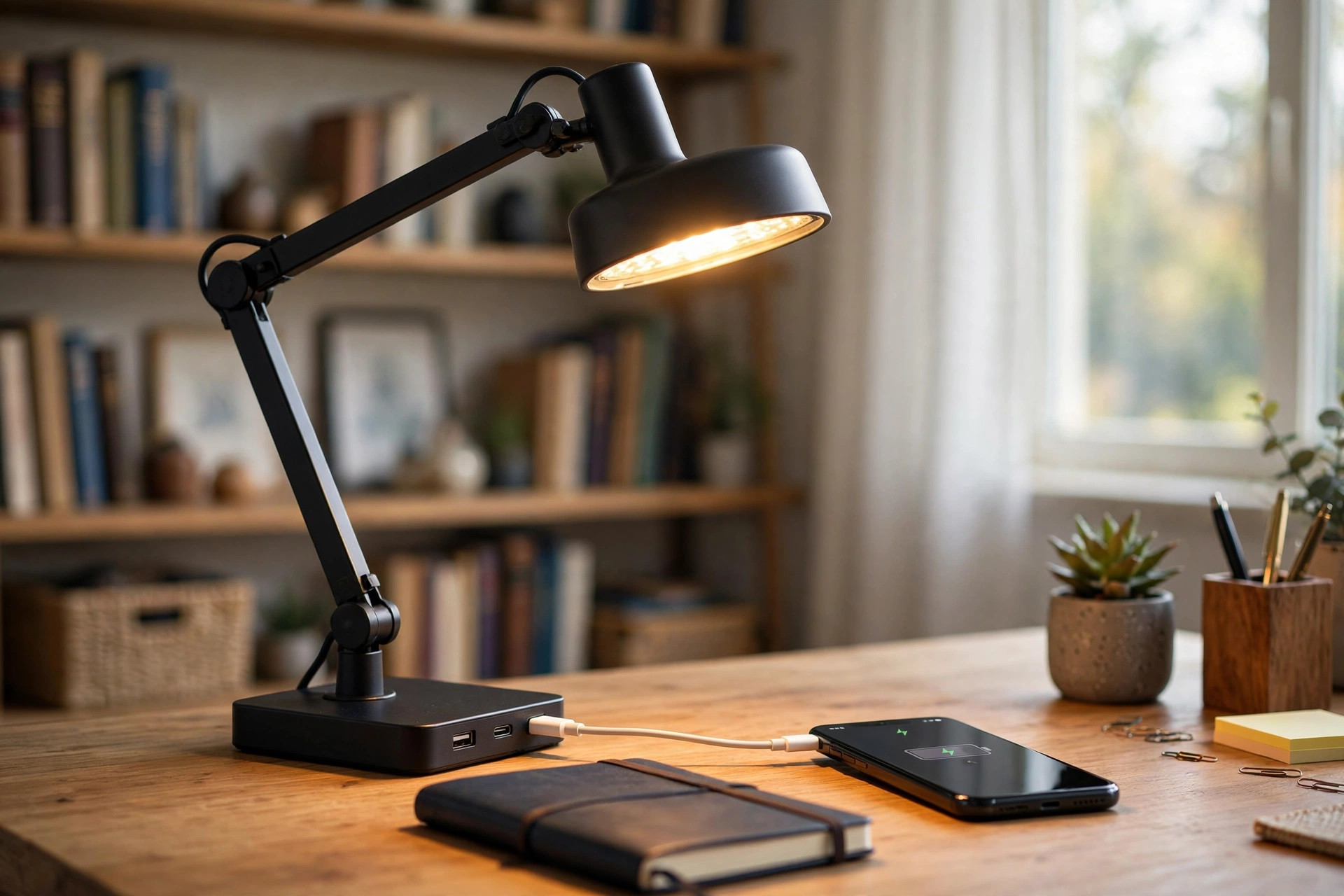

A home office desk lamp with usb charging station solves two small problems at once. It lights the desk where a person reads and writes. It also charges a phone or tablet through a built in USB port. Many workers keep this kind of lamp on a desk within arm’s reach. It saves an outlet. It cuts cord clutter. It keeps the phone close at hand.
The idea is simple. A lamp already needs power from the wall. A USB port draws from that same power line. So the lamp becomes a small charging hub. Most models place one or two USB ports on the base of the lamp. Some add a wireless charging pad as well. The lamp lights the work. The port powers the phone.
This guide explains what these lamps offer and how to pick one. It covers why they matter, what to look for, the main types on the market, price ranges, care, and safety. It closes with common questions.
Why It Matters
Good light protects the eyes. Many home offices sit in spare rooms with weak overhead light. A dim room forces the eyes to work hard. Headaches and tired eyes follow. A desk lamp puts light exactly where the work is. Papers, keyboards, and notebooks stay bright. The rest of the room can stay soft.
Charging ports solve a second problem. Home desks fill up with cords. Phone chargers, tablet cables, and earbud cases fight for outlets. A lamp with a USB port removes one cord from the pile. The phone charges from the lamp base. The desk looks cleaner. The wall outlet stays free for a computer or printer.
Furniture makers have taken note. Large retailers like IKEA and Wayfair now list desk lamps with charging features in their lighting sections. Ergonomic office specialists such as Herman Miller, Steelcase, and UPLIFT Desk treat proper task light as a core part of a healthy workstation. Reviewers at The Spruce, Wirecutter, and PCMag test these lamps alongside other home office gear. The category has grown from a novelty into a standard desk accessory.
What to Look For: Home Office Desk Lamp with Usb Charging Station
Light Quality
Look for adjustable brightness. Most lamps offer several levels, often from warm to cool white. Warm light near 2700K feels cozy in the evening. Cool light near 5000K or 6000K helps with reading fine print and detailed work. A lamp with a sliding or stepped dimmer gives more control than a simple on off switch.
Check the color rendering index, or CRI. A CRI above 80 shows colors close to true. This matters for design work, sewing, and reading charts. High CRI lamps cost a little more. They are worth it for anyone who works with color.
USB Ports
Count the ports. Most lamps have one USB A port. Better models add a second port or a USB C port. USB C charges newer phones and tablets faster. Check the output rating. A port rated at 2.1 amps charges a phone at a fair speed. A port rated at 1 amp charges slowly. Some ports are labeled for charging only. Others also pass data. For a desk lamp, charging only is fine.
Arm and Head
A fixed lamp head lights one spot. An adjustable arm reaches where it is needed. Swing arms fold flat when the desk needs the space. Gooseneck designs bend by hand and stay put. Look for smooth joints that hold their angle. A lamp that droops after a month is a poor buy.
Base Size and Stability
The base must hold the lamp steady. A heavy base stays put when the arm moves. A wide base resists tipping. But a large base eats desk space. Small desks need a slim base or a clamp mount. Clamp lamps attach to the desk edge and leave the surface free. This pairs well with a tidy desk, much like the broader approach described in guides to best task lighting for home office desk setup.
Types and Options
LED Swing Arm Lamps
These are the most common type. An LED panel sits on a two joint arm. The light is cool, bright, and even. Power use is low. LEDs last for tens of thousands of hours. Many include a USB port in the base. These lamps suit readers, students, and office workers who want steady light across a wide area.
Gooseneck Desk Lamps
A flexible metal neck lets the user point the head anywhere. Gooseneck lamps work well for craft tables and small desks. The bendable neck folds out of the way when not needed. Many LED versions now include USB charging in the base. They are light and easy to move from room to room.
Architect Style Lamps
The classic spring loaded design dates back decades. Modern versions use LEDs instead of bulbs. The springs balance the arm so it floats at any height. These lamps look sharp on a professional desk. USB ports appear in the base of newer models. They cost more than simple gooseneck lamps but last a long time.
Lamps with Wireless Charging
Some models add a Qi wireless pad to the base. A phone rests on the pad and charges without a cable. This is the next step beyond a USB port. Reviewers sometimes group these with similar gear, such as a led desk lamp with wireless charging base. Wireless pads charge more slowly than a cable. They also add to the price. Buyers who hate cables may find the trade worth it.
Clamp and Monitor Lamps
Clamp lamps grip the desk edge. They suit small desks where every inch counts. Some newer designs mount behind a monitor or clip to a shelf. USB ports sit in a small hub near the clamp. These lamps keep the desk surface clear for keyboards and papers.
Cost and Price
Prices run from about twenty dollars to over one hundred fifty. Simple LED gooseneck lamps with one USB port sit at the low end. They light a desk and charge a phone. Build quality is basic. The arm may feel loose after heavy use.
Mid range lamps, from roughly forty to eighty dollars, offer the best value for most buyers. They include dimming, color temperature control, and two USB ports. Arms feel solid. Bases are heavy. Many carry safety marks from known testing labs.
Premium lamps cost eighty dollars and up. They use high CRI LEDs, metal construction, and smart features like timers or motion sensors. Some include both USB A and USB C fast charging. Designer brands charge a premium for the name. For most home offices, a mid range lamp does the job well.
When comparing prices, buyers should note the USB output. A cheap lamp with a weak 1 amp port charges a phone very slowly. A mid range lamp with a 2.1 amp port works much better. The price gap often reflects this difference.
Care and Upkeep
LED desk lamps need little care. Dust the head and base with a dry cloth every few weeks. Dust on the lens cuts light output. A soft cloth restores full brightness. Do not use water or sprays on the lamp. Liquid can seep into the joints and harm the wiring.
Keep the USB port clean. Dust and lint collect inside the port. A dry wooden toothpick can lift out lint. Do not use metal tools. Metal can short the contacts. If a port stops working, try a different cable first. Cables fail more often than ports.
Do not overload the lamp. A desk lamp circuit is built for the light plus modest charging. It is not meant to run a space heater or a large monitor through the same strip. Keep the lamp plugged into a surge protector. Power surges can kill both the LED driver and the USB circuit.
Placement matters too. Set the lamp on the opposite side of the writing hand to cut shadows. Right handed writers place the lamp on the left. Left handed writers place it on the right. Keep the head about fifteen inches above the work surface. This gives even light without glare.
Safety
Buy lamps with a recognized safety mark. In the United States, look for UL or ETL listed marks on the lamp and the cord. These marks mean the product passed standard safety tests. Unmarked lamps may cut corners on wiring or heat control.
Check the cord. It should feel thick and flexible, not thin and stiff. Keep cords away from chair wheels and feet. A pinched cord is a fire risk. Do not run the cord under a rug where heat can build up.
USB ports add a small risk of overheating if a damaged cable is used. Replace frayed cables at once. If the lamp base feels hot to the touch, unplug it and stop using the ports. A warm base is normal during charging. A hot base is not.
Keep the lamp away from water. Do not place it where a drink can spill into the ports. A spill into a live USB port can short the circuit. Wipe spills at once and let the lamp dry before use.
These lamps fit into a larger desk power plan. Many workers combine a charging lamp with a usb c docking station for home office setup to power laptops and monitors from one hub. The lamp handles the phone. The dock handles the computer. Together they cut cord clutter across the whole desk.
Frequently Asked Questions
Can a desk lamp USB port fast charge a phone?
It depends on the port rating. A port rated at 2.1 amps or higher charges at a normal pace. A 1 amp port charges slowly. True fast charging needs USB C power delivery, which only some lamps offer. Check the product specs before buying. For most people, overnight or desk side top up charging is enough.
Do these lamps use a lot of electricity?
No. LED models use very little power, often under ten watts for the light itself. The USB circuit adds only the power the phone draws. A lamp left on all day costs a few dollars a year to run. This is far less than an old incandescent desk lamp, which could use forty watts or more.
Will the USB port work when the lamp light is off?
On most models, yes. The USB circuit draws power as long as the lamp is plugged in. Some lamps cut power to the port when the main switch is off. Check the manual. Models with a separate always on port are more useful for overnight charging.
Are these lamps safe to leave plugged in overnight?
A listed lamp in good condition is safe to leave plugged in. The LED driver draws almost no power when the light is off. Unplug the lamp during storms or long trips. Surge protectors add a layer of safety for everyday use.
Can I replace the LED if it burns out?
Most LED desk lamps have sealed LED panels. They are not meant to be replaced by the user. Rated life often runs thirty thousand to fifty thousand hours. At eight hours a day, that is ten to seventeen years. By the time the LED fades, most buyers want a new lamp anyway.
Do wireless charging lamps also have USB ports?
Many do. Makers often include both a wireless pad and one USB port in the base. The pad charges a phone placed on it. The port charges a second device by cable. Check the layout before buying. Some budget models offer only the pad with no wired port.
Final Word
A home office desk lamp with usb charging station is a small upgrade with daily payoff. It puts clear light on the work. It keeps the phone charged and close. It frees an outlet and tidies the desk. Buyers should pick adjustable light, a solid arm, and ports rated high enough to charge at a fair pace. A mid range LED model with a safety mark serves most home offices for years. Match the lamp to the desk size, keep the ports clean, and let this quiet workhorse do its job.
References
Herman Miller. (n.d.). Office furniture and ergonomic seating. https://www.hermanmiller.com IKEA. (n.d.). Home furnishings. https://www.ikea.com PCMag. (n.d.). Technology product reviews. https://www.pcmag.com Steelcase. (n.d.). Office furniture and workplace research. https://www.steelcase.com The Spruce. (n.d.). Home and garden advice. https://www.thespruce.com UPLIFT Desk. (n.d.). Standing desks and ergonomic office furniture. https://www.uplift-desk.com Wayfair. (n.d.). Furniture and home goods. https://www.wayfair.com Wirecutter. (n.d.). Product reviews from The New York Times. https://www.nytimes.com/wirecutter
Was this guide helpful?

About Michael Thompson
The My Garden US editorial team writes practical, in-depth home and garden guides for American homeowners — tested advice, no fluff.
You May Also Like
Best LED Strip Lights for Home Office Desk: A Plain Guide
August 25, 2026 0 views
Ergonomic Zero Gravity Office Chair Recliner: A Complete Buyer Guide
June 4, 2026 0 views
An Ergonomic Chair for Pregnancy Home Office Use: A Practical Guide
January 19, 2026 0 views