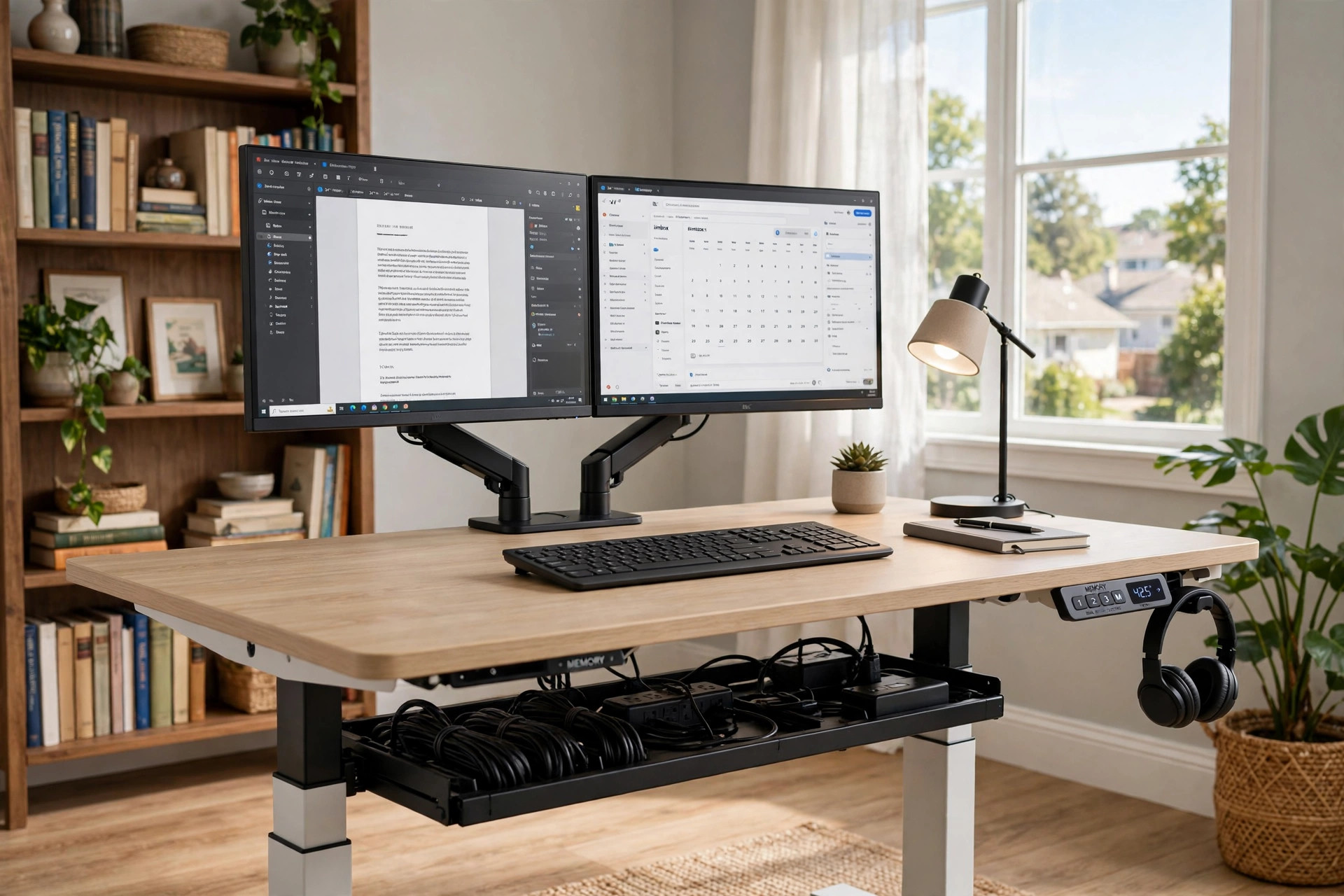

More Americans work from home than ever before. The dining table became a desk. The kitchen chair became an office chair. And the hours grew long. Many people now sit for eight, ten, or twelve hours a day. Their backs ache. Their necks stiffen. Their energy fades by mid afternoon. An adjustable standing desk with memory presets usa shoppers can buy online offers a simple answer. It rises and lowers at the touch of a button. And it remembers your favorite heights.
A memory preset is exactly what it sounds like. You set the desk to your sitting height. You press and hold a button. The desk stores that height. You do the same for your standing height. Then one tap returns the desk to either position. No guessing. No fiddling. The desk moves to the exact spot every time. For many home workers, that small feature makes the difference between a desk they adjust every day and one they leave in one position.
This guide explains what these desks are, why they matter, how to choose one, what they cost, and how to keep one working for years. It is written in plain language for the home buyer, not the engineer.
Why a Standing Desk with Memory Presets Matters
The human body was not built to sit all day. Doctors and health writers have said this for decades. When you sit for long stretches, blood moves more slowly through your legs. Your spine takes load in one fixed position. Your shoulders roll forward. Over months and years, this can feed back pain, stiff hips, and low energy.
Standing all day is no better. It tires the feet and the legs. The best advice from health experts is simple. Change position often. Sit for a while. Stand for a while. Shift between the two across the day. A sit-stand desk makes this easy. You press a button and the whole work surface rises.
Without memory presets, many owners stop adjusting. They set the desk once and leave it. Or they find the right standing height only by trial and error each time. Memory presets remove that friction. Button one can be your sitting height. Button two can be your standing height. A third button can serve a tall partner or a child doing homework. The desk stops where you want it, within a fraction of an inch, every single time.
Shared desks make this even more valuable. In many American homes, two people share one desk. A spouse works in the morning. A teenager studies in the afternoon. Each person has a different height. Each person gets a preset. Nobody argues about who moved the desk.
There is also a quiet productivity gain. Moving between sitting and standing breaks up a long day. Many workers report sharper focus after a position change. The desk does not make you work harder. It simply removes one small source of stiffness and restlessness.
What to Look for When You Choose: Adjustable Standing Desk with Memory Presets Usa
Not all desks with memory presets are equal. The handset may look the same on two models. The price may differ by hundreds of dollars. The real difference sits inside the frame and the motor. Here is what to check before you buy.
The Motor and Lift Capacity
An electric desk uses one or two motors in the legs. Two motors usually lift more smoothly and carry more weight. Check the lift capacity in pounds. A good desk lifts at least 200 pounds, and many carry 250 or more. Add up your monitor or monitors, your computer, your lamp, your books, and anything else that lives on the desk. Leave margin. A desk that works near its limit will lift slowly and wear faster.
Motor speed matters too. Most desks rise at about one to one and a half inches per second. That pace is fast enough to feel responsive without jolting your coffee cup.
The Height Range
Height range tells you how low and how high the desk can go. Typical ranges run from about 25 inches to about 50 inches. If you are shorter than five feet two or taller than six feet four, check the range with care. Sit at your chair. Measure from the floor to your elbows when your arms rest at a right angle. That is your sitting height. Stand in your shoes and do the same. That is your standing height. Both numbers should fall inside the range of the desk.
The Desktop Size and Material
Desktops come in widths from about 40 to 72 inches. A 48-inch top fits one monitor and a laptop. A 60-inch top fits two monitors with room to write. Depth matters as well. A top that is 30 inches deep gives your monitor room to sit back from your eyes. Laminate tops resist scratches and cost less. Solid wood tops look warm but cost more and weigh more. Round or beveled edges feel better on the wrists than sharp square edges.
The Memory Handset and Controls
Look closely at the handset. Basic handsets have up and down arrows plus numbered buttons, usually two to four. Better handsets add a small display that shows the height in inches. Some show reminders that prompt you to stand. Lock the handset if small children visit your office. The lock keeps little hands from moving the desk.
Frame Stability
Shake the desk at full height in the store display if you can. A good frame feels firm. A weak frame wobbles when you type. Wider feet, thick steel legs, and a crossbar between the legs all add stability. Two-motor frames usually resist wobble better than one-motor frames. Read buyer reviews that mention typing at full height, since that is the true test.
Posture does not depend on the desk alone. A best laptop stand for standing desk posture raises your screen to eye level, which keeps your neck straight whether you sit or stand. Design-focused furniture makers such as Herman Miller and workspace specialists like Steelcase have published years of research on how screen height and reach shape comfort at a desk.
Types and Options
Standing desks come in several shapes. Each suits a different room and a different budget.
Standard Two-Leg Desks
The two-leg rectangular desk is the most common type. Two lifting columns sit at the back left and back right. The handset controls both. These desks fit most rooms and most budgets. They are a safe first choice for a first standing desk.
Three-Leg L-Shaped Desks
L-shaped desks use three lifting columns. They give far more surface area. They suit people who spread out papers, use three monitors, or share the desk with a partner. They cost more and need more floor space. Measure your room with care before you order one, and check that the corner clears your walls at full height.
Desk Converters
A converter sits on top of an existing table or desk. It holds your keyboard, mouse, and monitor. You lift it by hand or with a small spring. Converters cost less than full desks. They suit renters who cannot replace their furniture. A full guide to the adjustable height desk converter for existing table explains when a converter is enough and when a full desk is better.
Treadmill and Bike Desks
Some owners pair a standing desk with a walking pad or a desk bike. The desk must be tall enough and wide enough for the setup. Walking pads need a flat, stable surface under the desk. If slow walking while you work appeals to you, read about a compact treadmill desk for walking while working before you choose your desk height range.
Retailers that carry a wide range of these types include IKEA for budget options, Wayfair for a broad online catalog, and office supply chains like Staples and Office Depot. Dedicated desk makers such as UPLIFT Desk focus on electric models with strong preset systems. Independent reviewers at Wirecutter and PCMag test popular models each year, and home guides like The Spruce walk through setup and ergonomics.
Cost and Price
Prices for an adjustable standing desk with memory presets usa models vary widely. A basic electric desk with a laminate top and two presets often sells for 200 to 350 dollars. Mid-range desks with dual motors, four presets, and a digital display run 350 to 700 dollars. Premium desks with solid wood tops, three-leg frames, and advanced handsets can pass 1,000 dollars.
What does the extra money buy? Heavier lift capacity. Faster motors. Quieter operation. Better stability at full height. Longer warranties, often seven to fifteen years on the frame and motor. Thicker desktops with better edge sealing that resist dents and moisture.
Watch for hidden costs. Shipping on a heavy desk can be expensive. Some sellers charge for the desktop and the frame separately, so the headline price is not the full price. A monitor arm, a cable tray, and a power strip add to the total. Set a budget that covers the desk plus the accessories you truly need.
Sales cluster around familiar dates. Back-to-school season, Black Friday, and the New Year bring discounts. If you can wait, you can often save a hundred dollars or more on a mid-range desk. Refurbished models from known makers are another way to save, and they usually carry the same warranty.
Care and Upkeep
A standing desk is a simple machine. A little care keeps it smooth for years.
Dust the legs and the handset once a month. Wipe the desktop with a damp cloth and mild soap. Keep liquids away from the handset and the control box under the desk. Coffee spills are the most common cause of handset failure.
Manage your cables. As the desk rises and falls, loose cables snag. Use a cable tray or spiral wrap under the top. Leave a service loop of extra cable length so nothing pulls tight at full height. Unplug the desk during long vacations and electrical storms.
Reset the desk if it behaves oddly. Most desks have a reset routine. You lower the desk all the way, release the button, then press and hold the down button until the desk rises slightly and stops. The manual lists the exact steps for your model. If one leg lags behind the other, reset the desk before you call support.
Do not overload the desk. Respect the lift capacity printed on the label. Heavy printers and large speakers belong on a separate stand. Check the frame bolts once a year and tighten any that have worked loose.
Safety
Electric desks are safe when used with care. Still, know the risks.
The desk can pinch. Keep fingers, pet paws, and children’s hands clear of the moving frame. Do not let a child ride the desk up and down. Many handsets have a lock. Use it when children are near.
Some desks include anti-collision sensors. The sensor stops the desk if it meets resistance on the way down. This protects a chair, a file cabinet, or a foot left under the desk. If your desk lacks this feature, look before you lower it.
Place the desk on a level floor. An uneven floor makes the frame twist as it moves. Use the adjustable glides on the feet to level it. Do not block the ventilation slots on the control box.
Keep the power cord where it cannot be stepped on or caught by a chair wheel. Do not run the cord under a rug where heat can build up. Replace a frayed cord at once.
Frequently Asked Questions
What does a memory preset do on a standing desk?
It stores a desk height under a numbered button. Press the button and the desk moves to that exact height on its own. Most desks store two to four heights.
How many presets do I need?
Two presets suit one user. One for sitting and one for standing. Three or four presets suit shared desks, where each person stores their own heights. More than four is rarely useful in a home office.
Can a standing desk with memory presets hold two monitors?
Yes, if the lift capacity allows it. Two monitors, their arms, and a computer can weigh 60 to 90 pounds. Check the rated capacity of the desk and stay well under it. Use monitor arms to free desktop space and to set the screens at eye level.
Do these desks need to stay plugged in?
The desk must be plugged in to move. The memory presets survive unplugging on most models. The handset keeps its settings in memory. You can unplug the desk at night to save a small amount of power.
How long does the motor last?
A quality dual-motor desk is rated for thousands of lift cycles. With normal home use, the frame and motor often last ten years or more. Long warranties of seven years and up signal a maker that trusts its own product.
Is an adjustable standing desk with memory presets usa voltage compatible everywhere in the country?
Desks sold for the American market run on standard 110 to 120 volt household current. They plug into any normal wall outlet. No special wiring or adapter is needed.
A Final Word
An adjustable standing desk with memory presets usa buyers can order today is one of the simplest upgrades a home office can get. It costs less than many office chairs. It takes about an hour to assemble. And it gives you back control over how you sit and stand through the day.
Choose a desk with a strong frame, a dual motor, and a handset you find easy to read. Measure your space. Measure your body. Set your presets once and let the desk do the rest. Your back, your neck, and your afternoon energy will thank you.
References
Herman Miller. (n.d.). Office furniture and ergonomic seating. https://www.hermanmiller.com IKEA. (n.d.). Home furnishings. https://www.ikea.com Office Depot. (n.d.). Office supplies and furniture. https://www.officedepot.com PCMag. (n.d.). Technology product reviews. https://www.pcmag.com Staples. (n.d.). Office supplies and furniture. https://www.staples.com Steelcase. (n.d.). Office furniture and workplace research. https://www.steelcase.com The Spruce. (n.d.). Home and garden advice. https://www.thespruce.com UPLIFT Desk. (n.d.). Standing desks and ergonomic office furniture. https://www.uplift-desk.com Wayfair. (n.d.). Furniture and home goods. https://www.wayfair.com Wirecutter. (n.d.). Product reviews from The New York Times. https://www.nytimes.com/wirecutter
Was this guide helpful?

About Lisa Anderson
The My Garden US editorial team writes practical, in-depth home and garden guides for American homeowners — tested advice, no fluff.
You May Also Like

A Home Office Bulletin Board with Wooden Frame: How to Choose and Use One
March 17, 2026 0 views
Best Cable Management Box for Desk Wires: A Complete Guide
April 7, 2026 0 views
Ergonomic Keyboard Tray for Corner Desk Setup: A Complete Guide
April 6, 2026 0 views