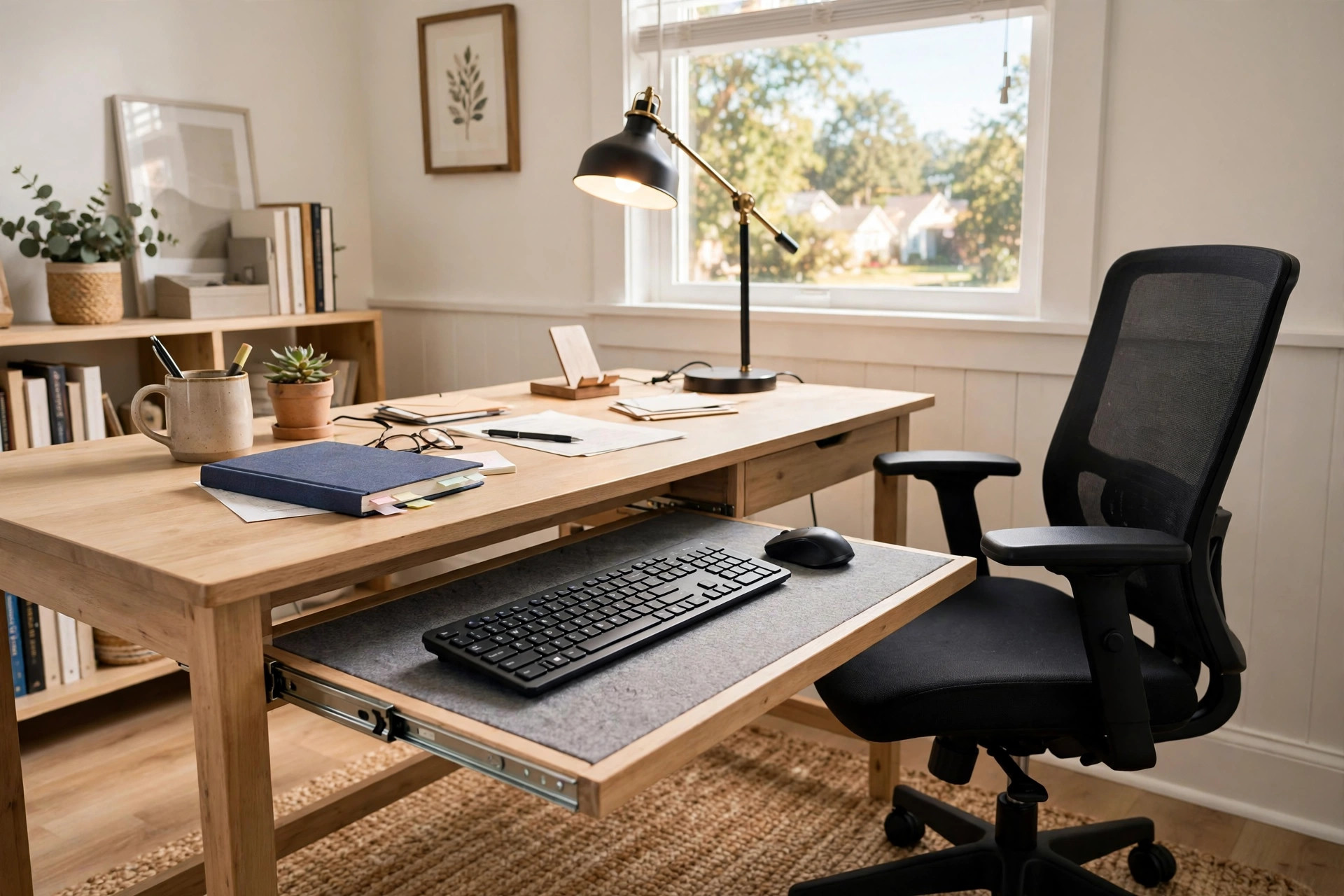

Why This Desk Type Matters
A home office desk with keyboard tray slide out does one simple job. It moves your keyboard and mouse to a tray that slides out from under the desk top. This leaves the main surface free for papers, books, a phone, or a second screen.
Many home workers type for six to ten hours a day. When the keyboard sits too high, the shoulders lift. The wrists bend. Over weeks and months, this causes soreness in the neck, arms, and hands. A tray that slides out can drop the keyboard by three to five inches below the desk top. That small change puts the arms in a neutral rest pose. Many office health guides note that the elbows should stay near the body and the wrists should stay flat while typing.
A slide out tray also frees space. Small home offices often use a desk that is only 42 to 55 inches wide. When the keyboard and mouse leave the top, the whole surface comes back. You can write, read papers, or place a drink without pushing the keyboard aside. For people who work in a corner of a bedroom or a shared room, this saved space is a real gain.
Another plus is speed. You slide the tray out when work starts and push it in when the day ends. The desk then looks clean. In a room that serves two uses, such as a guest room or a living room corner, this quick change keeps the space tidy.
What to Look For When You Choose: Home Office Desk with Keyboard Tray Slide Out
Tray Size and Travel
The tray should be wide enough for your keyboard and mouse side by side. A full size keyboard with a number pad needs about 27 to 30 inches of width. A compact keyboard can fit in about 22 inches. Measure your keyboard before you shop.
Travel means how far the tray slides out. A good tray pulls out at least 10 to 12 inches. That puts the keyboard well clear of the desk edge so your wrists do not hit the desk front. It should also slide with one hand and stop in a firm spot.
Height Adjustment
Some trays are fixed under the desk. Others tilt or drop lower on a small arm. A tray that tilts a few degrees down can help the wrists stay flat. If you are tall or short, a fixed tray may sit at the wrong height. Test your chair and desk height together.
A common rule is this. Sit in your chair with your feet flat. Let your arms hang. Bend the elbows to about 90 degrees. The keyboard should sit right under your hands. Many desks with built in trays place the tray about 26 to 28 inches from the floor. Your own body may need more or less.
Weight Limit and Build
The tray holds the keyboard, the mouse, and often the weight of your hands and wrists. Look for a weight limit of at least 20 to 30 pounds. A metal slide rail lasts longer than a plastic one. Ball bearing rails feel smooth and hold up over years of daily use.
Check how the tray joins the desk. A tray that bolts to the desk frame is more firm than one that clamps to the top. If you type hard or rest your palms on the tray, a weak mount will wobble. Reviews on sites like Wirecutter often test how firm such trays feel in daily use.
Desk Size and Room Fit
Measure your room before you buy. A home office desk with keyboard tray slide out still needs floor space. You also need room behind the chair to slide back when the tray is out. Allow at least 36 inches from the desk front to any wall or bed behind you.
Think about the desk depth too. A desk that is only 20 inches deep leaves little top space once the monitor sits on it. A depth of 24 to 30 inches gives room for a screen, a lamp, and papers. Retailers such as IKEA and Wayfair list full depth and width for each desk, so check the numbers before you order.
Types of Desks with Slide Out Trays
Standard Computer Desks
These are the most common. A simple rectangular desk with a tray mounted under the front edge. They suit most rooms and most budgets. The tray is usually made of wood board or metal mesh. Some fold down or can be removed if you do not want it.
L Shaped Desks
An L shaped desk gives a wide work top. The tray often sits on the main arm of the L. These desks suit people who use two monitors or spread papers wide. They need more floor space, so they fit best in a spare room or a large bedroom corner.
Standing Desk Frames with Trays
A standing desk rises and lowers by motor. Some frames let you add a keyboard tray under the top. This is a good mix for people who stand part of the day. The tray keeps the keyboard at the right height in both sitting and standing modes. Guides at UPLIFT Desk show how trays pair with height adjustable frames.
Student and Compact Desks
Small desks made for tight rooms often have a simple slide out tray. The tray may be smaller, fit for a compact keyboard only. If the room is small, a small desk with built in bookshelf for students may pair well with a slide out tray desk to add storage.
Converter Style Add Ons
If you already own a desk, you can bolt an after market tray under it. These clamp or screw to the desk top edge. An ergonomic standing desk converter with keyboard tray is another path. It raises the whole screen and keyboard together rather than using a slide out tray. Both solve the same height problem in different ways.
Cost and Price Ranges
Prices vary by size, build, and brand. As a rough guide:
– Budget desks with a basic tray: about 80 to 150 dollars. The tray is often thin board on simple rails. – Mid range desks: about 150 to 350 dollars. Better rails, firmer mounts, and thicker tops. – Solid wood or large L shaped desks: about 350 to 700 dollars. These last longer and look better. – Standing desk frames with a tray option: about 400 to 900 dollars or more for the full setup.
After market trays alone cost about 30 to 90 dollars. A tray that clamps under your current desk is the cheapest fix. Office supply stores such as Staples and large marketplaces like Amazon carry many such add on trays.
Watch for hidden costs. Delivery for a large desk can add 20 to 80 dollars. Some desks need two people to assemble. If you hire help, add that fee to the total.
Setting It Up for Comfort
Chair and Desk Height
Set the chair first. Feet flat on the floor. Thighs level. Back firm against the chair back. Then check the tray. Your forearms should rest near level with the floor. Your wrists should stay straight, not bent up or down. Research from office furniture firms such as Steelcase and Herman Miller stresses this neutral pose for long work days.
Screen Position
Place the monitor so the top of the screen sits at or just below eye level. The screen should be about an arm’s length away. When the keyboard drops to the tray, many people push the monitor back on the desk. Keep the screen close enough to read without leaning in.
Mouse and Extras
Give the mouse enough room on the tray. A cramped mouse hand leads to wrist pain. If the tray is narrow, consider a compact keyboard to free mouse space. Keep the phone, pens, and papers on the desk top where the keyboard used to sit.
Cables
A sliding tray moves. Cables that are too tight will pull when you open the tray. Leave slack in the keyboard and mouse cables. If the tray is near a PC tower, route the cables with a small clip so they do not snag. Guides on The Spruce and PCMag often cover clean cable setup for home offices.
Care and Upkeep
A slide out tray needs little care. Wipe the tray top with a damp cloth when dust builds up. Keep drinks on the desk top, not on the tray, since spills can run into the slide rails.
Oil or spray the rails once or twice a year with a light silicone spray if they start to stick. Do not use thick grease, which can gather dust. Tighten the mounting screws once a year. Screws loosen with daily sliding, and a loose tray will wobble.
If the tray is made of wood board, keep it dry. If it is metal mesh, brush crumbs out of the holes now and then. A tray that you treat well can last as long as the desk itself.
Safety Notes
A slide out tray has moving parts. Keep small children away from the rails. Fingers can get pinched where the tray meets the desk frame.
Check the weight limit and stay under it. Do not stand on the tray or let children sit on it. A tray that breaks can drop the keyboard and injure feet or hands.
Push the tray fully in when you stand up or walk away. An open tray at shin height is easy to bump. This is a common cause of bruised legs in small home offices.
Make sure the desk does not tip. If the desk is tall and narrow, push it against a wall. Some desks come with a wall anchor strap. Use it if one is in the box.
A tidy desk also cuts paper clutter. A quiet paper shredder for home office apartment can help you clear old papers that pile up on the freed desk top.
Frequently Asked Questions
Is a keyboard tray really better than typing on the desk top?
For most people, yes. A tray drops the keyboard a few inches below the desk top. This lets the shoulders rest and the wrists stay flat. Typing on a high desk top often lifts the shoulders all day. If your desk top already sits at elbow height, you may not need a tray. Measure first.
Can I add a slide out tray to a desk I already own?
Yes. After market trays bolt or clamp under most desk tops. They cost far less than a new desk. Check that your desk top is thick enough for the screws. A top thinner than three quarters of an inch may not hold screws well.
Will a slide out tray fit a full size keyboard and a mouse?
Many trays do, but check the width. Full size keyboards need about 27 to 30 inches with a mouse beside them. Compact desks often come with smaller trays. If you use a number pad daily, confirm the tray size before you buy.
Do slide out trays work with standing desks?
Yes, as add ons or built in options. The tray moves with the desk as it rises and lowers. Make sure the tray stays at a good height in both sitting and standing positions. You may need to set the desk stop points so the tray height stays right.
Are slide out trays hard to assemble?
Most are simple. The tray frame bolts under the desk with a few screws. The job takes 20 to 40 minutes with basic tools. After market trays come with their own rails and hardware. Read the guide first and lay out all parts.
What should I do if the tray wobbles?
First, tighten all mounting screws. If it still wobbles, check the rails. Worn plastic rails cause play. Replacing the rails is cheap. If the tray is thin board, the board itself may flex. A thicker tray or a center support can fix that.
Final Word
A home office desk with keyboard tray slide out is a small change with a big daily payoff. It frees desk space. It rests your arms. It keeps the room tidy at day’s end. Take time to measure your space and your keyboard. Pick a tray with smooth rails and a firm mount. Set your chair and screen to match. With that done, your work hours will feel easier on the body and calmer in the room.
References
Amazon. (n.d.). Online shopping. https://www.amazon.com Herman Miller. (n.d.). Office furniture and ergonomic seating. https://www.hermanmiller.com IKEA. (n.d.). Home furnishings. https://www.ikea.com PCMag. (n.d.). Technology product reviews. https://www.pcmag.com Staples. (n.d.). Office supplies and furniture. https://www.staples.com Steelcase. (n.d.). Office furniture and workplace research. https://www.steelcase.com The Spruce. (n.d.). Home and garden advice. https://www.thespruce.com UPLIFT Desk. (n.d.). Standing desks and ergonomic office furniture. https://www.uplift-desk.com Wayfair. (n.d.). Furniture and home goods. https://www.wayfair.com Wirecutter. (n.d.). Product reviews from The New York Times. https://www.nytimes.com/wirecutter
Was this guide helpful?

About Lisa Anderson
The My Garden US editorial team writes practical, in-depth home and garden guides for American homeowners — tested advice, no fluff.
You May Also Like

Small Bookshelf With Doors for Office Documents
June 2, 2026 0 views
Home Office File Organizer With Wall Mounted Pockets
February 18, 2026 0 views
Home Office Chair Replacement Wheels for Carpet: A Complete Buying Guide
September 7, 2026 0 views