
Introduction
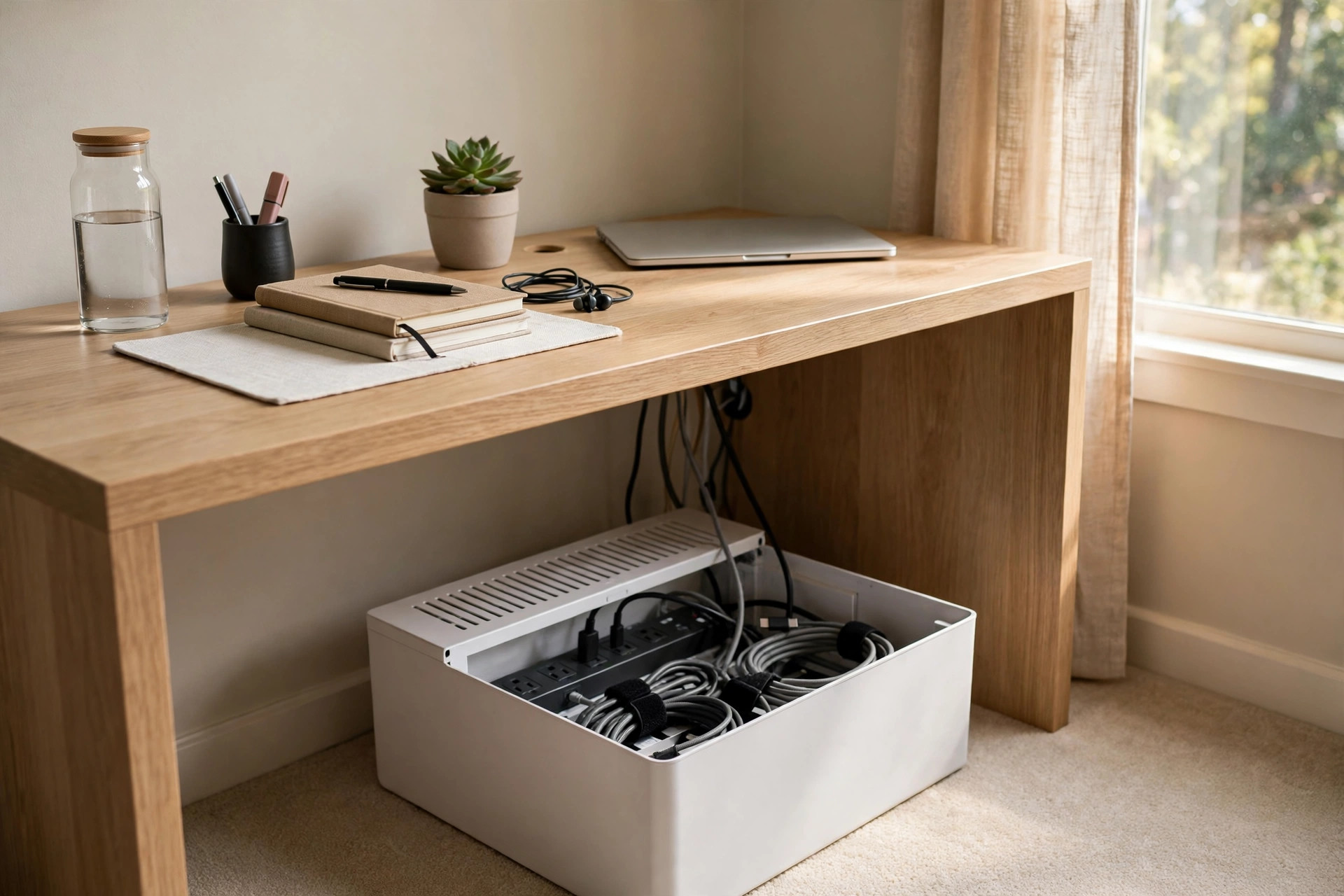
A desk should be a clean place to work. Yet most desks gather a mess of cords. Chargers, monitors, lamps, and speakers each bring a wire. Within a week the floor under the desk looks like a tangle of snakes. Finding the best cable management box for desk wires is one of the simplest ways to fix this. A cable management box is a small case that sits under or beside a desk. It holds a power strip inside. The cords pass through slots in the lid or sides. What was once a messy pile becomes one neat box. The desk looks calm. The floor stays clear. Cleaning takes less time. And the wires last longer because they are not bent, stepped on, or pulled.
This guide explains why a cable box matters, what to look for before you buy, the main types on the market, what you can expect to pay, and how to use one safely. It ends with answers to common questions. By the end, you will know how to choose a box that fits your desk, your cords, and your budget.
Why a Cable Management Box Matters: Best Cable Management Box for Desk Wires
A box does more than hide clutter. It protects. When cords lie loose on the floor, they catch feet. A tug can knock a laptop to the floor or rip a plug from a monitor. A box keeps the power strip in one place so nothing moves when a cord is pulled.
Dust is another problem. Cords attract dust like a magnet. A pile of cords on carpet becomes a home for dust balls and crumbs. A closed box keeps most of that out. When you do clean, you wipe one smooth surface instead of untangling ten cords.
There is also the matter of heat and wear. Power bricks and chargers grow warm in use. When they sit in a pile under paper and socks, heat has no place to go. A good box gives air room to move. Your adapters stay cooler and last longer. Many people who work from home also find that a neat desk helps them think. The eye rests on the work, not on the mess. In shared rooms, a box keeps small hands and pets away from outlets, which brings real peace of mind.
What to Look for When You Choose
Size and Shape
Size is the first thing to check. Measure your power strip. Then add room for the plugs, which stick out farther than most people expect. A large monitor cable with a thick head needs more space than a phone charger. As a rule, the box should be at least two inches wider than your power strip, and tall enough that plugs can stand upright without touching the lid.
Shape matters too. Long, low boxes fit under most desks and stay out of the way. Taller boxes work well behind a desk or against a wall. Some boxes come in square shapes for corners. Before you buy, look at the space where the box will sit. Measure the gap under your desk and between the desk and the wall. A box that looks fine in a photo may be too tall for a task lighting setup for a home office desk with a low shelf above it.
Material
Most boxes are made from plastic or wood. Plastic boxes are light, cheap, and easy to clean. Look for thick plastic that does not bend when you press it. Thin plastic can crack at the slots where cords enter. Wood boxes cost more but look better in a living room or study. A wooden organizer from IKEA can blend in with real furniture instead of looking like office gear.
Some boxes are made of bamboo or fiber board. These look warm and natural, but check that the finish is smooth and the joints are tight. Rough edges can scrape cable jackets over time. Whatever the material, the lid should fit well and stay shut. A lid that pops open when you push a cord through it defeats the purpose.
Ventilation
Ventilation is easy to miss, but it matters. Chargers and power strips give off heat. A box with no air holes can trap that heat. Look for slots, vents, or a gap under the lid that lets warm air rise out. Many well-designed boxes from Wayfair include vent patterns cut right into the sides.
Keep heavy blankets and paper away from the box, even when it is ventilated. Air needs a clear path. If the box will hold many warm adapters, such as a laptop brick plus a gaming console supply, pick a larger box with generous vents and leave it where room air can reach it.
Cord Slots and Lid Design
The slots are where cords enter and leave. They should be wide enough for your thickest cable but not so wide that small plugs fall through. Some boxes have rubber edges on the slots. These protect cables from sharp plastic and look neat. Others use simple cutouts. A hinged lid that opens wide makes it easy to reach the power strip when you need to add or remove a device. Boxes with lids that only lift halfway can be a daily annoyance.
Types of Cable Management Boxes
There are a few common types, and each suits a different desk.
Basic plastic boxes are the most common. They are simple cases with slots on both ends and a lid on top. They come in white, black, and gray. They work well in offices and bedrooms. Many buyers start here, and many never need more.
Wood and bamboo boxes cost more but look like furniture. They suit home offices in living rooms where the desk is in view all day. The finish should be smooth inside and out. Some have felt pads on the bottom so they do not scratch floors.
Large capacity boxes are made for big setups. If your desk holds two monitors, a dock, a printer, and speakers, a standard box will fill up fast. A dual monitor setup with an adjustable arm often needs a larger box because each screen brings its own power and video cable. Big boxes cost a little more, but they save you from buying twice.
Boxes with built-in outlets come with their own power strip built in. These can be handy because everything arrives as one unit. The drawback is that you cannot replace the strip alone if a switch wears out. Check the length of the built-in cord so it reaches your wall outlet.
Stackable and modular units let you join two boxes into one long run. They suit long desks and L-shaped setups. They cost more per box, but the clean line of one long case can look better than two separate boxes with a gap.
Cost and Price
Prices vary, but the range is small. Basic plastic boxes usually cost between ten and twenty-five dollars. They do the job well for most desks. Wood and bamboo boxes run from twenty-five to sixty dollars, depending on size and finish. Large capacity boxes and modular units can reach forty to eighty dollars. Boxes with built-in outlets sit in the middle, often around thirty to fifty dollars.
You do not need to spend a lot. A fifteen-dollar plastic box hides cords just as well as a fifty-dollar wooden one. The extra money buys looks and build quality, not better function. Think about where the box will sit. If it will live under a desk where no one sees it, a simple plastic box is the smart buy. If it sits on a sideboard in a guest room, the wooden one may be worth it. Check Staples or similar office stores for seasonal sales, which often drop prices on storage items by a quarter or more.
Care and Upkeep
A cable box needs very little care. Dust it with a dry cloth every few weeks. If it is plastic, you can wipe it with a damp cloth and mild soap. Let it dry fully before you put it back. Wood boxes need less water; a dry cloth is usually enough. Once a season, open the lid and look inside. Check that no cord has slipped out of its slot and that no adapter feels very hot. Push plugs in firmly. Loose plugs can arc and grow warm.
Over time, cables build up. A new device adds a new wire, and the old charger stays. Once a year, pull everything out and ask what you still use. Recycle dead chargers instead of storing them in the box. A box that is half empty vents better and is easier to clean. Label the cords if you often change devices. Small tags on each wire save you from guessing which plug goes to the monitor and which goes to the lamp.
Safety
Safety deserves its own section because a box holds electricity. Follow these rules and you will have no trouble.
First, never place the box where it can get wet. Keep it off damp floors and away from pet water bowls. Second, do not overload the power strip inside. Count the amps your devices draw and stay under the strip rating. If you are unsure, ask the maker or read the label on the strip. Third, give heat a way out. Do not pile coats or papers on the lid. Do not push the box into a tight corner where air cannot move.
Fourth, keep the cord that feeds the box in good shape. If the outer jacket is cut or the plug feels loose, replace the strip or the cord before you use it again. Fifth, buy strips with surge protection for valuable gear like computers. A box does not make electricity safe on its own; the strip and the wall outlet do that work. Finally, teach children that the box is not a toy. Even though the outlets are hidden, the box holds live power. Place it where small hands cannot reach, or use a model with a locking lid.
Frequently Asked Questions
Do cable management boxes get too hot? A well-vented box stays only a little warmer than the open air. The risk comes from overloading the power strip or blocking the vents. Use a box with air slots, leave space around it, and check inside once a season. If an adapter feels too hot to touch, move it out of the box and use it in the open until you find the cause.
What size box do I need for a desk with two monitors? Choose a large box, at least sixteen inches long. Two monitors bring two power cables plus video cables and often a dock or hub. Steelcase and other office brands note that monitor-heavy setups fill standard boxes fast. Measure your power strip with all plugs in, then add three inches. That length is your minimum.
Can I put a cable box on carpet? Yes, with care. Carpet blocks air flow under the box, so pick a box with vents on the sides or top rather than the bottom. Place it on a small hard mat if the carpet is thick. Keep the area around it clear so air can move. Check more often in the first month to make sure heat is not building up.
Will a cable management box work with a standing desk? It can, but plan the cord slack. A standing desk moves up and down, and the box usually sits on the floor or on a fixed shelf. The cords between the desk and the box need enough slack to reach the highest desk position. Many standing desk owners mount a smaller box or a cord tray right under the desktop so everything moves together. Uplift Desk owners often pair the desk with an under-desk mounted tray for this reason.
Is wood or plastic better for a cable box? Both work. Plastic is cheaper, lighter, and easy to clean. Wood looks better and feels more solid. The real test is ventilation and build quality, not material. A well-vented plastic box beats a sealed wooden one every time. Choose based on where the box will sit and what looks right in the room.
How do I stop cords from falling behind the desk? Clips and ties are the answer. Use small adhesive cord clips along the back edge of the desk to guide each wire toward the box. A bundle tie keeps grouped cords together. Wirecutter guides often suggest pairing a box with clips for the cleanest result. If you also use a footrest for under desk comfort, route the cords behind it so the foot space stays clear.
A Short Final Word
The best cable management box for desk wires is not the most expensive one. It is the one that fits your power strip, vents heat well, and matches the room it sits in. Measure first, buy once, and take ten minutes to route the cords with care. Your desk will look calmer, your cords will last longer, and cleaning will take half the time. A neat desk is a small daily gift to yourself, and a simple box is all it takes. Herman Miller designs whole workspaces around this idea: clear surfaces help clear minds. Start with the box, and let the rest follow.
Related guides on this site include ergonomic standing desk for small home office, best office chair for long hours home office, and affordable dual monitor setup for remote workers usa.
References
Herman Miller. (n.d.). Office furniture and ergonomic seating. https://www.hermanmiller.com IKEA. (n.d.). Home furnishings. https://www.ikea.com PCMag. (n.d.). Technology product reviews. https://www.pcmag.com Staples. (n.d.). Office supplies and furniture. https://www.staples.com Steelcase. (n.d.). Office furniture and workplace research. https://www.steelcase.com The Spruce. (n.d.). Home and garden advice. https://www.thespruce.com UPLIFT Desk. (n.d.). Standing desks and ergonomic office furniture. https://www.uplift-desk.com Wayfair. (n.d.). Furniture and home goods. https://www.wayfair.com Wirecutter. (n.d.). Product reviews from The New York Times. https://www.nytimes.com/wirecutter
Was this guide helpful?

About Robert Taylor
The My Garden US editorial team writes practical, in-depth home and garden guides for American homeowners — tested advice, no fluff.
You May Also Like

Desk Side File Drawer Unit on Wheels: A Buyer’s Guide
July 3, 2026 0 views
An Ergonomic Lumbar Support Pillow for Office Chair Comfort That Lasts All Day
May 25, 2026 0 views
Home Office Storage Ottoman With Lid: A Practical Buying Guide
September 12, 2026 0 views