Every winter the same complaint shows up: the video doorbell worked fine all summer, and now the battery dies in a week. Cold weather is hard on the lithium batteries inside video doorbells. Knowing how to keep smart doorbell battery warm in winter, and how to stretch the charge you have, saves you from climbing a ladder with a USB cable every few days. This guide covers how to keep smart doorbell battery warm in winter in plain steps.
Table of Contents
Table of Contents
Cold does two things to these batteries. It makes them drain faster while they work, and below freezing it can stop them from charging at all. You cannot change the weather, but you can cut the drain and charge smarter.
How to Keep Smart Doorbell Battery Warm in Winter: Why Cold Kills the Battery
When it comes to how to keep smart doorbell battery warm in winter, getting the details right makes all the difference.
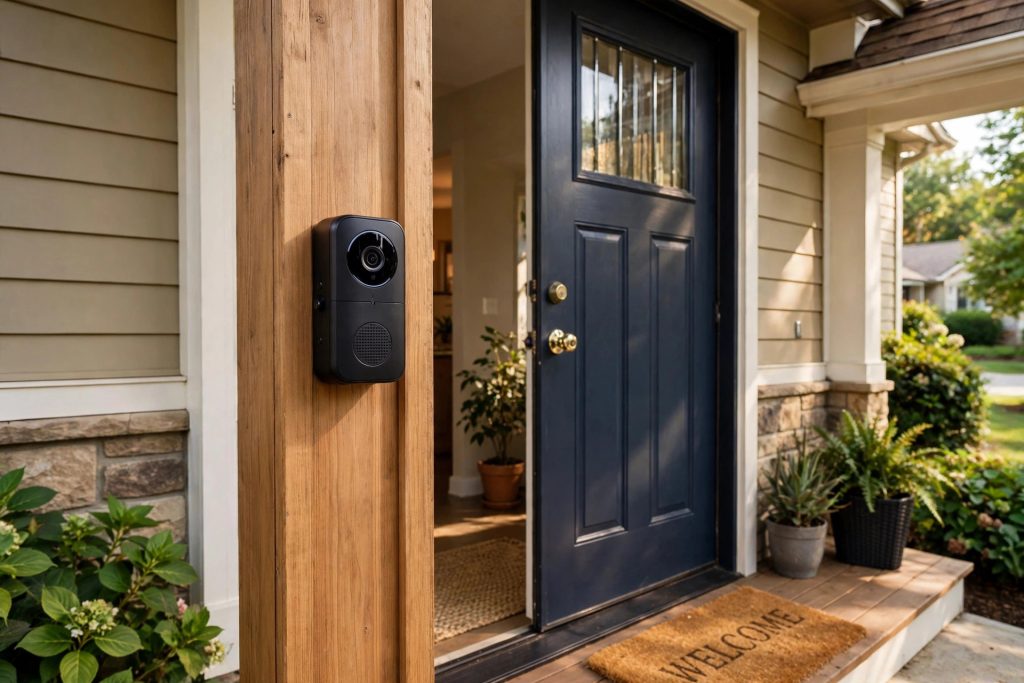
Many homeowners find that how to keep smart doorbell battery warm in winter is easier than they expected once they know the basics.
Lithium batteries rely on chemical reactions, and cold slows those reactions down. The battery holds less usable charge and delivers it poorly. Ring's own support material puts numbers on it: around 36 degrees the battery holds a charge less effectively, at 32 degrees it may not charge at all even when hardwired, and near minus 5 it can stop working until it warms up. The ring.com battery guide covers the charging side of this, and the bestbuy.com Q and A with Ring repeats the same temperature thresholds.
Google's Nest doorbell behaves the same way. Between minus 4 and 32 degrees the battery can still run the doorbell but it will not charge, and it drains faster than usual. The key lesson from both makers: never charge a frozen battery. Bring the doorbell inside, let it reach room temperature, then charge it. Charging a cold battery can damage it permanently.
The techlicious.com guide stresses this point and adds the settings that cut drain, which we cover below.
Cut the Biggest Battery Drains First
Many homeowners find that how to keep smart doorbell battery warm in winter is easier than they expected once they know the basics.
The key to how to keep smart doorbell battery warm in winter is choosing the right approach for your space and budget.
Before you buy anything, change the settings that eat the battery. Cold already shortens your runtime. Do not waste what is left on features you do not need in winter.
Lower motion sensitivity. Every motion event wakes the doorbell, records video, and sends an alert. Fewer events means a longer-lived battery. Open the app, go to motion settings, and slide sensitivity down until you get about five to fifteen alerts a day. The coolblue.be tips suggest the same range and warn that below freezing you should keep alerts under ten a day.
Narrow the motion zones. Draw the detection zone tight around your walkway and porch. Exclude the street, the neighbor's yard, and anywhere cars or pedestrians pass. The zdnet.com guide lists zone narrowing as one of the top winter moves, along with letting the battery warm up before charging.
Turn off power-hungry extras. Live view, HDR video, pre-roll recording, and snapshot capture all sip battery all day. Turn off what you do not need until spring. Shorten video clip lengths too. A twenty-second clip costs far less than a sixty-second one.
Fix a weak Wi-Fi signal. A doorbell that keeps losing its connection works overtime reconnecting, and that burns battery fast. Check the signal strength in the app. If it is weak, move a mesh node closer to the front of the house or add an extender. The hellotech.com guide lists weak Wi-Fi alongside cold weather and too many motion events as the big three battery killers.
If your signal is the problem, the plan in smart home Wi-Fi network setup helps you fix the dead zone at the front door.
Keep the Doorbell Itself Warmer
The key to how to keep smart doorbell battery warm in winter is choosing the right approach for your space and budget.
With a little planning, how to keep smart doorbell battery warm in winter can fit even a busy schedule.
You cannot heat the outdoors, but small changes in placement and shelter add up.
Mount it in the most sheltered spot that still sees the door. A spot under a porch overhang stays a few degrees warmer than an exposed wall, and it blocks wind. Wind strips heat from the doorbell faster than still air. If your doorbell hangs on an open wall getting blasted by winter wind, moving it a few feet under cover helps.
Face it away from the worst weather. A north-facing wall in most of the country takes the brunt of winter wind. An east or south facing mount gets a little sun, and even weak winter sun warms the case a degree or two.
Use an insulated cover or silicone skin. Several makers sell silicone covers for popular doorbells. They do not heat the battery, but they slow heat loss, like a jacket. Make sure the cover does not block the motion sensor, the microphone, or the button.
Hardwire if you can. A wired doorbell draws from house power, so the battery is a backup instead of the whole plan. But note the catch: below freezing, even a hardwired doorbell may not charge its battery. Wiring helps a lot in cool weather and less in deep cold. Check that your transformer is strong enough with the best doorbell transformer for smart doorbells guide.
The smarthometekkie.com guide notes that hardwired setups give more consistent power in cold weather, but the transformer itself deserves a check if problems persist.
The Winter Charging Routine
With a little planning, how to keep smart doorbell battery warm in winter can fit even a busy schedule.
Before you start, it helps to understand how how to keep smart doorbell battery warm in winter works in real homes.
In cold climates, charging becomes a routine, not an occasional chore. Do it right and the battery lasts longer.
Bring the whole doorbell inside to charge. Do not try to charge it on the wall in freezing weather. Pop it off the mount, bring it in, and let it sit until it reaches room temperature. Then plug it in. The digitaltrends.com cold weather guide recommends exactly this, and suggests keeping a spare battery charged and ready so the door is never unprotected.
Charge to full before it goes back out. A battery at full charge handles cold better and gives you the most runtime per cycle. In deep winter, check the battery level every morning. It can drop fast overnight, and a dead doorbell protects nothing.
Keep a second battery. For doorbells with removable batteries, a spare is the best winter accessory. Swap in the fresh one, bring the spent one inside to warm up and charge. The doorbell is only offline for a minute. The diysmarthomesolutions.com guide covers the full battery-life checklist, including motion zones and scheduling, that makes each charge last.
A small solar charger panel is another option for doorbells that support one. It mounts nearby in a sunny spot and trickles power into the battery all day. In winter the short days and low sun angle limit what it can do, so treat it as a helper that stretches the time between charges, not as a replacement for charging indoors. Keep the panel clear of snow and angled toward the strongest sun your porch gets.
If you are tired of the whole ritual, this is the season to consider a wired model. The best video doorbells without a subscription and best wireless doorbell cameras roundups show both wired and battery options side by side.
Watch for Winter-Specific Glitches
Before you start, it helps to understand how how to keep smart doorbell battery warm in winter works in real homes.
A good plan for how to keep smart doorbell battery warm in winter saves time, money, and frustration.
Cold causes odd behavior beyond short battery life. Hardwired chimes can buzz or chirp on their own when temperatures swing fast, because the metal contacts expand and contract. If your indoor chime starts making noise with no one at the door, check the chime wiring for loose connections first. The problem often clears when the temperature steadies.
Ice on the lens is another one. A thin sheet of ice over the camera turns night vision into a white blur. Wipe the lens with a soft dry cloth when you bring the doorbell in to charge. Do not pour hot water on it. The sudden temperature change can crack the lens or force water into the seals.
Also keep the motion sensor clear of snow buildup on the ledge below the doorbell. A pile of snow in the sensor's view can trigger constant alerts as it shifts and melts.
Plan Ahead Before the First Freeze
A good plan for how to keep smart doorbell battery warm in winter saves time, money, and frustration.
For most people, how to keep smart doorbell battery warm in winter comes down to a few smart choices.
Do this maintenance in the fall and winter gets easier:
- Update the doorbell firmware. Makers ship battery and cold-weather fixes in updates.
- Tighten motion zones and lower sensitivity before the cold arrives.
- Test the Wi-Fi signal at the door and fix weak spots.
- Buy the spare battery now, not in the middle of a cold snap.
- Clean the lens and the charging contacts.
If someone in the house has trouble hearing the chime, winter is also a good time to add a chime extender indoors where it is warm. The smart doorbell chime extenders guide and smart doorbells for hearing-impaired homes cover the options. And for the bigger picture, how to secure smart home devices keeps the whole setup safe while you fuss with the battery. With these steps, how to keep smart doorbell battery warm in winter stays simple and safe.
References
For most people, how to keep smart doorbell battery warm in winter comes down to a few smart choices.
- Techlicious. (n.d.). Why your video doorbell may stop working in the cold and how to fix it. https://www.techlicious.com/tip/why-your-video-doorbell-may-stop-working-in-the-cold-and-how-to-fix-it/
- Coolblue. (n.d.). 5 tips to extend the battery life of your smart doorbell. https://www.coolblue.be/en/advice/tips-to-extend-the-battery-life-of-your-smart-doorbell.html
- ZDNet. (n.d.). How to extend your smart doorbell's battery life in cold weather. https://www.zdnet.com/home-and-office/smart-home/how-to-extend-your-smart-doorbells-battery-life-in-cold-weather/
- Ring. (n.d.). Troubleshooting battery performance. https://ring.com/us/en/support/articles/9iatk/Reduce-Battery-Aging-with-Optimized-Battery-Charging
- HelloTech. (n.d.). How to make your Ring video doorbell battery last longer. https://www.hellotech.com/blog/how-to-make-ring-video-doorbell-battery-last-longer
- SmartHomeTekkie. (n.d.). Does cold weather affect the Ring video doorbell? https://smarthometekkie.com/does-cold-weather-affect-the-ring-video-doorbell/
- Digital Trends. (n.d.). How to improve Ring video doorbell performance in cold winter weather. https://www.digitaltrends.com/home/ring-video-doorbell-cold-weather-battery-chime/
- DIY Smart Home Solutions. (n.d.). How long does Ring video doorbell's battery last? Why does it drain quickly? https://www.diysmarthomesolutions.com/ring-video-doorbell-battery-life-level-power-strength-charge-drain/
- Best Buy. (n.d.). Ring battery doorbell cold weather Q and A. https://www.bestbuy.com/site/questions/ring-battery-doorbell-smart-wifi-video-doorbell-battery-powered-with-head-to-toe-video-live-view-and-two-way-talk-venetian-bronze/6589894/question/73f388b9-b7c0-30cd-bd9f-7fe6a9bdbfc2
If you are new to how to keep smart doorbell battery warm in winter, start with the simplest option and build from there.
When it comes to how to keep smart doorbell battery warm in winter, getting the details right makes all the difference.
Was this guide helpful?

About My Garden US
The My Garden US editorial team writes practical, in-depth home and garden guides for American homeowners — tested advice, no fluff.
You May Also Like
Keyless Entry Door Lock Reviews 2026 USA: A Plain Guide
August 6, 2026 20 views
Best Doorbell Transformer for Smart Doorbell: A Plain Buyer's Guide
June 12, 2026 19 views
Home Assistant vs SmartThings Comparison USA: Which Smart Home Platform Wins
April 30, 2026 20 views