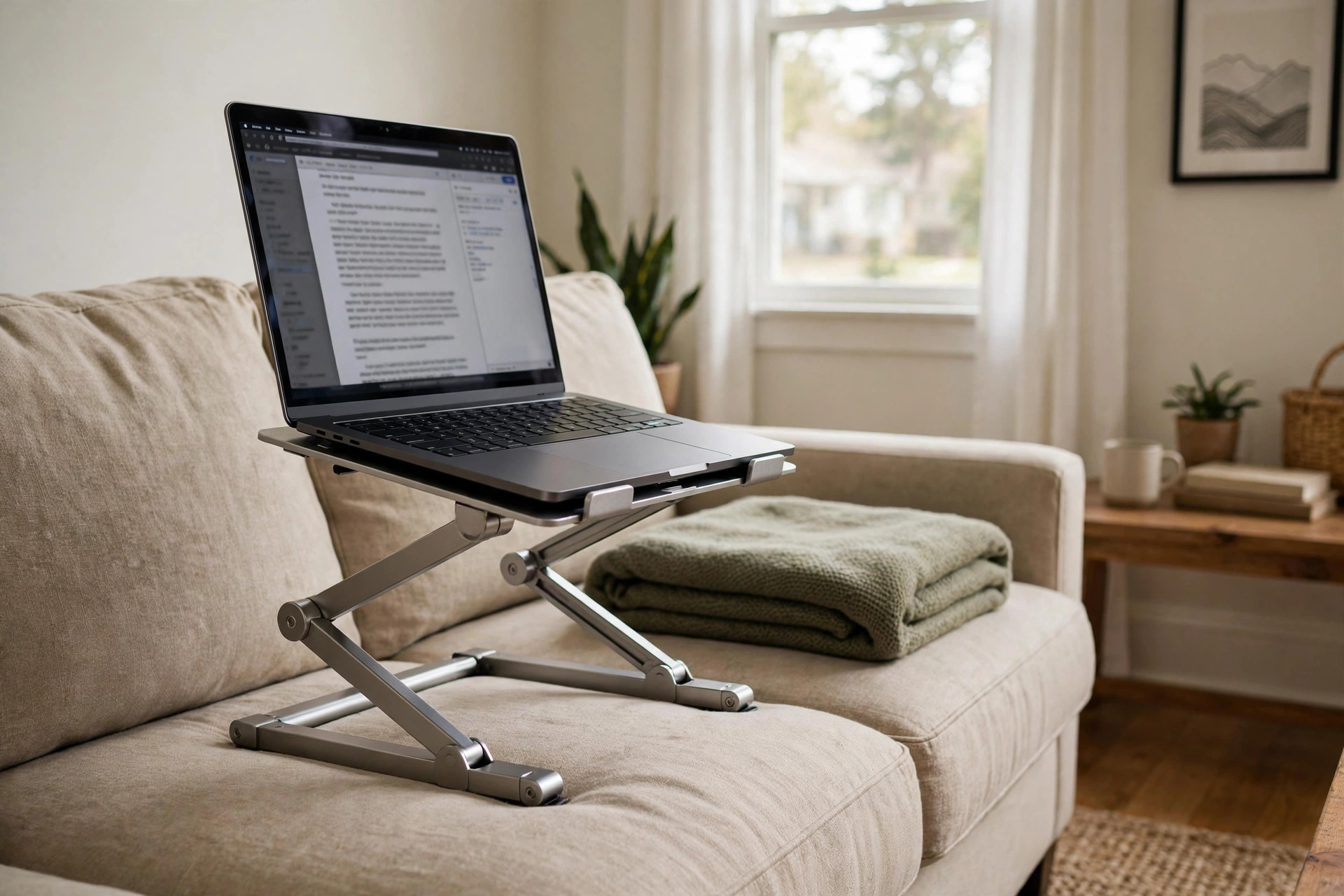

An ergonomic laptop stand for couch and bed is a simple tool that solves a real problem. Millions of people now work from home. They answer email from the couch. They finish reports in bed. The laptop sits low on their lap. The neck bends down. The back rounds. After an hour the pain starts. A stand lifts the screen and changes the whole picture.
Why It Matters
A laptop is built for travel, not for comfort. The screen and the keyboard are fixed together. When the keyboard is at a good height for your hands, the screen is far too low for your eyes. When the screen is at eye level, the keyboard is too high. You cannot win both ways. So you compromise, and your neck pays the price.
Doctors call this the forward head posture. For every inch your head moves forward, the muscles of your neck carry more weight. A bent neck for two hours a day can lead to pain that lasts for weeks. An ergonomic laptop stand for couch and bed breaks this pattern. It raises the screen toward eye level while you sit back against the cushions.
Heat is the second problem. A laptop on your lap blocks its own cooling vents. The machine runs hot. The fan spins loud. The battery drains faster. A stand with an open design lets air move under the machine. Many people notice their laptop runs quieter the same day they start using one. Review sites that test office gear have written about this airflow benefit for years. See The New York Times Wirecutter for their long-running laptop stand testing notes.
Comfort also means work gets done better. When you can sit upright on the couch instead of hunched over a low laptop, you type longer without tiring. Students writing papers in dorm beds report the same gain. The stand turns a soft, bad-work seat into a fair one.
What to Look For When You Choose: Ergonomic Laptop Stand for Couch and Bed
Start with height. The best stands let you change the height in small steps. On a couch you sit low and deep. In bed you sit higher against pillows. A fixed stand cannot fit both seats. Look for a model with at least four or five height settings. The top of the screen should sit near your eye line when you sit straight.
Next, check the tilt. A slight tilt back helps you see the screen without glare. Some stands tilt forward too, which suits tablet use. Metal friction joints tend to hold their setting better than plastic click joints over time.
Weight matters a lot for couch and bed use. A heavy stand will press into a mattress or a soft cushion. A very light stand may slide on smooth sheets. The middle ground works best: a stand of about one to two pounds with rubber feet. Rubber feet grip fabric and keep the stand from walking across the bed.
Size must match your laptop. Most stands fit machines from 11 to 17 inches. Measure your laptop before you order. A stand that is too narrow will let a big laptop rock side to side. A lip or stopper at the front edge keeps the laptop from sliding off when you shift your legs.
Also look at how flat it folds. If you plan to move between the couch, the bed, and the kitchen table, a stand that folds flat will slide into a bag or a drawer. Some models fold to the size of a thin book. Good design notes from IKEA often stress that small homes need tools that store flat.
A good pairing tip: an external keyboard and mouse turn the setup into a true workstation. You can find ideas for couch-friendly keyboards in our guide to best task lighting for home office desk setup.
Types and Options
Makers sell several kinds of stands for soft seating. Each has strengths.
Adjustable X-frame stands. Two metal bars cross in an X and lock at different angles. They are cheap, light, and fold flat. They suit smaller laptops best. On a soft bed they can sink a little, so place a tray or a large book under them.
Tray-style stands with cushions. A tray has a padded bottom that rests on your lap. The top holds the laptop at a fixed or slightly tilted angle. These feel the most stable on a couch. The cushion spreads the weight across your legs. The weakness is height: most cannot rise very high.
Over-bed table stands. A small table on legs spans your body while you lie in bed. The laptop sits on top at a fair height. These cost more and store less easily, but they double as breakfast trays and reading tables. Wayfair carries a wide range of these over-bed tables in many finishes.
Laptop risers with vent holes. Simple raised platforms with a honeycomb of holes. They do not adjust, but they cool well and look clean on a side table next to the couch. Pair one with a separate ergonomic footrest for under desk at home if your feet do not reach the floor.
Gooseneck clamp stands. A flexible arm clamps to a bed frame or a couch side table and holds the laptop in the air. These are popular with readers and with people who watch films in bed. They are not the best choice for heavy typing, since the screen may wobble as you type.
For readers who split time between a real desk and the sofa, our article on best laptop stand for standing desk posture covers taller desk options.
Cost and Price
Prices run in three bands. Simple folding stands cost about ten to twenty-five dollars. Mid-range stands with many height settings and solid metal frames cost about twenty-five to sixty dollars. Premium over-bed tables and clamp arms cost about sixty to one hundred fifty dollars.
Price does not always mean comfort. A twenty-dollar X-frame can fit a person as well as a sixty-dollar model if the height settings suit their seat. What the extra money buys is usually steadier joints, a wider tray, and a nicer finish. Tech reviewers at PCMag often point out that build quality shows up in how long a stand keeps its settings, not in how it looks on day one.
Set a budget before you shop. Then read real buyer reviews about the exact seat you use: couch, bed, or recliner. A stand that earns praise on a firm desk may fail on a soft mattress. If you work from a couch daily, spend a little more for stability. If the stand is only for weekend movie watching, the basic band is fine.
Watch for fake discounts. Some sellers raise the listed price and then show a big sale. Compare the price against two or three other stores before you buy. Home office ergonomics research from Herman Miller reminds buyers that the best tool is the one you will actually use every day, so fit matters more than brand name.
Care and Upkeep
A laptop stand needs little care, but small habits keep it working for years. Wipe the tray with a damp cloth each month to remove dust and crumbs. Dust under the laptop builds up fast on a bed, where lint is everywhere.
Check the joints every few months. Tighten any screws that have loosened. A wobbly joint will drop the laptop mid-session. If your stand uses click locks, make sure each click seats fully before you let go of the machine.
Keep the rubber feet clean. Once the feet lose their grip, the stand slides on sheets. A quick wash with mild soap restores most of them. If a foot tears off, many makers sell spare foot kits, or you can buy adhesive rubber pads at a hardware store.
Store the stand flat when not in use. Do not leave it folded under heavy books for weeks, or the hinges may bend. A drawer or a shelf keeps it safe. Wooden models like those featured at Steelcase should stay dry, since water can warp the tray over time.
If you use a cushion-style tray, air the cushion out from time to time. Wash removable covers per the maker instructions. A fresh cover makes the tray feel new again.
Safety
Safety sounds like a big word for a small tool, but a few rules matter. First, never block the laptop vents. The whole point of a stand is airflow. Keep the vent holes open and do not drape a blanket over the machine.
Second, watch the cords. On a couch, charging cables run across cushions where feet and pets travel. Route the cable behind the stand and keep it short. A laptop pulled off a stand by a caught cord can break its screen. Cable safety is a common topic at the UPLIFT Desk learning center.
Third, mind the weight limit. Most stands carry eight to ten pounds. A big gaming laptop with a power brick may exceed that. Check the rating on the box. An overloaded stand can collapse and drop the machine.
Fourth, think about posture limits. A stand helps, but it does not make the couch a perfect office. Take breaks. Stand up and walk every hour. If your neck or back hurts for more than a few days, see a doctor rather than buying another gadget.
Fifth, keep stands away from small children and pets when loaded. A curious cat can knock a raised laptop to the floor in a second.
Frequently Asked Questions
Is an ergonomic laptop stand for couch and bed really better than just using a pillow? Yes. A pillow raises the laptop a little, but it traps heat and gives no stable tilt. A stand lifts the screen higher, keeps the vents open, and holds a steady angle while you move. Pillows also compress over the hour, so the height changes while you work.
What height should the stand reach? Aim for the top third of the screen to sit at or just below your eye level when you sit straight. For most adults on a couch, that means a rise of about six to ten inches above the seat surface. Adjustable models let you fine-tune this. If you cannot reach eye level, get as close as you can; even four inches of lift helps.
Can I type on the laptop while it sits on the stand? You can, but it is not the best setup. Typing on a raised keyboard forces your wrists into an awkward angle. The better plan is an external keyboard and mouse on your lap or on a side table, with the laptop serving only as a screen. Many setup guides at The Spruce show this two-part arrangement.
Will a stand keep my laptop cooler? In most cases, yes. Raising the laptop opens the bottom vents to moving air. Users often report lower fan noise within the first week. A stand will not fix a clogged fan or dried thermal paste, though. If the machine still runs hot on the stand, have the cooling system cleaned.
Are these stands good for tablets too? Many work well with tablets, especially models with a front lip and a wide tilt range. Some stands are sold as laptop and tablet stands in one. Check the minimum width: a narrow X-frame may let a small tablet slip through.
How much should a first-time buyer spend? About twenty-five to forty dollars buys a solid adjustable metal stand that works on both couch and bed. Spend less if you only need it now and then. Spend more if you need an over-bed table or a clamp arm for daily use.
A Short Final Word
An ergonomic laptop stand for couch and bed is one of the smallest upgrades a home worker can make. It costs less than a dinner out. It sets up in a minute. And it changes how your neck, back, and laptop feel at the end of the day. Pick a model that adjusts to both your couch and your bed, keep an external keyboard nearby, and give your body the break it has earned.
References
Herman Miller. (n.d.). Office furniture and ergonomic seating. https://www.hermanmiller.com IKEA. (n.d.). Home furnishings. https://www.ikea.com PCMag. (n.d.). Technology product reviews. https://www.pcmag.com Steelcase. (n.d.). Office furniture and workplace research. https://www.steelcase.com The Spruce. (n.d.). Home and garden advice. https://www.thespruce.com UPLIFT Desk. (n.d.). Standing desks and ergonomic office furniture. https://www.uplift-desk.com Wayfair. (n.d.). Furniture and home goods. https://www.wayfair.com Wirecutter. (n.d.). Product reviews from The New York Times. https://www.nytimes.com/wirecutter
Was this guide helpful?

About Jennifer Lee
The My Garden US editorial team writes practical, in-depth home and garden guides for American homeowners — tested advice, no fluff.
You May Also Like

Home Office Monitor Riser with Drawer Storage: A Complete Buyer Guide
April 2, 2026 0 views
A Home Office Bulletin Board with Wooden Frame: How to Choose and Use One
March 17, 2026 0 views
Best Home Office Desk for Left Handed Users: A Practical Buying Guide
June 23, 2026 0 views