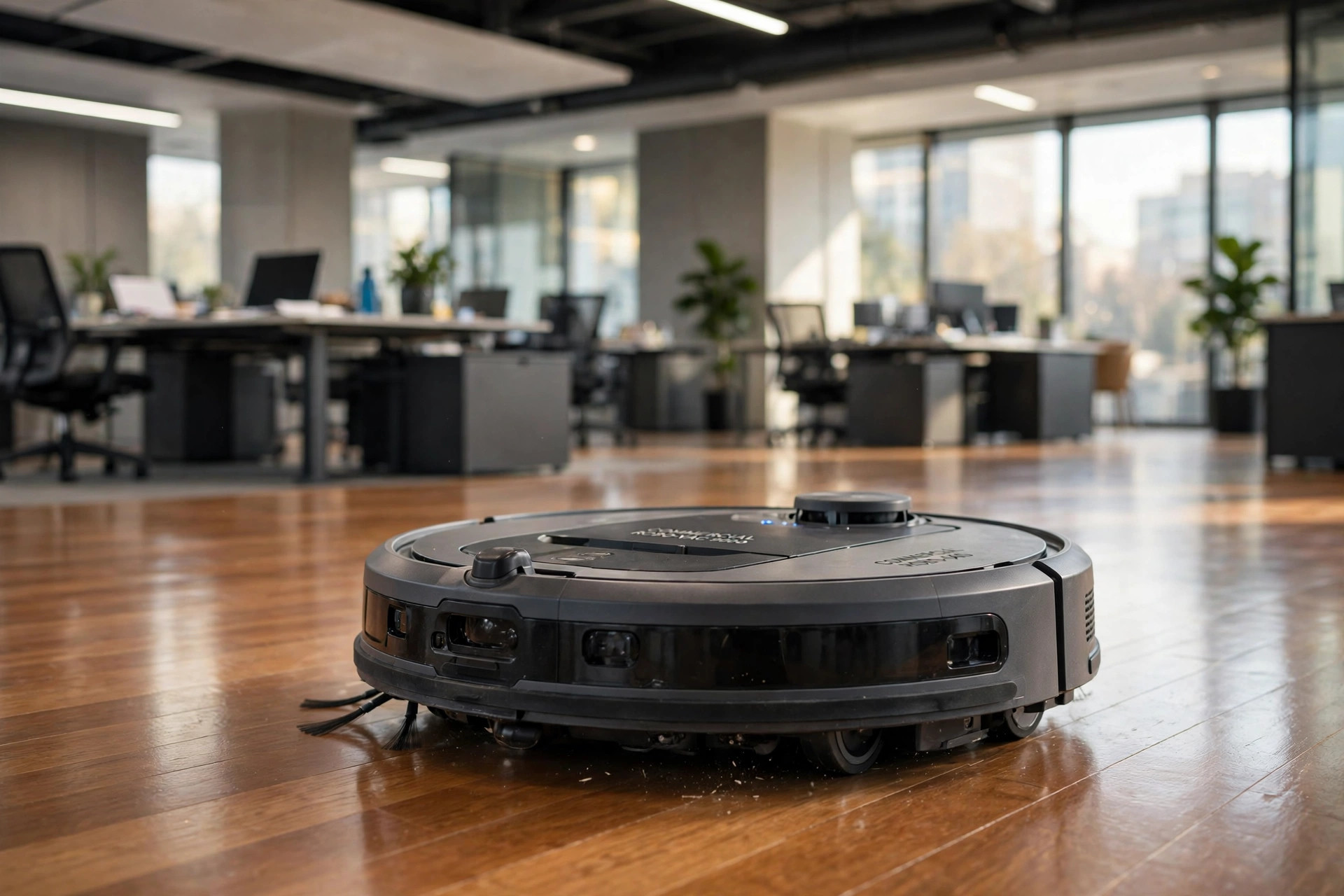

A commercial grade robot vacuum cleaners buying guide is the right place to start if you need to clean a large space with little labor. These machines are not the small round discs sold for living rooms. They are heavy-duty units built for offices, shops, schools, churches, and warehouses. They run longer, carry more dust, and work on a schedule with no breaks.
This guide explains what makes them different from home models, what features matter most, how much they cost, and how to keep them running. It also answers the questions buyers ask most often.
Why Commercial Grade Matters
A home robot vacuum runs for one hour and covers a few rooms. A commercial unit must do far more. It may need to clean five thousand square feet every night. It must deal with paper clips, sand, tracked-in mud, and crumbs from a lunch room. The motor, battery, and dust bin are built for that kind of work.
Commercial machines also run more hours in a day. A home unit may run three times a week. A commercial unit may run two full shifts, six days a week. That pace wears out cheap parts fast. Commercial grade parts are built to last for years under daily use.
There is a safety point too. Large buildings have strict rules about dust and air quality. A commercial machine should trap fine dust instead of blowing it back into the room. This matters in clinics, schools, and food shops. A good unit will state its filter grade right on the box.
If you are comparing cleaning tools, you may also want to look at our wet dry shop vacuums reviews and buying guide for heavy-duty manual options that pair well with a robot unit.
What to Look For: Commercial Grade Robot Vacuum Cleaners Buying Guide
Suction Power and Brush Design
Suction is measured in Pascals (Pa). Home models sit near 2,000 to 3,000 Pa. Commercial grade units often reach 5,000 Pa or more. More suction pulls up sand and grit from low carpet and hard floors.
The brush roll matters just as much. Look for a brush that resists hair wrap. Offices have long hair from many people. A tangled brush stops cleaning and needs hand work to fix. Some units use rubber rollers instead of bristles. Rubber resists tangles and is easy to wipe clean.
Battery Life and Coverage
A commercial robot must clean for at least three to four hours on one charge. Check the listed run time and the area it covers per charge. Also check the recharge time. A unit that needs six hours to recharge cannot do two shifts in a day.
Top models find their dock, recharge, and resume where they left off. This feature is a must for big floors. Without it, you must move the machine by hand, which defeats the point of a robot.
Dust Bin Capacity
A small bin fills in minutes in a busy lobby. Look for a bin of at least two liters. Many commercial units come with a self-empty dock. The robot returns to the dock and empties its bin into a large bag. Some docks hold thirty days of dust. This cuts labor to almost nothing.
Mapping and Navigation
Old robots bump around at random. Commercial units should not work that way. Look for LiDAR mapping or camera mapping. LiDAR builds a floor plan on the first run. You can then set no-go zones, such as a server closet or a display rack.
Smart maps also let you set zones by day. You can tell the machine to clean the lobby at night and the hallways in the early morning. Test reports on Consumer Reports often compare how well different robots map complex floor plans, which can help you judge this feature.
Filtration
Dust from a big building should stay inside the machine. Look for a HEPA-grade filter or a sealed filter system. This traps tiny particles that can irritate lungs. The EPA offers plain facts on indoor air quality and why good filtration matters in workplaces.
Types and Options
Mid-Size Office Robots
These are the most common type. They look like larger home robots but with bigger batteries and bins. They suit offices, dental clinics, and small retail stores up to about 3,000 square feet. They are the easiest to set up and the cheapest to buy.
Wide-Path Industrial Robots
These machines clean paths up to 30 inches wide in one pass. They suit warehouses, big-box stores, and airport terminals. They often cost several times more than office robots. Some come with scrubbing decks as well as vacuum motors.
Scrubber-Vacuum Combos
Some floors need wet cleaning too. A combo unit vacuums and scrubs in one pass. These suit grocery stores, gyms, and hospital halls. They cost more and need more upkeep, but they can replace two machines.
Reviews on sites such as The Spruce and Bob Vila walk through how different floor types respond to vacuum and scrubber machines, which can help you match the machine to your floor.
Cost and Price
Commercial grade robot vacuums cost far more than home models. Expect these rough ranges:
– Mid-size office units: $1,500 to $4,000 – Large-area units with self-empty docks: $4,000 to $10,000 – Industrial wide-path units: $10,000 to $40,000 or more
The machine is only part of the cost. Plan for filter packs, brush rolls, side brushes, and dust bags for the dock. Ask the maker for the yearly parts cost before you buy. A cheap machine with pricey parts can cost more over five years than a dear machine with cheap parts.
Some sellers offer lease plans. A lease spreads the cost over months and may include service. For a school or a church with a tight budget, a lease can be the right move. For a business with cash on hand, buying outright is often cheaper in the long run.
Price guides on Home Depot and buying advice from Family Handyman can give you a feel for current market prices before you talk to a dealer.
Care and Upkeep
A commercial robot needs steady care. Set a weekly checklist and follow it:
– Empty or check the dust bag in the dock each week. – Pull hair and thread off the brush roll. – Wipe the LiDAR dome and sensors with a soft cloth. – Rinse or tap out the filter as the manual directs. – Check the wheels for string and tape.
Filters should be replaced on schedule. A clogged filter cuts suction and strains the motor. Keep one spare filter set on the shelf so a change takes minutes, not days.
Battery care matters too. Do not leave the unit off its dock for weeks. Keep it charged. Most makers say the battery lasts two to four years with daily use. Budget for a replacement.
Guides on This Old House stress that steady small care beats rare big repairs, and that rule holds for robot machines as well as for homes.
Safety
A robot that roams a building at night must be safe. Look for these points:
– Cliff sensors. The unit should stop at stairs and loading dock edges. – Obstacle detection. It should slow down near people, pets, and displays. – Cord management. Cords on the floor can snag. Clear them before each run or set no-go zones. – Lockout features. Some units let you lock the controls so no one can change the schedule by mistake. – Data privacy. Mapping robots store floor plans. Check the maker’s privacy terms if the building has secure areas.
If the robot will run while people are present, choose a quiet model and run it during low-traffic hours. Mark the cleaning zone with a simple sign so no one trips over the machine.
The Good Housekeeping home and product teams often note safety marks and certifications to look for when a device runs on its own.
Common Mistakes to Avoid
Many buyers pick the wrong machine on their first try. Here are the mistakes to watch for.
Buying a Home Model for a Business
The most common error is to buy a home robot and hope it can handle a business. It cannot. The small battery will die before half the floor is done. The bin will fill too fast. The warranty may also be void if you use a home unit in a shop or office. Always buy a unit rated for commercial use.
Ignoring the Floor Plan
Some buildings have split levels, narrow aisles, or heavy furniture. A robot that cannot map these areas will waste time or get stuck. Walk the floor before you buy. Note the door widths, thresholds, and cords. Share this list with the seller and ask if the unit can handle it.
Skipping a Trial Run
Good sellers offer a demo or a trial period. Take it. Run the machine for a full week in your real space. Check how much dust it picks up, how often it gets stuck, and how loud it is. A trial shows problems that a sales page hides.
Forgetting the Parts Budget
A robot is only as good as its upkeep. Many buyers forget to price filters, brushes, and bags. A unit with rare parts can sit dead for weeks while you wait for shipping. Pick a brand with parts you can order in the United States with fast delivery.
The Family Handyman buying guides remind readers to check parts prices before purchase, a habit that saves money on any machine that runs daily.
FAQ
How is a commercial grade robot vacuum different from a home model?
It is built for bigger areas and longer hours. It has a larger battery, a bigger dust bin, stronger suction, and tougher parts. It also maps large floor plans and can recharge and resume cleaning on its own.
What size building suits a commercial robot vacuum?
A mid-size unit handles 2,000 to 5,000 square feet. For larger spaces, you may need a wide-path industrial unit or more than one robot. Measure your floor area and check the coverage figure on each model.
Do these machines work on carpet?
Yes. Most commercial units clean both hard floors and low-pile commercial carpet. Check the suction rating and brush type. Very thick pile carpet is hard for any robot, so test one before you commit.
How long does the battery last?
Most commercial units run three to five hours per charge. The dock recharges them in two to four hours. Units with resume-cleaning finish the job after a recharge without help.
Are they hard to set up?
Setup is usually simple. Place the dock, charge the unit, and run one mapping pass. Then you can set schedules and no-go zones in the app. A mid-size office can be mapped in under an hour.
What about upkeep costs?
Plan for filters, brushes, and dust bags each year. For a mid-size unit, yearly parts often run $100 to $300. Ask the maker for a parts price list before you buy, and keep spares on hand.
Tech reviews from CNET and PCMag break down battery and navigation test results in plain terms, which can help you compare models side by side.
For readers comparing vacuum types, our hepa vacuum cleaners price comparison usa covers filtration-focused models, and our upholstery cleaning machines reviews and buying guide covers fabric and furniture care.
A Final Word
A commercial grade robot vacuum can cut labor hours and keep floors clean every day. The key is to match the machine to the space. Measure your floors, note the dirt type, and set a real budget for parts and care. Do not buy on price alone. A well-chosen machine will pay for itself in saved labor within its first year or two.
References
Bob Vila. (n.d.). Home improvement advice. https://www.bobvila.com CNET. (n.d.). Technology news and reviews. https://www.cnet.com Consumer Reports. (n.d.). Product reviews and ratings. https://www.consumerreports.org Family Handyman. (n.d.). DIY home repair and maintenance. https://www.familyhandyman.com Good Housekeeping. (n.d.). Product reviews and home advice. https://www.goodhousekeeping.com PCMag. (n.d.). Technology product reviews. https://www.pcmag.com The Home Depot. (n.d.). Home improvement products. https://www.homedepot.com The Spruce. (n.d.). Home and garden advice. https://www.thespruce.com This Old House. (n.d.). Home renovation guidance. https://www.thisoldhouse.com U.S. Environmental Protection Agency. (n.d.). Protecting human health and the environment. https://www.epa.gov
Was this guide helpful?

About Emily Rodriguez
The My Garden US editorial team writes practical, in-depth home and garden guides for American homeowners — tested advice, no fluff.
You May Also Like
Top Rated Same Day Appliance Repair Services Reviews
May 14, 2026 0 views
Best All Purpose Cleaning Caddies for USA Homes
August 10, 2026 0 views
Dehumidifiers for Basements: A Price Comparison USA Guide
September 17, 2026 0 views