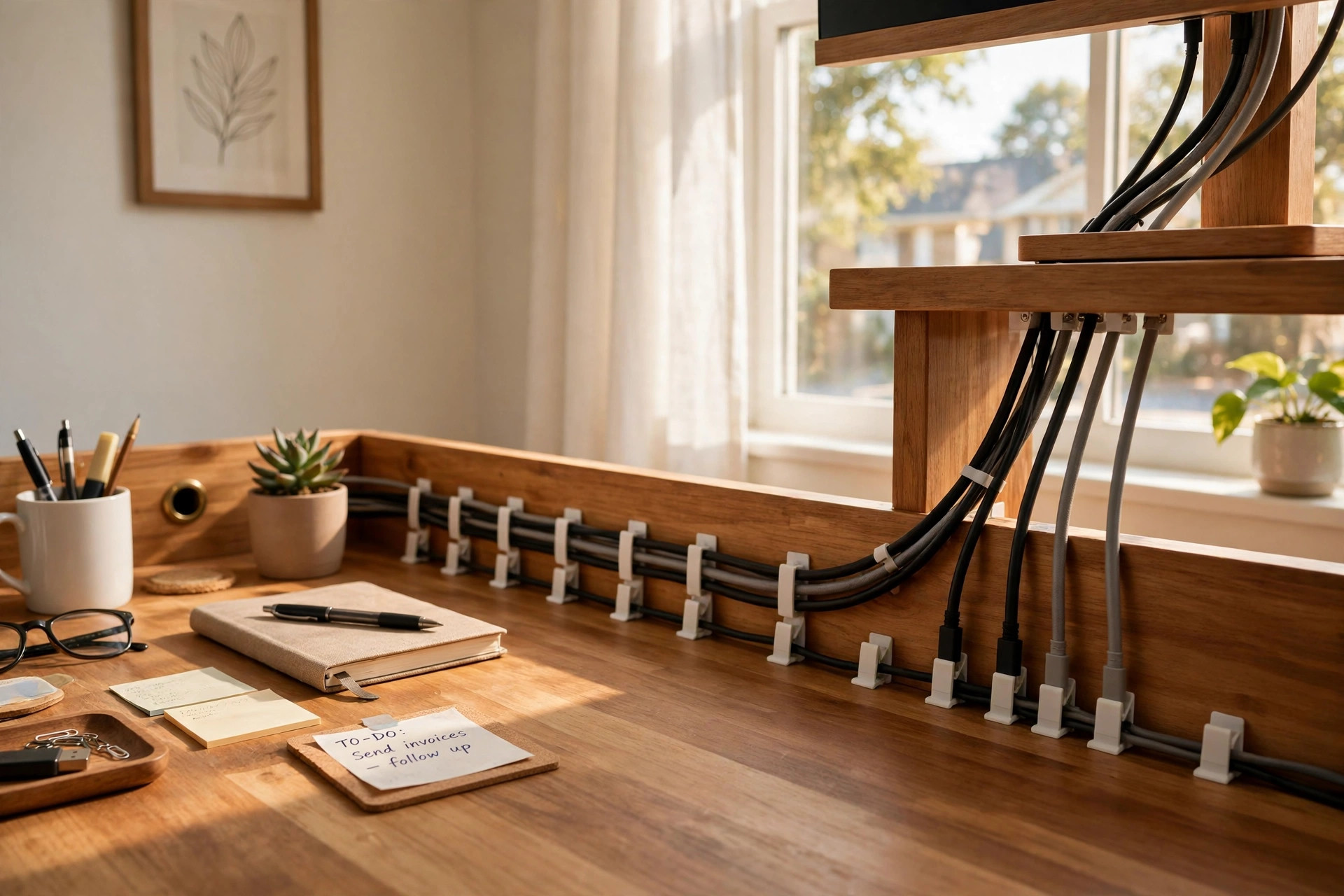

A clean desk makes work easier. Few things spoil a neat desk faster than a tangle of loose cords. The best cable clips for desk wire management turn that mess into order. They are small, cheap, and simple to use. A monitor cord, a phone charger, a lamp wire, and a printer cable all run along neat lines. Nothing hangs. Nothing snags. The desk looks calm. The mind follows.
Why Cable Clutter Matters
Loose wires are more than an eyesore. They fall behind the desk. They pull free from sockets. They wrap around chair legs. When you need to unplug one cord, you pull three. Time is lost. Tempers rise.
Dust settles on a pile of cables. A dust-covered bundle is hard to clean. Heat builds up in tight tangles. Most chargers run warm. Trapped heat shortens the life of adapters and cords. Neat routing lets air move. It keeps plugs seated. It protects the small ends of charging cables, which break first.
A tidy cable run also protects people. Feet catch on wires that drape to the floor. A chair rolls over them. Pets chew them. The best cable clips for desk wire management keep every wire off the floor and along a fixed path. The result is a safer room and a longer life for your gear.
Offices have learned this lesson for years. Guides on workspace ergonomics from makers like Steelcase note that a well-planned desk layout cuts strain and clutter. Home workers can use the same idea on a small scale. A few clips and ten minutes of work can change how a desk feels.
What to Look for When You Choose: Best Cable Clips for Desk Wire Management
Not all clips do the same job. A good choice starts with fit. Look at the wires you need to tame.
Grip size. Some clips hold one thin cord. Others hold a bunch of thick ones. Check the channel width. Phone cords are slim. Monitor power cords are thick. A clip that is too small will pop open. One that is too big lets thin cords slip out.
Mounting style. Most clips stick to the desk with adhesive. Some clamp to the edge. Some screw into wood. Adhesive pads are fast and need no tools. Edge clamps work on desks with a clear lip. Screws hold best on heavy bundles but leave marks.
Cable count. Decide how many lines each clip will hold. Single-slot clips guide one wire at a time. Multi-slot clips hold three, five, or more. For a main run along the back of a desk, a multi-slot clip keeps cords in a neat row.
Surface match. Adhesive clips stick well to smooth tops: glass, metal, sealed wood. Rough or painted surfaces may need a stronger pad or a screw. Read the maker’s notes before you buy.
Material. Silicone is soft and grips cords without biting. Plastic is firm and holds shape. Both work. Silicone is kinder to thin cables. Hard plastic suits thick power cords.
Reusability. Some clips open and close. You can add or move a cord later. Others are one-shot mounts. If your setup changes often, pick clips you can reuse.
Review sites such as Wirecutter and PCMag test desk accessories side by side. Their comparison guides help you judge grip and adhesive quality before you spend money.
Types and Options
Cable clips come in a few basic forms. Each suits a different spot on the desk.
Adhesive single clips. These are the classic choice. A small pad sticks under the desk edge or on the back panel. One cord snaps in. Use several in a line to guide a cord from the socket to the device.
Multi-channel holders. These hold three to five cords side by side. Place one at the back edge of the desk where cords leave for the wall. Place another near the monitor stand. They keep the main runs in tidy rows.
Spring clips. Some clips open with a squeeze. They grip cords of different sizes. They work well for headphone cables and phone chargers that you move every day.
Magnetic clips. A few clips use magnets for metal desks or filing cabinets. They can be moved without leaving marks. They suit rented rooms where walls and desks must stay clean.
Under-desk rails. For big setups, clips pair with a rail or tray. An under desk cable management tray for clean setup holds power strips and adapters. Clips then guide each cord from the tray to its device.
Clip-and-wrap combos. Some kits mix clips with velcro straps or sleeves. The clips guide cords along edges. The straps bind spare length into tight loops. Together they hide slack completely.
Many home offices pair clips with other storage. A best cable management box for desk wires hides the power strip and bulky adapters. Clips then run thin cords from the box to each device. Retailers like IKEA and Wayfair sell both clips and boxes in one order, which keeps colors and styles matched.
Desks built for the purpose help too. A home office desk with cable management holes gives cords a clean path through the top. Clips finish the job by guiding each wire from the hole to its device. Makers of work desks such as Uplift Desk build trays and grommets into their tops. Herman Miller offers desk systems with cable routing built in.
How to Set Them Up
A little planning makes the job fast. Follow these steps.
1. Unplug and sort. Take every cord off the desk. Group cords by device: monitor, computer, lamp, charger, speaker. 2. Plan the path. Decide where each cord should run. Keep power cords on one side. Keep data cords on the other if you can. This cuts buzz in audio gear. 3. Clean the surface. Wipe the spot for each clip with a damp cloth. Let it dry. Adhesive needs a clean, dry surface to hold. 4. Stick the clips. Peel and press. Hold each clip for thirty seconds. Wait a few hours before loading heavy cords if the maker says so. 5. Route the cords. Start at the wall socket. Lay each cord through its clips toward the device. Leave a small loop of slack near each device so plugs do not pull tight. 6. Bind spare length. Roll extra cord into a loop. Tie it with a strap. Tuck the loop behind the desk or in a tray.
Work from the back of the desk forward. Test each device as you go. If a cord is too short for its path, move the clip closer. Do not stretch cords taut. Gentle curves last longer than sharp bends.
Cost and Price
Cable clips are one of the cheapest desk upgrades. Prices follow size and count.
– Small packs (10 to 20 clips): often two to five dollars. Fine for a simple laptop setup. – Medium packs (20 to 50 clips): often five to ten dollars. Enough for a full desktop with monitor, speakers, and lamp. – Large kits with straps and ties: often ten to twenty dollars. Good for gaming desks or work stations with many devices.
Brand names cost a little more. Store brands cost less and often work just as well. Adhesive quality matters more than the logo. A strong pad on a cheap clip beats a weak pad on a costly one.
Buy a few extra clips. They are small and easy to lose. Spares let you add a new device later without a new order. A full set of clips costs less than one replacement charger cable.
Care and Upkeep
Cable clips need little care. A quick wipe now and then keeps them clean. Dust the cords at the same time. A damp cloth on the outside of each bundle is enough.
Check the adhesive once or twice a year. Heat and age can loosen pads. If a clip sags, press it back or replace the pad. Keep cords loose in their channels. Cords that swell with heat need room to breathe.
When you change devices, open the clips and re-route. Do not yank cords through closed clips. Sharp pulls can crack plastic clips and fray cable jackets. Silicone clips forgive more, but gentle handling still wins.
Label both ends of each cord with a small tag. When cables run in neat clipped rows, you can trace each one in seconds. This saves time when you swap a monitor or move the desk.
Home care guides from The Spruce often remind readers that small upkeep habits keep a workspace safe and pleasant. A five-minute check each season is enough here.
Safety
Wires carry power. Treat them with respect.
– Keep cords away from hot lamps and heaters. Heat melts insulation. – Do not run cords under rugs or mats. Trapped cords overheat and wear unseen. – Do not overload one power strip. Count the watts. Stay under the rated load. – Keep liquids off the desk near cords. A spill on a clipped cord can reach a socket fast. – Check for damage. Cracked jackets, bent plugs, and exposed wire mean the cord is done. Replace it. – Give power bricks air. Do not seal them in a box with no vents. Warm bricks need airflow.
Clips help safety by keeping cords off walkways and away from chair wheels. But clips are not a fix for bad cords. If a cable is frayed, no clip makes it safe.
Frequently Asked Questions
Do cable clips damage desk surfaces?
Most adhesive clips come off clean with slow peeling. Warm the pad with a hair dryer for a few seconds to soften the glue. On raw wood or soft paint, test a spare spot first. Screw mounts leave small holes. Edge clamps leave none.
How many clips do I need?
A basic laptop desk needs six to ten. A full desktop with monitor, speakers, lamp, and chargers needs fifteen to thirty. Plan one clip every eight to twelve inches along each cord run. Buy a few extra.
Can I use cable clips on glass desks?
Yes. Adhesive clips bond well to clean glass. Wipe the glass with alcohol first. Press firmly. Glass is smooth, so grip is strong. Removal is easy too, since glue does not soak into glass.
Will clips work for thick power cords?
Choose clips with wide channels made for thick cords. Silicone holders stretch a little. For very thick cords, use open-top clips or under-desk hooks. Do not force a thick cord into a thin clip. It will pop out and may crack the clip.
Are clips better than a cable management box?
They do different jobs. A box hides power strips and bulky adapters. Clips guide the thin cords from the box to each device. Most tidy desks use both. Start with clips for the visible cords. Add a box if the power strip area looks messy.
How do I remove adhesive clips without marks?
Pull slowly at a low angle. Warm the pad first with a hair dryer on low. Wipe leftover glue with a cloth dampened with warm soapy water. For stubborn residue, a drop of rubbing alcohol on a cloth usually clears it.
A Final Word
The best cable clips for desk wire management do not cost much and ask little of your time. They take a tangled desk and give it order. Cords run in straight lines. Plugs stay seated. The desk is easier to clean and safer to use.
Start small. Clip the two or three cords you see most. You will feel the difference at once. Then work through the rest. A calm desk is a small luxury. It is one you can build in an afternoon.
References
Herman Miller. (n.d.). Office furniture and ergonomic seating. https://www.hermanmiller.com IKEA. (n.d.). Home furnishings. https://www.ikea.com PCMag. (n.d.). Technology product reviews. https://www.pcmag.com Steelcase. (n.d.). Office furniture and workplace research. https://www.steelcase.com The Spruce. (n.d.). Home and garden advice. https://www.thespruce.com UPLIFT Desk. (n.d.). Standing desks and ergonomic office furniture. https://www.uplift-desk.com Wayfair. (n.d.). Furniture and home goods. https://www.wayfair.com Wirecutter. (n.d.). Product reviews from The New York Times. https://www.nytimes.com/wirecutter
Was this guide helpful?

About Sarah Mitchell
The My Garden US editorial team writes practical, in-depth home and garden guides for American homeowners — tested advice, no fluff.
You May Also Like

Narrow Ladder-Style Bookshelves for the Home Office
February 26, 2026 0 views
Corner Desk with Hutch for Small Home Office: A Complete Buying Guide
June 9, 2026 0 views
A Plain Guide to Choosing a Home Office Shredder for Sensitive Documents USA
March 15, 2026 0 views