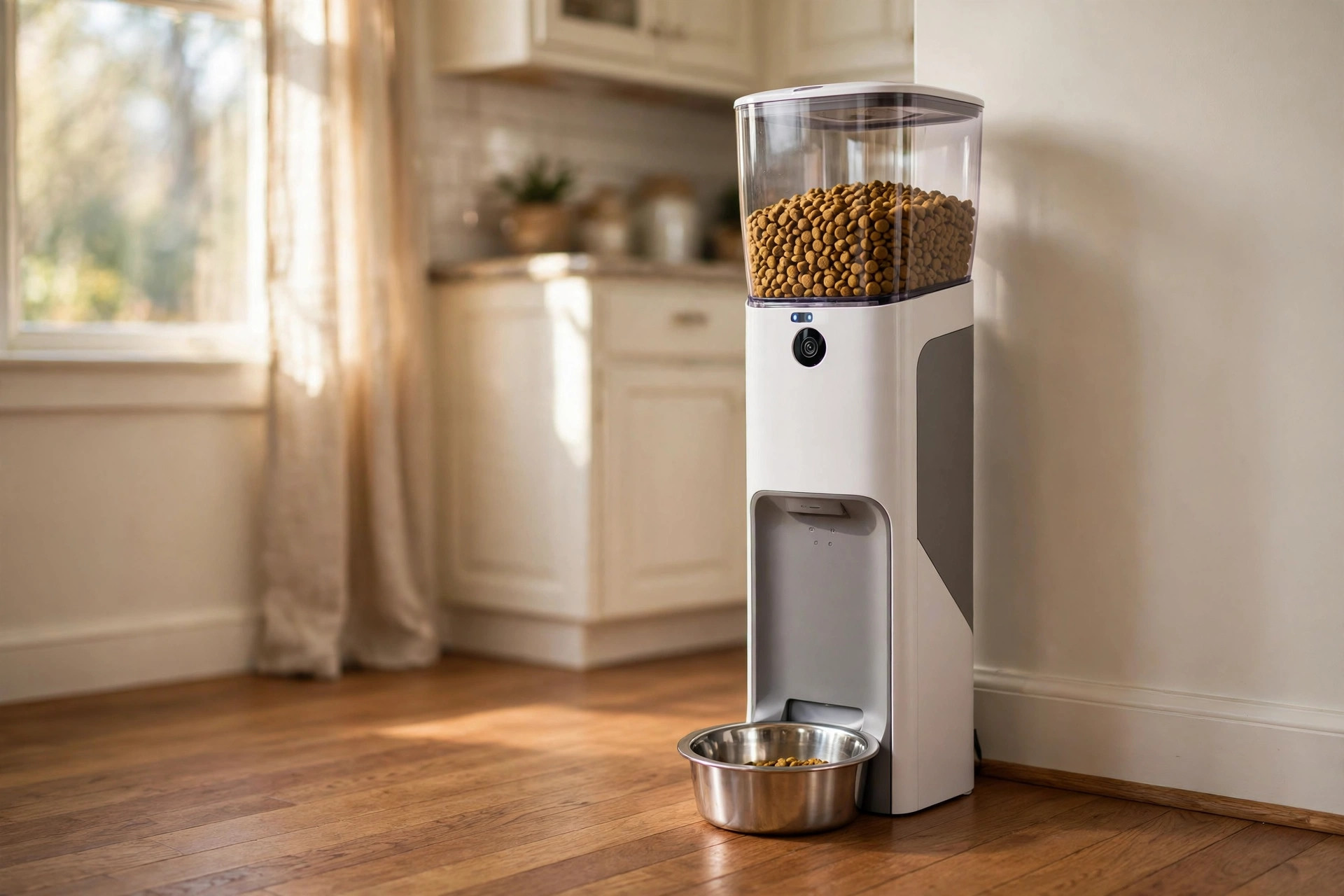
An automatic pet feeder for dogs with camera is one of the most useful tools a busy dog owner can buy. It drops food at the same time each day. It holds enough for many meals. And the built in camera lets you see your dog while you are at work, on a trip, or running late. This guide walks through what these feeders do, how to pick a good one, what they cost, and how to keep one clean and safe.
Why a Camera Feeder Makes Sense for Dog Owners
Dogs thrive on routine. They feel calm when meals come at the same hour. A camera feeder makes that routine possible even when you cannot be home. Shift workers, single owners, and families with long commutes all gain the same benefit. The dog eats on time, and the owner gets peace of mind.
The camera adds a layer of comfort that a plain timer feeder cannot match. You can open the app on your phone and see your dog walk up to the bowl. You can check that the food came out. You can spot a missed meal or a dog that seems off. Many owners use the camera simply to watch their pet during the day, which lowers the worry that comes with leaving a dog alone for hours.
A feeder with a camera also helps when two people share dog care. One person can watch the morning feed. The other can handle the evening. Both can look back at the same video record. This keeps everyone on the same page about how much the dog ate.
There is also value for training. Some owners review video to see if the dog eats too fast, guards the bowl, or ignores food when it is nervous. These small clues help you adjust feeding habits. A dog anxiety vest for thunderstorms and fireworks may also help a nervous dog stay calm at meal time during loud weather.
What to Look for When You Buy: Automatic Pet Feeder for Dogs with Camera
Not all smart feeders are built the same. A few key features matter far more than the rest. Check each one before you spend.
Camera Quality and Night Vision
A camera is only useful if the picture is clear. Look for high definition video so you can see your dog and the bowl with ease. Night vision matters too. Many dogs eat dinner after dark in winter, or the feeding corner may sit in a dim hallway. Infrared night vision lets you watch without turning on lights.
Some cameras record short clips when motion is detected. This is handy. You get a notice on your phone and a video of your dog eating. Reviewers at Consumer Reports often stress that simple, reliable features beat fancy ones that fail in daily use.
Portion Control and Scheduling
The heart of the feeder is the schedule. Look for a feeder that lets you set at least four meals per day. Portion size should adjust in small steps, such as quarter cup increments. Large dogs and small dogs need very different amounts, and a feeder that only gives big portions will overfeed a small breed.
A good app lets you change the schedule from your phone. If you will be late, you can push dinner back by an hour. If you give a morning walk treat, you can drop a small snack from the app. For a large breed, a pet feeder with camera and app that handles bigger hoppers is often the better pick.
Bowl, Hopper, and Food Type
The hopper is the tank that holds the dry food. A four to seven liter hopper suits most medium dogs for several days. Large dogs may need a bigger tank. Check that the bowl is stainless steel or a food safe material that is easy to lift out and wash.
Most feeders work only with dry kibble. Check the size of kibble your brand makes. Very large chunks can jam the dispenser. Semi moist food tends to clog too. Stick to standard dry kibble for the best results. The experts at Chewy note that matching kibble size to the feeder is one of the most common fixes for jamming problems.
Power Supply and Backup
A feeder that dies during a power cut can leave your dog hungry. Look for one that runs on a wall plug and also takes backup batteries. The batteries should keep the schedule running and dispense food even when the wifi is down. Some models lose their schedule in an outage, which defeats the purpose. Read the manual on this point before you buy.
Two-Way Audio and Extras
Many camera feeders include a speaker and microphone. You can call your dog to the bowl and hear it eat. This is a nice touch but not a must. Voice recorders that play a short message at meal time are also common. Keep expectations realistic. A dog may ignore a voice from a speaker at first. Guides from The Spruce Pets remind owners that audio features work best as a bonus, not as the main reason to buy.
App Quality and Smart Home Fit
The app should be simple. Set meals, view the camera, and get alerts. That is enough. Check reviews of the app before you buy, because a feeder with a poor app is hard to live with. Some feeders work with voice assistants, which can be handy in a kitchen. Tech reviewers at CNET and PCMag often test how well pet devices hold a wifi link in real homes, and weak wifi in a far corner is a common complaint.
Types of Smart Dog Feeders
Camera feeders fall into a few broad groups. Each suits a different household.
Gravity Feeders with Camera
These keep food flowing as the bowl empties. The camera lets you watch. They are simple and cheap. The drawback is portion control. A dog that overeats will eat too much, since the bowl never stays empty. These suit dogs with healthy self control and owners who mainly want the camera view.
Programmable Hopper Feeders
This is the most popular type. You set meal times and portion sizes in the app. The feeder drops the right amount at the right time. The camera watches each meal. This type suits almost every household. It is the best choice for dogs on a weight plan or a strict diet from the vet.
Feeders with Two-Way Audio and Motion Alerts
These add a camera with motion detection, a speaker, and a microphone. You get a ping when your dog nears the bowl. You can talk to your dog live. They cost more. They suit owners who are away long hours and want to interact with the dog during the day. A best dog crate for anxious dogs escape proof paired with a camera feeder can give an anxious dog both a safe space and regular meals.
Cost and Price
Prices vary by size and features. A basic camera feeder for a small dog often sells between forty and eighty dollars. Mid range models with good cameras, night vision, and strong apps run from eighty to one hundred fifty dollars. Large hopper models with two way audio and motion alerts can reach one hundred fifty to two hundred fifty dollars.
Ongoing costs are small. Backup batteries need replacing once or twice a year. Some brands charge a small monthly fee for cloud video storage, while basic live viewing stays free. Decide if you need saved clips before you pay for a plan. Many owners find live viewing and motion alerts are enough. Retailers such as Lowe’s, Home Depot, and Wayfair carry several brands, so you can compare prices side by side.
Setting Up Your Feeder
Start by placing the feeder in a quiet, low traffic spot. Dogs eat best where they feel safe. Keep it away from the washer, dryer, or a busy doorway. Make sure the floor is level so the feeder sits flat and steady.
Fill the hopper with fresh dry kibble. Do not overfill. Leave a little room at the top so the lid closes with ease. Run a test meal while you watch. Check that the portion size matches the mark on your measuring cup. Adjust in the app until it is right.
Set the camera angle next. You want to see both the bowl and the space around it. A view of the door your dog enters through is a bonus. Test the night vision by dimming the lights in the evening. If the picture is dark, move the feeder a few feet toward a lamp or window light.
Connect the app and turn on alerts. Meal confirmations tell you the food was dropped. Motion alerts tell you the dog came to eat. Some owners turn off motion alerts during the day if a cat also walks by, since false alerts get old fast.
Ask your vet about the right daily amount before you lock in the schedule. Feeding guides on the kibble bag are a starting point, not a rule. A vet can fine tune the amount for your dog’s age, weight, and health. Resources from the ASPCA offer solid general guidance on dog nutrition and feeding schedules.
Cleaning and Upkeep
A feeder handles food every day, so it needs regular cleaning. Lift out the bowl and wash it with warm soapy water each week. A bowl that sits dirty can grow bacteria and make the food taste stale.
Empty and wipe the hopper once a month. Dump the leftover kibble, wipe the inside with a dry cloth, and check the chute where food drops out. Crumbs and dust collect there. A clogged chute is the top cause of missed meals. Let all parts dry fully before you refill.
Check the camera lens now and then. A thin film of dust can blur the picture. A soft dry cloth is enough. Do not spray cleaner on the lens. If your model has a filter or a seal in the hopper, replace it on the schedule in the manual.
Keep an eye on the app. Updates fix bugs and improve the camera link. Turn on automatic updates if your phone allows it. If the feeder starts dropping the wrong amount, recalibrate the portion size with a measuring cup and reset the schedule.
Safety Tips
Never let a feeder fully replace human care. It handles meals, not walks, water checks, or health watch. Refill the water bowl yourself each day and give it a look. A dog that drinks less than usual may be ill, and a camera cannot catch that for you.
Keep the power cord out of reach. A bored dog may chew a cord that lies on the floor. Run the cord behind furniture or along a wall. Use the cord clips that come in the box.
Store extra kibble in a sealed container, not in the hopper for weeks at a time. Food left in a hopper for a month can go stale and lose nutrients. Match the hopper size to how much your dog eats in one to two weeks.
For dogs that ride in cars often, a best dog harness for car safety crash tested matters just as much as a feeder at home. Safety gear and steady meals together keep a dog healthy in every part of the day.
Be careful with where the camera points. Some owners place feeders near a front door, which can catch visitors on video. Tell guests about the camera. It is a small courtesy that avoids awkward moments.
Frequently Asked Questions
Can an automatic feeder replace a pet sitter? No. A feeder handles meals on time. It does not walk the dog, clean up, or notice illness. For trips longer than a day or two, use a sitter or boarder. The camera is a helper, not a stand in for a person.
What size hopper does a large dog need? A large dog that eats four to six cups a day needs a hopper of at least seven liters to last a long weekend. Measure your dog’s daily amount first, then pick a hopper that holds at least three to four days of food. A smart dog feeder for large dogs with a roomy tank means fewer refills.
Do these feeders work without wifi? Most keep the meal schedule without wifi if they have battery backup. The camera and the app need wifi to work. So the dog still eats on time, but you cannot watch or change the schedule until the link comes back.
Is wet food an option in a camera feeder? Most models are built for dry kibble only. Wet food spoils fast at room temperature and clogs the dispenser. A few feeders have cooled trays for wet food, but they are rare and cost more. For daily use, dry kibble is the safe choice.
How do I stop my dog from knocking the feeder over? Place the feeder against a wall or in a corner. Some models have a weighted base or screw mounts for extra grip. Feed on a hard floor so the feeder sits flat. A dog that paws at the feeder may need a slower intro, with treats placed near it for a few days.
Does the camera record all the time? It depends on the model. Some record only when motion is detected. Some offer round the clock cloud recording for a fee. Check the privacy settings in the app. You can usually turn off recording and keep live view only.
A Short Final Word
An automatic pet feeder for dogs with camera brings order to meal time. Your dog eats on schedule. You watch from anywhere. You catch problems early. Pick a model with a clear camera, true portion control, and battery backup. Keep it clean. Refill water yourself. And pair steady meals with walks, play, and vet care. That mix gives your dog a calm, healthy life, whether you are home or not.
References
ASPCA. (n.d.). Pet care and animal welfare resources. https://www.aspca.org Chewy. (n.d.). Pet supplies. https://www.chewy.com CNET. (n.d.). Technology news and reviews. https://www.cnet.com Consumer Reports. (n.d.). Product reviews and ratings. https://www.consumerreports.org Lowe’s. (n.d.). Home improvement products. https://www.lowes.com PCMag. (n.d.). Technology product reviews. https://www.pcmag.com The Home Depot. (n.d.). Home improvement products. https://www.homedepot.com The Spruce Pets. (n.d.). Pet care guides and product reviews. https://www.thesprucepets.com Wayfair. (n.d.). Furniture and home goods. https://www.wayfair.com
Was this guide helpful?

About Sarah Mitchell
The My Garden US editorial team writes practical, in-depth home and garden guides for American homeowners — tested advice, no fluff.