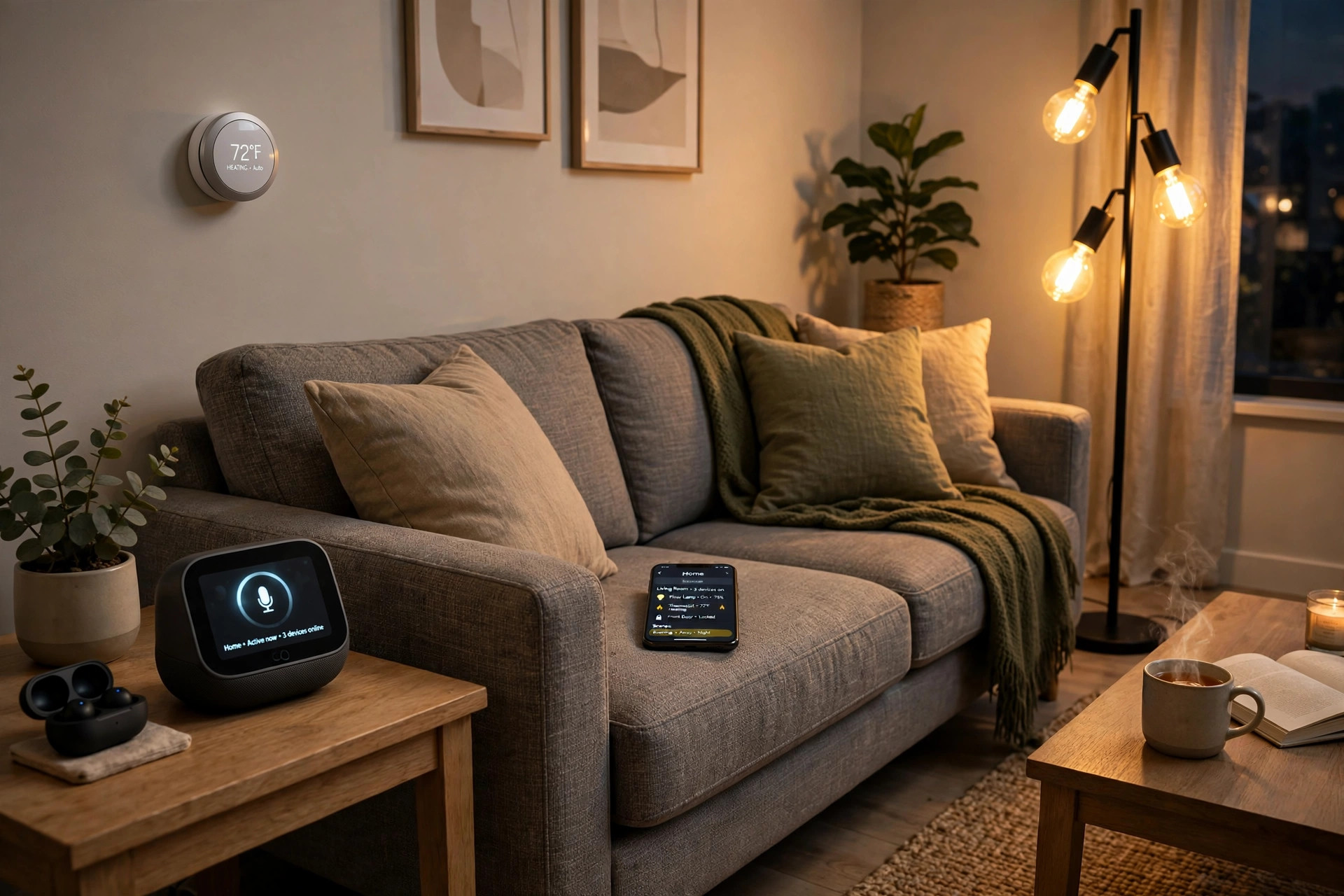

For years, the smart home was a mess. A light bulb from one brand would not talk to a speaker from another brand. A door lock needed its own app, while the thermostat needed a different one. Phone screens filled up with ten apps for ten devices, and half of them refused to work together. If you have lived through that, this guide on matter smart home devices explained for the usa market will make sense to you.
Matter is a shared language for smart home products. It was built by the biggest names in the business working together. The goal was simple. A bulb, a lock, a plug, or a sensor should work with the voice assistant you already own, no matter who made the device. This guide walks through what Matter is, how it works in a real home, what to check before you buy, and what it costs in the United States.
Why Matter Matters for USA Homes
Before Matter, buying smart home gear was a gamble. You had to guess which voice assistant the device supported. Amazon Alexa, Google Home, and Apple HomeKit each had their own rules. Many products worked with one of them but not the other two. A family that used two different phones often could not control the same lamp. Returns were common, and so was anger.
Matter removes that guessing game. A device with the Matter badge joins the home network once and then talks to every major assistant. One setup flow serves the whole house. For buyers in the United States, where homes often mix brands, that is a real change. The promise is a home where the parts fit together, the way lamp parts and plug parts have fit together for a hundred years.
What Matter Is, in Plain Words: Matter Smart Home Devices Explained Usa Guide
Matter is an open standard. That means the rules are public and any maker can follow them. The standard was developed by the Connectivity Standards Alliance, a group that includes Amazon, Apple, Google, Samsung, and hundreds of device makers. It is not an app. It is not a brand. It is a set of rules for how smart home devices talk to each other.
When people ask what is matter smart home standard, the short answer is this: it is the common tongue that lets your bulb, lock, and speaker hold a conversation. Your phone still runs the app you like. Your voice speaker still listens the way it always did. Matter just makes sure the devices behind them understand each other.
The Old Problem of Locked Systems
Old smart home gear spoke private dialects. Zigbee, Z-Wave, and a dozen brand-owned systems all did the same job in different ways. A hub from one maker could not speak to a hub from another. Shoppers had to study charts before buying a twenty-dollar bulb. Many gave up and stayed with one brand for everything, which kept prices high and choice low. Matter was drawn up to break those walls down.
How Matter Works in Your Home
A Matter device joins your home the same way a phone joins a Wi-Fi network. You scan a code printed on the box or in the manual. Your home app adds the device. From there, every assistant in the house can see it. If you own both an iPhone and an Echo speaker, the same lamp answers both of them.
Matter runs on the network gear you already have. It uses Wi-Fi for devices that need speed, like cameras and speakers. It uses Thread for small, low-power devices like sensors and bulbs. Thread is a wireless web that lets tiny devices pass messages to each other, which makes them fast and steady. If your home has a Thread border router, which is built into many new speakers and hubs, Thread devices join in with little trouble.
One more point matters. Matter keeps working when the internet goes down. Because devices talk to each other over your local network, a storm that knocks out the web does not knock out your lights. The voice assistant may go quiet without the cloud, but the lamps, locks, and plugs still answer the app on your phone. For homes in storm country, that local control is worth real money.
What to Look for When You Buy
Shopping for matter compatible smart home devices is easier than it used to be, but a few checks still help.
The Matter Logo on the Box
Look for the Matter badge. It is a small mark with three arrows pointing at each other. The box should also say which version of Matter it supports, such as 1.2 or 1.3. Higher numbers mean newer features, but any version will handle the basics. Be careful with boxes that say only “works with” one assistant. That is not the same as Matter. The badge is the proof.
Hubs, Controllers, and Apps
Some Matter devices need a hub, and some do not. Wi-Fi devices usually join straight to your router. Thread devices need a Thread border router nearby, which many modern speakers and streaming boxes already include. Before you buy, check that your home has one if you plan to buy Thread gear. Your phone app acts as the controller. Most homes already own one in the form of a smart speaker or display.
Wi-Fi or Thread
For a plug or a camera, Wi-Fi is fine. For bulbs, door sensors, and leak sensors, Thread is often better. It uses less power, so batteries last longer. It also builds a mesh, where each device helps pass along messages. In a big house, a mesh beats a single router. Either way, both speak Matter, so they will work together.
Types of Matter Smart Home Devices
The range grows every year. Lights were first, and they remain the most common. Smart bulbs, light strips, and switches from many makers now carry the badge. Plugs are next. A Matter plug turns any old lamp or fan into a smart device for little money.
Locks have joined too. A smart lock with Matter can be opened by code, phone, or voice, and it reports to every assistant in the house. Many buyers start their upgrade with a smart lock for your front door because the gain is so clear. Thermostats, shades, and ceiling fans are common now. Sensors round out the list: door and window sensors, motion sensors, and water leak sensors. A smart water leak detector for 2026 with Matter can warn your phone the moment it finds water, which can save thousands in damage.
Outdoor gear is catching on. Smart floodlights, garden plugs, and even robot mowers are starting to appear with the badge. A motion sensor flood light that talks to the rest of your system can light the yard and send a phone alert at the same time. Cameras and video doorbells are coming along more slowly, because video needs more work than the first versions of the standard allowed. Check the box for the latest version if video is your goal.
Cost and Price in the USA
Matter does not add much to the price. A Matter bulb often costs about the same as an old-style smart bulb, in the range of ten to twenty-five dollars. Plugs run fifteen to thirty dollars. Sensors run twenty to forty dollars. Locks are the big ticket, usually from one hundred to three hundred dollars depending on the build and the features.
Hubs add cost only if you need one. Many homes already own a speaker or display that acts as a Matter controller, so the added cost is zero. If you need a Thread border router, a small one can cost thirty to sixty dollars. When you compare brands, remember that the Matter badge itself is free to you. It is a standard, not a subscription. No maker can charge you a monthly fee for Matter itself, though some still charge for cloud extras like video storage.
Watch the sales. Big retail events often cut smart home prices by a quarter or more. Buying a starter set of bulbs and a plug is a cheap way to test the system before you spend on locks and thermostats. Sites like the Google Store and large retailers carry wide ranges, and independent testing outfits like Consumer Reports publish scores that help you compare.
Setup, Care, and Upkeep
Setup is the easy part. Open the box. Find the Matter QR code. Open your home app, scan the code, and follow the steps. The app will ask which room the device lives in and what to call it. Give it a plain name like “front porch light” so voice commands feel natural. The whole job takes about five minutes per device.
Care is simple too. Keep device software up to date. Makers send updates that fix bugs and add features, and the app will tell you when one is ready. Wipe dust off sensors now and then so they read true. Change batteries in sensors when the app warns you. If a device stops answering, unplug it for ten seconds and plug it back in. That old trick still works.
One habit saves trouble. Keep the box or a photo of the QR code. If you ever reset a device, you will need that code to add it back. A small folder of codes, kept in a drawer, beats a long search through the trash.
Safety and Privacy
Matter was built with safety in mind. Devices check each other’s identity before they talk, which makes it harder for a stranger’s gadget to join your network. Data stays on your local network when it can, instead of traveling to far-off servers. That is good for privacy and good for speed.
Still, use common sense. Buy from known makers. Read the privacy note in the app before you agree. Turn off features you do not use, like remote access, if you do not need them. For gear that guards your home, such as cameras and alarms, look at full security systems from established firms like SimpliSafe or ADT, which pair their own monitoring with smart devices. Check the U.S. Consumer Product Safety Commission now and then for recall notices on electrical gear. A safe home is a system, not a single device, and news sites like The Verge often report on flaws worth knowing about.
Frequently Asked Questions
Do I need to throw out my old smart home devices? No. Old devices keep working with their own apps. Matter only governs new gear that carries the badge. Many people run a mixed home for years: old devices on their old apps, new Matter devices on the new standard. Replace things as they wear out.
Does Matter work with Alexa, Google Home, and Apple Home at the same time? Yes. That is the whole point. One Matter device can be controlled by all three at once. Set it up in one app, then add it to the others with a pairing code. The lamp does not care which voice gave the order.
Is Matter the same as Zigbee or Z-Wave? No, though they solve the same problem. Zigbee and Z-Wave are older wireless systems, and each needs its own hub. In the matter vs zigbee smart home debate, Matter wins on simplicity: it runs on Wi-Fi and Thread, which most homes already have. Some makers now sell bridges that bring old Zigbee gear into a Matter home.
Do Matter devices need the internet to work? Not for basic control. Lights, locks, and plugs answer your phone app over your home network even when the web is down. Voice control and remote access from outside the house still need the internet, since those run through cloud servers.
How do I know a device really supports Matter? Look for the Matter badge on the box and in the listing. Then check the version number. Makers sometimes print “Matter-ready,” which can mean a future update, not support today. Reviewers at CNET and PCMag test these claims in their labs, and video doorbell makers and others publish clear spec sheets, so check before you buy.
Can renters use Matter devices? Yes, and renters may gain the most. Bulbs, plugs, and battery sensors need no wiring and no holes in the wall. When you move, you unscrew the bulbs, unplug the sensors, and take your smart home with you. Just confirm that your lease allows a smart lock before you swap the deadbolt.
A Final Word
Matter is not magic. It is plumbing. Like standard pipes and standard plugs, it lets parts from different makers fit together and do their job. For a USA home full of mixed brands, that quiet fit is the whole prize. Start small, with a bulb or a plug. Learn the setup flow. Then grow the system room by room. In a year or two, the wall of apps on your phone may shrink to one, and the house will simply work.
References
ADT. (n.d.). Home security and automation. https://www.adt.com CNET. (n.d.). Technology news and reviews. https://www.cnet.com Consumer Reports. (n.d.). Product reviews and ratings. https://www.consumerreports.org Google Store. (n.d.). Smart home devices. https://store.google.com PCMag. (n.d.). Technology product reviews. https://www.pcmag.com Ring. (n.d.). Smart home security devices. https://www.ring.com SimpliSafe. (n.d.). Home security systems. https://www.simplisafe.com The Verge. (n.d.). Technology news and reviews. https://www.theverge.com U.S. Consumer Product Safety Commission. (n.d.). Product safety information. https://www.cpsc.gov
Was this guide helpful?

About Emily Rodriguez
The My Garden US editorial team writes practical, in-depth home and garden guides for American homeowners — tested advice, no fluff.
You May Also Like
Roborock vs iRobot Comparison 2026 USA: Which Robot Vacuum Fits Your Home
June 15, 2026 0 views
Smart Pool Pump with App Control Reviews USA: What to Buy and Why
February 28, 2026 0 views
Best Smart Gas Detector Reviews 2026 USA: A Full Guide
February 9, 2026 0 views