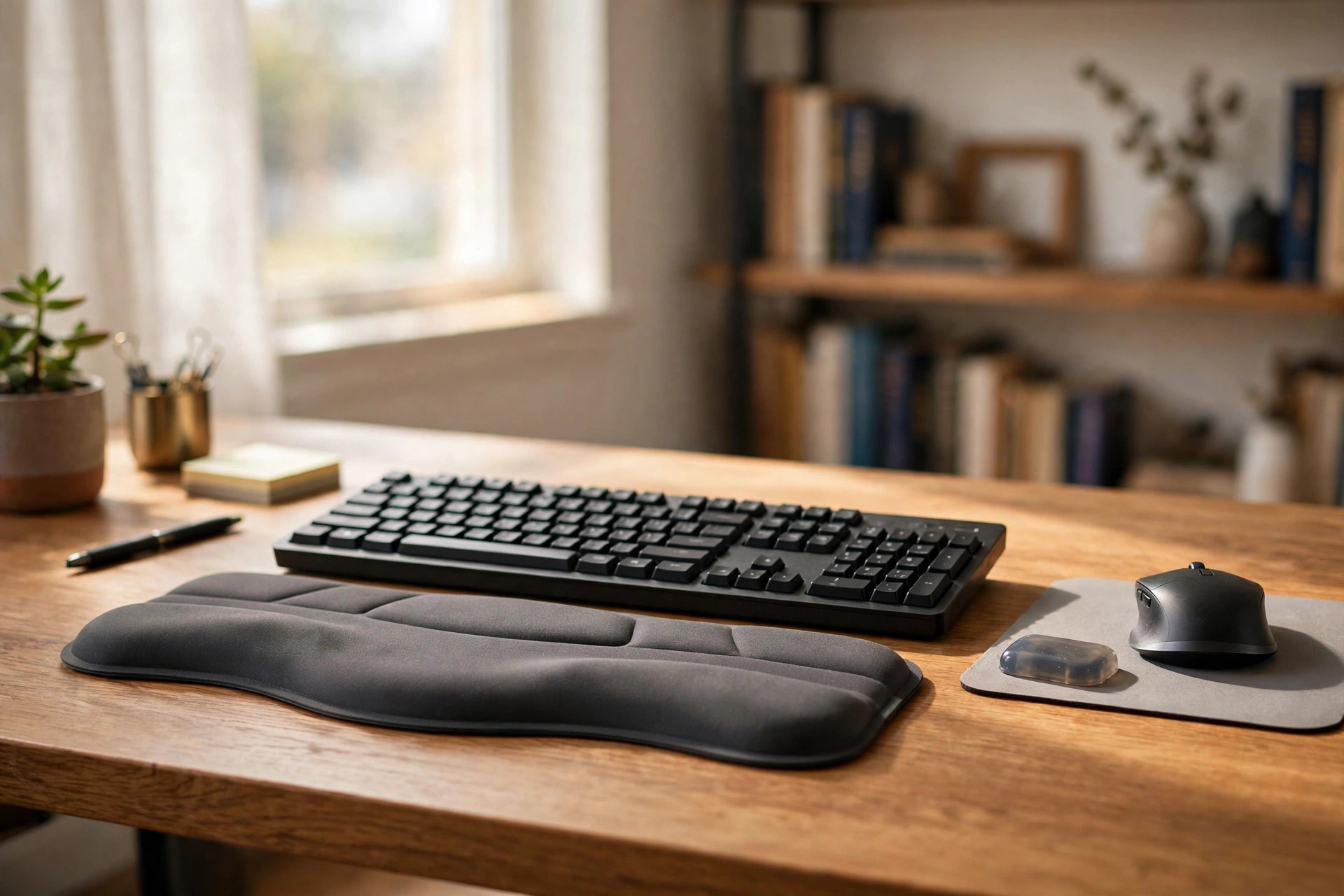

Most people who work from home type for many hours each day. Their hands rest on the desk in a bent position for the whole workday. Over weeks and months, this strain adds up. Sore wrists, stiff fingers, and tired forearms become a normal part of the day. An ergonomic wrist rest for keyboard and mouse is a small pad that sits in front of the keyboard and the mouse. It holds the wrist in a straight, level line while the hands move. The cost is low, and the effect can be felt within the first week.
Why a Wrist Rest Matters for Daily Typing
The wrist is a narrow passage of bone and tissue. Nerves and tendons pass through it on the way to the fingers. When the wrist bends up or down for a long time, that passage gets tight. Blood flow slows. The nerves take on pressure. The result is numbness, tingling, or a dull ache that grows through the afternoon.
A wrist rest changes the angle. It lifts the heel of the hand so the wrist floats straight. The fingers can then strike the keys without pulling. The mouse hand rests on a soft pad instead of pressing against the hard desk edge. Good design sites such as Herman Miller have long stressed that the wrist should stay neutral during desk work. Neutral means flat, neither bent up nor drooped down.
A wrist rest is not a cure for a medical problem. It is a tool for comfort and better posture. People with pain that does not ease should see a doctor. For the average home worker, though, a pad under the wrists is one of the cheapest upgrades a desk can get.
What to Look for When You Shop: Ergonomic Wrist Rest for Keyboard and Mouse
Materials That Last
Memory foam is the most common fill. It molds to the shape of the wrist and springs back when the hand lifts. It feels soft at first touch. Over time it can pack down, so a dense foam is better than a loose one.
Gel pads are filled with a cool gel. They stay firm and do not sink. Many users like them in warm rooms because the surface stays cool. Gel can feel hard to some people.
Wood wrist rests are a newer trend. They are carved from a single block, often walnut or beech. They give firm, steady support. Some users find them too hard, but others like the solid feel. Reviewers at Wirecutter often note that material choice is mostly a matter of personal comfort.
Shape and Size
A keyboard wrist rest is usually long and low, about the width of a standard keyboard. A mouse wrist rest is small and rounded, sized for one hand. Many sets sell the two pieces together.
Height matters. The rest should raise the wrist just enough to keep it level with the keys. If the pad is too tall, the wrist bends upward. If it is too short, the wrist hangs down. A height between one half inch and one inch suits most desks.
Width matters too. Compact keyboards need shorter rests. Full-size keyboards need full-length rests. Measure the keyboard before you order.
Fit With Your Desk Setup
A wrist rest works best as part of a full desk setup. The chair height, the desk height, and the monitor position all play a role. A pad cannot fix a chair that is too high or a monitor that sits too low. Office planners at Steelcase advise looking at the whole work station rather than one piece at a time.
If you use a standing desk, check that the rest stays put when the desk moves. Some pads have rubber feet or a non-slip base. Sites like UPLIFT Desk carry accessories made for moving desks. A wrist rest that slides will do more harm than good.
Travel sets are worth a look too. A small, soft rest that rolls up can go in a laptop bag. It weighs almost nothing. People who work from coffee shops or client offices like them. The support is not as firm as a desk model, but it is far better than a bare table edge.
Types of Ergonomic Wrist Rests
The classic two-piece set is the most popular. One long pad for the keyboard, one small pad for the mouse. This gives even support for both hands. Sets like this suit people who type and use a mouse in equal measure.
Single keyboard rests are for heavy typists. Writers, data entry staff, and programmers often pick these. They cover only the keyboard and leave the mouse hand free.
Mouse-only pads come in odd shapes. Some are oval. Some have a dip for the wrist. They are good for people whose main pain comes from mouse work, such as designers and photo editors.
Some mouse pads have a built-in wrist rest. The pad and the rest are one piece. These save desk space but cannot be moved apart. They suit small desks.
There are also heated and massaging rests, but they are rare. They cost more and need power. Most buyers stick with plain foam or gel.
Cost and Price Ranges
Prices for an ergonomic wrist rest for keyboard and mouse fall into three groups. Budget sets sell for five to fifteen dollars. They are usually plain foam with a cloth cover. They work fine for light use.
Mid-range sets sell for fifteen to thirty dollars. They use denser foam or gel. The covers are better made, often with a smooth fabric that cleans with a wipe. Retailers like IKEA and Wayfair carry many options in this range. This is the sweet spot for most home workers.
Premium sets sell for thirty to sixty dollars. They may be wood, leather-topped, or filled with high-grade gel. They last longer and look better on a nice desk. Tech reviewers at PCMag point out that a higher price does not always mean better comfort. The shape of the rest matters more than the brand name.
For a home office budget, a set in the mid-range is usually enough. Spend more only if you type more than eight hours a day. A good rule is to buy the best set you can afford within reason. Comfort you feel every hour of every workday is money well spent.
Care and Upkeep
A wrist rest sits under the hands for hours. Sweat and skin oil build up on the surface. Cleaning it each week keeps it fresh and helps it last.
Cloth-covered foam rests can be wiped with a damp cloth and mild soap. Do not soak them. Water inside the foam can cause a sour smell. Let the pad dry fully before use.
Gel rests wipe clean with ease. A damp cloth is enough. Avoid harsh cleaners that can cloud the surface.
Wood rests need little care. Wipe off dust with a dry cloth. Once or twice a year, rub in a light coat of mineral oil to keep the wood from drying out.
Check the rest every few months for wear. If the foam stays flat after the hand lifts, it has lost its spring. A flat pad no longer supports the wrist. Replace it. Home care guides at The Spruce remind readers that small desk items wear out faster than people expect.
Keep the rest in the right spot. It should sit at the front edge of the keyboard, not pushed back under the palms. The palms should hover over the keys. Only the wrist rests on the pad. This is the correct form, and it takes a few days to get used to.
Safety Notes
A wrist rest reduces strain, but bad habits can undo its good work. Do not lean your full body weight on the rests. Pressing hard on the wrist can squeeze the nerves you are trying to protect. The rest is for light support only.
Take breaks. Stand up once an hour. Stretch the fingers and roll the wrists. No desk product can replace movement. The U.S. Consumer Product Safety Commission notes that proper use of home office products matters as much as the product itself.
If you feel sharp pain, numbness that does not fade, or weakness in the grip, stop and see a doctor. These can be signs of a nerve problem. A wrist rest is a comfort aid, not a medical device. People with carpal tunnel syndrome or tendon trouble should follow their doctor’s plan first.
Keep small rests away from young children and pets. Foam pieces can be chewed, and gel fills are not safe to swallow.
Frequently Asked Questions
Should I use a wrist rest for both the keyboard and the mouse?
Yes, if you use both for long stretches. The keyboard hand and the mouse hand both bend at the wrist. A two-piece ergonomic wrist rest for keyboard and mouse gives each hand the same level of support. If you rarely use the mouse, the keyboard piece alone is fine.
How thick should the rest be?
Most people do best with a rest between one half inch and one inch high. The goal is a straight wrist. Sit at your desk and look at your hands from the side. The back of the hand should form a flat line with the forearm. Pick a thickness that makes that line straight.
Is gel better than memory foam?
Neither is better for everyone. Gel stays cool and firm. Memory foam feels soft and molds to your shape. People in warm rooms often prefer gel. People who like a soft feel often prefer foam. Try to test both in a store if you can.
Can a wrist rest fix carpal tunnel syndrome?
No. A wrist rest can ease strain and improve wrist position, but it cannot fix a medical condition. If you have pain, numbness, or tingling that lasts more than a few days, see a doctor. Follow medical advice before buying any product.
How long does a wrist rest last?
A foam rest lasts about one to two years with daily use. Gel lasts longer, often three years or more. Wood lasts for many years. Replace the rest when it stops springing back or feels uneven.
Does the rest go in front of or under the keyboard?
In front. The rest sits at the near edge of the keyboard. Your palms hover over the keys while the wrists touch the pad. Resting the palms on the pad while typing is a common error. The pad is for rest between bursts of typing, not for bearing weight while the fingers move.
A Short Final Word
An ergonomic wrist rest for keyboard and mouse is a small buy with a daily payoff. It costs less than a dinner out. It takes no tools to set up. It works from the first day. Pair it with a good chair and a sensible desk height, and the home office becomes a kinder place to work.
As you build out the rest of your work space, a wall grid panel for hanging supplies can keep small items off the desk. A desk clock with a temperature display helps you watch room comfort through the day. And if you sketch or draw at home, an adjustable drafting table for a home art studio pairs well with the same comfort rules. Guides at Family Handyman offer more ideas for setting up a home work space that treats the body well.
References
Family Handyman. (n.d.). DIY home repair and maintenance. https://www.familyhandyman.com Herman Miller. (n.d.). Office furniture and ergonomic seating. https://www.hermanmiller.com IKEA. (n.d.). Home furnishings. https://www.ikea.com PCMag. (n.d.). Technology product reviews. https://www.pcmag.com Steelcase. (n.d.). Office furniture and workplace research. https://www.steelcase.com The Spruce. (n.d.). Home and garden advice. https://www.thespruce.com U.S. Consumer Product Safety Commission. (n.d.). Product safety information. https://www.cpsc.gov UPLIFT Desk. (n.d.). Standing desks and ergonomic office furniture. https://www.uplift-desk.com Wayfair. (n.d.). Furniture and home goods. https://www.wayfair.com Wirecutter. (n.d.). Product reviews from The New York Times. https://www.nytimes.com/wirecutter
Was this guide helpful?

About Lisa Anderson
The My Garden US editorial team writes practical, in-depth home and garden guides for American homeowners — tested advice, no fluff.
You May Also Like

The Best Desk Organizer Set for a Small Office Desk: A Practical Guide
September 28, 2026 0 views
Home Office Closet to Office Conversion Kit: A Complete Guide
February 21, 2026 0 views
Rolling Cart for Home Office Printer Stand: A Complete Guide
July 31, 2026 0 views