
Good lighting is the cheapest upgrade in any home office. The best home office lighting for Zoom meetings is not about expensive gear. It is about placing simple lamps in the right spots so your face looks clear and your room looks calm. A webcam can only show what the light gives it. Dim light makes grainy, flat video. Harsh overhead light makes dark shadows under the eyes. Soft light in front of the face fixes both problems in minutes.
This guide explains what to buy, where to put it, and what to avoid. You will learn the three basic lamp types for video calls, how to use daylight, and how to light a small desk, a corner setup, or a whole room. Most of the setups here cost less than a new office chair. All of them follow the same rule: light the face, not the room behind you.
Why Good Lighting Matters for Video Calls
Video calls have become a daily part of American work life. Managers, clients, and teams judge what they see on screen. A dark or flickering image makes a worker look tired or careless. A well-lit image makes the same worker look alert and sure of himself. Studies of remote work in the 2020s showed that clear video builds trust faster than voice alone. People read faces. If the face is hidden in shadow, the message gets weaker.
Webcams are small and cheap. They need more light than the human eye does. A room that feels bright to you can still be too dark for a webcam. That is why offices built for video use many soft lights at desk height. The goal is even, steady light on the face from the front. Nothing more is needed. Many workers learn this only after a colleague says, “I cannot see you.” A quick test solves it. Open your camera preview and look at the image. If the face is dark, move a lamp in front of you and try again.
Good lighting also reduces eye strain. When the screen area and the room behind it match in brightness, the eyes relax. Workers on long call days report less fatigue when their desks are lit evenly. This is one more reason the best home office lighting for Zoom meetings matters beyond looks.
What to Look For When Choosing Video Call Lighting: Best Home Office Lighting for Zoom Meetings
Color Temperature
Color temperature is measured in Kelvin. It tells you if a bulb looks warm or cool. Warm light is near 2700K. It looks like an old living room lamp. Cool light is near 5000K to 6500K. It looks like daylight. For Zoom calls, aim for 4000K to 5000K. This range looks natural on most webcams. Warm bulbs make skin look orange. Very cool bulbs make skin look pale or blue. Many modern LED lamps let you change the color with a button. That feature is worth the small extra cost.
Brightness
Brightness is measured in lumens. For the main face light, look for 800 to 1600 lumens. That is about the light of one strong desk lamp aimed at your face. More is not always better. Too much brightness washes out the face and makes colors look flat. Start with less and add light until the video preview looks clear.
CRI, or Color Rendering
CRI stands for Color Rendering Index. It scores how well a light shows true colors. The scale runs from 0 to 100. Daylight is 100. Choose bulbs with a CRI of 90 or higher. Low-CRI bulbs make skin look gray or sickly. This number is printed on most bulb boxes. Check it before you buy.
Adjustability
The lamp should aim where you want it. Look for lamps with swivel heads, tilting stands, or flexible arms. Adjustable brightness helps too. Some days you need more light. Some days you need less. A lamp that cannot move is a lamp you will fight.
Flicker
Cheap bulbs can flicker in ways the eye misses but the camera catches. The result is a moving band across the video. Quality LED lamps from known makers list “flicker-free” on the box. If your video shows a pulsing stripe, change the bulb first.
Types of Lighting for Zoom Meetings
The Key Light
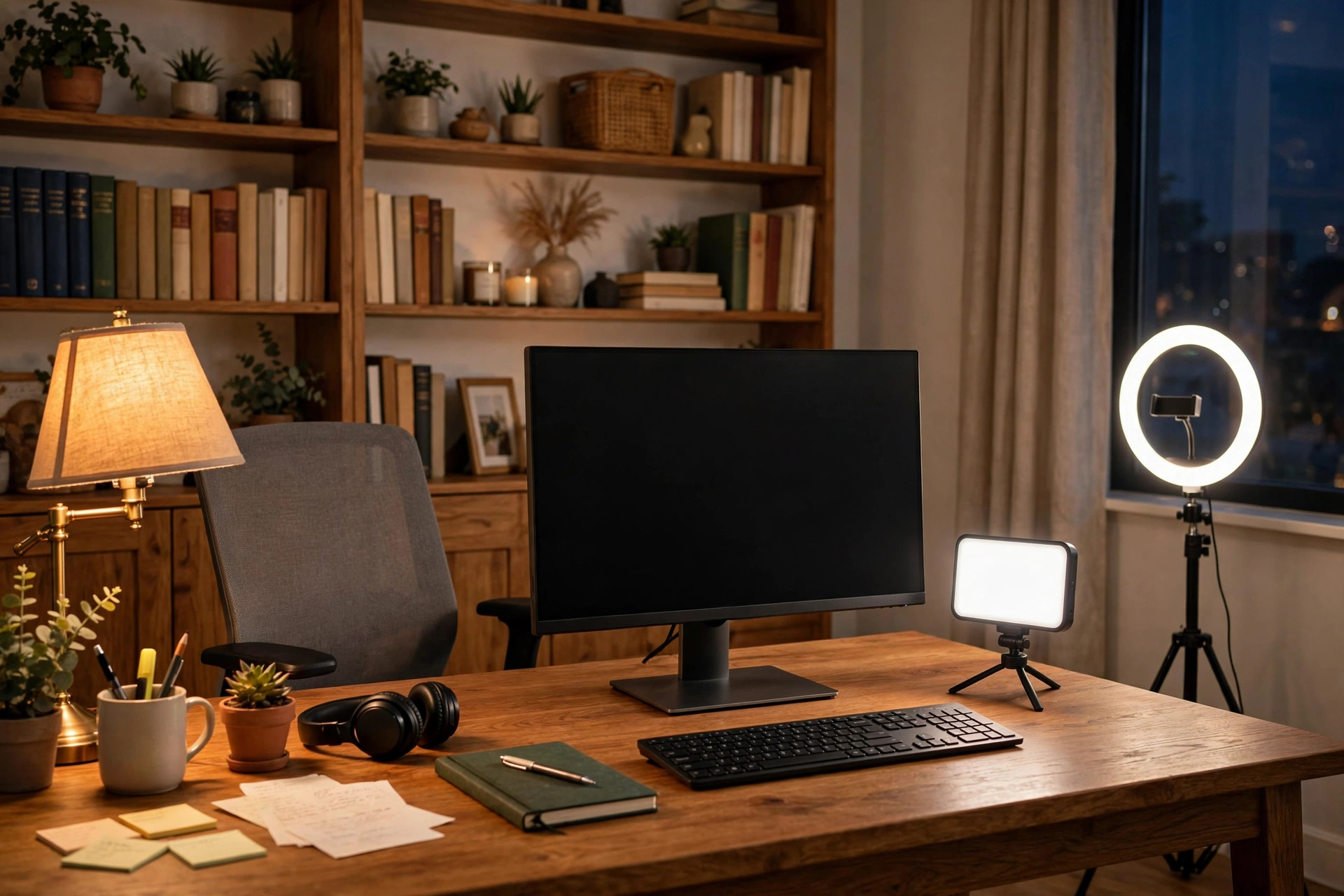
The key light is the main lamp. It sits in front of you, behind the webcam, at about face height. Its job is to light your face evenly. A soft white LED panel, a large ring light, or a wide desk lamp all work. The light should be a little above eye level and angled down slightly. This position fills in shadows under the brow and chin. A best ring light for home office video calls is one popular choice for this job, because it gives even, shadow-free light in one device. Keep the key light at arm’s length from the face. Closer is softer. Farther is weaker.
The Fill Light
The fill light is weaker than the key light. It sits to one side and softens the shadows the key light leaves. A small desk lamp with a shade works well. Use half the brightness of the key light. In small rooms, a best task lighting for home office desk setup can serve as the fill light while still lighting your papers. This keeps the desk neat and saves space.
The Background Light
The background light separates you from the wall behind you. It is a small lamp aimed at the back wall or a shelf. It does not need to be bright. A warm floor lamp or a shelf lamp does the job. This light adds depth to the image. Without it, the person can look pasted onto a flat wall.
Daylight From a Window
A window is free and flattering. Sit facing the window, not with the window behind you. Light from behind turns you into a dark shape. Light from the front is soft and even. North-facing windows give the steadiest light through the day. If the sun is too strong, use sheer curtains to soften it. Note that daylight changes. Morning light is warm. Midday light is bright. Evening light fades. A window plus one lamp covers most of the day.
Simple Setups for Different Spaces
The One-Lamp Setup
Place one soft LED lamp in front of you, just behind the webcam. Aim it at your face. Turn off any bright light behind you. This takes five minutes and costs very little. It is enough for a short daily check-in.
The Two-Lamp Setup
Add a second lamp to one side as a fill light. Set the key light brighter than the fill light. This is the setup most remote workers use. It handles long meetings and interviews well. It also works when daylight fades in the evening.
The Three-Lamp Setup
Add a background light behind you. This is the setup used by teachers, trainers, and anyone on camera for hours. It looks the most polished. It costs more, but each lamp can be small and cheap.
Small Desks and Corners
In a tight corner, use a clamp lamp that grips the desk edge. It takes no desk space. A light bar that sits on top of the monitor is another good choice. It shines down on the face and keyboard. Keep cords tucked behind the desk with a tray or clips.
Cost and Price
Lighting for Zoom calls does not have to cost much. A basic plan breaks down like this.
– Under $50: One LED desk lamp with adjustable color temperature. This covers the one-lamp setup. Many store brands sell these at big home stores. – $50 to $150: A key light plus a fill lamp. This range includes ring lights and small LED panels. This is the sweet spot for most workers. – $150 to $300: A full three-lamp setup with a good background light. This range buys known brands with flicker-free bulbs and sturdy stands.
Bulbs themselves cost little. A high-CRI LED bulb runs a few dollars and lasts for years. Replacing old bulbs with better ones is the cheapest upgrade of all.
Care and Upkeep
LED lamps need little care. Dust the lamp heads once a month. Dust dims the light more than most people think. Wipe the webcam lens with a soft cloth each week. A dirty lens makes even good light look hazy.
Check the bulbs once a year. LEDs fade slowly over time. If your video looks dimmer than before, the bulb may be aging. Keep a spare bulb in the drawer so you can swap it before an important call.
Cord care matters in a home office. Loose cords look messy on camera if they hang into the frame. They are also a trip hazard. Use ties or a tray to keep cords along the desk back. Unplug lamps during storms to protect the electronics.
Safety
Lamps get warm. Keep fabric, paper, and curtains away from hot bulbs. LED lamps run cooler than old halogen lamps, but they still need air flow. Do not cover a lamp head with a towel or box.
Check that the lamp is steady. A tall floor lamp can tip if it is bumped. Put it against a wall or behind furniture. Keep cords off the walking path. A cord across the floor is a common cause of home office falls.
Use bulbs with the right wattage for the fixture. The label inside the lamp socket gives the maximum. Going over it can melt the socket. LED bulbs use little power, so this is rarely a problem, but the rule still stands.
Choose lights certified by a known testing lab. Labels like UL or ETL mean the product passed safety tests. Cheap uncertified lamps sold online may skip these tests. The few dollars saved are not worth the risk.
Frequently Asked Questions
What is the best light color for Zoom meetings?
Use neutral to daylight white, around 4000K to 5000K. This range looks natural on most webcams. It matches indoor daylight and keeps skin tones true.
Should the light be in front of me or behind me?
In front of you. Light should fall on your face, where the camera looks. Light behind you makes you a dark shape against a bright background.
Is a ring light good for Zoom calls?
Yes. A ring light gives soft, even light that fills the face. It is simple to set up and works in small rooms. Many remote workers pair it with a desk lamp for extra fill.
Can I just use my window for light?
Yes, if you face the window. Daylight is flattering and free. But it changes through the day and disappears at night. Keep one lamp ready for cloudy days and evening calls.
Why does my video flicker or show bands?
Old or cheap bulbs flicker faster than the eye can see, but the camera catches it. Switch to a flicker-free LED lamp. Check that the lamp and camera refresh rates do not clash.
Do I need a headset for Zoom meetings too?
Good audio matters as much as good video. A noise cancelling headset for home office meetings blocks room noise and makes your voice clear. Pairing good light with good sound gives the most polished call.
A Short Final Word
The best home office lighting for Zoom meetings comes down to three habits. Put light in front of the face. Keep the color near daylight. Kill the bright light behind you. One lamp fixes most problems. Two lamps fix nearly all of them. Start small, test with your camera preview, and adjust until the picture looks like you on a good day. Your coworkers will notice the difference before they know what changed.
For more background, see Wayfair, Herman Miller, and Steelcase. For more background, see UPLIFT Desk, The Spruce, and Wirecutter. Buying guides are also published by PCMag and IKEA.
References
Herman Miller. (n.d.). Office furniture and ergonomic seating. https://www.hermanmiller.com IKEA. (n.d.). Home furnishings. https://www.ikea.com PCMag. (n.d.). Technology product reviews. https://www.pcmag.com Steelcase. (n.d.). Office furniture and workplace research. https://www.steelcase.com The Spruce. (n.d.). Home and garden advice. https://www.thespruce.com UPLIFT Desk. (n.d.). Standing desks and ergonomic office furniture. https://www.uplift-desk.com Wayfair. (n.d.). Furniture and home goods. https://www.wayfair.com Wirecutter. (n.d.). Product reviews from The New York Times. https://www.nytimes.com/wirecutter
Was this guide helpful?

About Emily Rodriguez
The My Garden US editorial team writes practical, in-depth home and garden guides for American homeowners — tested advice, no fluff.
You May Also Like
Small Desk Organizer With Phone Charging Dock: A Complete Guide
January 10, 2026 0 views
Home Office Filing Cabinet Lateral Two Drawer: A Complete Guide
February 6, 2026 0 views
The Best Office Chair for Sciatica Pain Relief
June 15, 2026 0 views