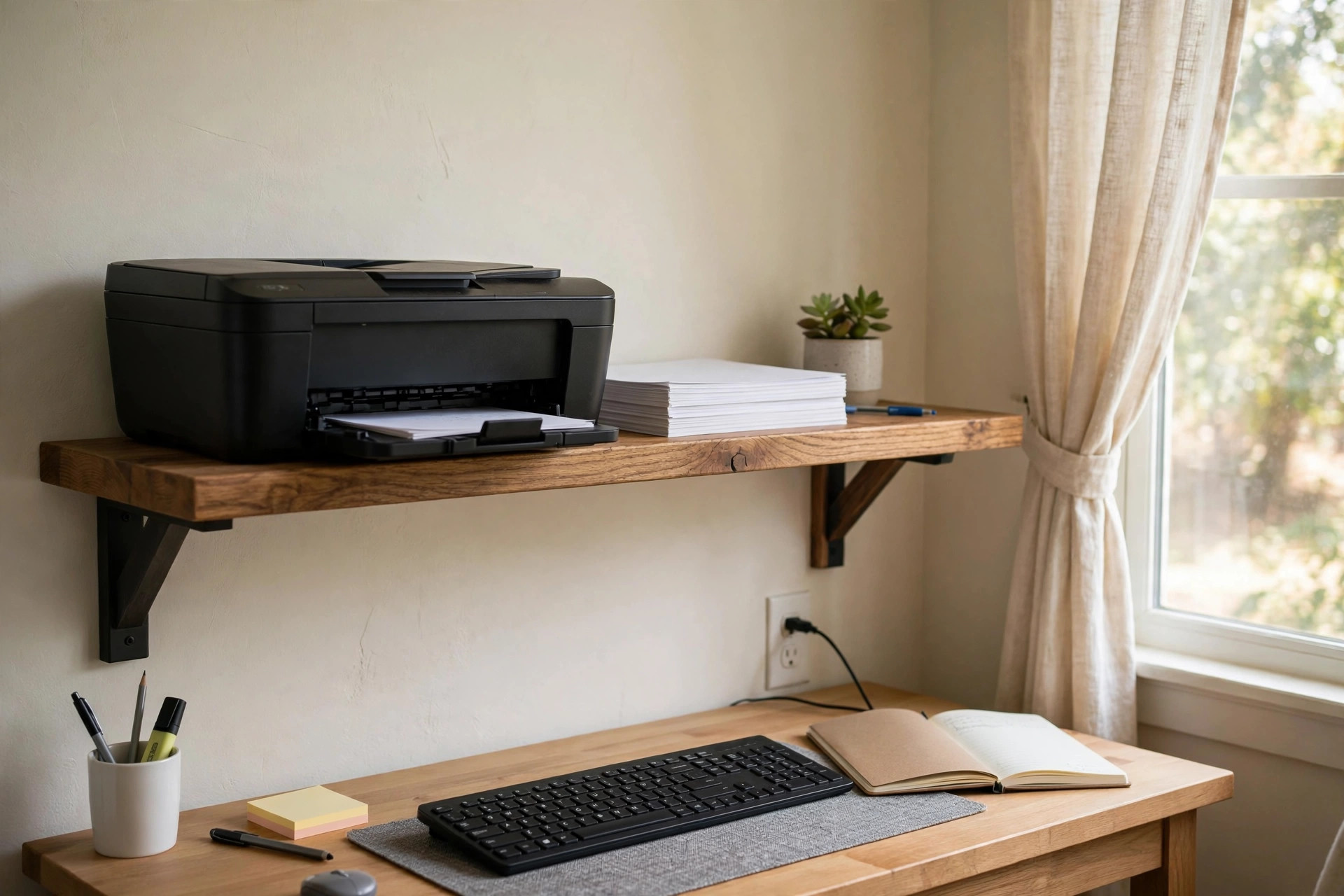

A home office wall shelf for printer storage is a simple fix for a common problem. The printer sits on the desk and eats up the space you need for work. It gathers paper dust, tangled cords, and clutter. A wall shelf lifts the printer off the work surface and gives it a place of its own. The desk stays open. The printer stays near. This guide explains why this kind of shelf matters, what to look for when you shop, the main types you will find, what they cost, and how to keep the setup safe for years.
Why a Wall Shelf for the Printer Matters
The printer is one of the largest items in a small office. Most printers are wide and deep, and they need clear space behind them for paper and in front for output. When the machine sits on the desk, it can take a third of the work area. Work feels crowded. Things fall. Papers pile up.
A wall shelf moves the printer up and off the desk. The desk below is free for a keyboard, a notebook, or a cup of coffee. The printer is still close at hand, at a height you can reach from your chair. Many people place the shelf just above or beside the desk so they can turn, press a button, and grab a page.
There is also the matter of cords. A printer needs a power cord and often a cable to the computer. When the printer sits on a wall shelf near an outlet, the cords can run down the wall in a neat line. They do not cross the desk. This makes the office look tidy and makes cleaning easier.
Air flow is another point in favor of a shelf. Printers run warm, and the paper path needs room on all sides. A solid open shelf lets air move around the machine. It also keeps the printer away from drinks on the desk, which is a common cause of sticky paper jams.
For people in apartments or small rooms, wall space is often free space. A wall shelf uses it well. That is why the home office wall shelf for printer storage has become such a common item in home offices across the country.
What to Look for When You Choose: Home Office Wall Shelf for Printer Storage
Not every shelf can hold a printer. Printers are heavy. A basic paper printer may weigh ten to fifteen pounds. A laser printer can weigh twenty-five pounds or more. Add a stack of paper and a spare toner cartridge, and the load grows. The shelf must be rated for the weight of your exact printer with room to spare.
Start by weighing your printer. Look at the manual or the label on the bottom of the machine. Then add five pounds for paper and supplies. Pick a shelf rated for at least that total, and more is better. A shelf rated for forty pounds gives you a safe margin for most home printers.
Depth matters just as much as weight. Measure your printer from front to back, including the paper tray when it is open. Many printers are fourteen to eighteen inches deep with the tray out. The shelf must be at least two inches deeper than the printer so the machine sits fully on it. A printer that hangs over the front edge is unstable and ugly.
Width matters too. The shelf should be at least two inches wider than the printer on each side. This leaves room for your hands when you change paper or toner. It also leaves room for the paper to come out flat without hitting a wall or bracket.
The mounting hardware is the heart of the system. A shelf that holds only with drywall plugs will fail under a heavy printer. The best method is to screw the brackets into the wooden studs behind the drywall. A stud finder, which you can read about at sites like The Spruce, will help you find them.
The surface of the shelf should be flat and smooth. A laminate or sealed wood top is easy to wipe clean. Rough or unfinished wood can snag paper. Avoid glass tops for printers, since they can be slippery and may not handle the load.
Ventilation is worth a thought. Some shelves have a raised back edge or side rails that keep the printer from sliding back and blocking the rear vents. If you pick a shelf with a lip, make sure it is low enough that you can still reach the paper tray.
Finally, think about the height. The shelf should be at a height you can reach while sitting or standing with ease. Most people mount it between waist and shoulder height. If it is too high, changing the toner becomes a chore. If it is too low, the desk below loses its use.
Types and Options on the Market
Wall shelves for printers come in several basic forms. Each has its place.
The most common is the fixed bracket shelf. Two or three metal brackets screw into the wall, and a board rests on top. These are strong and cheap. They hold heavy laser printers with ease. The brackets are visible, which some people dislike, but many styles now look clean and modern.
The second type is the floating shelf. It has no visible brackets. The support is hidden inside the shelf or in a metal rod fixed to the wall. Floating shelves look neat and simple. They can hold a printer, but only if the hidden hardware is heavy duty and fixed into studs. Cheap floating shelves are made for books and decor, not for a twenty-pound machine. Check the weight rating with care.
The third type is the wall-mounted printer stand or cabinet. This is a deeper unit, sometimes with a door or a lower shelf for paper. These units cost more, but they give you storage for paper, ink, and cables in one neat package.
A fourth option is the adjustable track system. Metal tracks screw into the wall, and shelf brackets slide into the tracks at any height. You can move the shelf up or down later without new holes. This is a good choice if you may change printers or rearrange the room. Retailers such as IKEA and Wayfair carry systems of this kind.
When you shop, you will see shelves in wood, metal, and laminate. Solid wood looks warm and holds screws well. Metal shelves are strong and easy to clean. Laminate boards are cheap and come in many colors. For design ideas, Wirecutter and PCMag both publish guides to home office gear that can help you compare styles.
Cost and Price
A basic bracket shelf strong enough for a printer costs little. A good pair of heavy-duty brackets plus a solid board can be had for twenty to forty dollars. This is the cheapest safe option, and it works very well.
A mid-range floating shelf rated for heavy loads costs forty to ninety dollars. The price rises with the length and the finish. Real wood costs more than laminate. A shelf made for printers, with a deep board and strong hidden mounts, sits at the top of this range.
A wall-mounted printer cabinet with doors costs ninety to two hundred dollars or more. The price depends on the size, the material, and the brand. Office furniture makers such as Herman Miller and Steelcase sell at the high end, while mass-market stores like Walmart and Target offer budget versions.
A set of tracks, brackets, and one deep shelf often costs fifty to one hundred dollars.
Do not forget the small extras in your budget. A stud finder, heavy-duty toggle bolts, cable clips, and a level add a few dollars each. All told, the full job often comes in under one hundred dollars for a simple bracket shelf.
Care and Upkeep
A wall shelf for a printer needs little care, but a few habits keep it safe and clean.
Dust the shelf and the printer once a week. Paper dust builds up fast around printers. A dry cloth or a soft brush works well. Do not let dust gather under the printer, where it can block vents.
Check the brackets twice a year. Look for loose screws or a shelf that has started to tilt. Tighten any screw that has worked loose.
Keep the paper supply on the shelf modest. A full ream of paper weighs five pounds. Store one open pack near the printer and keep the rest in a closet or a home office filing cabinet lateral two drawer unit on the floor.
Watch the cords. Printer cords can pull tight if the printer shifts. Leave a little slack, and use cable clips to guide cords down the wall. If you move the printer for cleaning, set it back in the same spot so the cords are not strained.
Clean up spills at once. Ink or toner on a laminate shelf wipes off if you catch it fast. On raw wood it can stain. A sealed top makes life easier.
With these simple steps, a good shelf will last as long as the printer, and often longer.
Safety
Safety is the most important part of this project. A printer falling from a wall shelf can hurt a person and break the machine. The rules below keep that from happening.
Always mount into studs when you can. Studs are the strong wood frames inside the wall. A screw driven into a stud can hold a great deal of weight. Drywall alone holds very little. If you are not sure where the studs are, buy or borrow a stud finder and mark them with a pencil before you drill.
Use the right fasteners. The screws or bolts that come with a cheap shelf may be too small for a printer. When in doubt, buy heavy-duty screws or toggle bolts rated for more than your total load. The small extra cost is worth it.
Do not overload the shelf. The weight rating is a limit, not a goal. Keep the total load, printer plus paper plus supplies, well under the rating. A margin of ten pounds or more is wise.
Keep the shelf away from heat and water. Do not mount it above a radiator or a heating vent. Heat can warp the shelf and harm the printer. Do not mount it where a window leak or a plant watering can could reach it.
Think about who uses the room. If small children play in the office, mount the shelf high enough that they cannot pull on it, and make sure the brackets are fully tight. The U.S. Consumer Product Safety Commission offers general guidance on anchoring furniture and keeping heavy items secure in homes with children.
Test the shelf before you trust it. After mounting, press down firmly on the shelf with both hands. It should not move, creak, or flex. Then place the printer on it and watch for a day. If anything feels loose, fix it at once.
Frequently Asked Questions
Can any wall shelf hold a printer? No. Many wall shelves are made for books, plants, or decor. They are not rated for the weight of a printer. You need a shelf rated for at least the weight of your printer plus paper and supplies. Check the rating on the box or the product page before you buy.
How deep should the shelf be? Measure your printer from front to back with the paper tray open. Add two inches. Most home printers need a shelf fourteen to twenty inches deep. A shelf that is too shallow lets the printer hang over the edge, which is unsafe.
Is it better to mount the shelf into studs or use drywall anchors? Studs are always better. A screw in a wood stud holds far more weight than any drywall anchor. Use a stud finder to locate them. If the studs are not where you need them, use heavy-duty toggle bolts as the next best choice.
Can I put the shelf above my desk? Yes, and many people do. Mount it at a height you can reach from your chair, usually between waist and shoulder level. Leave enough space between the desk and the shelf so you can still use the desk below.
What do I do with the printer cables? Run them down the wall from the shelf to the outlet and the computer. Use small cable clips to hold them flat against the wall. Leave a little slack so the cords are not pulled tight. This keeps the setup neat and safe. You can find cable management ideas alongside other office upgrades, and a comfortable seat matters too, so many shoppers also look at an ergonomic office chair with headrest for tall men or the best budget office chair under 150 dollars when they redo their workspace.
How often should I check the shelf? Check the screws and brackets twice a year, and any time you move the printer. Look for tilt, looseness, or cracks in the board. A quick check takes two minutes and keeps the setup safe.
A Final Word
A home office wall shelf for printer storage is a small project with a large payoff. It clears the desk, tidies the cords, and gives the printer a proper home. The work takes an afternoon. The cost is modest. The rules are simple: pick a shelf rated for the weight, make it deep enough, screw it into studs, and check it now and then.
Take the time to measure your printer before you shop. Buy hardware that is stronger than you think you need. Mount the shelf where you can reach it with ease. Then enjoy the extra desk space. A tidy office makes for calmer work, and this one shelf is a fine place to start.
References
Herman Miller. (n.d.). Office furniture and ergonomic seating. https://www.hermanmiller.com IKEA. (n.d.). Home furnishings. https://www.ikea.com PCMag. (n.d.). Technology product reviews. https://www.pcmag.com Steelcase. (n.d.). Office furniture and workplace research. https://www.steelcase.com Target. (n.d.). Retail store. https://www.target.com The Spruce. (n.d.). Home and garden advice. https://www.thespruce.com U.S. Consumer Product Safety Commission. (n.d.). Product safety information. https://www.cpsc.gov Walmart. (n.d.). Everyday low prices. https://www.walmart.com Wayfair. (n.d.). Furniture and home goods. https://www.wayfair.com Wirecutter. (n.d.). Product reviews from The New York Times. https://www.nytimes.com/wirecutter
Was this guide helpful?

About Jennifer Lee
The My Garden US editorial team writes practical, in-depth home and garden guides for American homeowners — tested advice, no fluff.
You May Also Like

An Ergonomic Office Chair With Headrest for Tall Men
July 22, 2026 0 views
Ergonomic Neck Pillow for Office Chair Headrest: A Plain Guide for Desk Workers
May 8, 2026 0 views
Adjustable Standing Desk with Memory Presets USA: A Plain Guide for Home Offices
January 19, 2026 0 views