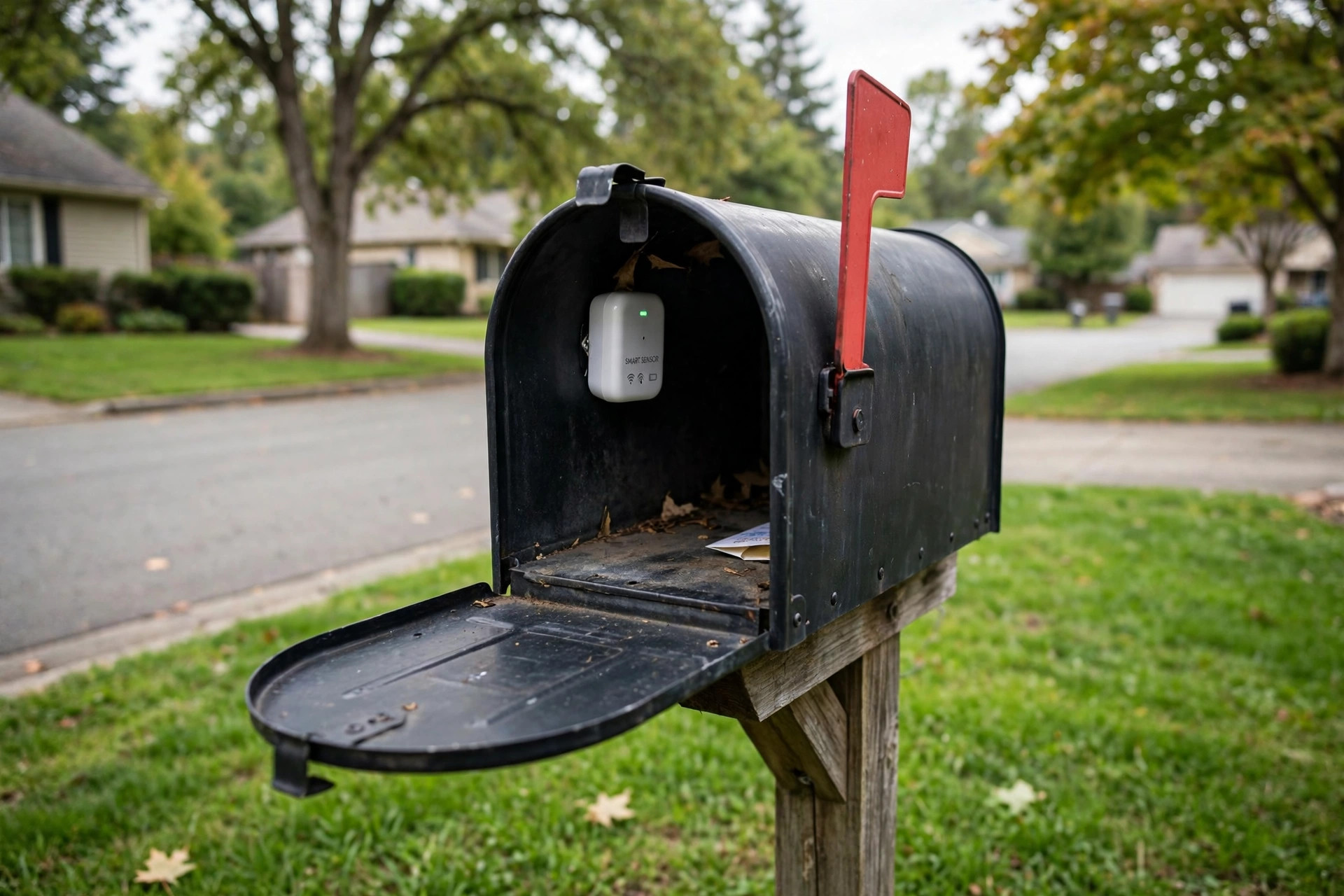

A smart mailbox sensor is a small device that sits inside or on your mailbox and sends an alert to your phone when the mail carrier opens the door or drops in a package. If you have read smart mailbox sensor reviews 2026 USA editions from this year, you know these little gadgets have grown far more reliable than the first models from a few years back. Battery life is longer, wireless range is stronger, and setup takes only a few minutes. For many households, a mailbox sensor has become as ordinary as a doorbell camera: a simple upgrade that saves daily trips to the curb and keeps mail safer.
Why a Mailbox Sensor Matters
Most Americans still get important things by mail. Bills, tax forms, medicine, and online orders all land in the box at the curb. A sensor removes the guesswork. You no longer walk out in the rain or the heat only to find an empty box. Instead, you get a quiet ping the moment the carrier arrives. That small change adds up over a year.
Security is the other reason. Mail theft, sometimes called porch piracy at the curb, is a real problem in many neighborhoods. When you know mail has arrived, you can bring it inside fast. Checks, credit cards, and prescriptions do not sit out for hours. Some models also alert you if the box is left open, which can stop a gust of wind from scattering your mail down the street. In tests covered by independent product testing, devices that send instant alerts helped families collect mail far sooner than those who relied on a fixed daily schedule.
What to Look for When You Choose: Smart Mailbox Sensor Reviews 2026 Usa
Not every sensor works well in every yard. The distance from your house to the curb matters most. Reviewers often rank connection range as the first thing to check, because a sensor that cannot reach your home network is of no use at all.
Wireless Range
Most sensors use one of three paths: Wi-Fi, a dedicated hub with long-range radio, or Bluetooth. Wi-Fi models are simple, but a mailbox at the end of a long driveway may sit too far from the router. Hub-based models reach farther, often 200 feet or more through walls. Bluetooth models reach the shortest distance and suit mailboxes close to the house. Before you buy, measure the distance from your router or hub spot to the mailbox, and pick a model rated for more than that distance.
Detection Method
Some sensors use motion or tilt to notice when the door opens. Others use a small beam that breaks when mail lands inside. Tilt sensors are common and cheap, but they can miss a light letter or trigger in heavy wind. Beam and magnetic sensors are more exact. In tech reviews of smart home gear, models with adjustable sensitivity got the best marks for avoiding false alerts.
Battery Life and Power
Good sensors run a year or more on one set of batteries. A few offer solar trickle charging. Look for models that send a low-battery warning to your phone, so you never miss mail because the sensor went silent. Coin-cell models last long but cost more to replace; AA and AAA models are easier to feed.
App and Smart Home Fit
Most sensors work through a phone app with push alerts. The better ones also link to voice assistants or routines. If you already use a Google smart home setup, pick a sensor that fits it, so you can say, “Has the mail arrived?” and get an answer. Users with Ring home security gear may prefer a sensor from the same brand family for one app instead of two.
Types of Smart Mailbox Sensors
Reviewers in 2026 group these products into a few clear types. Knowing the type helps you compare reviews fairly.
Stick-On Door Sensors
These are the simplest. A small magnetic pair sticks to the door and frame of the mailbox. When the door opens, the magnet parts and the alert fires. They cost little and install in seconds. They work best on standard metal mailboxes with a clear swinging door.
Motion and Tilt Sensors
These sit inside the box and watch for movement. They catch both the door opening and mail dropping in. They cost a bit more. In windy areas, pick one with a sensitivity setting, or you may get alerts on stormy days.
Package and Beam Sensors
Beam sensors mount on the inside walls and watch for an object breaking the beam. They can tell you that a package landed, not just that the door opened. They suit homes that get many online deliveries. They need a careful setup, because the beam must aim straight across the box.
Hub-Connected Systems
Some brands sell a sensor that talks to a home hub instead of your phone directly. The hub then sends the alert. These reach the farthest and often last longest on a battery. The trade cost is the hub price, but if you plan to add a smart floodlight for your backyard or other devices later, one hub can serve many sensors.
Cost and Price in 2026
Prices have fallen as the category grew. In 2026, a basic stick-on sensor costs around 20 to 40 dollars. Mid-range tilt and motion models run 40 to 80 dollars. Hub-based systems cost 80 to 150 dollars for the first sensor, with extra sensors at 25 to 50 dollars each. There is usually no monthly fee. A few brands offer paid cloud history, but the core alert is free.
When you compare smart home coverage and price guides, remember to count the total cost. A 30-dollar sensor that needs a 70-dollar hub costs more than a 60-dollar Wi-Fi model. Also check the return window. Because range depends on your yard, a seller with a 30-day return policy is worth more than a slightly lower price.
Care and Upkeep
A mailbox sensor lives in a harsh spot: heat in summer, cold in winter, and damp air year-round. A little care keeps it working.
– Wipe the sensor case every few months and check the seals. – Replace batteries once a year, even if the app still shows a charge. – After a storm, open the box and make sure the sensor has not shifted. – Keep the app updated, since makers often release fixes for false alerts. – In freezing weather, lithium batteries last longer than alkaline ones.
If alerts stop, check the connection first. Move a Wi-Fi extender closer, or re-pair the sensor to its hub. Nine times in ten, the fix takes five minutes.
Safety and Privacy
Mailbox sensors are low-risk devices, but a few points deserve care. The sensor mounts near the street, so pick one with a lock or screw mount if theft worries you. A locking mailbox paired with a sensor gives the best defense: the box stays shut, and you still know when mail arrives.
On privacy, these sensors watch the box, not the street. They do not record video or sound. Still, read the app’s privacy policy before you sign in. The consumer safety agency reminds buyers that any wireless device near the home should use a strong password and current software. Keep your home network password long, and do not share sensor access with strangers.
Some reviewers also note that a sensor is not a substitute for a full security plan. Families who want camera coverage and professional monitoring often pair a sensor with services such as SimpliSafe or ADT. The sensor covers the curb; the alarm covers the doors and windows.
Frequently Asked Questions
Do smart mailbox sensors work with metal mailboxes?
Yes, but metal can block wireless signals. Models with an external antenna or a hub system work best. Place the sensor near the door opening rather than deep inside the box, and test the range before you mount it for good.
Will the sensor alert me for packages left at the door?
Most mailbox sensors only watch the mailbox. For doorstep packages, you need a doorbell camera or a motion sensor at the door. Some owners pair a mailbox sensor with window and door automation such as smart blinds routines, so the whole home reacts at once.
How long does setup take?
Most models set up in ten to fifteen minutes. You stick or screw the sensor in place, pair it with the app, and run one test by opening the box. Hub models add a few minutes to place the hub near a window facing the street.
Can a sensor survive winter?
Most are rated from about minus 4 to 140 degrees Fahrenheit. Battery life drops in the cold, so expect shorter life in northern states. Lithium batteries handle cold better, as noted in recent smart home reporting.
Do I need a subscription?
No. The mail alert is free on nearly every model. Paid plans, where offered, add history logs or multi-user alerts. For most homes, the free tier is enough.
Can one app handle more than one mailbox?
Yes. Most apps let you name and monitor several sensors at once. This suits homes with a separate box for a rental unit or a home office. Each sensor appears as its own entry in the app, and alerts show which box opened. Just make sure every box sits within range of your hub or network before you buy a second unit.
A Short Final Word
A smart mailbox sensor is a small buy that pays off every day. Pick a model with range to spare, a detection method that suits your mailbox, and an app you will actually open. Read a few reviews from this year, compare total costs, and mount the sensor with care. Then enjoy the quiet ping that tells you the mail is here.
Related guides on this site include best video doorbell without subscription usa, ring vs nest doorbell comparison 2026 usa, and best wireless doorbell camera reviews usa.
References
ADT. (n.d.). Home security and automation. https://www.adt.com Best mailbox with lock reviews 2026 usa. (n.d.). Home and garden information. https://www.best-mailbox-with-lock-reviews-2026-usa/ Best smart blinds reviews 2026 usa. (n.d.). Home and garden information. https://www.best-smart-blinds-reviews-2026-usa/ Best smart floodlight for backyard usa. (n.d.). Home and garden information. https://www.best-smart-floodlight-for-backyard-usa/ CNET. (n.d.). Technology news and reviews. https://www.cnet.com Consumer Reports. (n.d.). Product reviews and ratings. https://www.consumerreports.org Google Store. (n.d.). Smart home devices. https://store.google.com PCMag. (n.d.). Technology product reviews. https://www.pcmag.com Ring. (n.d.). Smart home security devices. https://www.ring.com SimpliSafe. (n.d.). Home security systems. https://www.simplisafe.com The Verge. (n.d.). Technology news and reviews. https://www.theverge.com U.S. Consumer Product Safety Commission. (n.d.). Product safety information. https://www.cpsc.gov
Was this guide helpful?

About David Wilson
The My Garden US editorial team writes practical, in-depth home and garden guides for American homeowners — tested advice, no fluff.
You May Also Like
Alexa vs Google Home 2026 Comparison USA: Which Voice Assistant Wins Your Home
March 24, 2026 0 views
Smart Plug for Space Heater Safety Reviews
March 31, 2026 0 views
Smart Porch Light With Camera Reviews USA
January 14, 2026 0 views