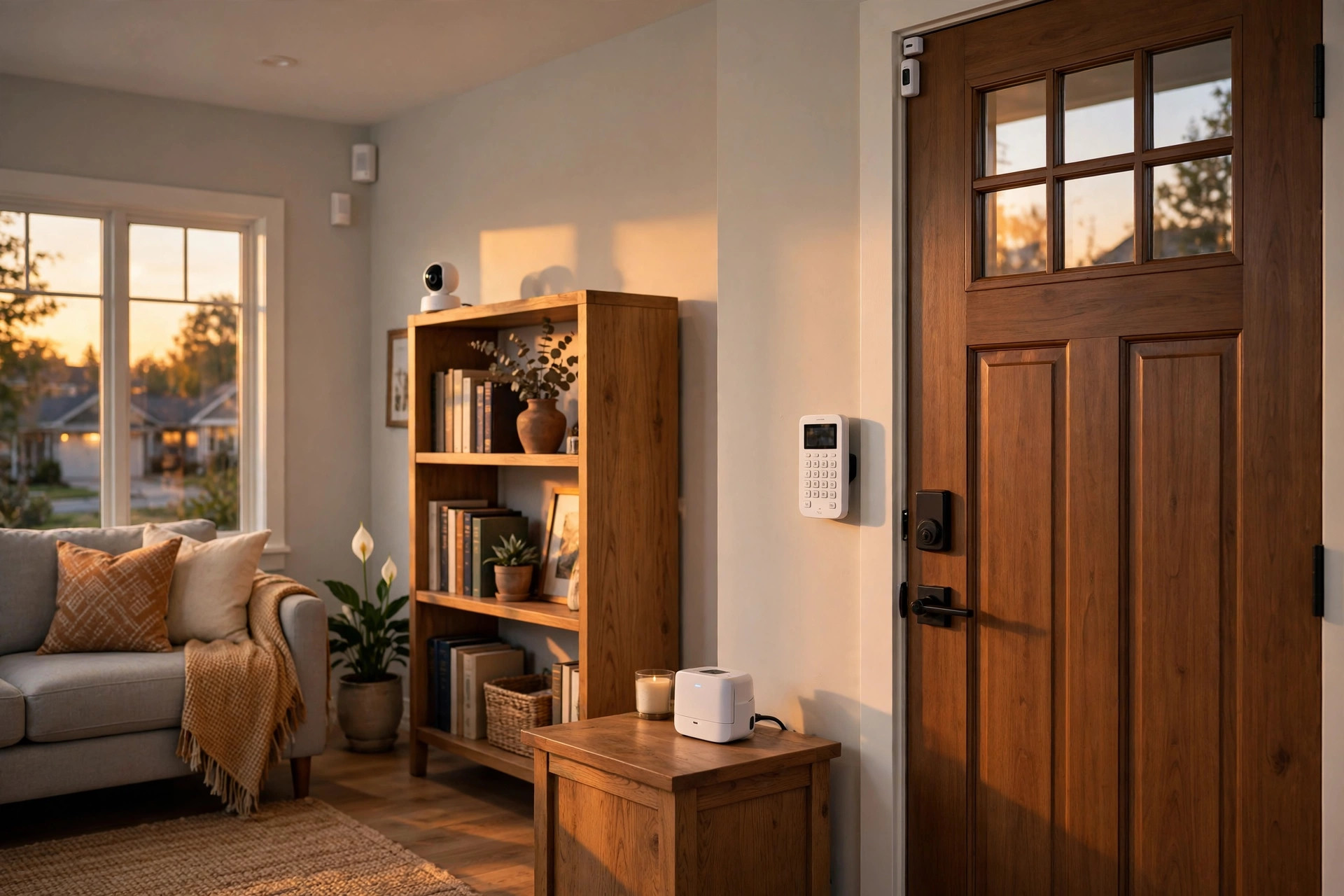

Most burglars choose the easy target. A dark house. An empty driveway. No sign of an alarm in the yard. Police records tell a plain story. Homes without security systems are broken into far more often than homes with one. This guide will help you find the best professionally monitored security system USA homeowners can buy today. For many families, a basic self-monitored alarm is not enough. They want trained people watching over their home day and night. That is what professional monitoring offers. A monitoring center answers when your alarm goes off. It calls you first, then the police or fire department when needed. Below we cover how these systems work, which features matter most, what they cost, and which questions to ask before you sign.
Why Professional Monitoring Matters
An alarm that sounds in an empty house helps very little. A self-monitored system sends alerts to your phone, which works fine when you are awake and your phone is near you. It fails when you are asleep, on a plane, or in a meeting. Professional monitoring closes that gap with a team of operators who stand by at all hours and respond within seconds when a sensor trips.
The Alarm Is Only Half the Job
Sirens and flashing lights can scare off a burglar. That is the first half of the job. The second half is getting help to your door. Professional monitoring centers are staffed around the clock, including nights, weekends, and holidays. When an alarm signal arrives, an operator reviews it and follows a clear plan. They try to reach you. They call your backup contacts. If no one answers, or if you ask for help, they contact the police or fire department. Studies of alarm response show that monitored homes get faster police response than unmonitored ones.
Faster Emergency Response
Time matters in a fire. A smoke detector that only beeps helps no one if you are not home. Monitored smoke and carbon monoxide detectors send a signal to the center at once, and the operator can send the fire department even when you are miles away. Many families with older parents value the panic button feature most. One press brings help, and no phone call is needed.
Protection When You Are Away
Americans take vacations, business trips, and weekend visits to family, and an empty house is a tempting target. With professional monitoring, your home is never truly alone. Door and window sensors, motion detectors, and glass-break sensors all report to the center. Some plans add video verification, and police departments in many cities give faster response to alarms verified by video. For cameras that work well with monitored plans, see reviews of wired PoE camera systems and NVR-based home camera systems.
How Professionally Monitored Systems Work: Best Professionally Monitored Security System Usa
The idea is simple. Small sensors watch your home. A control hub collects their signals. The hub talks to a monitoring center over the internet or a cellular network. When something is wrong, people at the center take action. Let us look at each part in more detail.
The Equipment in Your Home
Most systems start with a base station or hub. Door and window sensors attach to entry points. Motion detectors watch rooms and hallways. Glass-break sensors listen for the sound of breaking glass. Many plans also include smoke, carbon monoxide, and water leak sensors. A keypad lets you arm and disarm the system, and smartphone apps do the same from your pocket. The equipment guide at CNET offers clear comparisons of hubs, sensors, and cameras from many brands.
The Monitoring Center
Monitoring centers are secure buildings with backup power and backup phone lines. When your system sends an alert, it appears on the operator screen in seconds, along with your address and call list. The operator calls you first. If you give the correct safe word, the alarm is cancelled. If you do not answer, they call the police. The whole process often takes less than a minute. The Verge has covered how these centers operate and how technology is changing them.
Cellular, Broadband, and Landline Connections
Your hub must reach the monitoring center at all times. Older systems used a home phone line. Burglars learned to cut phone wires, so the industry moved on. Most new systems use a cellular connection, the same kind your phone uses. Some use your home internet as well. Many hubs use both, so one backup covers the other. Cellular monitoring costs the company more, which is why monthly fees vary by connection type. Ask which connection your plan uses before you sign.
What to Look For When You Choose
Not every monitored system fits every home. A small apartment needs less gear than a two-story house with a garage. Keep these points in mind as you compare plans.
Monitoring Plans and Contract Terms
Some companies require a three-year contract. Others offer month-to-month plans. Long contracts often come with free or discounted equipment. Month-to-month plans cost more per month but let you leave at any time. Read the cancellation terms before you sign, and ask what happens to your equipment if you cancel. Independent testing groups such as Consumer Reports publish member surveys on contract satisfaction and hidden fees.
Equipment Quality and Compatibility
Good sensors last for years on one battery. Cheap sensors fail or send false alarms. Look for equipment with long battery life and clear low-battery warnings. Check whether the system works with devices you already own. Many homeowners want their alarm to talk to smart locks, thermostats, and lights. If you rent your home, choose a system with wireless sensors that remove without damage. A useful starting point is this guide to security systems for renters.
Cameras and Video Verification
Cameras add a layer of proof. When an alarm trips, the monitoring center can look at a short video clip. This helps operators tell a real break-in from a false alarm. Some police departments now require video or audio proof before they send officers to an alarm call. If fast police response matters to you, pick a plan that includes video verification. Indoor cameras should have privacy shutters or easy ways to turn them off. Outdoor cameras need weather protection and night vision. Reviews at PCMag compare camera quality, night vision, and storage plans.
Smart Home Integration
A monitored system can do more than guard doors. It can lock your doors when you arm it, turn on lights when motion is detected, and lower the thermostat when you leave. Check which smart home platforms your system supports. The Google Store lists smart home products that pair with popular alarm hubs. Plan the integration before you buy, not after.
Installation Options
National companies often send a technician to install the system. Professional installation costs more, but the technician tests every sensor before leaving. Do-it-yourself systems ship to your door with clear instructions, and most people finish setup in under an hour. If you are not handy with tools, pay for the technician. A poorly placed motion detector causes false alarms for years.
Types of Professionally Monitored Systems
The market offers three main paths to professional monitoring. Each has strengths and trade-offs.
National Companies With Installers
Big national brands employ their own technicians and run their own monitoring centers. They offer the widest range of equipment, including hardwired options for new homes. The trade-off is cost and contracts. Monthly fees run higher, and three-year agreements are common. ADT is the oldest name in this group and operates one of the largest monitoring networks in the country.
DIY Systems With Optional Monitoring
A newer group of companies sells equipment you install yourself. The same equipment can run self-monitored for free or with paid professional monitoring. Monthly plans are often cheaper, and contracts are rare. The trade-off is that you do the setup and the troubleshooting. SimpliSafe and Ring are well-known names in this space. Both offer professional monitoring plans that you can start or stop at any time.
Local and Regional Alarm Companies
Small local companies often give the most personal service. The owner may answer the phone, and technicians know the area and its permit rules. A small company may outsource its monitoring to a third-party center. That is not a problem by itself, but ask which center handles your alarms and whether it meets industry standards.
Cost and Price: What You Will Pay
Security monitoring is a long-term expense. It pays to understand the full cost before you commit.
Equipment Costs
A basic starter kit with a hub, three door sensors, and one motion detector costs between one hundred and three hundred dollars. Larger kits with cameras and smoke detectors can reach one thousand dollars or more. Companies with long contracts often install the equipment for little or no upfront cost, and you pay for it through higher monthly fees. Always ask for the total cost over the full contract term, not just the first month.
Monthly Monitoring Fees
Basic professional monitoring costs about twenty to thirty dollars per month. Plans with cameras, home automation, and video verification run thirty to sixty dollars per month. Get the monthly fee in writing, and ask how often the company raises rates.
Hidden Fees to Watch For
Activation fees can add one hundred dollars or more to your first bill. Some contracts charge a large fee if you cancel early, and equipment that you “rent” must be returned when the contract ends. Ask about all of these charges before you sign. A fair company will list every fee on one page.
Care and Upkeep
A security system needs a little care to stay reliable, and most of the work is simple.
Testing Your System
Test your system once a month. Put it in test mode first so the monitoring center knows not to call the police. Then trip each sensor one by one and check that every signal reaches the hub. Take the system out of test mode when you finish. Monthly testing catches dead batteries and failed sensors before they matter.
Batteries and Firmware
Wireless sensors run on small batteries that last one to three years, and your hub will warn you when one runs low. Replace batteries at once and keep spares in a drawer. Update the hub firmware when the app tells you, since updates fix bugs and close security holes.
Updating Your Call List
The monitoring center calls the numbers on your list. Keep that list current and make sure your backup contacts know your safe word. Tell the company when you get a new pet, since pets can set off motion detectors. Review your account once a year and update anything that changed.
Safety
A security system should make your home safer, not create new risks. A few simple rules keep it that way.
False Alarms and Fines
False alarms waste police time, and many cities now fine homeowners for repeated false alarms. Most false alarms come from user error, such as forgetting to disarm the system, or from low batteries. Learn your system, teach every family member how to use it, and keep batteries fresh. These simple steps prevent most false alarms.
Choosing Safe Placement for Cameras
Cameras watch your home, but they must respect the law and your neighbors. Do not point cameras into a neighbor’s windows, and place indoor cameras in common areas rather than bedrooms or bathrooms. Tell babysitters and house guests that cameras are recording. The U.S. Consumer Product Safety Commission publishes guidance on safe placement of corded devices near windows.
Permit Requirements
Some cities require an alarm permit before your system can be monitored. Permits are usually cheap, often twenty-five to fifty dollars per year. Your alarm company may handle the paperwork for you. If not, check with your city or county. Operating without a required permit can delay police response to your alarms.
Frequently Asked Questions
What is the difference between professional monitoring and self-monitoring?
With self-monitoring, alarm alerts go to your phone and you decide what to do. With professional monitoring, a staffed center receives the alerts and acts for you. The center calls you, then calls the police or fire department if needed. Professional monitoring works even when you are asleep or away from your phone.
Do I need a landline phone for a monitored system?
No. Most modern systems use a cellular connection or your home internet. Cellular monitoring is the most common choice because it keeps working during power and internet outages. Landline monitoring still exists and costs less, but it is easier for a burglar to defeat.
Will a monitored system lower my home insurance bill?
Many insurance companies offer discounts of five to twenty percent for monitored alarm systems. The discount is larger for systems that include fire and water monitoring. Ask your insurance agent what discount your policy offers, and get a certificate from your alarm company as proof.
Can I take my system with me when I move?
It depends on your contract and equipment. Wireless DIY systems move easily: you pack the sensors and set them up in the new home. Systems installed by a national company may require a technician visit and a relocation fee. Ask about moving terms before you sign.
What happens during a power outage?
The hub switches to its backup battery, which lasts several hours. Cellular monitoring keeps working because it does not depend on your home internet. Sensors run on their own batteries and keep reporting. When power returns, the system reconnects on its own. Test the backup battery once a year.
Are monitored systems worth the monthly cost?
For most homeowners, yes. The monthly fee buys round-the-clock human response and faster emergency help, and insurance discounts offset part of the cost. A single prevented burglary or an early fire alert can save far more than years of fees.
Final Word
The best professionally monitored security system USA homeowners can choose is the one that fits their home, their budget, and their daily life. Start with your needs. Count your doors and windows. Decide whether you want cameras, fire monitoring, and smart home features. Compare at least three companies on equipment cost, monthly fees, and contract terms. Read every fee line before you sign. Once the system is in, test it monthly and keep your contact list fresh. A good monitored system is quiet most days. That silence is the sound of a home that is well protected.
References
ADT. (n.d.). Home security and automation. https://www.adt.com CNET. (n.d.). Technology news and reviews. https://www.cnet.com Consumer Reports. (n.d.). Product reviews and ratings. https://www.consumerreports.org Google Store. (n.d.). Smart home devices. https://store.google.com PCMag. (n.d.). Technology product reviews. https://www.pcmag.com Ring. (n.d.). Smart home security devices. https://www.ring.com SimpliSafe. (n.d.). Home security systems. https://www.simplisafe.com The Verge. (n.d.). Technology news and reviews. https://www.theverge.com U.S. Consumer Product Safety Commission. (n.d.). Product safety information. https://www.cpsc.gov
Was this guide helpful?

About Lisa Anderson
The My Garden US editorial team writes practical, in-depth home and garden guides for American homeowners — tested advice, no fluff.
You May Also Like
Solar Panel Cleaning Service Cost Near Me: What to Pay
July 26, 2026 0 views
Smart Mailbox Sensor Reviews 2026 USA: Best Picks for Every Home
May 21, 2026 0 views
Fireproof Safe for Home Reviews 2026 USA: What Buyers Should Know
September 16, 2026 0 views