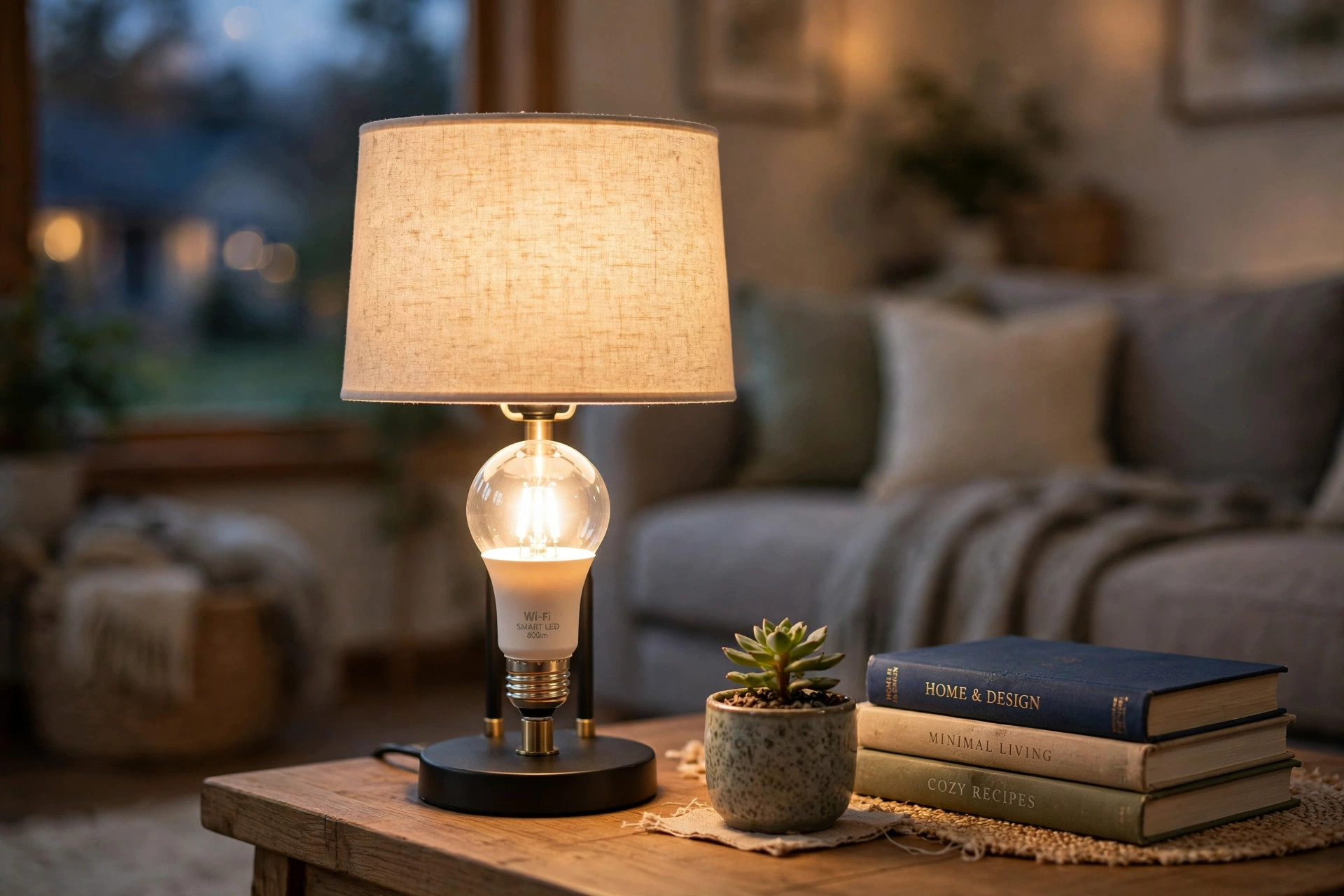

A wifi smart bulb looks like an ordinary light bulb, but it connects to your home internet network and lets you control your lights from your phone. This wifi smart bulbs buying guide USA homeowners read will walk you through the main points before you buy. You do not need to be a computer expert to use one. Most bulbs screw into a standard socket and set up in less than ten minutes.
Many American families now use these bulbs to dim lights from the couch, to change the color of a room for a party, or to set lamps to turn on by themselves at sunset. They cost a little more than a plain bulb at first, but they use little power and last for years.
Why a Smart Bulb Matters
Light shapes how a home feels. Bright white light helps you cook and read. Soft warm light helps you rest in the evening. Before wifi smart bulbs came to the market, changing that mood meant buying different bulbs or adding special dimmer switches. Now one bulb can do all of it.
A smart bulb matters because it saves effort. You can turn off every light in the house without walking room to room. You can set a schedule so lights come on before you get home from work. If you are on vacation, timed lights can make the house look lived in, which may discourage break-ins.
It also matters because it saves energy. Most smart bulbs use LED parts, and LEDs use far less power than old incandescent bulbs. The U.S. Department of Energy has long advised shoppers that LED lighting is one of the cheapest ways to cut a home power bill. When you add dimming and schedules on top of that, the savings grow. A bulb that dims itself to half brightness or turns itself off on a timer wastes less.
For older adults and people with limited movement, a smart bulb can be a real help. Voice control means no fumbling for switches in the dark. For renters, smart bulbs are attractive because they need no new wiring. You screw one in like any bulb and take it with you when you move.
What to Look for When You Shop: Wifi Smart Bulbs Buying Guide Usa
Start with the socket and shape. Most American lamps use the standard A19 bulb shape with a medium screw base, called E26. Check the size your lamp or fixture needs before you order. Bulbs also come in smaller shapes for ceiling fans, vanity bars, and flood lights. A bulb that does not fit is useless, so measure or read your old bulb label first.
Next, look at brightness. Bulb makers measure brightness in lumens, not watts. For a living room lamp, 800 lumens is a good all-around choice. That is about as bright as an old 60-watt bulb. For a reading spot, look for 1,100 lumens or more. The ENERGY STAR program lists tested bulbs with real lumen ratings, which can help you compare brands honestly.
Color matters more than most shoppers expect. Basic smart bulbs give white light that you can dim. Better bulbs let you shift that white from cool daylight to warm candlelight. The fanciest bulbs add full color, so you can turn a room red, blue, or green. Think about your own home. If you only need white light that dims, do not pay extra for millions of colors you will never use.
Check how the bulb connects. True wifi smart bulbs join your home wifi network and need no extra hub. Some bulbs use other systems, such as Zigbee or Bluetooth, and need a small hub box plugged into your router. Bluetooth-only bulbs are cheaper, but they only work when your phone is close by. For most buyers, a hub-free wifi bulb is the simplest choice.
App quality is easy to overlook and hard to fix later. You will use the maker’s app to set up the bulb, name your rooms, and build schedules. Read recent app reviews before you buy. A cheap bulb with a poor app will cause more trouble than a good bulb that costs a little more. The app should also let you group bulbs, so one tap can control a whole room.
Voice control is another point to check. Many shoppers want to say “turn on the kitchen lights” to a voice helper. Look on the box for clear support of the system you already use. Some bulbs work with all major helpers. Others work with only one or two. If you already own smart speakers, match the bulb to them.
Types and Options on the Market
Smart bulbs fall into three broad types. The first type is the white-dimming bulb. It gives white light only, but you can dim it from your phone. This type is the cheapest and the easiest to use. It suits bedrooms, hallways, and any place where you simply want dimming without rewiring.
The second type is the tunable white bulb. It shifts between cool white and warm white. Cool white suits a home office or a kitchen, where clear light helps you work. Warm white suits a living room or dining room in the evening. Many families choose this type because it covers daily life without the price of full color.
The third type is the full-color bulb. It can make millions of colors and also do white light. These bulbs are popular in bedrooms, home theaters, and outdoor party areas. They cost the most.
Beyond these three types, there are special shapes. Smart flood lights fit recessed ceiling cans and outdoor fixtures. Smart filament bulbs copy the look of old Edison bulbs with a vintage glow, and they suit open fixtures where the bulb itself is on display. Smart strip lights and bars are not bulbs at all, but they can add color under cabinets or behind a television. If you like the layered look of kitchen island pendants buying guide usa readers often study, smart bulbs in pendant fixtures can pair well with those fittings.
Some brands sell bulbs in multipacks of two or four. If you plan to light a whole room, a pack is often the better deal than single bulbs bought one at a time.
Cost and Price: What You Should Expect to Pay
A single white-dimming wifi smart bulb in the United States usually sells for between 8 and 15 dollars. A tunable white bulb runs from about 12 to 20 dollars. A full-color bulb from a major brand runs from about 20 to 50 dollars, though store brands may cost less. Multipacks bring the per-bulb price down by a dollar or two each.
Watch for sales. Home improvement stores run lighting sales around holidays, and prices can drop by 20 percent or more. Buying in late autumn, when stores clear stock before the holidays, often brings the best deals.
Do not judge a bulb by price alone. Check the rated life. A good LED smart bulb is rated for 15,000 to 25,000 hours. At three hours of use a day, that is more than 13 years. A cheaper bulb with a short rated life may cost you more in the long run, because you will replace it sooner.
Also consider the hidden cost of the app and account. Most brands give the app free with no monthly fee. A few advanced features, such as detailed energy reports or long video-style histories, may sit behind a paid plan. For basic lighting control, you should never need a subscription. If a product page pushes a monthly plan hard, take that as a warning sign.
Care and Upkeep
Smart bulbs need little care, but a few habits will keep them working well. Keep the bulb’s firmware updated. Makers send updates through the app that fix bugs and close security holes. When the app offers an update, install it.
Keep your wifi network healthy. A smart bulb is only as reliable as the signal that reaches it. If a bulb keeps dropping offline, the problem is often a weak signal, not a bad bulb. Moving your router closer, or adding a simple range extender, usually fixes it. Bulbs on the far side of a house or in a garage are the most likely to lose their connection.
Clean bulbs the same way you clean any bulb. Turn the power off, let the bulb cool, and wipe it with a dry soft cloth. Dust on the glass can dim the light and make colors look dull. Do not use water or spray cleaners on the bulb.
Know how to reset a bulb. If a bulb stops responding, the fix is usually a reset: turn it off and on in a set pattern, often three or five times, until it blinks. The exact pattern is in the maker’s guide. A reset does not break the bulb. It simply puts it back into setup mode so you can add it to your network again.
Plan for power outages. When power returns after an outage, many smart bulbs turn on at full brightness. This can wake a household at night. Some brands let you set a “power loss recovery” choice in the app, so bulbs return to their last state instead. Check for that setting if outages are common where you live.
Safety Points to Remember
Smart bulbs are safe when you use them the way the maker intends. Always match the bulb to the fixture. Do not put a bulb in an enclosed fixture unless the box says it is rated for enclosed use. Heat builds up in closed fixtures, and heat shortens the life of the electronics inside a smart bulb. The Consumer Product Safety Commission and lighting guides remind shoppers that fixture ratings exist for a reason.
Do not use an indoor smart bulb outdoors. Outdoor fixtures face rain, heat, and cold that indoor bulbs cannot handle. If you want smart light outside, buy bulbs rated for outdoor or damp use. Readers who compare outdoor options in our solar path lights buying guide usa guide will find the same advice about weather ratings.
Keep firmware current for security, not just for features. A smart bulb is a small computer on your network. Old software can have holes that bad actors might use. Updates from the maker close those holes. This takes little effort and is worth the habit.
If a bulb smells hot, buzzes loudly, or flickers badly, turn it off and stop using it. A small flicker at very low dim levels can be normal with some bulbs. Heavy flicker, a burning smell, or a hot base is not normal. Replace the bulb and report the problem to the maker if it is under warranty.
Frequently Asked Questions
Do wifi smart bulbs need a hub?
Most do not. A wifi smart bulb connects straight to your home wifi network through the maker’s app. Some bulbs use Zigbee or similar systems and need a hub box. Read the box or the product page to learn whether a hub is needed.
Will a smart bulb work with a regular wall switch?
Yes, but with a limit. The wall switch must stay on for the smart bulb to have power. If someone flips the switch off, the bulb goes offline and your phone cannot reach it. Many families put small covers over the switch or add a smart switch so no one turns it off by accident.
How much power does a smart bulb use when it is off?
Very little. A smart bulb in standby uses about half a watt to one watt, because its wifi radio stays awake to hear your commands. That is only a few cents a year. It is far less than the power an old bulb wasted as heat when it was on.
Can I mix brands in one home?
You can, but it is simpler to stick with one brand. Different brands need different apps. Voice helpers can control mixed brands together, but setup and schedules are easier when every bulb lives in the same app. If you start with one brand, finish the room or the floor with that brand before adding another.
Do smart bulbs work during an internet outage?
It depends. Bulbs that talk through a cloud service may lose remote control when the internet is down, though local wifi control often still works in the app. Voice helpers that need the cloud will stop working. The bulb still works like a normal bulb with the wall switch. If your area loses internet often, this is worth knowing before you buy.
Are smart bulbs worth it for renters?
Yes. They are one of the best smart home upgrades for renters because they need no wiring changes and no landlord approval in most cases. You screw them in like ordinary bulbs. When you move, you take them with you. For reading corners, shoppers often pair them with lamps covered in our reading floor lamps buying guide usa guide.
A Short Final Word
A wifi smart bulb is a small buy that changes how a home feels every day. Start with one room. Pick the right brightness, choose white or color to match your needs, and make sure the app and voice support fit your home. Buy from a brand with good reviews and a real warranty. Once the first room works well, adding more rooms is easy. Good light is worth a little planning, and a smart bulb makes that planning pay off every evening.
Retailers such as Home Depot, Lowe’s, Philips, Lumens, Lamps Plus, and The Spruce all carry wide selections with buying advice, and CNET and Consumer Reports publish independent test results worth reading before you spend.
References
CNET. (n.d.). Technology news and reviews. https://www.cnet.com Consumer Reports. (n.d.). Product reviews and ratings. https://www.consumerreports.org ENERGY STAR. (n.d.). Energy efficient products. https://www.energystar.gov Lamps Plus. (n.d.). Lighting and home decor. https://www.lampsplus.com Lowe’s. (n.d.). Home improvement products. https://www.lowes.com Lumens. (n.d.). Lighting and ceiling fans. https://www.lumens.com Philips. (n.d.). Lighting products. https://www.philips.com The Home Depot. (n.d.). Home improvement products. https://www.homedepot.com The Spruce. (n.d.). Home and garden advice. https://www.thespruce.com U.S. Consumer Product Safety Commission. (n.d.). Product safety information. https://www.cpsc.gov U.S. Department of Energy. (n.d.). Energy efficiency and renewable energy. https://www.energy.gov
Was this guide helpful?

About David Wilson
The My Garden US editorial team writes practical, in-depth home and garden guides for American homeowners — tested advice, no fluff.
You May Also Like

Reading Floor Lamps USA Online Deals: A Simple Guide to Bright Corners
April 18, 2026 0 views
Kitchen Track Lighting: How to Find the Best USA Online Deals
July 9, 2026 0 views
Indoor Grow Lights for Florida Homes: A Practical Guide
June 17, 2026 0 views