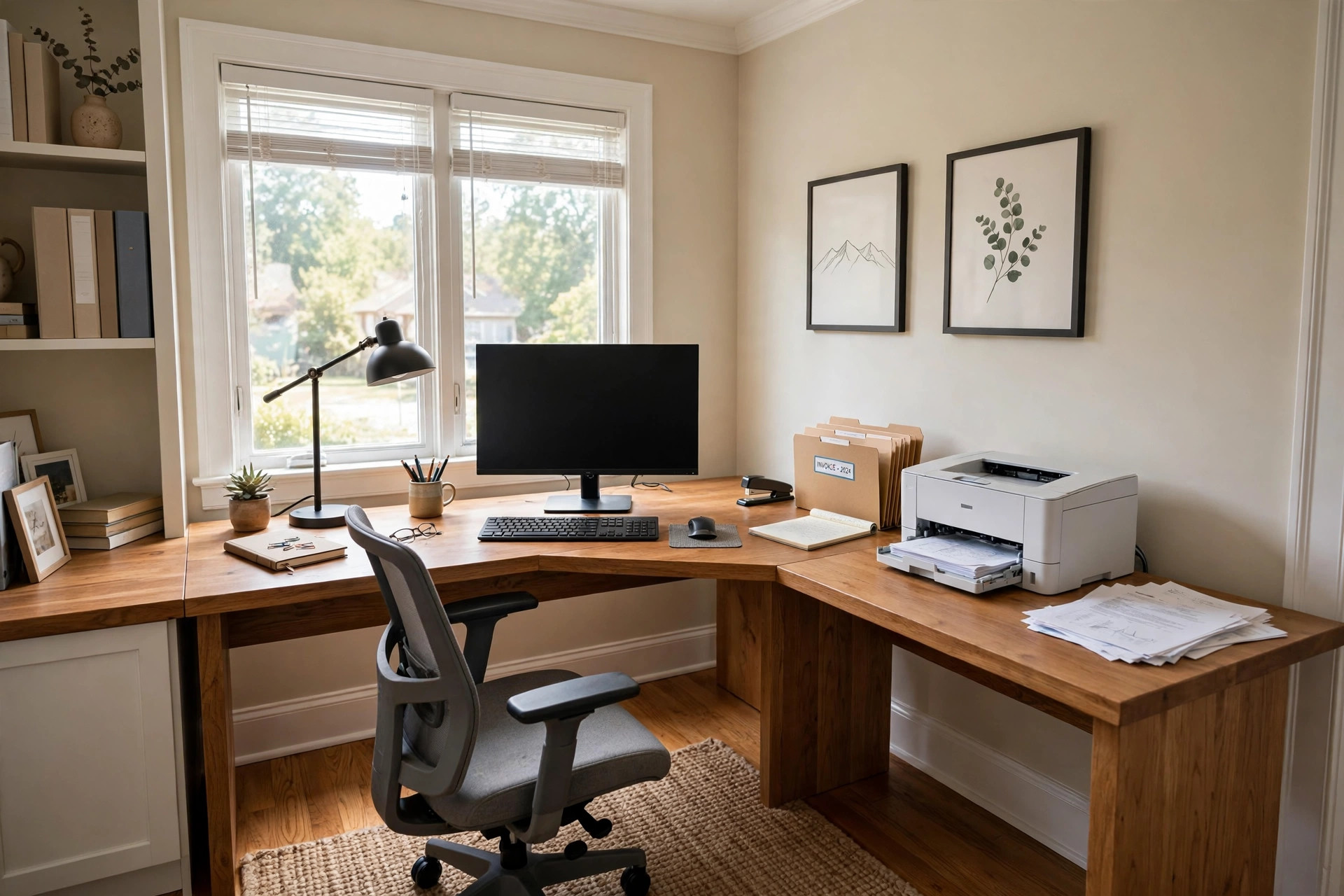

A home office desk with side return extension is a simple answer to a common problem. Many people work from home at a desk that is too small. Papers pile up next to the keyboard. The printer sits on the floor. The desk lamp takes up the last free corner. A side return extension adds a second work surface at a right angle to the main desk, and suddenly there is room for everything.
The side return is the short arm that joins the main desk on one side. Together the two parts form an L shape. The shape fits well into corners. It turns wasted corner space into useful space. This guide explains why this desk shape works so well, what to look for when you shop, how much you can expect to pay, and how to keep the desk in good shape for years.
Why a Side Return Desk Matters
More Surface Without More Floor Space
A straight desk only grows longer when you need more room. A home office desk with side return extension grows around the corner instead. The return adds two to four feet of extra surface along the wall. Your computer stays on the main desk. The return holds the printer, the phone, the files, or your morning coffee. Nothing needs to sit on top of anything else.
A Place for Everything
Work goes faster when each tool has a home. The main desk is for the keyboard and monitor. The side return is for reference books, notebooks, and the inbox tray. When the day ends, papers can stay out on the return instead of being stacked on the keyboard. This small habit keeps the main work area clear and calm.
Good Fit for Corner Spaces
Corners are hard to use. A bookcase rarely fits there well, and a chair pushed into a corner feels cramped. A home office desk with side return extension was made for corners. The main desk runs along one wall and the return runs along the other. The worker sits at the bend with everything within arm’s reach. Small bedrooms and spare rooms often have just the right corner for this shape.
Helps With Cable Mess
Computers, monitors, lamps, chargers, and printers each need power. On a small desk the cords tangle fast. The side return gives you a second surface where power strips and cable trays can hide. Many models have wire holes in both the main desk and the return, so cords can drop neatly out of sight.
How to Choose the Right Desk: Home Office Desk with Side Return Extension
Measure Your Space First
Take a tape measure to the room before you shop. Measure the wall where the main desk will go and the wall where the return will go. Write down both numbers. Most returns are between 36 and 48 inches long and about 20 inches deep. Add the main desk length to the return depth on one wall, and the main desk depth to the return length on the other wall. Leave at least 30 inches of open space in front of the desk for your chair.
Left or Right Return
The return can join the main desk on the left side or the right side. Many desks can be set up either way. Think about your work habits. If you are right handed, a right side return keeps your writing hand near your papers. If your monitor faces the door, pick the side that does not block your view. In a corner, the room itself may decide for you.
Check the Height
Standard desk height is about 29 to 30 inches from the floor to the work surface. This height suits most adults with a standard office chair. If you are much taller or shorter than average, look for a desk with adjustable feet or an adjustable height frame. Your elbows should rest at about a right angle when you type, and your feet should sit flat on the floor. Pair the desk with an ergonomic standing desk for small home office only if you plan to stand often; otherwise a fixed desk with a good chair is fine.
Weight Capacity
A home office desk with side return extension must hold real weight. A monitor, a computer tower, books, and a printer can add up to 100 pounds or more. Look for a stated weight limit of at least 150 pounds for the main desk. The return usually holds less, but it should still handle a printer without bowing. Solid frames and thick panels last longer than thin hollow ones.
Storage Needs
Some returns are just a flat surface. Others include drawers, shelves, or a cabinet. Think about what you keep near your desk. If you file papers, a return with a file drawer saves a trip across the room. If you like a clean look, an open return with no drawers keeps the line of sight open. Match the storage to your habits, not to what looks nice in the store.
Types and Options
L-Shaped Two-Piece Desks
The most common type is a two-piece set. The main desk and the return are separate pieces that lock together. This design ships in smaller boxes and fits through narrow doors. You can also use the two pieces apart if your room changes. Look for sturdy brackets or bolts at the joint so the two parts do not drift apart with use.
Single-Piece Corner Desks
Some desks are cut as one large L-shaped top. These feel very solid because there is no joint. The trade off is size. A one-piece top is heavy and hard to carry upstairs. Measure your doorways and stairways before you buy one.
Standing Desks With Returns
Height adjustable desks now come with side returns. The main desk rises and lowers at the push of a button. The return may stay fixed at one height, or it may rise with the desk. A fixed return is fine for items you use while sitting, like a printer. If you want to stand and write notes on the return, choose a model where both parts move together.
Glass, Wood, and Metal Tops
Desk tops come in several materials. Laminate over particle board is the most common and the least costly. It resists stains and comes in many colors. Solid wood looks warm and lasts for decades, but it costs more and needs care. Glass tops look light and modern, yet they show every fingerprint. Metal frames with wood tops give an office feel that suits many home studies.
Reversible and Expandable Models
Some desks let you mount the return on either side, which helps when you move. A few models let you add a second return on the other side to make a U shape. If you expect your work to grow, these flexible designs are worth the extra cost.
Cost and Price
A basic home office desk with side return extension costs between 150 and 300 dollars. These models use laminate tops and simple steel frames. They are strong enough for normal computer work and light printing.
Mid-range desks run from 300 to 600 dollars. At this price you get thicker tops, better cable management, drawers or cabinets in the return, and nicer finishes. This is the sweet spot for most home workers who use the desk every day.
High-end models cost 600 to 1,200 dollars or more. These include solid wood tops, adjustable height motors, premium hardware, and long warranties. If you work at the desk eight hours a day, the comfort and durability may be worth it.
Remember to budget for the chair as well. A desk is only half of a comfortable workspace. A best office chair for long hours home office protects your back during long days, and it matters as much as the desk itself.
Watch for hidden costs. Delivery of a large desk may carry a fee. Assembly takes one to two hours for most models, and you may want help lifting the top into place.
Care and Upkeep
Daily Habits
Clear the work surface at the end of each day. Wipe up spills right away, since coffee and water can stain laminate edges and wood tops. Keep the printer paper in a tray so loose sheets do not drift onto the floor.
Cleaning Different Materials
Laminate tops clean well with a damp cloth and mild soap. Avoid harsh cleaners that can dull the finish. Solid wood benefits from a furniture polish a few times a year. Glass tops need a glass cleaner and a soft cloth to stay clear. Dust the return as often as the main desk, since dust settles evenly across both surfaces.
Tightening and Checks
Check the bolts at the joint between the desk and the return every few months. Heavy use can loosen them, and a wobbly joint will only get worse. Tighten adjustable feet if the desk rocks on an uneven floor. If the desk has a cable tray, make sure cords are not pulling on the plugs.
Protecting the Surface
Use a desk pad under your keyboard and mouse. It guards the top against scratches and gives the mouse a smooth track. Coasters under hot mugs stop heat marks on wood. A printer mat under a laser printer catches stray toner dust.
Setting Up Your Return for Real Work
A Two-Monitor Layout
Many home workers now use two screens. Put both monitors on the main desk and keep the return for papers and reference work. An affordable dual monitor setup for remote workers usa pairs well with an L-shaped desk because the main desk is wide enough for two stands.
Printer and Scanner Station
The return is the natural home for a printer. Put it at the far end of the return so paper can feed without hitting the wall. Leave room behind it for the paper tray to open. If you also have a scanner, place it beside the printer with the cords running through the nearest wire hole.
Lighting the Whole L
One desk lamp rarely lights both parts of an L-shaped desk. Put the main task lamp on the main desk where you read and write. Add a small lamp or a clip light on the return if you use it after dark. Good light in both areas keeps eye strain low.
Keeping Cords Under Control
Run a power strip along the back edge of the return where it meets the wall. Plug the printer, charger, and lamp into it. Use adhesive clips to hold cords to the underside of the desk. A tidy run of cords makes cleaning easier and looks far better.
Safety
A home office desk with side return extension is a safe piece of furniture when it is set up well. Still, a few points deserve care. Always anchor tall returns with hutches or shelves to the wall if you have small children who might climb. Keep the power strip off the floor and away from feet so it does not become a trip hazard. Do not overload one end of the return with a heavy printer and stacks of books while the other end sits empty; spread the weight to keep the desk stable. If the desk has sharp metal corners, add soft corner guards when young children play nearby.
FAQ
Will a side return desk fit in a small bedroom?
Often yes. A typical setup needs about five feet of wall in each direction. Measure carefully and pick a model with a shorter return if the room is tight. Corner placement uses the room well.
Can the return go on either side?
Many models can. Check the product description for the word reversible. One-piece desks are usually fixed to one side, so be sure before you order.
Is a side return desk good for gaming?
It can be. Gamers like the extra space for a second monitor, speakers, and a console. Choose a model with a strong frame and good cable holes. Make sure the return is deep enough for your gear.
How hard is assembly?
Most two-piece desks take one to two hours with basic tools. The maker usually includes an Allen wrench. Read the steps first and lay out all parts. Ask a friend to help lift the top.
What is the difference between a return and a credenza?
A return joins the desk at a right angle and matches it in height. A credenza is a separate low cabinet that stands against the wall. A return feels like part of the desk, while a credenza is a stand-alone piece.
Can I add a return to a desk I already own?
Sometimes. Some makers sell matching returns for their desk lines. A general return rarely lines up in height and color with another brand’s desk. Measure your desk height first and compare it to the return before you buy.
Final Word
A home office desk with side return extension turns a plain corner into a full work station. It costs little more than a straight desk but gives much more room. Choose the size that fits your walls, pick the return side that suits your habits, and keep the weight limits in mind. With good lighting, tidy cords, and a comfortable chair, the L-shaped desk will serve you well for many years of home office work.
For more background, see Herman Miller, Steelcase, and UPLIFT Desk. For more background, see The Spruce, Wirecutter, and PCMag. Buying guides are also published by IKEA and Wayfair.
References
Herman Miller. (n.d.). Office furniture and ergonomic seating. https://www.hermanmiller.com IKEA. (n.d.). Home furnishings. https://www.ikea.com PCMag. (n.d.). Technology product reviews. https://www.pcmag.com Steelcase. (n.d.). Office furniture and workplace research. https://www.steelcase.com The Spruce. (n.d.). Home and garden advice. https://www.thespruce.com UPLIFT Desk. (n.d.). Standing desks and ergonomic office furniture. https://www.uplift-desk.com Wayfair. (n.d.). Furniture and home goods. https://www.wayfair.com Wirecutter. (n.d.). Product reviews from The New York Times. https://www.nytimes.com/wirecutter
Was this guide helpful?

About Michael Thompson
The My Garden US editorial team writes practical, in-depth home and garden guides for American homeowners — tested advice, no fluff.
You May Also Like
Ergonomic Laptop Stand for Couch and Bed: A Buyer Guide
September 26, 2026 0 views
Home Office Wall Shelf for Printer Storage: A Practical Guide
July 19, 2026 0 views
Rolling Cart for Home Office Printer Stand: A Complete Guide
July 31, 2026 0 views