
A freezer full of food is a quiet asset. It sits in the garage or the basement and does its job. But when the door fails to close, or the power cuts out at night, or the cooling coils wear thin, food warms without a sound. The best temperature sensor for freezer reviews USA listings can point you to a small device that watches that cold space for you and sends an alert before the food is lost. This guide explains what these sensors do, what to look for, and how to pick one with a calm mind.
Why a Freezer Temperature Sensor Matters
Most freezer trouble goes unseen. A door left ajar on a busy evening warms the interior by the hour. A summer storm can cut power for six or ten hours while you sleep. The food may look fine on the surface, yet bacteria grow once food stays above safe cold for too long. A sensor gives you early warning. It checks the air inside the box every few minutes and reports back to your phone.
The money at stake is real. A chest freezer can hold several hundred dollars of meat, fish, and prepared meals. One warm night can spoil the whole load. A sensor that costs the price of a family pizza is a plain piece of insurance.
There is also peace of mind. Many people keep a second freezer in the garage, out of sight. A sensor closes that distance. You check the temperature from the kitchen, from the office, or from a hotel on a trip. When the reading climbs past your set limit, you get a text, an email, or a push alert. You can then call a neighbor, head home early, or move the food to coolers with ice.
What to Look for in a Freezer Temperature Sensor: Best Temperature Sensor for Freezer Reviews Usa
Reviews of the best temperature sensor for freezer units tend to circle the same points. Below are the features that matter most. Read them before you buy, and you will shop with a steady hand.
Sensor Range and Accuracy
A freezer runs near zero degrees Fahrenheit. The sensor must read well below freezing and stay true. Look for a stated range that reaches at least minus 22 degrees Fahrenheit. Accuracy within one or two degrees is enough for home use. Some sensors also track humidity, which is less useful in a freezer but harmless to have.
Connectivity and Alerts
The sensor must reach your phone from inside a metal box. Metal blocks radio signals, so range matters. Many sensors use Bluetooth, which works within the house but not far beyond it. Wi-Fi gateways or hub-based sensors reach further and send alerts anywhere you have internet. Decide how you want to be told. Text and email alerts are simple. Push alerts through an app are quick. The best units let you set a high and a low limit and alert you the moment the reading crosses either one.
Battery Life
Batteries drain faster in the cold. A sensor that lasts two years in a warm room may last one year in a freezer. Look for sensors that use lithium batteries, which handle cold better than alkaline cells. Some reviews of freezer temperature monitors note the battery died after eight months. Check real buyer notes on this point. A sensor that needs new batteries every few months is a chore.
App Quality and Ease of Use
You will open the app more than you think. It should show the current reading at a glance, keep a chart of the past day or week, and make alerts easy to set. Read recent reviews of the app itself, not just the device. An app that crashes or loses the sensor is worse than no sensor at all.
Number of Sensors and Hubs
One hub can serve several sensors. If you have two freezers, or a freezer and a refrigerator, look for systems that let you add extra sensors to one account. This keeps the cost per unit down and puts all readings on one screen.
Types of Freezer Temperature Sensors
The market holds three broad types. Each suits a different home.
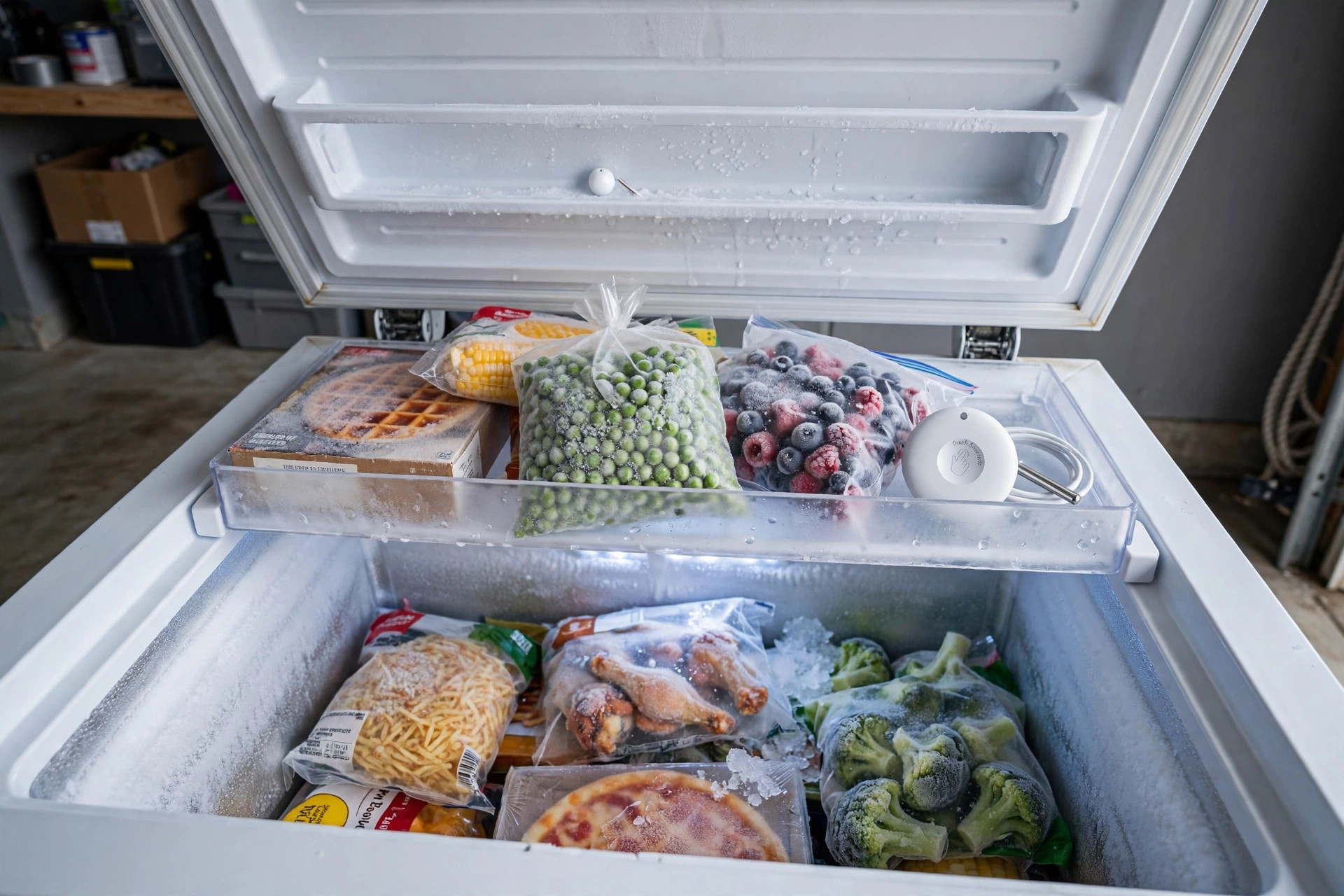
Standalone wireless sensors. These are small units that sit inside the freezer and talk to a hub or directly to Wi-Fi. They are the most common type in freezer temperature sensor reviews USA shoppers read. They need no wiring. You place the sensor on a shelf, set it up in the app, and you are done.
Wired probe sensors. These put a thin probe inside the freezer while the main unit stays outside. A thin cable runs through the door gasket. The signal never fights the metal box, so the connection is steady. The cable is flat and thin, and most door gaskets seal around it without harm. Some users worry about the seal. In practice, a flat probe cable rarely changes the door seal enough to matter.
Multi-sensor home systems. Some smart home systems include temperature sensing as one job among many. A security or automation hub may take in a small sensor and fold its alerts into the same app that watches doors and cameras. If you already run such a system, adding its temperature sensor can be the simplest path. Reviews of these systems often note the sensor is not as cold-rated as a dedicated unit, so check the stated range before you trust it in a freezer.
How to Choose the Right One for Your Home
Start with your freezer. A small upright unit in the kitchen is close to your router. A chest freezer in the garage is further away and may sit behind walls. For a distant freezer, pick a sensor with a separate Wi-Fi gateway or a long-range radio. Bluetooth-only sensors can lose contact through garage walls.
Next, count your freezers. If you have one freezer, one sensor is enough. If you have two or three, buy a system that lets you add sensors cheaply. The first unit often costs more because it includes the hub. Extra sensors usually cost less.
Think about who needs the alert. If the whole family shops and cooks, alerts to one phone may not be enough. Some apps let you add family members. Others forward alerts by email, which you can send to a shared address. Pick a system that reaches the people who can act.
Read a handful of recent reviews before you buy. Look for notes from people who used the sensor in a freezer for months, not days. Short reviews tell you about setup. Long-term reviews tell you about battery life, signal steadiness, and alert speed. Both matter.
Finally, check the return policy. A sensor may work well on paper and still lose its signal in your garage. Buy from a seller that allows returns, and test the sensor in the first week. Place it in the freezer, walk around the house, and confirm you still get readings from the far rooms.
Price and Cost
Most freezer temperature sensors cost between 20 and 60 dollars in the USA. A single Bluetooth sensor without a hub sits at the low end. A Wi-Fi sensor with cloud alerts sits in the middle. A starter kit with a hub and two sensors sits near the top of the range. Extra sensors for an existing hub often cost 20 to 30 dollars each.
There is usually no monthly fee. A few brands charge for extra history or for text alerts beyond a free quota, but the basic temperature alerts are free. Read the fine print before you buy. A five-dollar monthly fee may not sound like much, but it adds up over the years, and it is not needed for most homes.
Compared with the cost of the food at risk, the price is small. A sensor pays for itself the first time it catches a warm freezer early.
Care and Upkeep
A freezer sensor asks little of you. Place it on a middle shelf, away from the cold air vent if your freezer has one, so the reading matches the air your food sits in. Some people set the sensor inside a cup of water or oil so the reading stays steady when the door opens. This smooths short swings and gives a fairer picture of food temperature.
Check the battery once every few months. The app often shows battery level, so a quick glance is enough. Replace lithium batteries once a year if you want to be safe. Clean the sensor with a dry cloth now and then. Do not wash it or soak it unless the maker says it is safe.
Test the alerts twice a year. Warm the sensor in your hand for a minute and see if the alert arrives. Then put it back. This takes five minutes and tells you the whole chain still works: sensor, signal, and phone.
Safety
A temperature sensor is a watchful tool, but it is not a guarantee. Use it as one part of food safety, not the whole plan. The U.S. Consumer Product Safety Commission reminds homeowners that appliance alarms and monitors support, but do not replace, sound habits (CPSC). Keep the freezer full or nearly full, since a full freezer holds cold longer in a power cut. Do not refreeze food that stayed above 40 degrees Fahrenheit for more than two hours.
Place the sensor so it does not touch bare heating elements or block vents. Keep cords from wired probes clear of the door hinge. Use the batteries the maker calls for, and recycle old batteries at a local drop point rather than tossing them in the trash.
For shoppers who already watch their homes with security gear, a temperature sensor fits the same habit. Readers who compare best glass break sensor reviews 2026 usa or best door alarm sensor for apartments usa know the value of an early warning. A freezer sensor is that same idea, aimed at your food.
Frequently Asked Questions
How does a freezer temperature sensor send alerts to my phone?
The sensor reads the air inside the freezer every few minutes. It sends the reading by Bluetooth, Wi-Fi, or a low-power radio to a hub or your router. When the reading crosses your set limit, the maker’s cloud service or the app sends a text, email, or push alert to your phone. The whole chain takes a minute or two in most cases.
Where should I put the sensor inside the freezer?
Place it on a middle shelf, toward the center, away from the door and away from the cooling vent. This gives the truest reading of the air around your food. Some owners set the sensor in a sealed bottle of water so short door openings do not cause false alarms. Keep it where you can reach it for battery changes.
Will a Bluetooth sensor work through a freezer door and garage walls?
Bluetooth can struggle. A metal freezer door weakens the signal, and a garage wall weakens it more. If your freezer sits far from your phone, pick a sensor with a Wi-Fi gateway that plugs in near the freezer. Many freezer temperature sensor reviews USA buyers leave note that Wi-Fi models alert them even when they are miles from home. For shoppers comparing sensor options in a wider smart home, smart mailbox sensor reviews 2026 usa show the same range question comes up with outdoor devices.
Do these sensors work in a power outage?
The sensor runs on its own battery, so it keeps reading during a power cut. But if your Wi-Fi router loses power too, the alerts may not reach your phone until power returns. Some hubs have battery backup. A simple fix is a small battery backup for the router, which keeps the alerts flowing through the outage.
Can one sensor watch both a freezer and a refrigerator?
One sensor watches one space. But many systems let you add a second sensor to the same hub and app. If you want both a fridge and a freezer watched, buy the starter kit and add the second sensor, or buy a two-sensor pack from the start. This keeps every reading on one screen and costs less than two separate systems.
Are there monthly fees for freezer temperature sensors?
Most have none. The common brands give temperature charts and basic alerts for free. A few charge for extra features like long data history or unlimited text messages. For most homes, the free tier is enough. Check the product page for the words “no subscription required” before you buy, and read recent buyer notes to confirm nothing changed.
A Final Word
A freezer temperature sensor is a small, plain device that does one job well. It watches the cold and calls out when the cold slips away. Pick a model with a range that reaches deep cold, a signal that reaches your phone, and an app you trust. Place it on a middle shelf, test the alerts twice a year, and let it stand watch. The best temperature sensor for freezer reviews USA readers keep returning to is not the fanciest one. It is the one that is still sending readings a year later, quiet and steady, like the freezer itself.
For more background, see Google Store, SimpliSafe, and ADT. For more background, see CNET, PCMag, and The Verge. See Consumer Reports for more detail.
References
ADT. (n.d.). Home security and automation. https://www.adt.com CNET. (n.d.). Technology news and reviews. https://www.cnet.com Consumer Reports. (n.d.). Product reviews and ratings. https://www.consumerreports.org Google Store. (n.d.). Smart home devices. https://store.google.com PCMag. (n.d.). Technology product reviews. https://www.pcmag.com SimpliSafe. (n.d.). Home security systems. https://www.simplisafe.com The Verge. (n.d.). Technology news and reviews. https://www.theverge.com U.S. Consumer Product Safety Commission. (n.d.). Product safety information. https://www.cpsc.gov
Was this guide helpful?

About Sarah Mitchell
The My Garden US editorial team writes practical, in-depth home and garden guides for American homeowners — tested advice, no fluff.
You May Also Like
Apartment Security System No Drilling Reviews: A Complete Guide for Renters
July 25, 2026 0 views
Best Automatic Driveway Gate Cost Installed
February 26, 2026 0 views
Alexa vs Google Home 2026 Comparison USA: Which Voice Assistant Wins Your Home
March 24, 2026 0 views