
A power surge can destroy your appliances in a single second. Lightning, grid switching, and your own large motors can send spikes through your wiring. A whole house surge protector at your main electrical panel stops most of them. The whole house surge protector installation cost varies with the device you pick, your panel, and local labor rates. This guide explains each part in plain words.
Why Whole House Surge Protection Matters
Most people think of surges as rare events caused by lightning. Lightning is the most dramatic cause, but it is not the only one. Power companies switch loads on the grid every day. That switching can send small surges down the line. Big appliances in your own home, like the air conditioner or the well pump, can also make small surges when they start and stop. These small surges wear down the delicate circuits inside modern electronics over months and years.
Almost every modern home is full of electronics with sensitive parts. Your refrigerator, washing machine, furnace, garage door opener, and smart thermostat each have a control board. Replacing one board can cost more than the whole house surge protector installation cost. A single device at the panel protects all of them at once.
A protector cannot stop every possible surge. A direct lightning strike to your house is more force than any consumer device can handle. But direct strikes are rare. Most surges are smaller, and a good panel device handles those. It gives the extra voltage a safe path to ground in a fraction of a second, like a safety valve for your wiring.
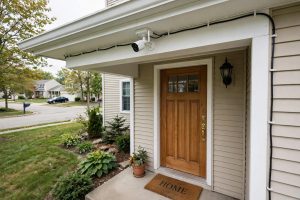
Homeowners who have invested in smart home gear have even more at stake. A surge can take out a smart security system camera, a video doorbell, and a hub in one event. If you have read reviews of smart home gadgets you know how fast the replacement cost adds up. Panel protection is cheap insurance next to that bill.
What Shapes the Whole House Surge Protector Installation Cost
The total price has three parts: the device, the labor, and any extra work your panel needs. Let us look at each one.
The Device Itself
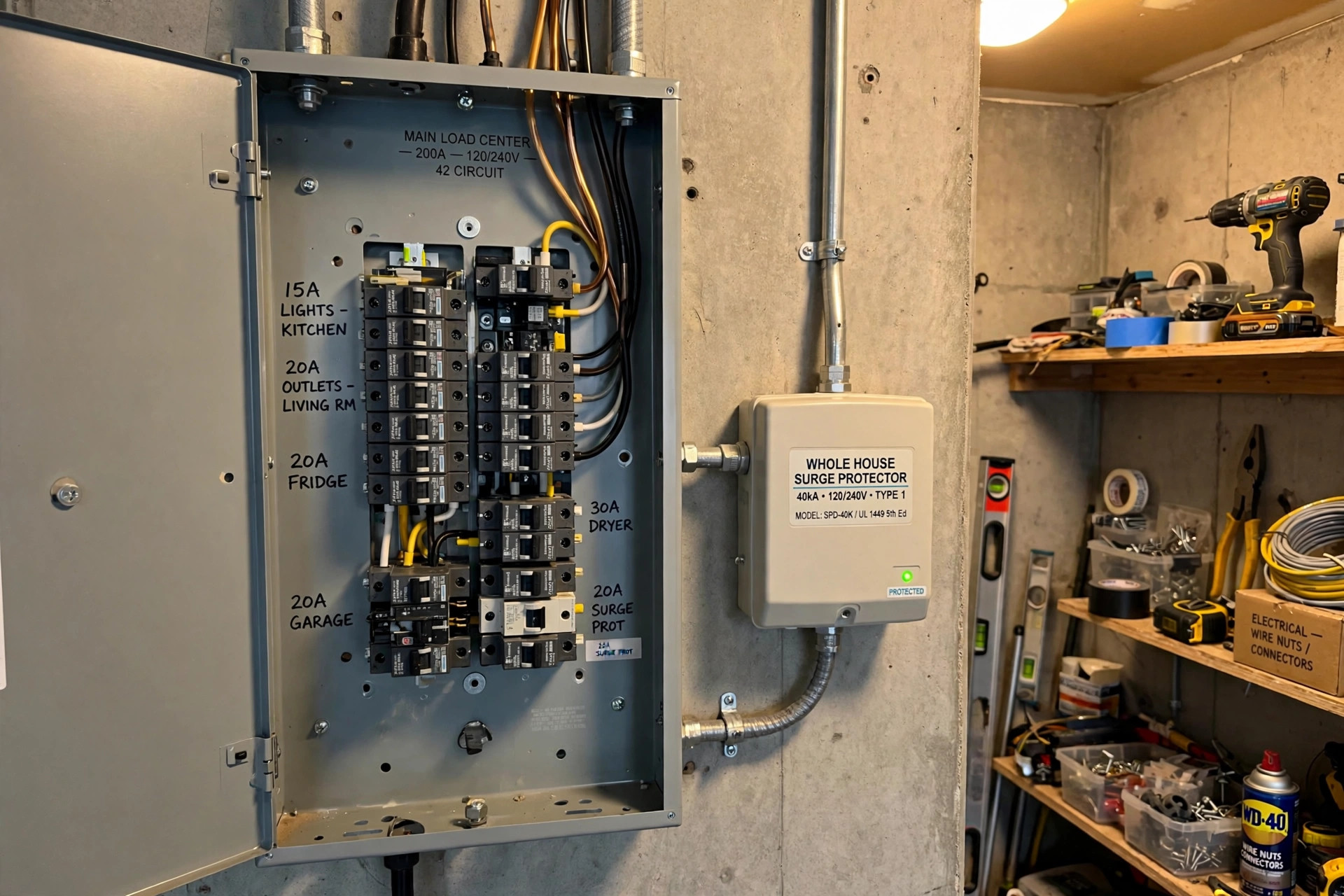
A Type 1 device is wired on the line side of your main breaker. A Type 2 device is wired on the load side, on its own dedicated double-pole breaker. Both shunt surge current to ground. Your electrician will tell you which one fits your panel.
Devices are rated in kiloamperes, written as kA. Common ratings are 40, 50, 80, and 100 kA. The number tells you how much surge current the device can absorb. A higher number costs more but lasts longer. For most single-family homes, an 80 kA unit is a solid middle choice. Small homes may do fine with 40 or 50 kA. Large homes with 400-amp service often use 100 kA or higher.
The device alone usually costs 100 to 400 dollars. Premium models with indicator lights and replaceable modules sit at the top of that range. Consumer Reports and other review outlets track which brands hold up best. Budget brands exist, but this is a safety device. A known maker with a real warranty is worth the extra money.
Labor and the Condition of Your Panel
Labor is the largest part of the whole house surge protector installation cost in most markets. A licensed electrician usually charges 150 to 300 dollars when the panel is in good shape and has two free breaker slots. The work takes about one to two hours.
Your panel may need extra work first. Older panels may be full, with no free slots for the new double-pole breaker. The electrician may need to add a subpanel or move circuits. Some very old panels may need to be replaced before any new device can be added safely. The U.S. Consumer Product Safety Commission has published safety alerts about some old panel brands, and a good electrician will check yours. A panel upgrade adds several hundred to a few thousand dollars. That is rare for this job, but it is worth knowing.
Location matters too. Electricians in big coastal cities charge more per hour than those in small towns. A job that costs 200 dollars in labor in one state can cost 350 in another. Get two or three quotes if you have time. Prices for electrical work are not fixed, and a short phone call can save you real money.
Typical Total Costs in the United States
For a standard home with a modern panel, the whole house surge protector installation cost usually lands between 300 and 600 dollars, device and labor together. Here is how that breaks down in common cases.
A simple install with a mid-range 80 kA device and a flat-rate electrician often comes to about 350 to 450 dollars. This is the most common case in the country. The panel has free slots, the wiring run is short, and the job takes about an hour.
A higher-end install with a 100 kA device, a longer wire run, or a higher local labor rate can reach 500 to 700 dollars. This is still fair for a device that may protect your home for ten years or more.
A complex install can pass 1,000 dollars. This happens when the panel needs circuit rearrangement, when a home has 400-amp service with two panels, or when the electrician must run conduit to reach the panel. Larger houses often have two panels, and each needs its own protector for full coverage.
Some homeowners ask whether they can install the device themselves to save money. The answer from the trade is clear: do not. Live lugs sit near the work area even when the main breaker is off. A mistake can start a fire or cause a fatal shock. Almost every maker requires professional installation to keep the warranty valid.
What to Look For When You Buy
Not all surge protectors are equal. Here are the features that matter most.
First, look for a UL 1449 listing. UL is the main safety testing lab in the United States. The UL 1449 standard covers surge protective devices. A listed device has been tested to handle surges safely without catching fire or falling apart. If a device lacks this listing, do not buy it.
Second, check the surge current rating in kA. As noted above, 80 kA is a good target for most homes. Do not be swayed by very large numbers on cheap devices. An honest 50 kA unit from a known maker beats a no-name unit that claims 200 kA.
Third, look at the clamping voltage, also called the voltage protection rating. This is the voltage level at which the device starts shunting current. Lower is better. Common ratings are 400, 500, and 600 volts. A 400-volt rating protects your electronics sooner than a 600-volt rating.
Fourth, check the warranty and the connected-equipment policy. Many makers offer a limited warranty on the device, plus a policy that pays for damaged equipment if the device fails. Read the fine print. These policies often require professional installation and proper grounding.
Fifth, look for status indicator lights. A good device has a light that shows it is working. Each surge uses up some of the device’s life. When the light goes out or changes color, it is time to replace the unit. Without an indicator, you would never know your protection was gone.
Types and Options on the Market
Beyond Type 1 and Type 2, shoppers will see a few more options.
Some devices come as breaker-style units that plug into two slots in the panel like a normal double-pole breaker. These are neat and compact, and the quick install keeps labor costs down.
Other devices are box-style units that mount beside the panel and wire in with short leads. These are common for higher kA ratings. They need a little more room on the wall, but they fit panels that are too crowded for breaker-style units.
A few whole house units also filter electrical noise. This is a bonus feature, not a must-have. It may help audio gear and home theater equipment sound cleaner, but it does not change the surge protection itself. Do not pay a large premium for it unless you care about that benefit.
Point-of-use surge strips still have a role. A panel device handles the big surges, but a good power strip adds a second layer for your most valuable gear. Use both.
If you are also hardening your home against break-ins, schedule electrical work together with projects like a door reinforcement kit so one visit covers more than one task. And if you run robot vacuums or other smart floor care gear covered by PCMag around the house, those circuit boards benefit from panel-level protection too.
Cost and Price: Getting a Fair Quote
A fair quote should list three things: the exact device model, the labor charge, and any extra parts or panel work. If a quote just says “surge protector install, 600 dollars” with no detail, ask for the model number. You can then check the device price at a major home improvement retailer and see how much of the quote is labor. You deserve to see the split.
Watch out for upsells. Some companies try to sell a panel-wide “surge system” made of several add-on boxes at inflated prices. A single good Type 1 or Type 2 device from a known maker is enough for most homes.
Ask whether the quote includes a permit. Most towns do not require one for this small job, but some do. Ask also whether the price includes testing and a written warranty. A professional will test the device after install and leave you the manual and warranty card.
Timing can affect price as well. Electrical work scheduled during a bigger project, like a panel upgrade or a renovation, often costs less per task because the electrician is already on site. If you have other electrical work planned, ask to bundle the surge protector into the same visit.
Care and Upkeep
A whole house surge protector needs little care. Plan to glance at the indicator light once or twice a year. Many homeowners check it when they test their smart security devices. If the light shows a fault, call your electrician for a replacement.
After a known lightning strike near your home, check the indicator even if your electronics seem fine. The device may have absorbed a large surge and sacrificed itself. That is its job. Replacement usually costs less than the first install because the wiring is already in place.
Most devices last five to fifteen years, depending on how many surges they absorb. Homes in storm-prone areas wear devices out faster. Keep the manual and warranty terms in your home file so you know the coverage period.
Keep the area around your panel clear. The device needs air flow to stay cool, and the electrician needs access for future service. Do not stack boxes against the panel or hang coats over it. This is basic electrical safety, and it applies to every device wired into your panel.
Safety Rules to Follow
Electricity demands respect. These rules keep your home safe.
Hire a licensed electrician. This is not a DIY job. The main lugs in your panel stay live even with the main breaker off, and contact with them can kill. Check that the electrician carries a current license and insurance.
Make sure your grounding is sound. A surge protector can only shunt excess voltage to ground if the ground path is good. Older homes sometimes have weak grounding rods and wires. A good electrician checks the grounding as part of the install. Without a solid ground, the protector cannot do its job.
Never overload the panel. The new device needs its own dedicated double-pole breaker. It should never share a breaker with another circuit.
Keep water away from the panel. If your panel is in a damp basement or an outdoor box, make sure the enclosure is rated for the location. Moisture and high voltage are a dangerous mix.
For families reviewing home safety devices and alarms, remember that surge protection guards the electronics those systems depend on. A security camera is only useful if its power supply survives the next storm.
Frequently Asked Questions
How much does a whole house surge protector cost to install? For a standard home with a modern panel, the total usually runs 300 to 600 dollars. That covers the device, which costs 100 to 400 dollars, plus one to two hours of electrician labor. Complex panels or two-panel homes can push the total past 1,000 dollars.
Is a whole house surge protector worth the money? For most homeowners, yes. One fried refrigerator control board or furnace board can cost more than the entire install. The device also protects dozens of smaller electronics at once. It is one of the cheapest ways to insure your home’s electronics.
How long does installation take? A straightforward install takes one to two hours. If your panel needs extra work, such as moving circuits or adding a subpanel, the job can take half a day or more.
Do I still need power strips with surge protection? Yes, for your most valuable electronics. The panel device handles large surges for the whole house. A quality surge strip at your computer or home theater adds a second layer. The two work together.
How often should the device be replaced? Most units last five to fifteen years. Check the indicator light once or twice a year, and right away after a close lightning strike. When the light shows a fault, or when the warranty period ends, have it replaced.
Can renters get whole house surge protection? The device wires into the main panel, which belongs to the property owner. Renters should ask the landlord. Many landlords agree because the device protects their appliances too. Renters can also use point-of-use surge strips, which need no wiring.
A Final Word
The whole house surge protector installation cost is modest next to what it guards. A few hundred dollars buys a device that stands watch over every circuit in your home for years. The key steps are simple: pick a UL 1449 listed device with a solid kA rating, hire a licensed electrician, and check the indicator light now and then. Read a few tech product reviews and buying guides before you shop so you recognize a fair quote. And if you shop for smart home gear at the Google Store, remember that every connected device you add is another reason to protect the panel first.
References
ADT. (n.d.). Home security and automation. https://www.adt.com CNET. (n.d.). Technology news and reviews. https://www.cnet.com Consumer Reports. (n.d.). Product reviews and ratings. https://www.consumerreports.org Google Store. (n.d.). Smart home devices. https://store.google.com PCMag. (n.d.). Technology product reviews. https://www.pcmag.com Ring. (n.d.). Smart home security devices. https://www.ring.com SimpliSafe. (n.d.). Home security systems. https://www.simplisafe.com The Home Depot. (n.d.). Home improvement products. https://www.homedepot.com The Verge. (n.d.). Technology news and reviews. https://www.theverge.com U.S. Consumer Product Safety Commission. (n.d.). Product safety information. https://www.cpsc.gov
Was this guide helpful?

About Robert Taylor
The My Garden US editorial team writes practical, in-depth home and garden guides for American homeowners — tested advice, no fluff.
You May Also Like
Smart Circuit Breaker Panel Reviews 2026 USA
January 11, 2026 0 views
Best Fake Security Camera Reviews 2026 USA: A Plain Guide
July 23, 2026 0 views
Robot Lawn Mower Reviews for USA Yards
April 19, 2026 0 views